
1. పరిచయం
ధన్యవాదాలు, ధన్యవాదాలు.asing the Caliber HPG415BT/B Portable Bluetooth Speaker. This manual provides important information regarding the safe and efficient operation of your device. Please read it thoroughly before use and retain it for future reference.
ప్యాకేజీ విషయాలు
- Caliber HPG415BT/B Portable Bluetooth Speaker
- USB to Mini USB Charging Cable
- 3.5mm ఆడియో కేబుల్
- రిమోట్ కంట్రోల్
- ఇన్స్ట్రక్షన్ మాన్యువల్
2. భద్రతా సమాచారం
సురక్షితమైన ఆపరేషన్ను నిర్ధారించడానికి మరియు నష్టాన్ని నివారించడానికి, దయచేసి ఈ క్రింది భద్రతా మార్గదర్శకాలను గమనించండి:
- పరికరాన్ని వర్షం, తేమ లేదా తీవ్రమైన ఉష్ణోగ్రతలకు గురిచేయవద్దు.
- Avoid placing the speaker near heat sources such as radiators, stoves, or other heat-producing appliances.
- యూనిట్ను మీరే విడదీయవద్దు, మరమ్మతు చేయవద్దు లేదా సవరించవద్దు. అన్ని సర్వీసింగ్లను అర్హత కలిగిన సిబ్బందికి సూచించండి.
- Use only the specified charging cable and power adapter (5V USB) to charge the battery.
- బలమైన అయస్కాంత క్షేత్రాల నుండి పరికరాన్ని దూరంగా ఉంచండి.
- పరికరాన్ని పొడి, మృదువైన గుడ్డతో మాత్రమే శుభ్రం చేయండి. ద్రవ క్లీనర్లను ఉపయోగించవద్దు.
3. ఉత్పత్తి లక్షణాలు
The Caliber HPG415BT/B speaker offers a range of features for versatile audio playback:
- వైర్లెస్ బ్లూటూత్ టెక్నాలజీ: Connect wirelessly to compatible devices within a 10-meter range (Bluetooth version 2.1, supports A2DP and AVRCP profileలు).
- బహుళ ప్లేబ్యాక్ ఎంపికలు: Play audio from USB drives and SD cards (up to 32GB).
- FM రేడియో: Enjoy your favorite radio stations with automatic search and storage functions.
- LED డిస్ప్లే: Provides clear information on current mode and status.
- High Power Sound: Equipped with 2x 3W speakers for a total of 6W RMS output.
- ఇంటిగ్రేటెడ్ రీఛార్జబుల్ బ్యాటరీ: Offers up to 5 hours of continuous playback.
- సహజమైన నియంత్రణలు: Features buttons for previous/next track, play/pause, mode selection, EQ adjustment, and volume control.
- 3.5mm ఆడియో ఇన్పుట్: Connect external audio devices via the included audio cable.
- రిమోట్ కంట్రోల్: Conveniently operate the speaker from a distance.
4. నియంత్రణలు మరియు కనెక్షన్లు
Familiarize yourself with the speaker's controls and connection ports:
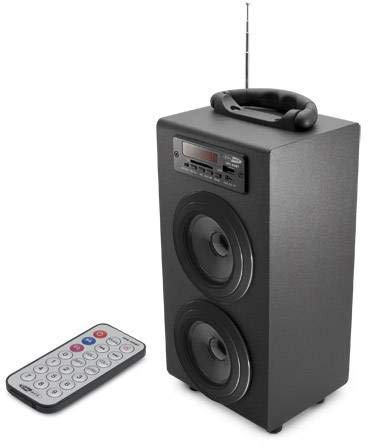
Image 1: Caliber HPG415BT/B Portable Bluetooth Speaker. This image shows the overall design of the speaker, featuring a tubular shape, front-facing speakers, and a control panel on the top or front.
నియంత్రణ ప్యానెల్ (సాధారణ లేఅవుట్)
- మోడ్ బటన్: బ్లూటూత్, FM రేడియో, USB, SD మరియు AUX మోడ్ల మధ్య మారుతుంది.
- ప్లే/పాజ్ బటన్: ప్లేబ్యాక్ను ప్రారంభిస్తుంది లేదా పాజ్ చేస్తుంది.
- మునుపటి/తదుపరి బటన్లు: Skips tracks in media modes or changes radio stations in FM mode.
- వాల్యూమ్ +/- బటన్లు: ఆడియో అవుట్పుట్ స్థాయిని సర్దుబాటు చేస్తుంది.
- EQ బటన్: ఈక్వలైజర్ ప్రీసెట్ల ద్వారా సైకిల్స్.
- పవర్ ఆన్ / ఆఫ్ స్విచ్: Located typically on the rear or side.
Connection Ports (Typical Layout)
- USB పోర్ట్: USB ఫ్లాష్ డ్రైవ్లను కనెక్ట్ చేయడానికి.
- SD కార్డ్ స్లాట్: SD మెమరీ కార్డులను చొప్పించడానికి.
- AUX ఇన్పుట్ (3.5mm): For connecting external audio devices via cable.
- Mini USB Charging Port: ఛార్జింగ్ కేబుల్ను కనెక్ట్ చేయడానికి.
5. సెటప్
5.1 ప్రారంభ ఛార్జింగ్
- మొదటిసారి ఉపయోగించే ముందు, స్పీకర్ అంతర్గత బ్యాటరీని పూర్తిగా ఛార్జ్ చేయండి.
- Connect the supplied Mini USB cable to the speaker's charging port.
- Connect the other end of the USB cable to a 5V USB power source (e.g., a computer USB port or a USB wall adapter, not included).
- The LED indicator will show charging status. Once fully charged, the indicator may change color or turn off.
5.2 పవర్ చేయడం ఆన్/ఆఫ్
- To power on, slide the Power ON/OFF switch to the 'ON' position. The LED display will light up.
- To power off, slide the Power ON/OFF switch to the 'OFF' position.
6. ఆపరేటింగ్ సూచనలు
6.1 బ్లూటూత్ మోడ్
- Power on the speaker. It will automatically enter Bluetooth pairing mode, indicated by a flashing Bluetooth icon on the LED display.
- మీ స్మార్ట్ఫోన్, టాబ్లెట్ లేదా ఇతర బ్లూటూత్-ప్రారంభించబడిన పరికరంలో బ్లూటూత్ను ప్రారంభించండి.
- కోసం వెతకండి available Bluetooth devices and select "HPG415BT" from the list.
- Once paired, the speaker will emit a confirmation sound, and the Bluetooth icon on the display will stop flashing.
- You can now play audio from your connected device through the speaker. Use the PLAY/PAUSE and PREVIOUS/NEXT buttons on the speaker or remote to control playback.
6.2 FM రేడియో మోడ్
- నొక్కండి మోడ్ LED డిస్ప్లేలో "FM" కనిపించే వరకు పదే పదే బటన్ను నొక్కండి.
- To perform an automatic station scan, press and hold the ప్లే/పాజ్ చేయండి button. The speaker will scan and save available FM stations.
- ఉపయోగించండి మునుపటి / తదుపరి సేవ్ చేసిన స్టేషన్ల ద్వారా నావిగేట్ చేయడానికి బటన్లు.
6.3 USB/SD కార్డ్ ప్లేబ్యాక్
- USB పోర్ట్లోకి USB ఫ్లాష్ డ్రైవ్ను లేదా SD కార్డ్ స్లాట్లోకి SD కార్డ్ను చొప్పించండి.
- స్పీకర్ ఆటోమేటిక్గా USB లేదా SD మోడ్కి మారి, ఆడియో ప్లే చేయడం ప్రారంభిస్తుంది files. లేకపోతే, నొక్కండి మోడ్ సరైన మూలాన్ని ఎంచుకోవడానికి బటన్.
- ఉపయోగించండి ప్లే/పాజ్ చేయండి మరియు మునుపటి / తదుపరి ప్లేబ్యాక్ని నియంత్రించడానికి బటన్లు.
6.4 AUX ఇన్పుట్ మోడ్
- Connect one end of the supplied 3.5mm audio cable to the speaker's AUX input port.
- కేబుల్ యొక్క మరొక చివరను హెడ్ఫోన్ జాక్ లేదా మీ బాహ్య ఆడియో పరికరం యొక్క ఆడియో అవుట్పుట్కు కనెక్ట్ చేయండి.
- నొక్కండి మోడ్ LED డిస్ప్లేలో "AUX" కనిపించే వరకు పదే పదే బటన్ను నొక్కండి.
- Control playback and volume directly from your external audio device.
7 బ్యాటరీని ఛార్జ్ చేస్తోంది
When the battery is low, the speaker may emit an audible warning or the LED indicator will show a low battery status. To charge:
- Connect the Mini USB charging cable to the speaker's charging port.
- Connect the USB end to a 5V USB power source.
- The charging indicator will illuminate. Charging typically takes several hours.
- Once fully charged, the indicator will change or turn off. Disconnect the charging cable.
8. నిర్వహణ
- శుభ్రపరచడం: స్పీకర్ బాహ్య భాగాన్ని తుడవడానికి మృదువైన, పొడి వస్త్రాన్ని ఉపయోగించండి. రాపిడి క్లీనర్లు, వ్యాక్స్ లేదా ద్రావకాలను ఉపయోగించవద్దు.
- నిల్వ: ఎక్కువసేపు ఉపయోగంలో లేనప్పుడు, స్పీకర్ను చల్లని, పొడి ప్రదేశంలో, ప్రత్యక్ష సూర్యకాంతి మరియు తీవ్రమైన ఉష్ణోగ్రతలకు దూరంగా నిల్వ చేయండి.
- బ్యాటరీ సంరక్షణ: బ్యాటరీ జీవితకాలాన్ని పొడిగించడానికి, బ్యాటరీని తరచుగా పూర్తిగా డిశ్చార్జ్ చేయకుండా ఉండండి. ఉపయోగంలో లేనప్పటికీ, దానిని క్రమం తప్పకుండా ఛార్జ్ చేయండి.
9. ట్రబుల్షూటింగ్
| సమస్య | సాధ్యమైన కారణం | పరిష్కారం |
|---|---|---|
| శక్తి లేదు | Battery is discharged; Power switch is OFF. | Charge the battery; Slide the power switch to ON. |
| శబ్దం లేదు | Volume is too low; Incorrect mode selected; Device not connected properly. | Increase volume; Press MODE to select correct source; Reconnect device. |
| బ్లూటూత్ కనెక్ట్ కావడం లేదు | స్పీకర్ జత చేసే మోడ్లో లేదు; పరికరం బ్లూటూత్ ఆఫ్లో ఉంది; స్పీకర్ పరికరం నుండి చాలా దూరంలో ఉంది. | Ensure speaker is in Bluetooth mode and flashing; Enable Bluetooth on your device; Move devices closer (within 10m). |
| FM రేడియో స్టాటిక్ | బలహీనమైన సిగ్నల్; జోక్యం. | Relocate the speaker for better reception; Perform an auto-scan again. |
10. స్పెసిఫికేషన్లు
- మోడల్: HPG415BT/B
- అవుట్పుట్ పవర్: 6W RMS (2x 3W)
- బ్లూటూత్ వెర్షన్: 2.1
- బ్లూటూత్ ఆపరేటింగ్ రేంజ్: 10 మీటర్ వరకు
- కనెక్టివిటీ: Bluetooth, USB, SD Card, 3.5mm AUX Input
- మద్దతు ఉన్న మీడియా: USB drives, SD cards (up to 32GB)
- FM రేడియో: Yes, with auto-scan
- ప్రదర్శన: LED
- బ్యాటరీ రకం: Integrated Rechargeable
- బ్యాటరీ లైఫ్: 5 గంటల వరకు
- ఛార్జింగ్: USB 5V
- కొలతలు (L x W x H): 140 x 120 x 280 మిమీ
- బరువు: సుమారు 1.04 కిలోలు (2.29 పౌండ్లు)
- నియంత్రణ రకం: Buttons, Remote Control
11. వారంటీ మరియు మద్దతు
Caliber products are designed and manufactured to the highest quality standards. For warranty information or technical support, please refer to the warranty card included with your product or visit the official Caliber webసంప్రదింపు వివరాల కోసం సైట్.