
పరిచయం
This manual provides instructions for the safe and efficient operation of your Axess MS3912 Mini Entertainment System. Please read this manual thoroughly before using the device and retain it for future reference.
ముఖ్య లక్షణాలు:
- AM/FM రేడియో
- క్యాసెట్ ప్లేయర్ మరియు రికార్డర్
- CD ప్లేయర్
- USB Port for MP3 Playback
- సహాయక ఇన్పుట్
- హెడ్ఫోన్ జాక్
- Portable/Detachable Speakers
- రిమోట్ కంట్రోల్
- AC/DC Power Operation
భద్రతా సమాచారం
హెచ్చరిక:
ఈ ఉత్పత్తిలో క్యాన్సర్ మరియు పుట్టుకతో వచ్చే లోపాలు లేదా ఇతర పునరుత్పత్తికి హాని కలిగించడానికి కాలిఫోర్నియా రాష్ట్రానికి తెలిసిన రసాయనాలు ఉన్నాయి.
అగ్ని ప్రమాదాలు, విద్యుత్ షాక్ మరియు వ్యక్తిగత గాయాల ప్రమాదాన్ని తగ్గించడానికి విద్యుత్ ఉపకరణాలను ఉపయోగిస్తున్నప్పుడు ఎల్లప్పుడూ ప్రాథమిక భద్రతా జాగ్రత్తలను అనుసరించండి.
- ఈ ఉపకరణాన్ని వర్షం లేదా తేమకు బహిర్గతం చేయవద్దు.
- ఏ వెంటిలేషన్ ఓపెనింగ్లను నిరోధించవద్దు.
- సరైన వాల్యూమ్ ఉండేలా చూసుకోండిtage supply (AC 120V/60Hz for US models, check local specifications).
- యూనిట్ యొక్క సి ని తెరవవద్దుasing; అన్ని సర్వీసింగ్లను అర్హత కలిగిన సిబ్బందికి సూచించండి.
- యూనిట్ను ఉష్ణ వనరులు, ప్రత్యక్ష సూర్యకాంతి మరియు బలమైన అయస్కాంత క్షేత్రాల నుండి దూరంగా ఉంచండి.
- మెరుపు తుఫానుల సమయంలో లేదా ఎక్కువ కాలం ఉపయోగించనప్పుడు యూనిట్ను అన్ప్లగ్ చేయండి.
ప్యాకేజీ విషయాలు
క్రింద జాబితా చేయబడిన అన్ని వస్తువులు మీ ప్యాకేజీలో చేర్చబడ్డాయని ధృవీకరించండి:
- Axess MS3912 Main Unit
- Detachable Speakers (2)
- రిమోట్ కంట్రోల్
- AC పవర్ కార్డ్
- వినియోగదారు మాన్యువల్ (ఈ పత్రం)
నియంత్రణలు మరియు కనెక్షన్లు
Familiarize yourself with the various controls and connection points on your MS3912 system.
ముందు ప్యానెల్ నియంత్రణలు
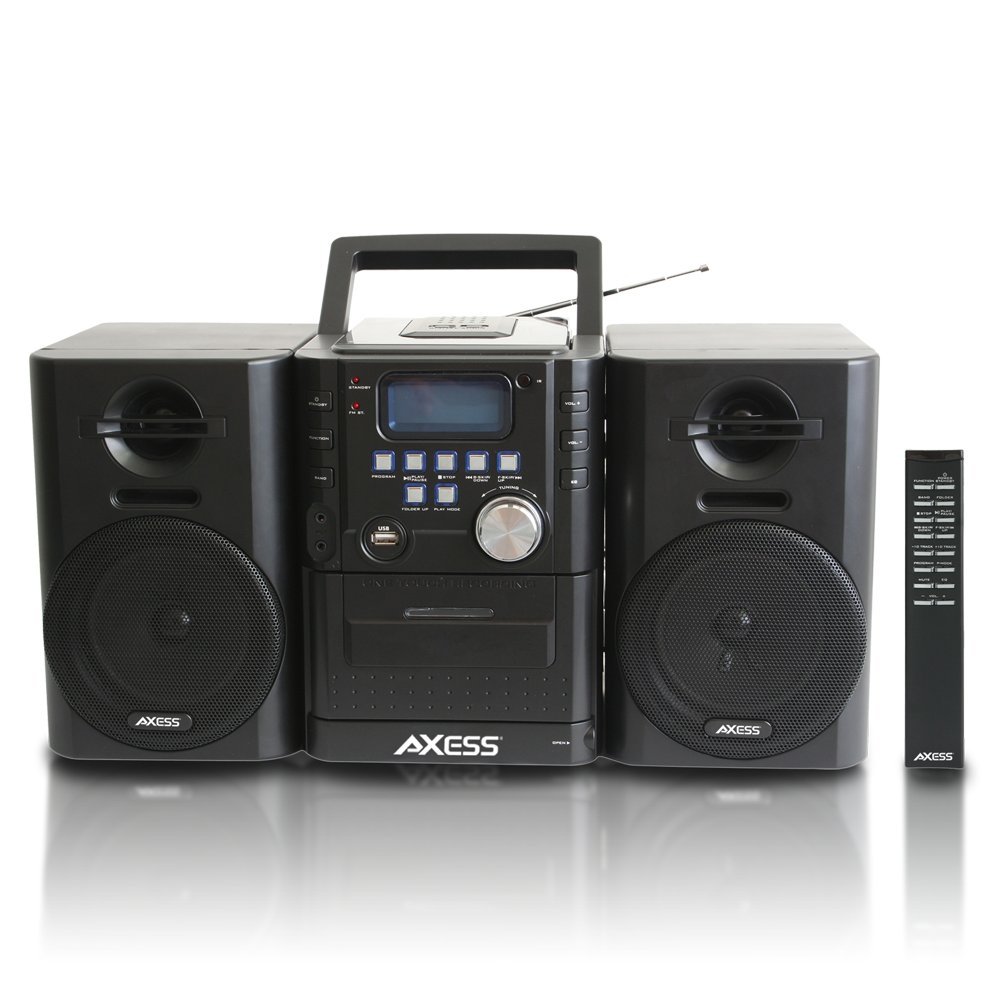
చిత్రం: ముందు భాగం view of the Axess MS3912 Mini Entertainment System, showing the central unit with display, control buttons, USB port, CD tray, cassette deck, and two detachable speakers. A remote control is also visible on the right.
- స్టాండ్బై బటన్: యూనిట్ని ఆన్ లేదా ఆఫ్ చేస్తుంది.
- ఫంక్షన్ బటన్: Selects between CD, USB, TAPE, AUX, and RADIO modes.
- బ్యాండ్ బటన్: In Radio mode, switches between AM and FM bands.
- ప్రోగ్రామ్ బటన్: Used for programming CD/USB tracks.
- ప్లే/పాజ్ బటన్: Starts or pauses playback for CD, USB, or Cassette.
- STOP బటన్: ప్లేబ్యాక్ను ఆపివేస్తుంది.
- SKIP/SEARCH Buttons (<< / >>): ట్రాక్లను దాటవేస్తుంది లేదా వేగంగా ముందుకు/రివైండ్ చేస్తుంది.
- FOLDER UP / PLAY MODE Buttons: Navigates folders on USB or changes play mode.
- వాల్యూమ్ నాబ్: ఆడియో అవుట్పుట్ స్థాయిని సర్దుబాటు చేస్తుంది.
- USB పోర్ట్: Connects USB flash drives for MP3 playback.
- PC/AUX IN Jack: బాహ్య ఆడియో పరికరాలను కనెక్ట్ చేస్తుంది.
- హెడ్ఫోన్ జాక్: Connects headphones for private listening.
- CD కంపార్ట్మెంట్: టాప్-లోడింగ్ CD ప్లేయర్.
- క్యాసెట్ డెక్: ముందు భాగంలో లోడ్ చేయగల క్యాసెట్ ప్లేయర్/రికార్డర్.
- ప్రదర్శన: Shows current function, track number, radio frequency, etc.
వెనుక ప్యానెల్ కనెక్షన్లు

చిత్రం: వెనుక view of the Axess MS3912 Mini Entertainment System, showing the FM antenna, battery compartment, AC power input, and speaker connection jacks.
- FM యాంటెన్నా: Extend for optimal FM reception.
- స్పీకర్ జాక్స్: Connect the left and right speakers.
- AC పవర్ ఇన్పుట్: AC పవర్ కార్డ్ని కనెక్ట్ చేయండి.
- బ్యాటరీ కంపార్ట్మెంట్: Holds batteries for portable operation.
సెటప్
1. స్పీకర్లను కనెక్ట్ చేస్తోంది
Connect the speaker wires from the detachable speakers to the corresponding speaker jacks on the rear of the main unit. Ensure the polarity (+/-) matches for optimal sound quality.
2. యూనిట్కు శక్తినివ్వడం
AC పవర్ ఆపరేషన్:
Insert the AC power cord into the AC power input jack on the rear of the unit, then plug the other end into a standard wall outlet (AC 120V/60Hz).
DC (Battery) Power Operation:
Open the battery compartment cover on the rear of the unit. Insert the required number of C-size batteries (not included), ensuring correct polarity. Close the battery compartment cover securely. The unit will automatically switch to battery power when AC power is disconnected.
3. యాంటెన్నా సెటప్
For FM radio reception, fully extend the telescopic FM antenna. For AM reception, the unit has a built-in AM antenna, which may require rotating the unit for best reception.
ఆపరేటింగ్ సూచనలు
1. పవర్ ఆన్/ఆఫ్
నొక్కండి స్టాండ్బై యూనిట్ను ఆన్ లేదా ఆఫ్ చేయడానికి ముందు ప్యానెల్ లేదా రిమోట్ కంట్రోల్లోని బటన్.
2. ఫంక్షన్ ఎంపిక
నొక్కండి ఫంక్షన్ button repeatedly to cycle through the available modes: CD, USB, TAPE, AUX, and RADIO.
3. CD ప్లేయర్ ఆపరేషన్
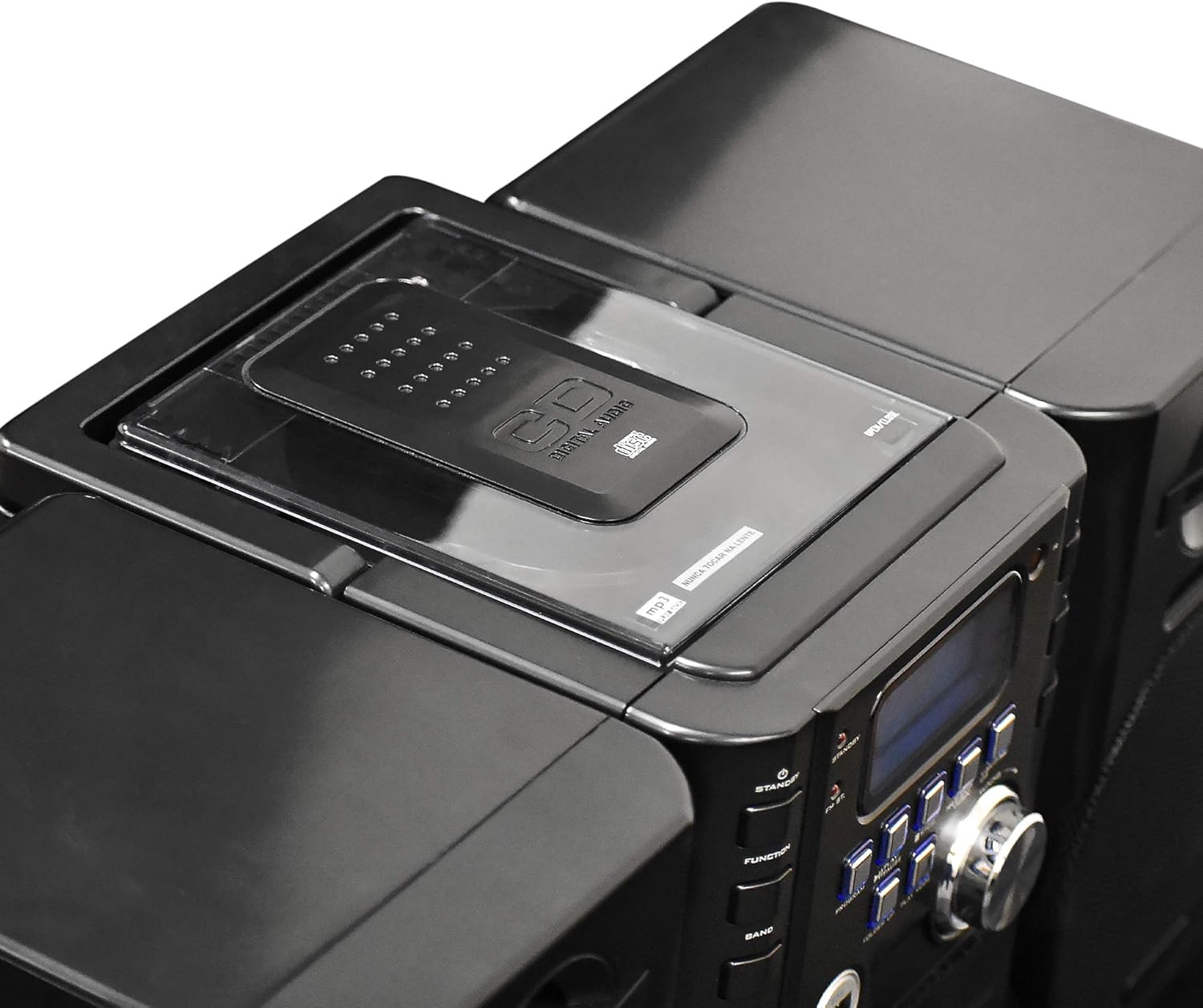
చిత్రం: పైన view of the Axess MS3912 Mini Entertainment System, showing the transparent lid of the top-loading CD compartment.
- నొక్కండి ఫంక్షన్ to select CD mode.
- CD కంపార్ట్మెంట్ కవర్ను తెరవండి.
- లేబుల్ వైపు పైకి ఎదురుగా ఉండేలా CD ఉంచండి.
- CD కంపార్ట్మెంట్ కవర్ను మూసివేయండి. యూనిట్ డిస్క్ను చదువుతుంది.
- నొక్కండి ప్లే/పాజ్ చేయండి ప్లేబ్యాక్ ప్రారంభించడానికి.
- ఉపయోగించండి స్కిప్ / సెర్చ్ ట్రాక్లను నావిగేట్ చేయడానికి బటన్లు.
- నొక్కండి ఆపు ప్లేబ్యాక్ని ముగించడానికి.
4. USB/MP3 Player Operation

చిత్రం: వైపు view of the Axess MS3912 Mini Entertainment System, highlighting the USB port and PC/AUX IN jack on the central unit.
- USB పోర్టులో USB ఫ్లాష్ డ్రైవ్ను చొప్పించండి.
- నొక్కండి ఫంక్షన్ USB మోడ్ని ఎంచుకోవడానికి.
- The unit will automatically begin playing MP3 fileUSB డ్రైవ్ నుండి.
- ఉపయోగించండి ప్లే/పాజ్ చేయండి, ఆపు, మరియు స్కిప్ / సెర్చ్ నియంత్రణ కోసం బటన్లు.
- ఉపయోగించండి ఫోల్డర్ అప్ to navigate between folders on the USB drive.
5. Cassette Player/Recorder Operation
- నొక్కండి ఫంక్షన్ to select TAPE mode.
- Open the cassette deck door and insert a cassette tape.
- నొక్కండి ప్లే/పాజ్ చేయండి ప్లేబ్యాక్ ప్రారంభించడానికి.
- ఉపయోగించండి ఫాస్ట్ ఫార్వర్డ్ మరియు రివైండ్ buttons (often combined with SKIP/SEARCH buttons) to move through the tape.
- నొక్కండి ఆపు ప్లేబ్యాక్ని ముగించడానికి.
- రికార్డింగ్: To record from CD, USB, or Radio, select the desired source, then press the రికార్డ్ చేయండి button on the cassette deck (if available, or a combination of PLAY and RECORD). Ensure a blank, recordable cassette is inserted.
6. AM/FM రేడియో ఆపరేషన్
- నొక్కండి ఫంక్షన్ రేడియో మోడ్ని ఎంచుకోవడానికి.
- నొక్కండి బ్యాండ్ to select AM or FM.
- ఉపయోగించండి ట్యూనింగ్ నాబ్ లేదా స్కిప్ / సెర్చ్ buttons to tune to your desired station.
- For FM, extend the telescopic antenna. For AM, rotate the unit for best reception.
- ప్రీసెట్టింగ్ స్టేషన్లు: Tune to a station, press కార్యక్రమం, అప్పుడు ఉపయోగించండి స్కిప్ / సెర్చ్ ప్రీసెట్ నంబర్ను ఎంచుకోవడానికి, మరియు నొక్కండి కార్యక్రమం మళ్ళీ సేవ్ చేయడానికి.
7. Auxiliary Input (AUX) Use
బాహ్య ఆడియో పరికరాన్ని (ఉదా. స్మార్ట్ఫోన్, MP3 ప్లేయర్) కనెక్ట్ చేయండి PC/AUX IN jack using a 3.5mm audio cable (not included). Press ఫంక్షన్ to select AUX mode. Audio from the external device will play through the MS3912 speakers.
8. హెడ్ఫోన్ వాడకం
ప్రామాణిక 3.5mm హెడ్ఫోన్లను ప్లగ్ చేయండి హెడ్ఫోన్ jack for private listening. The speakers will automatically mute when headphones are connected.
9. రిమోట్ కంట్రోల్
The included remote control allows for convenient operation of most functions from a distance. Ensure batteries are correctly inserted into the remote control.
నిర్వహణ
యూనిట్ శుభ్రపరచడం
Wipe the exterior of the unit with a soft, dry cloth. Do not use abrasive cleaners, waxes, or solvents. For the CD lens, use a specialized CD lens cleaner disc. For the cassette deck, use a head cleaning cassette.
నిల్వ
If storing the unit for an extended period, remove all batteries to prevent leakage. Store in a cool, dry place away from direct sunlight and extreme temperatures.
ట్రబుల్షూటింగ్
| సమస్య | సాధ్యమైన కారణం | పరిష్కారం |
|---|---|---|
| శక్తి లేదు | AC cord not plugged in; Batteries depleted or incorrectly inserted. | AC త్రాడు కనెక్షన్ను తనిఖీ చేయండి; బ్యాటరీలను మార్చండి లేదా సరైన ధ్రువణతను నిర్ధారించుకోండి. |
| శబ్దం లేదు | Volume too low; Headphones connected; Speakers not connected properly; Incorrect function selected. | Increase volume; Disconnect headphones; Check speaker connections; Select correct function (CD, USB, TAPE, AUX, RADIO). |
| CD స్కిప్ అవుతుంది లేదా ప్లే అవ్వడం లేదు | CD is dirty or scratched; CD inserted incorrectly; Unit is vibrating. | Clean CD with a soft cloth; Reinsert CD label side up; Place unit on a stable surface. |
| పేలవమైన రేడియో రిసెప్షన్ | FM antenna not extended; Unit position for AM is poor; Interference. | Fully extend FM antenna; Rotate unit for better AM reception; Move unit away from other electronic devices. |
| USB ఆడటం లేదు | USB డ్రైవ్ సరిగ్గా ఫార్మాట్ చేయబడలేదు; అనుకూలంగా లేదు. file types; USB drive not inserted fully. | USB FAT32 ఫార్మాట్లో ఉందని నిర్ధారించుకోండి; MP3 మాత్రమే files are supported; Reinsert USB drive. |
| Cassette recording not working | Tape is write-protected; No blank tape inserted; Incorrect source selected. | Check tape's write-protect tab; Insert a blank, recordable tape; Select the desired audio source (CD, USB, Radio, AUX). |
స్పెసిఫికేషన్లు
| ఫీచర్ | స్పెసిఫికేషన్ |
|---|---|
| మోడల్ సంఖ్య | MS3912 |
| బ్రాండ్ | AXESS |
| పవర్ అవుట్పుట్ | 12W స్పీకర్లు |
| శక్తి మూలం | AC 120V/60Hz or DC (C-size batteries, not included) |
| రేడియో పౌనఃపున్యాల | AM/FM |
| మద్దతు ఉన్న మీడియా | CD, MP3 (via USB), Cassette Tape |
| ఇన్పుట్లు | USB Port, 3.5mm AUX Input |
| అవుట్పుట్లు | 3.5mm హెడ్ఫోన్ జాక్ |
| కొలతలు (L x W x H) | 43.82 x 21.59 x 24.13 సెం.మీ (సుమారుగా 17.25 x 8.5 x 9.5 అంగుళాలు) |
| బరువు | 3.88 కిలోలు (సుమారు 8.55 పౌండ్లు) |