
పరిచయం
This manual provides essential instructions for the safe and efficient operation, maintenance, and troubleshooting of your NuWave 30602 Double Precision Induction Cooktop Burner. Please read this manual thoroughly before first use and retain it for future reference.
ముఖ్యమైన భద్రతా సమాచారం
Always follow basic safety precautions when using electrical appliances to reduce the risk of fire, electric shock, and injury. This appliance is for household use only.
- వేడి ఉపరితలాలను తాకవద్దు. హ్యాండిల్స్ లేదా నాబ్లను ఉపయోగించండి.
- విద్యుత్ షాక్ నుండి రక్షించడానికి, త్రాడు, ప్లగ్లు లేదా ఉపకరణాన్ని నీటిలో లేదా ఇతర ద్రవంలో ముంచవద్దు.
- ఏదైనా ఉపకరణాన్ని పిల్లలు లేదా సమీపంలో ఉపయోగించినప్పుడు నిశిత పర్యవేక్షణ అవసరం.
- ఉపయోగంలో లేనప్పుడు మరియు శుభ్రపరిచే ముందు అవుట్లెట్ నుండి అన్ప్లగ్ చేయండి. భాగాలను ఉంచడానికి లేదా తీయడానికి ముందు చల్లబరచడానికి అనుమతించండి.
- పాడైపోయిన త్రాడు లేదా ప్లగ్తో లేదా ఉపకరణం పనిచేయకపోవడం లేదా ఏ పద్ధతిలో పాడైపోయిన తర్వాత ఏ పరికరాన్ని ఆపరేట్ చేయవద్దు.
- ఉపకరణాల తయారీదారు సిఫార్సు చేయని అనుబంధ జోడింపులను ఉపయోగించడం వల్ల గాయాలు సంభవించవచ్చు.
- ఆరుబయట ఉపయోగించవద్దు.
- టేబుల్ లేదా కౌంటర్ అంచుపై త్రాడు వేలాడదీయవద్దు లేదా వేడి ఉపరితలాలను తాకవద్దు.
- వేడి గ్యాస్ లేదా ఎలక్ట్రిక్ బర్నర్ లేదా వేడిచేసిన ఓవెన్లో ఉంచవద్దు.
- వేడి నూనె లేదా ఇతర వేడి ద్రవాలు ఉన్న ఉపకరణాన్ని తరలించేటప్పుడు చాలా జాగ్రత్తగా ఉండాలి.
- ఎల్లప్పుడూ ముందుగా ఉపకరణానికి ప్లగ్ను అటాచ్ చేయండి, తర్వాత గోడ అవుట్లెట్లోకి త్రాడును ప్లగ్ చేయండి. డిస్కనెక్ట్ చేయడానికి, ఏదైనా నియంత్రణను "ఆఫ్"కి తిప్పండి, ఆపై గోడ అవుట్లెట్ నుండి ప్లగ్ను తీసివేయండి.
- ఉపకరణాన్ని ఉద్దేశించిన వినియోగానికి కాకుండా ఇతర వాటికి ఉపయోగించవద్దు.
- Individuals with pacemakers or similar medical devices should consult their physician before using an induction cooktop.
- Use only induction-compatible cookware (magnetic bottom).
ఉత్పత్తి ముగిసిందిview
The NuWave 30602 is a double precision induction cooktop designed for efficient and precise cooking. It features two independent cooking zones, each with its own control panel.
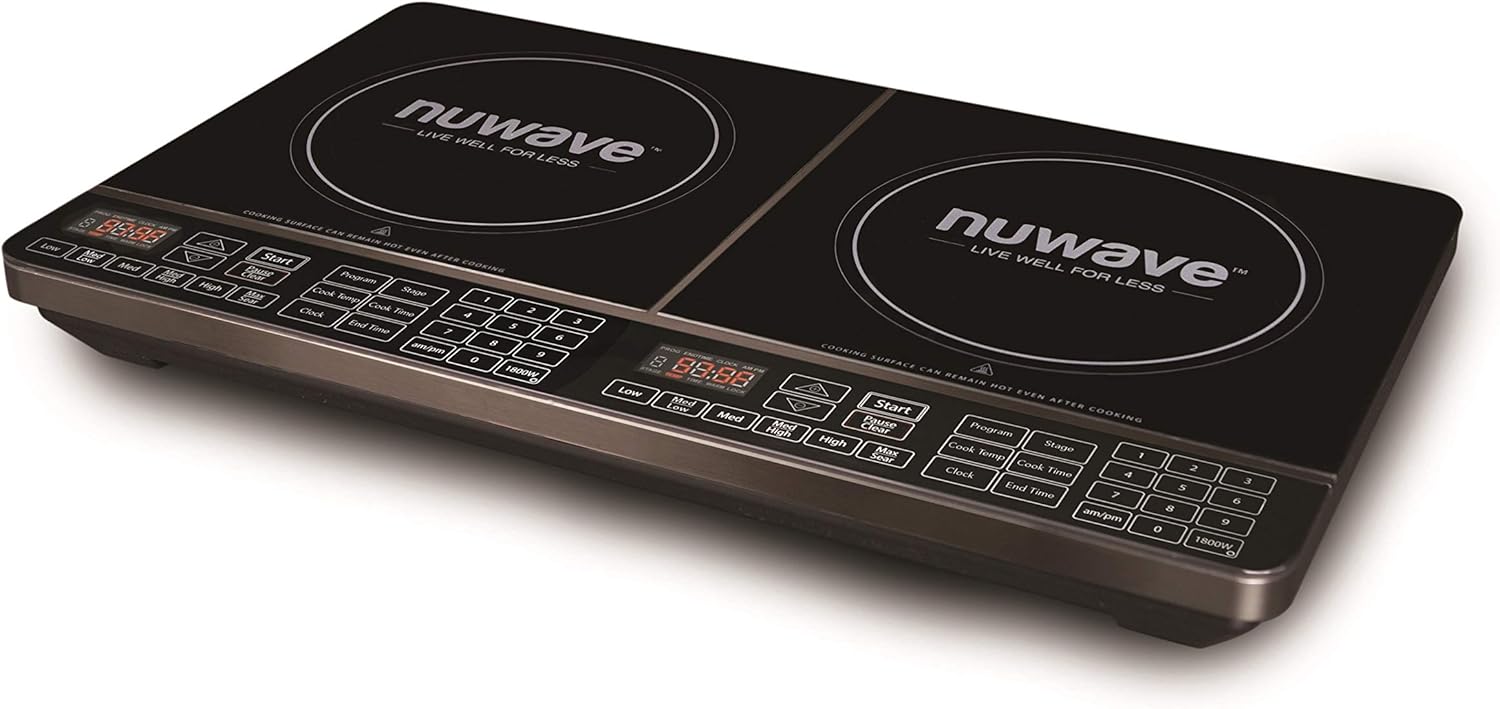
చిత్రం 1: కోణీయ view of the NuWave 30602 Double Precision Induction Cooktop Burner. This image shows the overall design of the cooktop, including the two cooking zones and the integrated control panels.
కంట్రోల్ ప్యానెల్ ఫీచర్లు
Each cooking zone has a dedicated control panel with touch-sensitive buttons and a digital display. Key controls include:
- డిజిటల్ ప్రదర్శన: Shows temperature, time, and error codes.
- Start/Pause/Clear: Initiates, pauses, or clears cooking settings.
- Program/Stage: బహుళ-ల కోసంtagఇ వంట.
- Temperature/Wattage Controls: Buttons for adjusting temperature (Low, Med Low, Med, Med High, High, Max Sear) and wattage (am/pm, 1800W).
- Clock/Cook Time/End Time: For setting timers and delayed cooking.
- Number Pad (1-9, 0): For precise temperature and time input.

చిత్రం 2: పై నుండి క్రిందికి view of the NuWave 30602 Double Precision Induction Cooktop Burner, highlighting the control panels for each burner. This image provides a clear view of all buttons and the digital displays.
సెటప్
- అన్ప్యాకింగ్: Carefully remove the cooktop from its packaging. Retain packaging for storage or return if necessary.
- ప్లేస్మెంట్: Place the cooktop on a stable, level, heat-resistant surface. Ensure there is adequate ventilation around the unit. Do not block the air vents located on the bottom or sides.
- పవర్ కనెక్షన్: పవర్ కార్డ్ను ప్రామాణిక 120V AC ఎలక్ట్రికల్ అవుట్లెట్కి ప్లగ్ చేయండి. అవుట్లెట్ సరిగ్గా గ్రౌండింగ్ చేయబడిందని నిర్ధారించుకోండి.
- Rear Power Switch: Locate the main ON/OFF switch at the back of the unit, near where the power cord connects. Flip this switch to the 'ON' position to supply power to the cooktop. The digital displays will illuminate.
- వంట సామాగ్రిని తనిఖీ చేయండి: Before cooking, ensure you are using induction-compatible cookware. This typically includes cast iron, enameled iron, and stainless steel with a magnetic bottom. A simple test is to place a magnet on the bottom of your pot or pan; if it sticks, the cookware is compatible.
ఆపరేటింగ్ సూచనలు
ప్రాథమిక ఆపరేషన్
- Ensure the rear power switch is ON.
- Place induction-compatible cookware containing food or liquid on the desired cooking zone.
- Press the 'Start' button for the chosen cooking zone. The display will show a default temperature or wattage.
- Adjust the temperature or wattage using the dedicated temperature buttons (Low, Med Low, Med, Med High, High, Max Sear) or the number pad for precise settings. The cooktop offers 94 different temperature settings, ranging from 100°F to 575°F, in 5-degree increments.
- To stop cooking, press the 'Clear' button for the active zone, or remove the cookware. The unit will automatically shut off if no cookware is detected for a period.
ప్రీ-ప్రోగ్రామ్ సెట్టింగులు
The cooktop includes 6 different pre-programmed temperature settings for common cooking tasks. Refer to your quick-start guide for specific details on activating these programs.
వెచ్చని ఫీచర్ ఉంచండి
Activate the 2-hour 'Keep Warm' feature to maintain food at approximately 155°F (68°C). This is ideal for keeping dishes warm after cooking.
మల్టీ-ఎస్tagఇ వంట
The 'Program' and 'Stage' buttons allow you to set up to three different cooking stages with varying temperatures and times. This is useful for recipes that require different heat levels during the cooking process.
వాట్tagఇ నిర్వహణ
The cooktop allows for wattage adjustment between the two heating elements. This feature helps manage power consumption, especially when using both burners simultaneously. Consult the display for current wattage distribution and adjust as needed.
లాక్ ఫీచర్
To prevent accidental changes to settings during cooking, use the lock feature. This typically involves a long-press or simultaneous press of specific buttons. Refer to the on-screen prompts or quick-start guide for exact activation and deactivation steps. Note that activating the lock feature may require precise button presses.
అభిమాని ఆపరేషన్
It is normal for the internal cooling fan(s) to operate continuously while the cooktop is heating and for a period after cooking has finished. This ensures proper cooling of internal components.
నిర్వహణ మరియు శుభ్రపరచడం
Regular cleaning ensures optimal performance and extends the life of your cooktop.
- శుభ్రపరిచే ముందు: Always unplug the cooktop from the power outlet and ensure it has completely cooled down.
- కుక్టాప్ ఉపరితలం: ప్రకటనతో గాజు ఉపరితలాన్ని తుడవండిamp cloth and mild detergent. For stubborn stains or spills, use a non-abrasive cooktop cleaner specifically designed for glass or ceramic surfaces. Avoid abrasive pads, scouring powders, or harsh chemicals that can scratch or damage the surface.
- నియంత్రణ ప్యానెల్: కంట్రోల్ ప్యానెల్ను సాఫ్ట్, డితో తుడవండిamp cloth. Do not use excessive water or allow liquids to seep into the controls.
- బాహ్య: బాహ్య గృహాన్ని మృదువైన, d తో శుభ్రం చేయండి.amp గుడ్డ.
- వెంట్స్: Ensure the air intake and exhaust vents are clear of dust and debris. Use a soft brush or vacuum cleaner to gently clean them.
- చిందులు: Clean up spills immediately, especially sugary liquids, to prevent them from hardening and potentially damaging the glass surface.
ట్రబుల్షూటింగ్
మీ కుక్టాప్తో మీకు సమస్యలు ఎదురైతే, ఈ క్రింది సాధారణ సమస్యలు మరియు పరిష్కారాలను చూడండి:
| సమస్య | సాధ్యమైన కారణం | పరిష్కారం |
|---|---|---|
| కుక్టాప్ ఆన్ కావడం లేదు. | Rear power switch is OFF. Unit not plugged in. Power outage. | Ensure the rear power switch is ON. Check if the power cord is securely plugged into a working outlet. Check your household circuit breaker. |
| డిస్ప్లే ఎర్రర్ కోడ్ను చూపిస్తుంది (ఉదా. E0, E1). | No cookware or incompatible cookware detected. Overheating. Internal malfunction. | Ensure induction-compatible cookware is centered on the cooking zone. Allow the unit to cool if it overheated. If the error persists, contact customer support. |
| Temperature setting (e.g., 'Sear') does not activate. | తాత్కాలిక సాఫ్ట్వేర్ లోపం. | Turn the unit off using the rear power switch, wait a few seconds, then turn it back on. This often resets the controls. |
| Cooktop makes a humming or buzzing noise. | Normal operation of induction technology or cooling fan. | This is typically normal. Induction cooktops use electromagnetic fields which can cause a slight hum in some cookware. The cooling fan also produces noise. |
| Temperature control seems inaccurate or too high/low. | Induction heats very rapidly. Cookware type and food volume affect heat transfer. | Adjust temperature in smaller increments. Familiarize yourself with how your specific cookware reacts to induction heat. Start with lower settings and increase as needed. |
If the problem persists after attempting these solutions, please contact Nuwave customer support.
స్పెసిఫికేషన్లు
- మోడల్ సంఖ్య: 30602
- బ్రాండ్: నువ్వావే
- శక్తి: 900/1800 Watts (shared between two burners)
- ఉష్ణోగ్రత పరిధి: 100°F - 575°F
- ఉష్ణోగ్రత సెట్టింగులు: 94 precise temperature settings, 5-degree increments
- ముందుగా ప్రోగ్రామ్ చేయబడిన సెట్టింగ్లు: 6
- వెచ్చగా ఉంచు ఫీచర్: 2°F వద్ద 155 గంటలు
- హీటింగ్ ఎలిమెంట్స్: 2 (Sealed Burner type)
- నియంత్రణల రకం: టచ్-సెన్సిటివ్ బటన్లు
- ప్రత్యేక లక్షణాలు: Temperature Control, Induction Compatible
- వస్తువు బరువు: సుమారు 17.4 పౌండ్లు
- UPC: 735343078521, 793842115260, 652185306028
వారంటీ సమాచారం
For detailed warranty information, please refer to the warranty card included with your product packaging. You may also visit the official Nuwave webఅత్యంత ప్రస్తుత వారంటీ నిబంధనలు మరియు షరతుల కోసం సైట్.
కస్టమర్ మద్దతు
If you require further assistance, have questions about your NuWave 30602 Double Precision Induction Cooktop Burner, or need to report a service issue, please contact Nuwave customer support through their official webసైట్ లేదా మీ ఉత్పత్తి డాక్యుమెంటేషన్లో అందించిన సంప్రదింపు సమాచారం.