
పరిచయం
The C2G 40914 Compact Ampలైఫైయర్ రూపొందించబడింది amplify dynamic microphone or stereo audio signals, providing 15 Watts of power per channel to a sound reinforcement system. This amplifier features a discreet installation and remote control capability via an included wall plate. It is suitable for various audio setups requiring compact amplification and external volume management.
పెట్టెలో ఏముంది
దయచేసి ఇన్స్టాలేషన్తో కొనసాగే ముందు అన్ని భాగాలు ఉన్నాయని ధృవీకరించండి:
- కాంపాక్ట్ Ampజీవితకాలం
- Decorator Volume Control Wall Plate
- ఫేస్ ప్లేట్ కవర్
- పవర్ అడాప్టర్
- Bracket Mounting Screws 6-32 (25mm) qty. 2
- Wall Plate Mounting Screw M3.5 (8mm) qty. 3
- వినియోగదారు మాన్యువల్
ఉత్పత్తి ముగిసిందిview
తో మిమ్మల్ని మీరు పరిచయం చేసుకోండి amplifier and wall plate components.

మూర్తి 1: ముందు view of the C2G 40914 Compact Amplifier. This image displays the local volume control knob, power indicator LED, 1/4 inch microphone input, 3.5mm auxiliary input, and input select switch.

మూర్తి 2: వెనుక view of the C2G 40914 Compact Ampప్రాణాలను బలిగొంటాడు. ఈ view shows the speaker output terminals (L+, L-, R+, R-), the remote volume control port (RJ45), and the DC 12V power input.

మూర్తి 3: Decorator Volume Control Wall Plate and face plate cover. The wall plate features a rotary volume knob and a power indicator LED.
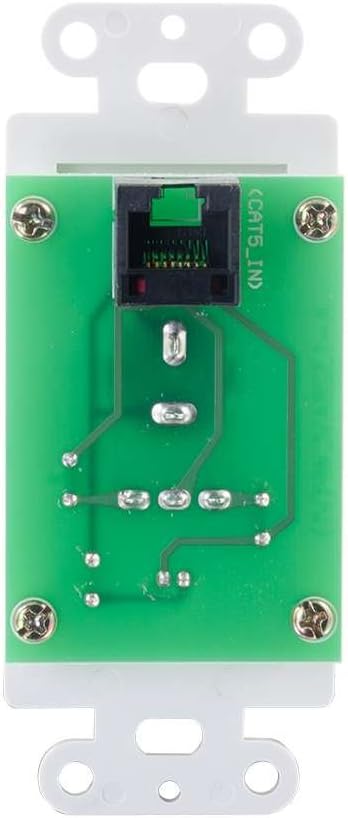
మూర్తి 4: వెనుక view of the Decorator Volume Control Wall Plate, showing the RJ45 connector for remote communication with the ampజీవితకాలం.
సెటప్
-
మౌంట్ ది Ampజీవితకాలం:
ది amplifier includes a built-in mounting bracket. Secure the amplifier to a suitable surface using the provided 6-32 (25mm) mounting screws. Ensure adequate ventilation around the unit.
-
కనెక్టింగ్ స్పీకర్లు:
Connect your passive speakers to the speaker output terminals on the rear of the amplifier (L+, L-, R+, R-). Ensure correct polarity (+ to + and - to -) for each speaker channel. The amplifier provides 15 watts per channel.
-
ఆడియో మూలాలను కనెక్ట్ చేస్తోంది:
- మైక్రోఫోన్ ఇన్పుట్: Connect a dynamic microphone to the 1/4 inch MIC IN jack on the front panel.
- సహాయక ఇన్పుట్: Connect an audio source (e.g., smartphone, media player) to the 3.5mm AUX IN jack on the front panel.
-
Connecting the Remote Wall Plate:
Install the Decorator Volume Control Wall Plate in a standard wall box. Connect a Cat5e/Cat6 cable (not included) from the RJ45 port on the rear of the wall plate to the REMOTE port (RJ45) on the rear of the amplifier. Secure the wall plate with the provided M3.5 (8mm) screws and attach the face plate cover.
-
శక్తినిస్తుంది Ampజీవితకాలం:
Connect the included power adapter to the DC 12V input on the rear of the amplifier, then plug the adapter into a standard AC power outlet. The power indicator LED on the amplifier and wall plate will illuminate.
ఆపరేటింగ్ సూచనలు
-
పవర్ ఆన్/ఆఫ్:
ది amplifier powers on automatically when connected to power. The power indicator LED on both the amplifier and the wall plate will light up.
-
ఇన్పుట్ ఎంపిక:
ఉపయోగించండి ఇన్పుట్ ఎంచుకోండి switch on the front panel of the amplifier to choose between the MIC IN and AUX IN audio sources.
-
వాల్యూమ్ నియంత్రణ:
ది amplifier offers both local and remote volume control options:
- Local Volume: Adjust the rotary knob labeled వాల్యూమ్ ముందు ప్యానెల్లో ampజీవితకాలం.
- Remote Volume: Adjust the rotary knob labeled వాల్యూమ్ on the Decorator Volume Control Wall Plate.
ఉపయోగించండి వాల్యూమ్ ఎంపిక స్విచ్ ఆన్ చేయండి amplifier to determine whether the local or remote volume control is active. Set to 'LOCAL' to use the amplifier's knob, or 'REMOTE' to use the wall plate's knob.
-
మైక్రోఫోన్ వినియోగం:
When MIC IN is selected, speak into the connected dynamic microphone. Adjust the volume using the selected volume control (local or remote) to achieve the desired output level.
నిర్వహణ
- ఉంచండి amplifier and wall plate clean by wiping with a soft, dry cloth.
- Avoid using liquid cleaners or aerosol sprays, which may damage the unit.
- చుట్టూ సరైన వెంటిలేషన్ ఉండేలా చూసుకోండి ampవేడెక్కడం నిరోధించడానికి lifier.
- Do not expose the unit to excessive moisture or extreme temperatures.
ట్రబుల్షూటింగ్
If you encounter issues with your C2G 40914 Compact Amplifier, please refer to the following common solutions:
-
ఆడియో అవుట్పుట్ లేదు:
- Ensure the power adapter is securely connected and the power indicator LEDs are lit.
- Verify that speakers are correctly wired to the ampసరైన ధ్రువణతతో లైఫైయర్ యొక్క అవుట్పుట్ టెర్మినల్స్.
- అని తనిఖీ చేయండి ఇన్పుట్ ఎంచుకోండి switch is set to the correct source (MIC or AUX).
- అని నిర్ధారించండి వాల్యూమ్ ఎంపిక switch is set to the active volume control (LOCAL or REMOTE) and that the volume knob is turned up.
- Test with a different audio source or microphone to rule out source device issues.
-
Remote Volume Control Not Working:
- Ensure the Cat5e/Cat6 cable connecting the wall plate to the amplifier is securely plugged into both RJ45 ports.
- అని ధృవీకరించండి వాల్యూమ్ ఎంపిక స్విచ్ ఆన్ చేయండి amplifier is set to 'REMOTE'.
- Check the wall plate's power indicator LED to ensure it is receiving power.
-
వక్రీకరించిన ఆడియో:
- రెండింటిలోనూ వాల్యూమ్ స్థాయిని తగ్గించండి amplifier/wall plate and the audio source device.
- Ensure speaker impedance matches the amplifier's requirements (typically 4-8 ohms).
- అన్ని కేబుల్ కనెక్షన్లు వదులుగా ఉన్నాయా లేదా దెబ్బతిన్నాయా అని తనిఖీ చేయండి.
స్పెసిఫికేషన్లు
| ఫీచర్ | వివరాలు |
|---|---|
| ఉత్పత్తి కొలతలు | 1.95 x 1.3 x 4.05 అంగుళాలు (L x W x H) |
| వస్తువు బరువు | 1 పౌండ్ |
| మోడల్ సంఖ్య | 40914 |
| అవుట్పుట్ పవర్ | 15 Watts per channel (30W total) |
| ఇన్పుట్ కనెక్టర్లు | 1/4 inch Dynamic Microphone, 3.5mm Stereo Audio Line Level |
| అవుట్పుట్ కనెక్టర్లు | Speaker Terminals (L+, L-, R+, R-) |
| రిమోట్ కంట్రోల్ | RJ45 for external volume control wall plate |
| విద్యుత్ సరఫరా | DC 12V (Power Adapter included) |
| అనుకూల పరికరాలు | వక్తలు |
| రంగు | నలుపు |
వారంటీ మరియు మద్దతు
The C2G 40914 Compact Amplifier is thoroughly inspected and tested to ensure quality and comes with a warranty for your complete satisfaction. For specific warranty terms and conditions, please refer to the documentation included with your purchase or visit the official C2G webసైట్.
సాంకేతిక మద్దతు, ట్రబుల్షూటింగ్ సహాయం లేదా తదుపరి విచారణల కోసం, దయచేసి సందర్శించండి C2G Store లేదా వారి అధికారిక మద్దతు ఛానెల్లు.