
1. పరిచయం
This manual provides detailed instructions for the setup, operation, maintenance, and troubleshooting of your EXCELVAN E300 Portable Thermal Printer. Please read this manual carefully before using the printer to ensure proper function and longevity of the device.
The EXCELVAN E300 is a compact and efficient thermal printer designed for printing receipts and tickets. It features high-speed printing, a durable print head, and versatile connectivity options including Bluetooth and USB, making it suitable for various point-of-sale (POS) environments.
2. ఉత్పత్తి ముగిసిందిview
2.1 ప్యాకేజీ విషయాలు
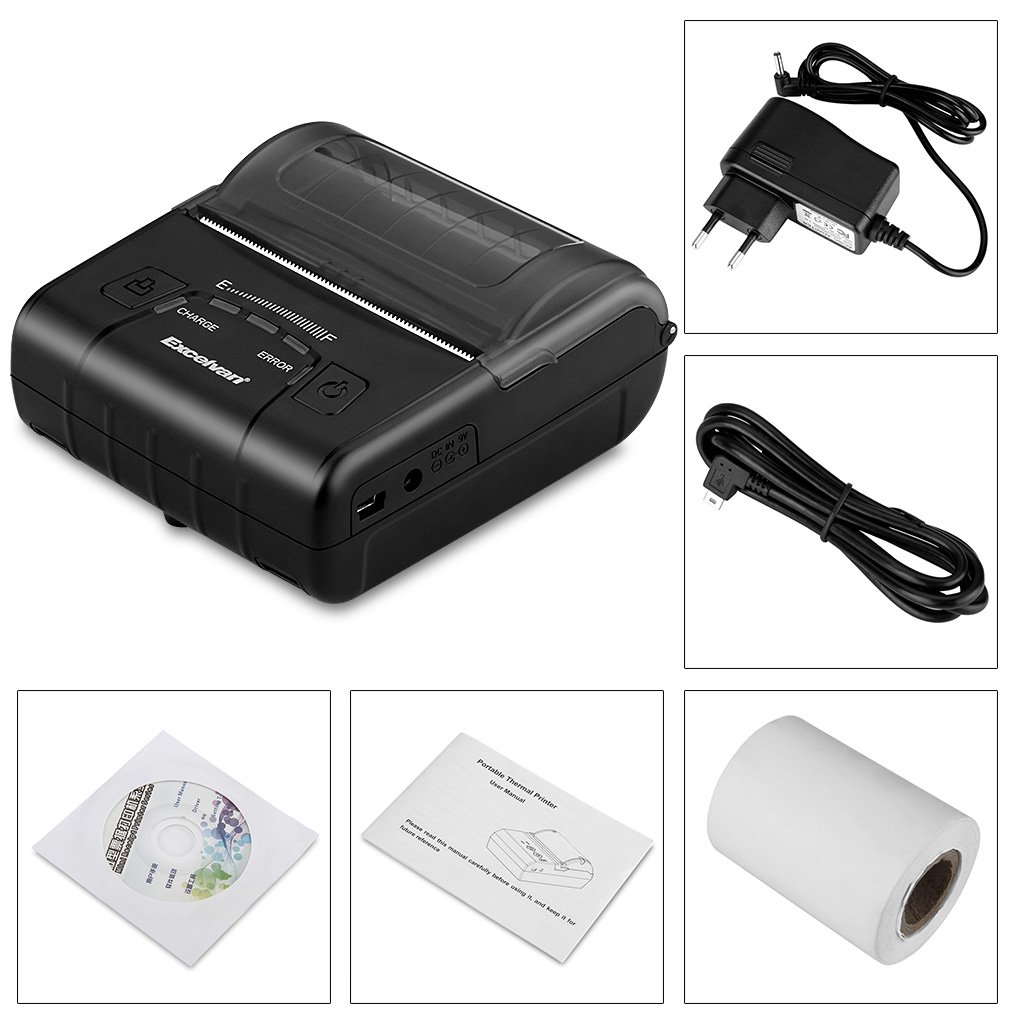
అన్ప్యాక్ చేసిన తర్వాత, క్రింద జాబితా చేయబడిన అన్ని అంశాలు చేర్చబడ్డాయని దయచేసి ధృవీకరించండి:
- 1 x 80mm Thermal Printer
- 1 x పవర్ అడాప్టర్
- 1 x లిథియం బ్యాటరీ
- 1 x USB కేబుల్ (110 సెం.మీ.)
- 1 x థర్మల్ పేపర్ రోల్
- 1 x యూజర్ మాన్యువల్ (ఈ పత్రం)
- 1 x CD (containing drivers and software)
2.2 ప్రింటర్ భాగాలు
Familiarize yourself with the main components of your EXCELVAN E300 printer:

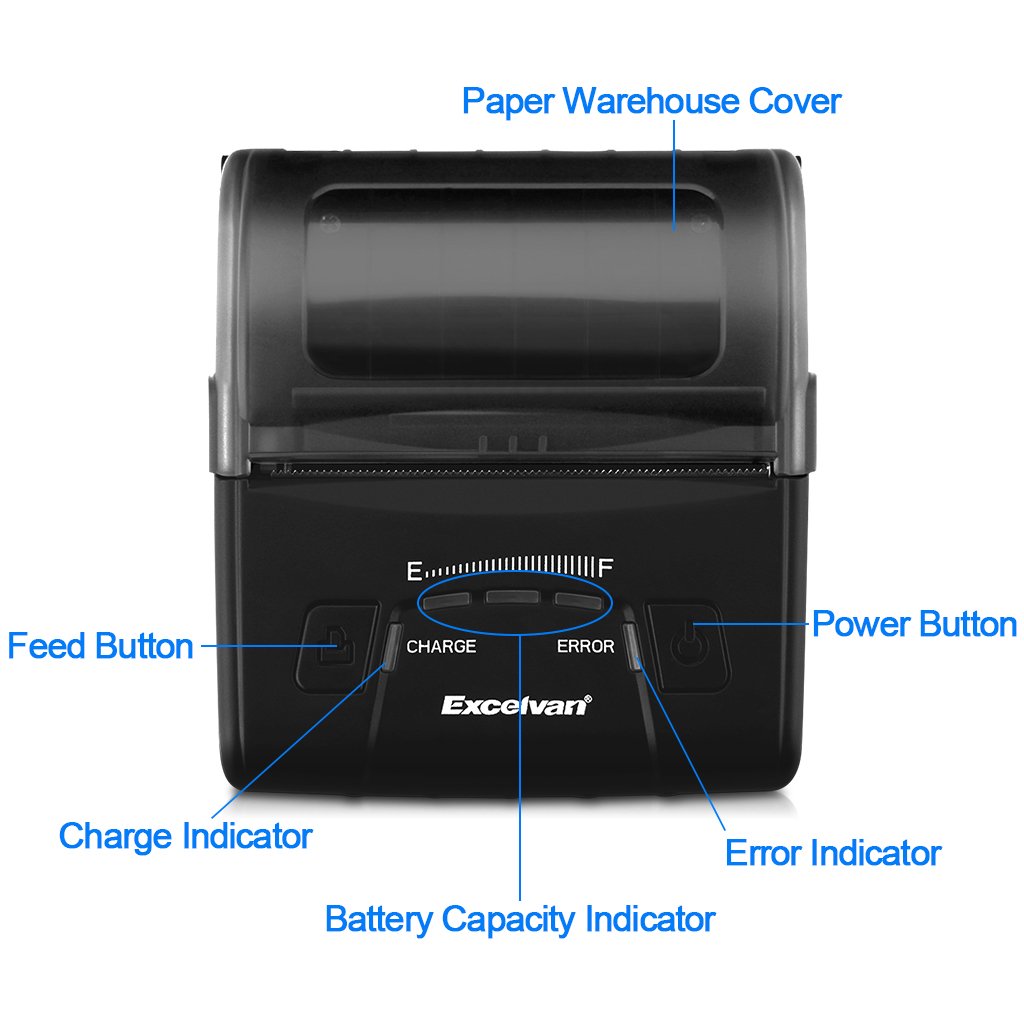
మూర్తి 1: ముందు view of the EXCELVAN E300 printer with key components labeled.
- Paper Warehouse Cover: Protects the paper roll compartment.
- ఫీడ్ బటన్: Advances the paper.
- ఛార్జ్ ఇండికేటర్: Lights up when the battery is charging.
- బ్యాటరీ కెపాసిటీ సూచిక: ప్రస్తుత బ్యాటరీ స్థాయిని చూపుతుంది.
- లోపం సూచిక: Lights up to indicate an error (e.g., paper out, cover open).
- పవర్ బటన్: ప్రింటర్ను ఆన్/ఆఫ్ చేస్తుంది.
3. సెటప్
3.1 బ్యాటరీ ఇన్స్టాలేషన్
- Open the battery compartment cover located on the bottom of the printer.
- Insert the provided lithium battery, ensuring the contacts align correctly.
- ముఖ్యమైన: Remove any insulating tape from the battery contacts before installation or charging.
మూర్తి 2: Battery installation and warning to remove insulating tape.
- బ్యాటరీ కంపార్ట్మెంట్ కవర్ను సురక్షితంగా మూసివేయండి.
3.2 బ్యాటరీని ఛార్జ్ చేయడం
Before first use, fully charge the printer battery.
- Connect the power adapter to the printer's DC IN 9V port.
- పవర్ అడాప్టర్ను వాల్ అవుట్లెట్లోకి ప్లగ్ చేయండి.
- The Charge Indicator light will illuminate during charging. It will turn off or change color (depending on model) when fully charged.
- గమనిక: The USB cable is for data connection to a computer only and does not charge the device.
మూర్తి 3: Charging port and USB port. Use the power adapter for charging.
3.3 థర్మల్ పేపర్ను లోడ్ చేస్తోంది
ఈ ప్రింటర్ 80mm వెడల్పు గల థర్మల్ పేపర్ రోల్స్ను ఉపయోగిస్తుంది.
- Open the Paper Warehouse Cover by gently lifting it.
- Insert the thermal paper roll into the compartment, ensuring the paper feeds from the bottom and the leading edge comes out towards the front of the printer.
- కట్టింగ్ ఎడ్జ్ దాటి కొద్ది మొత్తంలో కాగితాన్ని బయటకు లాగండి.
- Close the Paper Warehouse Cover firmly until it clicks into place.
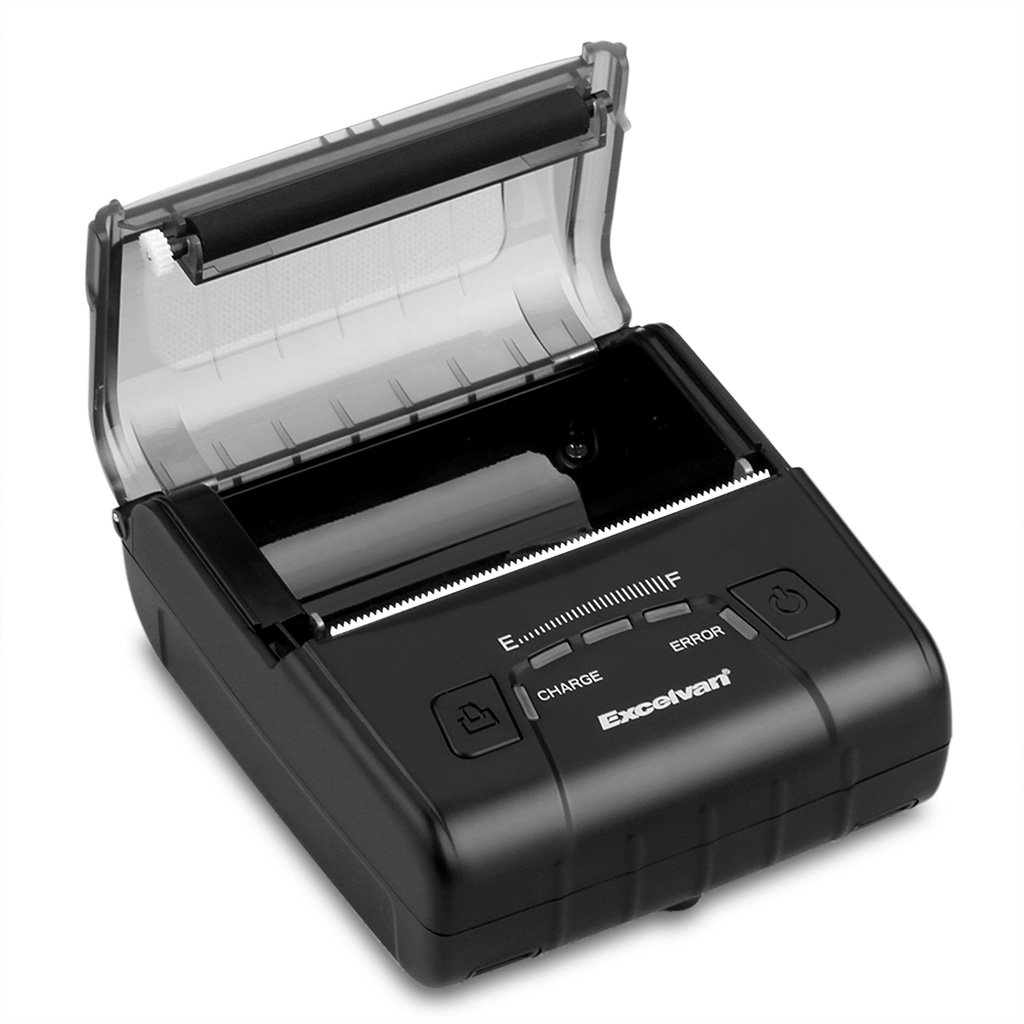
మూర్తి 4: Loading thermal paper into the printer.
4. ఆపరేటింగ్ సూచనలు
4.1 పవర్ ఆన్/ఆఫ్
- పవర్ ఆన్ చేయడానికి: Press and hold the Power Button until the indicator lights illuminate.
- పవర్ ఆఫ్ చేయడానికి: Press and hold the Power Button until the indicator lights turn off.
4.2 డ్రైవర్ ఇన్స్టాలేషన్
Install the appropriate drivers for your operating system from the provided CD or download them from the official EXCELVAN webసైట్ (అందుబాటులో ఉంటే).
- Supported Operating Systems: Android, iOS, Linux, Windows (2000, 2003, XP, 7, 8, 8.1, 10).
4.3 ప్రింటర్ను కనెక్ట్ చేస్తోంది
The EXCELVAN E300 supports both Bluetooth and USB connectivity.
4.3.1 బ్లూటూత్ కనెక్షన్
- ప్రింటర్ ఆన్ చేయబడిందని నిర్ధారించుకోండి.
- మీ పరికరంలో (స్మార్ట్ఫోన్, టాబ్లెట్, కంప్యూటర్), బ్లూటూత్ను ప్రారంభించి, అందుబాటులో ఉన్న పరికరాల కోసం శోధించండి.
- Select "EXCELVAN E300" or a similar name from the list.
- Enter the pairing PIN (usually "0000" or "1234") if prompted.
- జత చేసిన తర్వాత, మీరు మీ అప్లికేషన్ యొక్క ప్రింట్ సెట్టింగ్ల నుండి ప్రింటర్ను ఎంచుకోవచ్చు.
4.3.2 USB కనెక్షన్
- USB కేబుల్ యొక్క ఒక చివరను ప్రింటర్ యొక్క USB పోర్ట్కు కనెక్ట్ చేయండి.
- మీ కంప్యూటర్లో అందుబాటులో ఉన్న USB పోర్ట్కి మరొక చివరను కనెక్ట్ చేయండి.
- Ensure the necessary drivers are installed. The printer should appear as an available printing device in your system settings.
4.4 ప్రింటింగ్
Once connected and drivers are installed, you can initiate printing from your application.

మూర్తి 5: The printer in operation, producing a receipt.
- Use the Feed Button to advance paper manually if needed.
- The printer supports ESC/POS commands for advanced control.
- Graphic printing, including bitmaps and QR codes, is supported.
5. నిర్వహణ
5.1 ప్రింట్ హెడ్ను శుభ్రపరచడం
Regular cleaning of the print head ensures optimal print quality and extends the printer's lifespan.
- Turn off the printer and disconnect the power adapter.
- Open the Paper Warehouse Cover.
- తేలికగా కాటన్ శుభ్రముపరచు ఉపయోగించండి dampened with isopropyl alcohol to gently wipe the thermal print head (the dark strip inside the cover).
- కవర్ను మూసివేసి ప్రింటర్ను ఆన్ చేసే ముందు ప్రింట్ హెడ్ పూర్తిగా ఆరనివ్వండి.
5.2 బ్యాటరీ సంరక్షణ
- బ్యాటరీని తరచుగా పూర్తిగా డిశ్చార్జ్ చేయడాన్ని నివారించండి.
- Charge the battery regularly, even if the printer is not in use for extended periods.
- ఉపయోగంలో లేనప్పుడు ప్రింటర్ను చల్లని, పొడి ప్రదేశంలో నిల్వ చేయండి.
6. ట్రబుల్షూటింగ్
This section addresses common issues you might encounter with your EXCELVAN E300 printer.
| సమస్య | సాధ్యమైన కారణం | పరిష్కారం |
|---|---|---|
| ప్రింటర్ పవర్ ఆన్ అవ్వదు. | తక్కువ బ్యాటరీ లేదా పవర్ లేదు. | Charge the battery using the power adapter. Ensure the power adapter is correctly connected. |
| No paper output. | Paper out, paper jam, or cover not closed. | Check if the paper roll is empty and replace if necessary. Clear any paper jams. Ensure the Paper Warehouse Cover is securely closed. |
| Error Indicator is lit. | Paper out, cover open, or print head overheating. | Check paper status and cover. If the printer has been printing continuously, allow it to cool down. |
| పేలవమైన ముద్రణ నాణ్యత. | Dirty print head, low battery, or incorrect paper. | Clean the print head (see Section 5.1). Ensure the battery is sufficiently charged. Use high-quality thermal paper. |
| బ్లూటూత్ ద్వారా కనెక్ట్ చేయడం సాధ్యం కాలేదు. | బ్లూటూత్ ప్రారంభించబడలేదు, తప్పు జత చేయడం లేదా జోక్యం. | Ensure Bluetooth is enabled on both devices. Re-attempt pairing. Move closer to the printer and away from other wireless devices. |
7. స్పెసిఫికేషన్లు
Detailed technical specifications for the EXCELVAN E300 Thermal Printer:
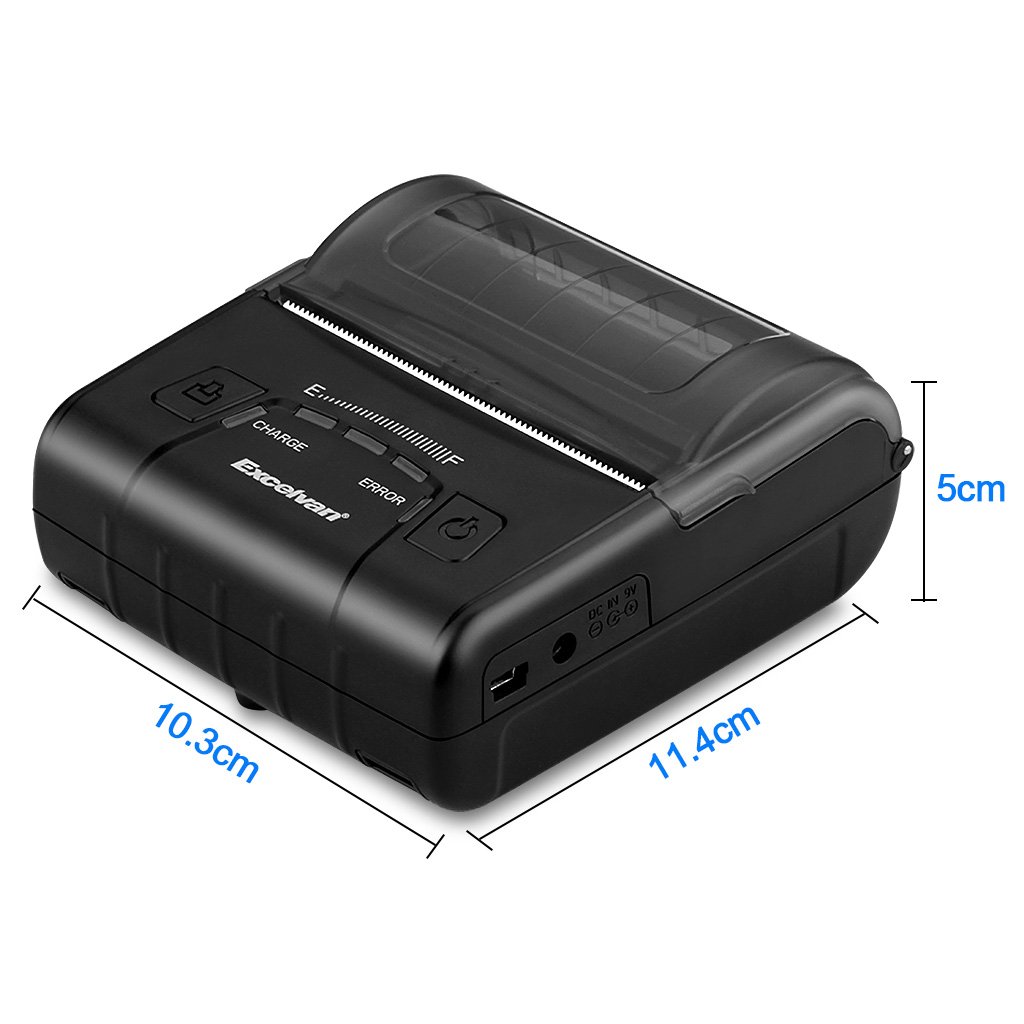
మూర్తి 6: EXCELVAN E300 Printer Dimensions.
| ఫీచర్ | స్పెసిఫికేషన్ |
|---|---|
| ప్రింటింగ్ పద్ధతి | థర్మల్ లైన్ ప్రింటింగ్ |
| ప్రభావవంతమైన ప్రింట్ వెడల్పు | 72 మి.మీ |
| రిజల్యూషన్ | 384 చుక్కలు / లైన్ |
| ప్రింటింగ్ స్పీడ్ | 90 mm/s |
| ఇంటర్ఫేస్ | USB, బ్లూటూత్ |
| పేపర్ రకం | థర్మల్ పేపర్ |
| పేపర్ వెడల్పు | 79.5 ± 0.5 మిమీ |
| పేపర్ వ్యాసం | ≤ 43 mm (40 mm recommended) |
| ఆదేశాలు | ESC/POS compatible |
| విద్యుత్ సరఫరా | పునర్వినియోగపరచదగిన పాలిమర్ లిథియం బ్యాటరీ |
| బ్యాటరీ కెపాసిటీ | 2500 mAh / 7.4 V |
| పవర్ అడాప్టర్ అవుట్పుట్ | 9.0 V / 2 A |
| డ్రైవర్ సాఫ్ట్వేర్ | Android, iOS, Linux, Win2000/2003/XP/7/8/8.1/10 |
| ప్రింట్ హెడ్ లైఫ్ | 50 km (Print Density ≤ 12.5) |
| ఆపరేటింగ్ ఉష్ణోగ్రత | 5 °C ~ 45 °C |
| ఆపరేటింగ్ తేమ | 10% ~ 80% |
| కొలతలు (L x W x H) | 11 x 5 x 10 సెం.మీ (సుమారుగా) |
| బరువు | 285 గ్రాములు |
8. వారంటీ మరియు మద్దతు
8.1 వారంటీ సమాచారం
The EXCELVAN E300 printer comes with a standard manufacturer's warranty. Please refer to the warranty card included in your package or contact your retailer for specific terms and conditions regarding warranty coverage and duration.
8.2 కస్టమర్ మద్దతు
For technical assistance, troubleshooting not covered in this manual, or inquiries about your product, please contact EXCELVAN customer support or your authorized dealer. Contact information can typically be found on the product packaging or the official EXCELVAN webసైట్.