
1. ఉత్పత్తి ముగిసిందిview
The Canon EF 24-105mm f/4L IS II USM is a versatile standard zoom lens designed for Canon EOS cameras. It features a constant f/4L aperture and a broad focal range from wide-angle to mid-telephoto, making it suitable for various photographic situations. The integrated Image Stabilizer (IS) provides up to 4 stops of shake correction, enhancing sharpness in handheld shooting. Its optical design includes Air Sphere Coating (ASC) to minimize flare and ghosting, and a 10-blade circular aperture for smooth background blur.
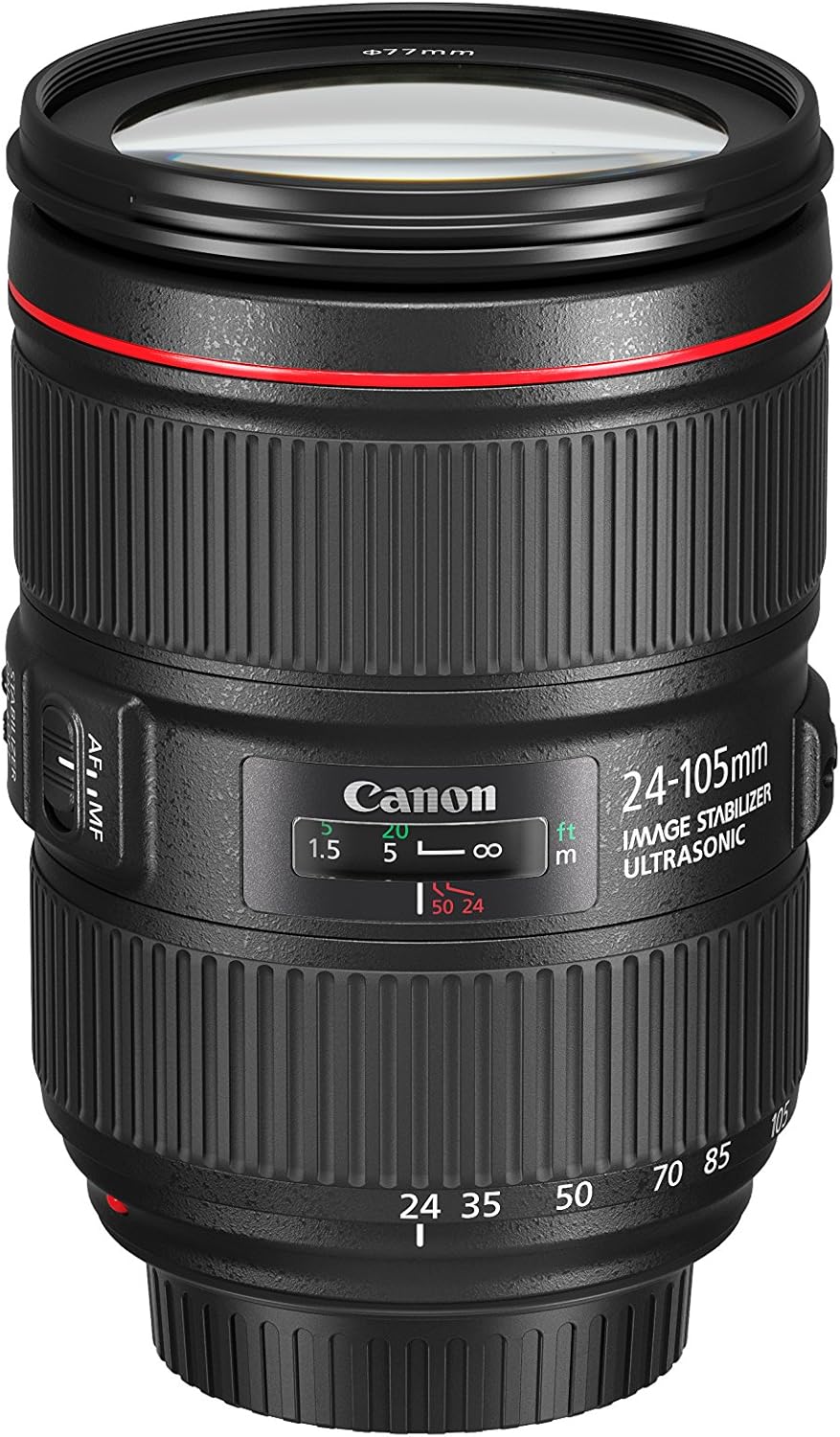
Image 1.1: The Canon EF 24-105mm f/4L IS II USM Lens, showcasing దాని కాంపాక్ట్ డిజైన్.
ముఖ్య లక్షణాలు:
- All-new optical design: Significant improvements in peripheral brightness.
- High-performance standard zoom lens: Constant f/4L aperture with a broad angle of view (wide angle to mid-telephoto).
- Air Sphere Coating (ASC): Helps to significantly reduce flare and ghosting.
- ఇమేజ్ స్టెబిలైజర్: Up to 4 stops of shake correction for sharp images.
- Circular Aperture (10 blades): Delivers beautiful, soft backgrounds.
2. పెట్టెలో ఏముంది
Verify that all the following items are included with your Canon EF 24-105mm f/4L IS II USM Lens:
- EF 24-105mm f/4 L IS II USM Lens
- లెన్స్ క్యాప్ E-77II
- లెన్స్ డస్ట్ క్యాప్ E
- Lens Case LP1219
- Lens Hood EW-83M
- ఇన్స్ట్రక్షన్ మాన్యువల్
- వారంటీ కార్డ్
3. సెటప్
3.1 లెన్స్ను అటాచ్ చేయడం
- వెనుక లెన్స్ క్యాప్ మరియు కెమెరా బాడీ క్యాప్ను తీసివేయండి.
- Align the red index mark on the lens with the red index mark on the camera body.
- Turn the lens clockwise until it clicks into place.
3.2 లెన్స్ను తీసివేయడం
- While pressing the lens release button on the camera, turn the lens counter-clockwise until it stops.
- లెన్స్ తొలగించండి.
- Attach the rear lens cap to the lens and the body cap to the camera.
3.3 Attaching the Lens Hood (EW-83M)
Align the red dot on the lens hood with the red dot on the front of the lens. Turn the hood clockwise until it clicks into place. The lens hood helps to prevent flare and ghosting by blocking unwanted light.
4. లెన్స్ను ఆపరేట్ చేయడం

చిత్రం 4.1: వైపు view of the lens showing the AF/MF and Stabilizer switches.
4.1 Focus Mode Switch (AF/MF)
- AF (ఆటో ఫోకస్): Set the switch to AF for automatic focusing.
- MF (మాన్యువల్ ఫోకస్): Set the switch to MF to manually adjust focus using the focus ring.
4.2 Image Stabilizer Switch (ON/OFF)
- పై: Turn the Image Stabilizer ON to reduce camera shake when shooting handheld.
- ఆఫ్: Turn the Image Stabilizer OFF when using a tripod or when shooting at very high shutter speeds.
4.3 Zoom Ring
Rotate the zoom ring to change the focal length from 24mm (wide-angle) to 105mm (telephoto). The lens maintains a constant f/4 aperture throughout the zoom range.

చిత్రం 4.2: ముందు view of the lens, showing the zoom ring and filter thread.
4.4 ఫోకస్ రింగ్
When the focus mode switch is set to MF, rotate this ring to adjust the focus manually.
4.5 Zoom Lock Switch
This switch is located on the side of the lens. When engaged, it locks the lens at the 24mm position to prevent zoom creep during transport or when the camera is pointed downwards.
5. నిర్వహణ
5.1 లెన్స్ శుభ్రపరచడం
- లెన్స్ ఉపరితలం నుండి దుమ్మును తొలగించడానికి లెన్స్ బ్లోవర్ను ఉపయోగించండి.
- For smudges or fingerprints, use a soft, clean lens cloth and a small amount of lens cleaning solution. Wipe gently in a circular motion.
- Never use abrasive materials or harsh chemicals.
5.2 Storing the Lens
- ఉపయోగంలో లేనప్పుడు ఎల్లప్పుడూ ముందు మరియు వెనుక లెన్స్ మూతలను అటాచ్ చేయండి.
- లెన్స్ను చల్లని, పొడి ప్రదేశంలో, ప్రత్యక్ష సూర్యకాంతి మరియు తీవ్రమైన ఉష్ణోగ్రతలకు దూరంగా నిల్వ చేయండి.
- If storing for an extended period, place it in a lens case with a desiccant to prevent mold and mildew.
6. ట్రబుల్షూటింగ్
If you encounter issues with your lens, consider the following common solutions:
- లెన్స్ ఫోకస్ చేయకపోవడం: Ensure the AF/MF switch is set to AF for autofocus, or adjust manually in MF mode. Check that the lens is securely attached to the camera body.
- చిత్రం బ్లర్: Verify the Image Stabilizer is ON if shooting handheld. Check your camera's shutter speed and ISO settings.
- కెమెరా ద్వారా లెన్స్ గుర్తించబడలేదు: Remove and reattach the lens. Clean the electrical contacts on both the lens and camera body with a clean, dry cloth.
For more detailed troubleshooting or persistent issues, refer to your camera's instruction manual or contact Canon customer support.
7. అధికారిక ఉత్పత్తి వీడియో
వీడియో 7.1: ఒక అధికారిview of the Canon EF 24-105mm f/4L IS II USM lens, highlighting its features and design.
8. స్పెసిఫికేషన్లు
| ఫీచర్ | వివరాలు |
|---|---|
| బ్రాండ్ | కానన్ |
| మోడల్ సంఖ్య | 1380C002 |
| ఫోకల్ లెంగ్త్ | 24-105మి.మీ |
| లెన్స్ రకం | జూమ్ చేయండి |
| అనుకూలమైన మౌంటులు | కానన్ EF |
| గరిష్ట ఎపర్చరు | f/4 |
| కనిష్ట ఎపర్చరు | f/22 |
| చిత్రం స్థిరీకరణ | ఆప్టికల్ |
| ఫోకస్ రకం | ఆటో ఫోకస్ |
| డయాఫ్రాగమ్ బ్లేడ్ల సంఖ్య | 10 |
| ఫోటో ఫిల్టర్ సైజు | 77మి.మీ |
| లెన్స్ కోటింగ్ | Air Sphere Coating |
| రంగు | నలుపు |
9. వారంటీ మరియు మద్దతు
This Canon EF 24-105mm f/4L IS II USM Lens comes with a 1-సంవత్సరం తయారీదారు వారంటీ. For warranty claims, technical support, or service inquiries, please visit the official Canon website or contact your local authorized Canon service center. Keep your purchase receipt and warranty card as proof of purchase.
ఆన్లైన్ మద్దతు: కానన్ మద్దతు Webసైట్