
1. పరిచయం
This manual provides comprehensive instructions for the proper installation, operation, and maintenance of the CALEFFI 720090 USB/Radio Device. Please read this manual thoroughly before using the device to ensure safe and efficient operation and to maximize its lifespan. Keep this manual for future reference.
2. ఉత్పత్తి ముగిసిందిview
The CALEFFI 720090 is a USB/radio device designed for reading and displaying consumption data. It facilitates bidirectional wireless transmission, enabling communication with compatible systems. The device is intended for use with the SW7200 software, developed for the Microsoft Windows operating system, to manage and visualize collected data.
ముఖ్య లక్షణాలు:
- USB interface for easy connection to a computer.
- Bidirectional wireless transmission at 868.0 ÷ 868.5 MHz with 20 mW power.
- Compatible with SW7200 software for Microsoft Windows for consumption data management.
ఉత్పత్తి చిత్రం:
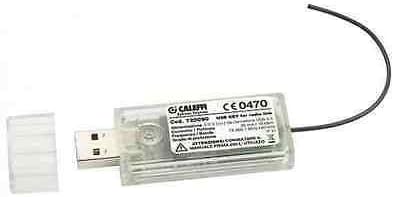
This image displays the CALEFFI 720090 USB/Radio Device. It is a compact, clear plastic USB dongle with a removable cap, revealing the USB-A connector. A small black wire antenna extends from the opposite end. The device features a label with 'CALEFFI' branding, model number '720090', and regulatory markings like 'CE0470', along with technical specifications for its 868 MHz wireless transmission.
3. సెటప్
Follow these steps to set up your CALEFFI 720090 USB/Radio Device:
- సాఫ్ట్వేర్ ఇన్స్టాలేషన్: Before connecting the device, install the SW7200 software on your Microsoft Windows computer. Refer to the SW7200 software manual for detailed installation instructions.
- పరికరాన్ని కనెక్ట్ చేయండి: Insert the CALEFFI 720090 USB/Radio Device into an available USB port on your computer. Ensure the connection is secure.
- డ్రైవర్ ఇన్స్టాలేషన్: Your operating system should automatically detect and install the necessary drivers. If prompted, follow the on-screen instructions. If automatic installation fails, consult the SW7200 software documentation or CALEFFI support for manual driver installation.
- కనెక్షన్ని ధృవీకరించండి: Once connected and drivers are installed, open the SW7200 software. The software should recognize the connected USB/radio device.
4. ఆపరేటింగ్ సూచనలు
Once the device is set up and recognized by the SW7200 software, you can begin using it to read and display consumption data.
- Launch SW7200 Software: Open the SW7200 application on your computer.
- Initiate Data Transmission: Within the software interface, select the option to initiate data transmission or scanning for compatible radio devices. The CALEFFI 720090 will establish a wireless connection.
- Read Consumption Data: Follow the software's instructions to read and collect consumption data from your connected systems.
- View and Analyze Data: The SW7200 software will display the collected data, allowing for analysis and reporting. Refer to the SW7200 software manual for detailed instructions on data interpretation and management features.
5. నిర్వహణ
The CALEFFI 720090 USB/Radio Device requires minimal maintenance to ensure optimal performance.
- శుభ్రపరచడం: Gently wipe the device with a dry, soft cloth. Do not use harsh chemicals or abrasive cleaners.
- నిల్వ: ఉపయోగంలో లేనప్పుడు, పరికరాన్ని ప్రత్యక్ష సూర్యకాంతి మరియు తీవ్రమైన ఉష్ణోగ్రతలకు దూరంగా చల్లని, పొడి ప్రదేశంలో నిల్వ చేయండి.
- రక్షణ: Keep the USB port covered with its cap when not connected to prevent dust and debris from entering.
- సాఫ్ట్వేర్ అప్డేట్లు: Regularly check for updates to the SW7200 software to ensure compatibility and access to the latest features and bug fixes.
6. ట్రబుల్షూటింగ్
If you encounter issues with your CALEFFI 720090 USB/Radio Device, refer to the following common troubleshooting steps:
- పరికరం గుర్తించబడలేదు:
- Ensure the device is fully inserted into the USB port.
- మీ కంప్యూటర్లో వేరే USB పోర్ట్ని ప్రయత్నించండి.
- మీ కంప్యూటర్ని పునఃప్రారంభించండి.
- Verify that the SW7200 software is installed correctly.
- Check Device Manager in Windows for any driver-related issues. Reinstall drivers if necessary.
- డేటా ట్రాన్స్మిషన్ లేదు:
- Ensure the device is recognized by the SW7200 software.
- Check the range and potential obstructions between the USB/radio device and the transmitting units.
- Verify that the transmitting units are powered on and functioning correctly.
- Consult the SW7200 software manual for specific instructions on initiating and troubleshooting data acquisition.
- సాఫ్ట్వేర్ లోపాలు:
- Ensure your SW7200 software is up to date.
- Restart the SW7200 application.
- If errors persist, reinstall the SW7200 software.
If these steps do not resolve the issue, please contact CALEFFI customer support for further assistance.
7. స్పెసిఫికేషన్లు
| తయారీదారు | CALEFFI |
| పార్ట్ నంబర్ | 720090 |
| వస్తువు బరువు | 997.9 గ్రా |
| బ్యాటరీలు అవసరం | నం |
| వైర్లెస్ ట్రాన్స్మిషన్ | Bidirectional 868.0 ÷ 868.5 MHz, 20 mW |
| అనుకూల సాఫ్ట్వేర్ | SW7200 for Microsoft Windows |
| మొదట అందుబాటులో ఉన్న తేదీ | ఫిబ్రవరి 21, 2020 |
8. వారంటీ మరియు మద్దతు
Specific warranty details for the CALEFFI 720090 USB/Radio Device are not provided within the product information. For warranty claims, technical support, or further inquiries, please contact CALEFFI directly through their official website or customer service channels. Ensure you have your product model number (720090) and any purchase documentation available when seeking support.