
1. పరిచయం
Thank you for choosing the ADE WS1911 Weather Station. This manual provides essential information for setting up, operating, and maintaining your device. Please read these instructions carefully before use to ensure optimal performance and longevity of your weather station.

The ADE WS1911 Weather Station features a clear digital display showing time, indoor/outdoor temperature, humidity, and weather forecast. A red LED projection displays time and temperature.
2. ప్యాకేజీ విషయాలు
- 1x ADE WS1911 Base Station
- 1x వైర్లెస్ అవుట్డోర్ సెన్సార్
- 1x పవర్ అడాప్టర్
- Batteries for Outdoor Sensor (type not specified, typically AAA/AA)
- 1x CR2032 Battery (pre-installed or included for main unit backup)
- వినియోగదారు మాన్యువల్
3. భద్రతా సమాచారం
- Do not expose the base station to extreme temperatures, direct sunlight, or high humidity.
- The outdoor sensor is splash-proof but should not be submerged in water.
- అందించిన పవర్ అడాప్టర్ను మాత్రమే ఉపయోగించండి.
- బ్యాటరీలను పిల్లలకు అందుబాటులో లేకుండా ఉంచండి. ఉపయోగించిన బ్యాటరీలను బాధ్యతాయుతంగా పారవేయండి.
- పరికరాన్ని మీరే విడదీయడానికి లేదా మరమ్మతు చేయడానికి ప్రయత్నించవద్దు. సేవ కోసం అర్హత కలిగిన సిబ్బందిని సంప్రదించండి.
4. సెటప్
4.1 పరికరాన్ని శక్తివంతం చేయడం
- Insert batteries into the outdoor sensor, observing polarity.
- For the base station, insert the CR2032 backup battery (if not pre-installed).
- Connect the power adapter to the base station and plug it into a power outlet. The display will light up.
4.2 అవుట్డోర్ సెన్సార్ ప్లేస్మెంట్
- Place the outdoor sensor in a shaded area, protected from direct rain and sunlight, to ensure accurate temperature and humidity readings.
- Ensure the sensor is within 60 meters (197 feet) of the base station, avoiding large metal objects or thick walls that may interfere with the radio signal.
4.3 Initial Setup and DCF Signal Reception
Upon powering on, the base station will automatically search for the DCF radio signal to set the time and date. This process may take several minutes or up to an hour, depending on your location and signal strength. Ensure the station is placed away from electronic interference.

The main unit features a clear LCD display. The wireless outdoor sensor can be placed up to 60 meters away and is splash-proof.
5. ఆపరేటింగ్ సూచనలు
5.1 ప్రదర్శన ముగిసిందిview

This diagram highlights key features: Date/Time, Outdoor Temperature, 180° Rotatable Projection Display, Indoor/Outdoor Humidity, Indoor Temperature, Comfort Indicator, and Trend Displays.
LCD డిస్ప్లే చూపిస్తుంది:
- ప్రస్తుత సమయం మరియు తేదీ
- ఇండోర్ ఉష్ణోగ్రత మరియు తేమ
- బహిరంగ ఉష్ణోగ్రత మరియు తేమ
- Weather Forecast (animated icons)
- కంఫర్ట్ ఇండికేటర్
- ఉష్ణోగ్రత/తేమ ట్రెండ్
5.2 సమయం మరియు తేదీని మాన్యువల్గా సెట్ చేయడం
If the DCF signal is not received, you can manually set the time and date. Refer to the specific buttons on your device (usually 'MODE' or 'SET') and follow the on-screen prompts to adjust hours, minutes, year, month, and day.
5.3 అలారం ఫంక్షన్
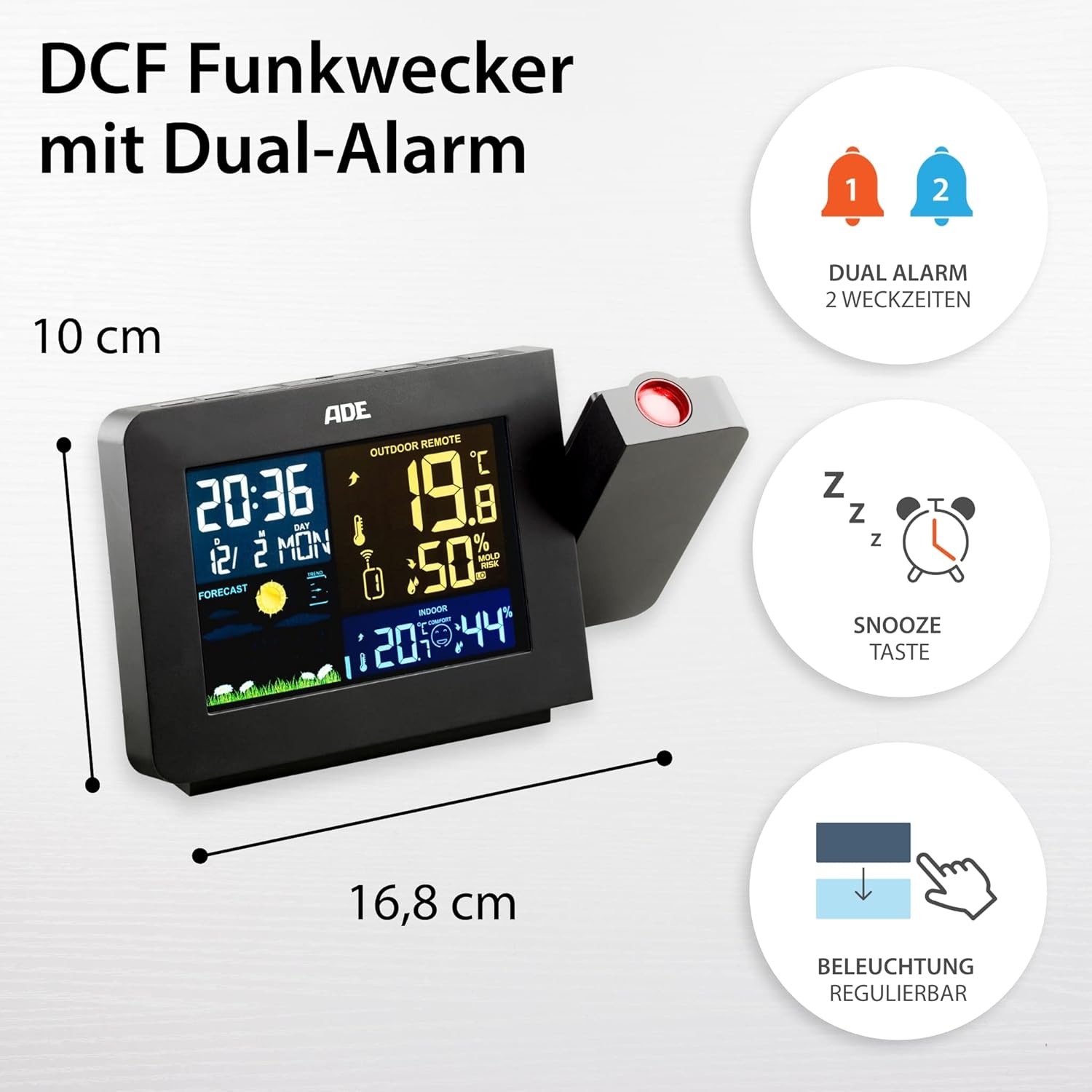
The station includes a DCF radio-controlled clock with two independent alarms and a snooze function. The display backlight is adjustable.
The WS1911 features a dual alarm function. Press the 'ALARM' button to enter alarm setting mode. Use the '+' and '-' buttons to adjust the alarm time. Press 'ALARM' again to confirm. Activate or deactivate alarms using the designated alarm switch or button. The 'SNOOZE' button provides a temporary pause for the alarm.
5.4 ప్రొజెక్షన్ ఫంక్షన్

The 180° rotatable projection feature allows for easy viewing of time and temperature on a wall or ceiling, especially useful at night.
The weather station can project the time and outdoor temperature onto a wall or ceiling. The projection arm is 180° rotatable for optimal positioning. Locate the projection button (often labeled 'PROJECTION' or a projector icon) to activate or deactivate this feature.
5.5 వాతావరణ సూచన

The weather station provides animated weather forecasts, along with indoor and outdoor temperature and humidity readings, contributing to a comfortable indoor climate.
The weather station analyzes atmospheric pressure changes to predict weather conditions for the next 12-24 hours. Animated icons (e.g., sun, clouds, rain) on the display represent the forecast. This is a prediction and may not always be 100% accurate.
5.6 ఉష్ణోగ్రత మరియు తేమ ప్రదర్శన
The station displays both indoor and outdoor temperature (in °C or °F) and humidity. Use the '°C/°F' button to switch between Celsius and Fahrenheit. The comfort indicator provides a visual representation of the indoor climate based on temperature and humidity levels.
5.7 ప్రదర్శన ప్రకాశం
The LCD display features 4 adjustable brightness levels. Use the designated button (often a light bulb icon or 'DIMMER') to cycle through the brightness settings to suit your preference, especially in varying light conditions or at night.
6. నిర్వహణ
6.1 శుభ్రపరచడం
Wipe the base station and outdoor sensor with a soft, damp cloth. Do not use abrasive cleaners or solvents, as these can damage the surfaces.
6.2 బ్యాటరీ భర్తీ

The ADE WS1911 Weather Station offers flexible power options, operating either via batteries or the included power adapter.
When the battery indicator appears on the display, replace the batteries in the outdoor sensor. For the base station, the CR2032 battery primarily serves as a backup for settings during power outages. Replace it periodically or if settings are lost frequently.
7. ట్రబుల్షూటింగ్
- బయటి ఉష్ణోగ్రత/తేమ రీడింగ్ లేదు: Ensure the outdoor sensor batteries are fresh and correctly inserted. Check that the sensor is within range and not obstructed by large metal objects. Try resetting both the base station and the sensor (remove batteries, wait a few seconds, reinsert).
- తప్పు సమయం: If the DCF signal is weak, try relocating the base station to an area with better reception, away from electronic devices. You can also set the time manually.
- డిస్ప్లే పనిచేయడం లేదు: Check the power adapter connection and ensure it's plugged into a working outlet. If using batteries, ensure they are fresh and correctly inserted.
- Projection unclear: Adjust the focus of the projection lens (if available) or the distance to the projection surface. Ensure the room is sufficiently dark for optimal visibility.
8. స్పెసిఫికేషన్లు
- మోడల్: ADE WS1911
- బ్రాండ్: ADE
- రంగు: నలుపు
- మెటీరియల్: యాక్రిలోనిట్రైల్ బుటాడిన్ స్టైరీన్ (ABS)
- శక్తి మూలం: AC Adapter (included) or Batteries (1x CR2032 for main unit, batteries for outdoor sensor)
- కనెక్టివిటీ: Radio Frequency (RF) for outdoor sensor
- అవుట్డోర్ సెన్సార్ పరిధి: 60 మీటర్లు (197 అడుగులు) వరకు
- ప్రత్యేక లక్షణాలు: DCF Radio-controlled clock, Dual Alarm with Snooze, 180° Rotatable LED Projection (Time & Temperature), Indoor/Outdoor Thermometer, Indoor/Outdoor Hygrometer, Animated Weather Forecast, Backlit LCD with 4 brightness levels.
9. మద్దతు
For further assistance or if you encounter issues not covered in this manual, please refer to the official ADE website or contact their customer support. Additional language versions of this manual may be available for download online.
If you are not satisfied with your purchase, please initiate a return through your Amazon account for a refund.