
1. పరిచయం
ధన్యవాదాలు, ధన్యవాదాలు.asing the Syma X5HW RC Quadcopter Drone. This manual provides essential information for the safe operation, setup, and maintenance of your drone. Please read it thoroughly before first use to ensure proper function and to avoid damage.
The Syma X5HW is a 2.4G 4-channel RC quadcopter featuring a 0.3MP HD camera for FPV real-time transmission, high-hold mode, 360° 3D flips, headless mode, and a built-in 6-axis gyro for stable flight. It is designed for both beginners and experienced users.
2. భద్రతా జాగ్రత్తలు
- విమాన పర్యావరణం: Fly in open areas, away from people, animals, buildings, and power lines. Avoid flying in strong winds or adverse weather conditions.
- వయస్సు సిఫార్సు: This product is recommended for users aged 14 and above. Adult supervision is advised for younger users.
- బ్యాటరీ భద్రత: Use only the provided charger and battery. Do not overcharge or short-circuit the battery. Disconnect the battery after use and during charging. Do not expose batteries to extreme temperatures or direct sunlight.
- ప్రొపెల్లర్ భద్రత: Keep hands, face, and loose clothing away from rotating propellers. Always ensure propellers are securely attached before flight.
- నీటి బహిర్గతం: The drone is not waterproof. Avoid contact with water or moisture.
- దృశ్య రేఖ: డ్రోన్ ఎగురుతున్నప్పుడు ఎల్లప్పుడూ దృశ్యమాన రేఖను నిర్వహించండి.
- గోప్యతను గౌరవించండి: When using the camera, respect the privacy of others.
3. ప్యాకేజీ విషయాలు
ప్యాకేజీలో అన్ని అంశాలు ఉన్నాయని నిర్ధారించుకోండి:
- Syma X5HW RC Quadcopter Drone
- రిమోట్ కంట్రోలర్
- USB ఛార్జింగ్ కేబుల్
- Main Blades (Propellers)
- ప్రొపెల్లర్ గార్డ్స్
- ల్యాండింగ్ గేర్
- HD Camera (0.3MP)
- స్క్రూడ్రైవర్
- వినియోగదారు మాన్యువల్ (ఈ పత్రం)
- 3.7V 600mAh LiPo బ్యాటరీ

Image: Syma X5HW package contents, showing the drone, remote, and various accessories.
4. కాంపోనెంట్ ఐడెంటిఫికేషన్
4.1 డ్రోన్ భాగాలు

చిత్రం: పైన view of the Syma X5HW drone.
- ప్రొపెల్లర్లు: Four main blades for lift and propulsion.
- ప్రొపెల్లర్ గార్డ్స్: ప్రొపెల్లర్ల చుట్టూ రక్షణ ఫ్రేమ్లు.
- మోటార్లు: ప్రొపెల్లర్లను నడపండి.
- LED లైట్లు: Indicate drone orientation and status (front: red, rear: green).
- బ్యాటరీ కంపార్ట్మెంట్: Located on the underside of the drone.
- కెమెరా: Attaches to the bottom for photo and video capture.
- ల్యాండింగ్ గేర్: Provides stable landing and protects the camera.
4.2 రిమోట్ కంట్రోలర్ భాగాలు
Image: Syma X5HW remote controller (part of the package contents image).
- ఎడమ జాయ్స్టిక్ (థ్రోటిల్/యా): ఎత్తు (పైకి/క్రిందికి) మరియు భ్రమణాన్ని (ఎడమ/కుడి) నియంత్రిస్తుంది.
- కుడి జాయ్స్టిక్ (దిశ): ముందుకు/వెనుకకు మరియు ఎడమ/కుడి కదలికలను నియంత్రిస్తుంది.
- పవర్ స్విచ్: కంట్రోలర్ను ఆన్/ఆఫ్ చేస్తుంది.
- బటన్లను కత్తిరించండి: Adjust drone stability (forward/backward, left/right, yaw).
- స్పీడ్ మోడ్ బటన్: Toggles between low and high speed.
- 3D ఫ్లిప్ బటన్: Initiates 360° flips.
- హెడ్లెస్ మోడ్ బటన్: హెడ్లెస్ మోడ్ను యాక్టివేట్ చేస్తుంది/డియాక్టివేట్ చేస్తుంది.
- ఫోటో/వీడియో బటన్: ఫోటోలను సంగ్రహిస్తుంది లేదా వీడియో రికార్డింగ్ను ప్రారంభిస్తుంది/ఆపివేస్తుంది.
- ఫోన్ హోల్డర్: For mounting a smartphone to view FPV ఫీడ్.
5. సెటప్
5.1 డ్రోన్ బ్యాటరీని ఛార్జ్ చేయడం
- డ్రోన్ బ్యాటరీని USB ఛార్జింగ్ కేబుల్కు కనెక్ట్ చేయండి.
- USB కేబుల్ను USB పవర్ సోర్స్లోకి ప్లగ్ చేయండి (ఉదా. కంప్యూటర్ USB పోర్ట్, USB వాల్ అడాప్టర్).
- The indicator light on the USB cable will illuminate during charging and turn off when fully charged.
- Charging time is approximately 90 minutes. Do not leave unattended during charging.
5.2 రిమోట్ కంట్రోలర్ బ్యాటరీ ఇన్స్టాలేషన్
- రిమోట్ కంట్రోలర్ వెనుక బ్యాటరీ కంపార్ట్మెంట్ను తెరవండి.
- Insert 4x AA batteries (not included) according to the polarity markings.
- బ్యాటరీ కంపార్ట్మెంట్ను సురక్షితంగా మూసివేయండి.
5.3 ప్రొపెల్లర్ ఇన్స్టాలేషన్
Ensure propellers are installed correctly. Each propeller is marked with 'A' or 'B'. Match them to the corresponding motor shafts marked 'A' or 'B'.
- Attach propeller 'A' to motor shafts 'A'.
- Attach propeller 'B' to motor shafts 'B'.
- Press down firmly until they are seated.
5.4 ప్రొపెల్లర్ గార్డ్ ఇన్స్టాలేషన్
Attach the propeller guards to the drone's arms using the provided screws and screwdriver for added protection.
5.5 Landing Gear Installation
Slide the landing gear into the designated slots on the underside of the drone until they click into place.
5.6 కెమెరా సంస్థాపన
- Connect the camera's cable to the port on the underside of the drone.
- Secure the camera module into its slot.
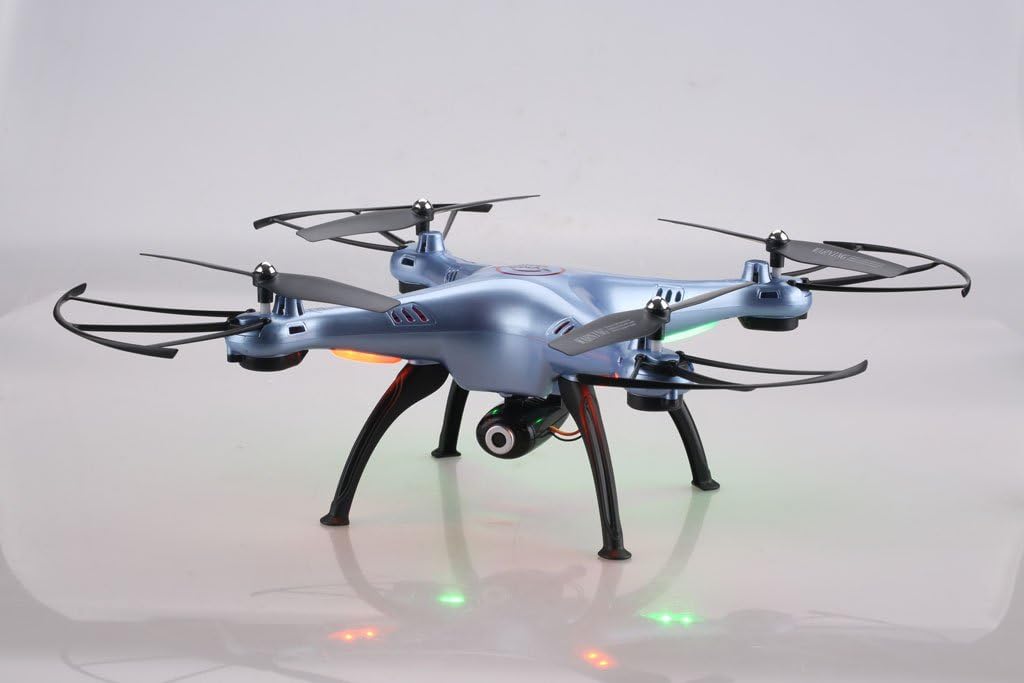
Image: Syma X5HW drone with camera and landing gear attached.
6. ఆపరేటింగ్ సూచనలు
6.1 Pairing the Drone and Remote Controller
- డ్రోన్ను చదునైన, స్థాయి ఉపరితలంపై ఉంచండి.
- Insert the charged battery into the drone and connect it. The drone's LED lights will flash.
- రిమోట్ కంట్రోలర్ ఆన్ చేయండి. రిమోట్లోని ఇండికేటర్ లైట్ వెలుగుతుంది.
- Push the left joystick (throttle) all the way up, then all the way down.
- The drone's LED lights and the remote's indicator light will become solid, indicating successful pairing.
6.2 Calibration (Gyroscope Reset)
If the drone drifts during flight, perform a gyroscope calibration:
- After pairing, place the drone on a flat, level surface.
- Push both joysticks to the bottom-right corner simultaneously for 2-3 seconds.
- The drone's LED lights will flash rapidly and then become solid, indicating successful calibration.
6.3 ప్రాథమిక విమాన నియంత్రణలు
- టేకాఫ్: After pairing and calibration, gently push the left joystick (throttle) up. The propellers will start spinning, and the drone will ascend.
- లాండింగ్: Gently pull the left joystick (throttle) down. The drone will descend and land.
- ఎత్తు నియంత్రణ: Left joystick up/down.
- Rotation (Yaw): Left joystick left/right.
- ముందుకు/వెనుకకు: Right joystick up/down.
- Left/Right Sideways Flight: Right joystick left/right.
6.4 Advanced Flight Functions
- స్పీడ్ మోడ్: Press the Speed Mode button to switch between low and high speed. Low speed is recommended for beginners.
- హెడ్లెస్ మోడ్: Press the Headless Mode button. The drone will orient itself relative to the pilot, regardless of its actual front direction. Press again to exit.
- High-Hold Mode (Altitude Hold): The drone automatically maintains its altitude using an integrated air pressure sensor. After taking off, release the left joystick, and the drone will hover at its current height. Adjust altitude by pushing the left joystick up or down.
- 3D ఫ్లిప్లు: Fly the drone to a height of at least 3 meters. Press the 3D Flip button, then quickly push the right joystick in any direction (forward, backward, left, or right). The drone will perform a 360° flip in that direction.
6.5 FPV and Camera Operation
The Syma X5HW features a 0.3MP HD camera for real-time FPV transmission via Wi-Fi.
- అనువర్తనాన్ని డౌన్లోడ్ చేయండి: Download the free "SYMA FPV" app from the App Store (iOS) or Google Play Store (Android) to your smartphone.
- Wi-Fiకి కనెక్ట్ చేయండి: Turn on the drone. On your smartphone, go to Wi-Fi settings and connect to the Wi-Fi network named "SYMA-X5HW" (or similar).
- యాప్ను ప్రారంభించండి: Open the SYMA FPV app. You should see the live video feed from the drone's camera.
- ఫోటోలు తీసుకోవడం: Press the Photo/Video button on the remote controller once to take a photo. Photos are saved to your smartphone.
- వీడియో రికార్డ్ చేయండి: Press and hold the Photo/Video button on the remote controller to start video recording. Press and hold again to stop. Videos are saved to your smartphone.
7. నిర్వహణ
- శుభ్రపరచడం: Use a soft, dry cloth to clean the drone and remote controller. Do not use solvents or harsh chemicals.
- ప్రొపెల్లర్ తనిఖీ: Regularly check propellers for damage (cracks, bends). Replace damaged propellers immediately.
- మోటారు సంరక్షణ: మోటార్లను దుమ్ము, చెత్త లేకుండా ఉంచండి.
- బ్యాటరీ నిల్వ: If storing the drone for an extended period, charge the battery to about 50% and remove it from the drone. Store in a cool, dry place.
- సాధారణ నిల్వ: Store the drone and remote in a cool, dry environment, away from direct sunlight and extreme temperatures.
8. ట్రబుల్షూటింగ్
| సమస్య | సాధ్యమైన కారణం | పరిష్కారం |
|---|---|---|
| డ్రోన్ రిమోట్కు స్పందించదు. | Not paired; low battery (drone or remote). | Ensure drone and remote are powered on and paired correctly. Charge drone battery. Replace remote batteries. |
| ఎగురుతున్నప్పుడు డ్రోన్ కదులుతుంది. | Gyroscope not calibrated; uneven surface during startup; wind interference. | Perform gyroscope calibration on a flat surface. Fly in calm conditions. Use trim buttons to fine-tune. |
| ప్రొపెల్లర్లు తిరగవు. | Propellers jammed; motor issue; low battery. | Check for obstructions. Ensure battery is charged and connected. |
| FPV వీడియో ఫీడ్ లేదు. | Wi-Fi not connected; app not open; camera not connected. | Ensure smartphone is connected to drone's Wi-Fi. Open SYMA FPV app. Check camera connection to drone. |
| చిన్న విమాన సమయం. | బ్యాటరీ పూర్తిగా ఛార్జ్ కాలేదు; పాత బ్యాటరీ; దూకుడుగా ఎగురుతోంది. | Ensure battery is fully charged. Consider replacing old batteries. Fly more gently. |
9. స్పెసిఫికేషన్లు
- మోడల్: Syma X5HW
- ఫ్రీక్వెన్సీ: 2.4GHz
- ఛానెల్లు: 4-ఛానల్
- గైరో: 6-యాక్సిస్ గైరోస్కోప్
- కెమెరా: 0.3MP HD Camera (720p video resolution)
- FPV: Wi-Fi Real-time Transmission
- విమాన మోడ్లు: High-Hold Mode, Headless Mode, 3D Flips
- బ్యాటరీ: 3.7V 600mAh LiPo
- ఛార్జింగ్ సమయం: సుమారు 90 నిమిషాలు
- విమాన సమయం: సుమారు 10 నిమిషాలు
- నియంత్రణ పరిధి: 100 మీటర్ వరకు
- మెటీరియల్: ప్లాస్టిక్
- సిఫార్సు చేసిన వయస్సు: 14+
10. వారంటీ మరియు మద్దతు
Syma products are manufactured to high quality standards. For warranty information or technical support, please refer to the contact details provided with your purchase documentation or visit the official Syma webవారంటీ క్లెయిమ్ల కోసం మీ కొనుగోలు రుజువును ఉంచండి.