
1. పరిచయం
This manual provides detailed instructions for the installation, operation, and maintenance of the CP PLUS CP-UVR-1616K1-V3 16-Channel 1080P Digital Video Recorder (DVR). This device supports 16 channels of video input and 16 channels of audio input, offering comprehensive surveillance capabilities. It is designed for reliable performance in various security applications.
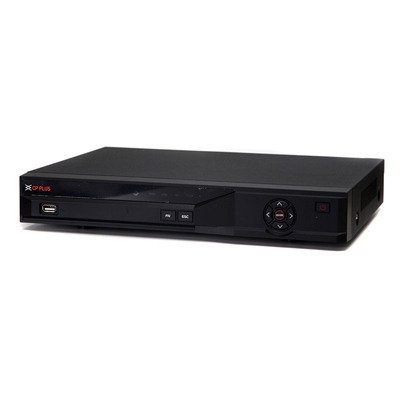
మూర్తి 1: ముందు view of the CP PLUS CP-UVR-1616K1-V3 DVR unit.
2. భద్రతా జాగ్రత్తలు
- Ensure proper ventilation around the DVR to prevent overheating.
- పరికరాన్ని నీరు లేదా తేమకు బహిర్గతం చేయవద్దు.
- యూనిట్తో సరఫరా చేయబడిన పవర్ అడాప్టర్ను మాత్రమే ఉపయోగించండి.
- DVR ని ప్రత్యక్ష సూర్యకాంతిలో లేదా ఉష్ణ వనరుల దగ్గర ఉంచకుండా ఉండండి.
- భౌతిక నష్టాన్ని నివారించడానికి పరికరాన్ని జాగ్రత్తగా నిర్వహించండి.
3. సెటప్ మరియు ఇన్స్టాలేషన్
3.1 అన్ప్యాకింగ్
Carefully remove all components from the packaging. Verify that all items listed in the packing list are present.
3.2 హార్డ్వేర్ కనెక్షన్లు
- కెమెరాలను కనెక్ట్ చేయండి: Connect your HDCVI, Analog, or IP cameras to the BNC video input ports (16 channels available) on the rear panel of the DVR.
- ఆడియోని కనెక్ట్ చేయండి: Connect audio input devices to the 16 RCA audio input channels. Connect an audio output device to the 1 RCA audio output channel.
- డిస్ప్లేను కనెక్ట్ చేయండి: Connect a monitor or television to the HDMI or VGA output port for video display.
- నెట్వర్క్ని కనెక్ట్ చేయండి: Connect an Ethernet cable from the DVR's network port to your router or network switch for remote access and IP camera integration.
- HDD ని ఇన్స్టాల్ చేయండి (ఐచ్ఛికం): If not pre-installed, open the DVR casing and connect a SATA HDD (up to 6TB) to the internal SATA port. Secure the HDD with screws.
- USB పరికరాలను కనెక్ట్ చేయండి: Connect a mouse or USB storage device to one of the two USB 2.0 ports.
- పవర్ ఆన్: పవర్ అడాప్టర్ను DVRకి కనెక్ట్ చేసి, ఆపై పవర్ అవుట్లెట్కు కనెక్ట్ చేయండి. DVR ఆటోమేటిక్గా పవర్ ఆన్ అవుతుంది.
4. ఆపరేటింగ్ సూచనలు
4.1 ప్రారంభ సెటప్ విజార్డ్
Upon first power-on, the DVR will guide you through an initial setup wizard. Follow the on-screen prompts to configure basic settings such as language, date/time, network settings, and user accounts.
4.2 ప్రత్యక్ష ప్రసారం View
ప్రారంభ సెటప్ తర్వాత, DVR ప్రత్యక్ష ప్రసారం ప్రదర్శిస్తుంది view of connected cameras. You can switch between different display splits (1/4/8/9/16 channels) using the on-screen controls or mouse.
4.3 రికార్డింగ్
The DVR supports various recording modes including continuous, motion detection, and scheduled recording.
- Main Stream Recording: 1080P (1~15fps), 1080N/720P/960H/D1/HD1/BCIF/CIF/QCIF (1~25/30fps).
- Extra Stream Recording: CIF/QCIF (1~15fps).
Access the recording settings through the main menu to configure your preferred recording schedule and parameters.
4.4 ప్లేబ్యాక్
తిరిగిview రికార్డ్ చేసిన footage, navigate to the Playback menu. You can search for recordings by date, time, and event type.
4.5 మొబైల్ యాక్సెస్
Download the official mobile applications (iCMOB, gCMOB, wCMOB) from your device's app store to access live view and playback remotely. Refer to the app's instructions for setup.
4.6 CMS Software
For centralized management of multiple DVRs, use the KVMS or KVMS Pro CMS software. Install the software on a compatible computer and follow the provided instructions for device addition and management.
5. నిర్వహణ
- రెగ్యులర్ క్లీనింగ్: Keep the DVR free from dust. Use a soft, dry cloth for cleaning. Do not use liquid cleaners.
- ఫర్మ్వేర్ నవీకరణలు: Periodically check the CP PLUS official webసరైన పనితీరు మరియు భద్రతను నిర్ధారించడానికి ఫర్మ్వేర్ నవీకరణల కోసం సైట్.
- హార్డ్ డ్రైవ్ ఆరోగ్యం: Monitor the health of the installed hard drive through the DVR's system settings. Replace the HDD if errors are detected.
- Backup Recordings: Regularly back up important recordings to an external USB storage device or network storage.
6. ట్రబుల్షూటింగ్
| సమస్య | సాధ్యమైన కారణం | పరిష్కారం |
|---|---|---|
| మానిటర్ పై వీడియో అవుట్పుట్ లేదు. | Loose HDMI/VGA cable, incorrect input selected on monitor, DVR not powered on. | కేబుల్ కనెక్షన్లను తనిఖీ చేయండి, మానిటర్ సరైన ఇన్పుట్లో ఉందని నిర్ధారించుకోండి, DVR పవర్ను ధృవీకరించండి. |
| కెమెరాలు కనిపించడం లేదు. | Loose BNC cable, camera power issue, incorrect camera type selected. | Check camera connections and power, verify camera compatibility and settings in DVR menu. |
| రికార్డింగ్ లేదు. | HDD not installed or faulty, recording schedule not configured, insufficient storage. | Install/check HDD, configure recording schedule, check HDD space. |
| రిమోట్ యాక్సెస్ పనిచేయడం లేదు. | Network cable disconnected, incorrect network settings, firewall blocking. | Check network cable, verify IP address/gateway/DNS settings, configure port forwarding or P2P. |
7. స్పెసిఫికేషన్లు
| ఫీచర్ | వివరాలు |
|---|---|
| మోడల్ | CP-UVR-1616K1-V3 |
| వీడియో ఇన్పుట్ | 16 channel BNC (HDCVI/Analog/IP up to 5Mp) |
| ఆడియో ఇన్పుట్/అవుట్పుట్ | 16 channel RCA input, 1 channel RCA output |
| వీడియో అవుట్పుట్ | 1 HDMI, 1 VGA (Simultaneous) |
| వీడియో రిజల్యూషన్ | 1080P(1920×1080), 1080N(960×1080), 720P, 960H, D1, HD1, BCIF, CIF, QCIF |
| వీడియో కంప్రెషన్ | H.264 |
| ఆడియో కంప్రెషన్ | జి .711 |
| Recording Frame Rate (Main Stream) | 1080P (1~15fps), 1080N/720P/960H/D1/HD1/BCIF/CIF/QCIF (1~25/30fps) |
| HDD మద్దతు | 1 SATA పోర్ట్, 6TB వరకు |
| USB ఇంటర్ఫేస్ | 2 x USB 2.0 |
| మొబైల్ సాఫ్ట్వేర్ | iCMOB, gCMOB, wCMOB |
| CMS సాఫ్ట్వేర్ | KVMS, KVMS Pro |
| కొలతలు | 325mm x 255mm x 55mm |
| బరువు | 1.5Kg (without HDD) |
8. మద్దతు మరియు వారంటీ
For technical assistance, product support, or warranty inquiries, please contact CP PLUS customer service. Refer to the official CP PLUS webఅత్యంత తాజా సంప్రదింపు సమాచారం మరియు వారంటీ నిబంధనల కోసం సైట్.
అధికారిక Webసైట్: www.cpplusworld.com
వారంటీ క్లెయిమ్ల కోసం కొనుగోలు రుజువుగా మీ కొనుగోలు రసీదును ఉంచండి.