
1. పరిచయం
Amkette Trubeats S50 అనేది మీ ఆడియో అనుభవాన్ని మెరుగుపరచడానికి రూపొందించబడిన బహుముఖ స్మార్ట్ వైర్లెస్ బ్లూటూత్ స్పీకర్. ఇది బ్లూటూత్, USB, మైక్రో SD కార్డ్ మరియు AUX ఇన్పుట్తో పాటు ఇంటిగ్రేటెడ్ FM రేడియోతో సహా బహుళ కనెక్టివిటీ ఎంపికలను కలిగి ఉంది. స్పీకర్ అలారం ఫంక్షన్లతో కూడిన డిజిటల్ గడియారాన్ని కూడా కలిగి ఉంది మరియు ప్రత్యేక స్మార్ట్ఫోన్ అప్లికేషన్ ద్వారా నియంత్రించవచ్చు. అదనంగా, ఇది మీ మొబైల్ పరికరాలను ఛార్జ్ చేయడానికి పవర్ బ్యాంక్గా పనిచేస్తుంది.
2. ప్యాకేజీ విషయాలు
దయచేసి ఈ క్రింది అంశాల కోసం పెట్టెను ఎంచుకోండి:
- ఆమ్కెట్ ట్రూబీట్స్ S50 స్మార్ట్ వైర్లెస్ బ్లూటూత్ స్పీకర్
- USB ఛార్జింగ్ కేబుల్
- AUX కేబుల్
- వినియోగదారు మాన్యువల్ (ఈ పత్రం)
3. ఉత్పత్తి ముగిసిందిview
మీ Amkette Trubeats S50 స్పీకర్ యొక్క వివిధ భాగాలు మరియు నియంత్రణలతో మిమ్మల్ని మీరు పరిచయం చేసుకోండి.
3.1 ఫ్రంట్ View

మూర్తి 1: ముందు view ఆమ్కెట్ ట్రూబీట్స్ S50 స్పీకర్ యొక్క, స్పీకర్ గ్రిల్ మరియు LED డిస్ప్లేను చూపిస్తుంది.
3.2 టాప్ కంట్రోల్ ప్యానెల్

చిత్రం 2: ఆమ్కెట్ ట్రూబీట్స్ S50 స్పీకర్ యొక్క టాప్ కంట్రోల్ బటన్ల యొక్క లేబుల్ చేయబడిన రేఖాచిత్రం: మోడ్, వాల్యూమ్ డౌన్/మునుపటి, ప్లే/పాజ్/ఆన్సర్ కాల్, వాల్యూమ్ అప్/తదుపరి, గడియారం మరియు మైక్రోఫోన్.
- మోడ్ బటన్: బ్లూటూత్, FM, AUX, USB మరియు మైక్రో SD మోడ్ల మధ్య మారడానికి నొక్కండి.
- K-/ బటన్: వాల్యూమ్ తగ్గించడానికి నొక్కండి; మునుపటి ట్రాక్/స్టేషన్ కోసం ఎక్కువసేపు నొక్కి ఉంచండి.
- ప్లే/పాజ్/సమాధానం కాల్ బటన్: ఆడియోను ప్లే చేయడానికి/పాజ్ చేయడానికి నొక్కండి; కాల్లకు సమాధానం ఇవ్వడానికి/ముగించడానికి నొక్కండి.
- +/N బటన్: వాల్యూమ్ పెంచడానికి నొక్కండి; తదుపరి ట్రాక్/స్టేషన్ కోసం ఎక్కువసేపు నొక్కండి.
- గడియారం బటన్: సమయం మరియు అలారాలను సెట్ చేయడానికి నొక్కండి.
- మైక్రోఫోన్: హ్యాండ్స్-ఫ్రీ కాలింగ్ కోసం.
3.3 వెనుక పోర్టులు మరియు స్విచ్

చిత్రం 3: ఆమ్కెట్ ట్రూబీట్స్ S50 స్పీకర్ వెనుక పోర్టుల లేబుల్ చేయబడిన రేఖాచిత్రం: AUX, మైక్రో SD, USB హోస్ట్, USB DC, మరియు ఆన్/ఆఫ్ స్విచ్.
- AUX ఇన్పుట్: 3.5mm AUX కేబుల్ ఉపయోగించి బాహ్య ఆడియో పరికరాలను కనెక్ట్ చేయండి.
- మైక్రో SD కార్డ్ స్లాట్: ఆడియో ప్లేబ్యాక్ కోసం మైక్రో SD కార్డ్ని చొప్పించండి.
- USB హోస్ట్ పోర్ట్: ఆడియో ప్లేబ్యాక్ కోసం USB డ్రైవ్ను చొప్పించండి లేదా పవర్ బ్యాంక్గా ఉపయోగించండి.
- USB DC ఇన్పుట్: స్పీకర్కు శక్తినివ్వడానికి USB ఛార్జింగ్ కేబుల్ను కనెక్ట్ చేయండి.
- స్విచ్ ఆన్/ఆఫ్: స్పీకర్ను ఆన్ లేదా ఆఫ్ చేయండి.
4. సెటప్
4.1 స్పీకర్ను ఛార్జ్ చేయడం
- USB ఛార్జింగ్ కేబుల్ యొక్క చిన్న చివరను USB DC ఇన్పుట్ స్పీకర్ వెనుక భాగంలో పోర్ట్.
- USB ఛార్జింగ్ కేబుల్ యొక్క పెద్ద చివరను USB పవర్ అడాప్టర్ (చేర్చబడలేదు) లేదా కంప్యూటర్ యొక్క USB పోర్ట్కి కనెక్ట్ చేయండి.
- LED సూచిక ఛార్జింగ్ స్థితిని చూపుతుంది. పూర్తిగా ఛార్జ్ చేయడానికి సాధారణంగా దాదాపు 4 గంటలు పడుతుంది.
గమనిక: స్పీకర్లో బ్యాటరీ స్థాయి సూచిక కనిపించదు. మొదటిసారి ఉపయోగించే ముందు మరియు బ్యాటరీ తక్కువగా ఉన్నప్పుడు పూర్తిగా ఛార్జ్ చేయాలని సిఫార్సు చేయబడింది.
4.2 పవర్ చేయడం ఆన్/ఆఫ్
- పవర్ ఆన్ చేయడానికి, ఆన్/ఆఫ్ స్విచ్ స్పీకర్ వెనుక భాగంలో 'ఆన్' స్థానానికి.
- పవర్ ఆఫ్ చేయడానికి, ఆన్/ఆఫ్ స్విచ్ 'ఆఫ్' స్థానానికి.
5. ఆపరేటింగ్ సూచనలు
5.1 బ్లూటూత్ జత చేయడం

చిత్రం 4: బ్లూటూత్ జత చేసే మోడ్లో స్పీకర్, డిస్ప్లేపై 'BT' ద్వారా సూచించబడింది.
- స్పీకర్ను ఆన్ చేయండి. ఇది స్వయంచాలకంగా బ్లూటూత్ జత చేసే మోడ్లోకి ప్రవేశిస్తుంది, LED డిస్ప్లేపై 'BT' ఫ్లాషింగ్ ద్వారా సూచించబడుతుంది.
- మీ స్మార్ట్ఫోన్ లేదా ఇతర పరికరంలో బ్లూటూత్ను ప్రారంభించండి.
- కోసం వెతకండి అందుబాటులో ఉన్న పరికరాలను ఎంచుకోండి మరియు జాబితా నుండి "Amkette S50"ని ఎంచుకోండి.
- జత చేసిన తర్వాత, స్పీకర్ నిర్ధారణ టోన్ను విడుదల చేస్తుంది మరియు 'BT' ఫ్లాషింగ్ ఆగిపోతుంది.
- మీరు ఇప్పుడు మీ పరికరం నుండి స్పీకర్ ద్వారా ఆడియోను ప్లే చేయవచ్చు.
5.2 AUX ఇన్పుట్ను ఉపయోగించడం

చిత్రం 5: వైర్డు ఆడియో ప్లేబ్యాక్ కోసం AUX కేబుల్ ద్వారా స్పీకర్ స్మార్ట్ఫోన్కు కనెక్ట్ చేయబడింది.
- 3.5mm AUX కేబుల్ యొక్క ఒక చివరను దీనికి కనెక్ట్ చేయండి AUX ఇన్పుట్ స్పీకర్ వెనుక భాగంలో పోర్ట్.
- AUX కేబుల్ యొక్క మరొక చివరను మీ బాహ్య పరికరం (ఉదా. స్మార్ట్ఫోన్, MP3 ప్లేయర్, ల్యాప్టాప్) యొక్క ఆడియో అవుట్పుట్ జాక్కి కనెక్ట్ చేయండి.
- నొక్కండి మోడ్ బటన్ స్పీకర్ AUX మోడ్లోకి ప్రవేశించే వరకు పదే పదే.
- మీ కనెక్ట్ చేయబడిన పరికరం నుండి ఆడియోను ప్లే చేయండి.
5.3 USB/మైక్రో SD కార్డ్ని ఉపయోగించడం
- USB డ్రైవ్ను చొప్పించండి USB హోస్ట్ పోర్ట్ లేదా మైక్రో SD కార్డ్లోకి మైక్రో SD కార్డ్ స్లాట్ స్పీకర్ వెనుక భాగంలో.
- మీ ఆడియోను నిర్ధారించుకోండి fileలు (MP3 ఫార్మాట్ సిఫార్సు చేయబడింది) డ్రైవ్/కార్డ్లో నిల్వ చేయబడతాయి.
- నొక్కండి మోడ్ బటన్ స్పీకర్ USB లేదా మైక్రో SD మోడ్లోకి ప్రవేశించే వరకు పదే పదే ప్లేబ్యాక్ చేయండి. ప్లేబ్యాక్ స్వయంచాలకంగా ప్రారంభమవుతుంది.
- ఉపయోగించండి కె-/ మరియు +/N ట్రాక్ నావిగేషన్ మరియు వాల్యూమ్ నియంత్రణ కోసం బటన్లు.
5.4 FM రేడియో ఆపరేషన్

చిత్రం 6: స్టేషన్ ఎంపిక కోసం యాప్ నియంత్రణతో, FM ఫ్రీక్వెన్సీని ప్రదర్శిస్తున్న స్పీకర్.
- నొక్కండి మోడ్ బటన్ స్పీకర్ FM రేడియో మోడ్లోకి ప్రవేశించే వరకు పదే పదే.
- ఆటో స్కాన్: FM మోడ్లో, ఎక్కువసేపు నొక్కండి ప్లే/పాజ్ చేయండి అందుబాటులో ఉన్న FM స్టేషన్ల కోసం ఆటోమేటిక్ స్కాన్ను ప్రారంభించడానికి బటన్. స్పీకర్ గుర్తించబడిన స్టేషన్లను సేవ్ చేస్తుంది.
- మాన్యువల్ ట్యూనింగ్: ఉపయోగించండి కె-/ మరియు +/N సేవ్ చేసిన స్టేషన్ల ద్వారా నావిగేట్ చెయ్యడానికి బటన్లు.
- ఖచ్చితమైన ట్యూనింగ్ మరియు స్టేషన్ నిర్వహణ కోసం, Amkette Trubeats స్మార్ట్ స్పీకర్ యాప్ను ఉపయోగించండి (విభాగం 5.7 చూడండి).
5.5 డిజిటల్ గడియారం మరియు అలారం సెటప్

చిత్రం 7: స్పీకర్ దాని LED స్క్రీన్పై ప్రస్తుత సమయాన్ని ప్రదర్శిస్తోంది.
- సెట్టింగు సమయం: నొక్కండి మరియు పట్టుకోండి CLOCK బటన్. గంట డిస్ప్లే ఫ్లాష్ అవుతుంది. ఉపయోగించండి కె-/ మరియు +/N గంటను సర్దుబాటు చేయడానికి బటన్లు. నొక్కండి CLOCK బటన్ మళ్ళీ నిమిషాలను సెట్ చేయడానికి మరియు సర్దుబాటు చేయడానికి కె-/ మరియు +/N. నొక్కండి CLOCK బటన్ మరోసారి నిర్ధారించడానికి.
- అలారాలను సెట్ చేయడం: క్లుప్తంగా నొక్కండి CLOCK బటన్ అలారం 1 మరియు అలారం 2 సెట్టింగ్ల ద్వారా సైకిల్ చేయడానికి. అలారం సమయం ప్రదర్శించబడినప్పుడు, ఎక్కువసేపు నొక్కండి CLOCK బటన్ అలారం సెట్టింగ్ మోడ్లోకి ప్రవేశించడానికి. గంట మరియు నిమిషాలను సర్దుబాటు చేయండి ఉపయోగించి కె-/ మరియు +/N, ప్రతి ఒక్కటి ఒక చిన్న ప్రెస్ తో నిర్ధారిస్తుంది CLOCK బటన్. మీరు యాప్ ద్వారా అలారం సోర్స్ (FM/SD కార్డ్/USB) కూడా సెట్ చేయవచ్చు.
5.6 పవర్ బ్యాంక్గా ఉపయోగించడం
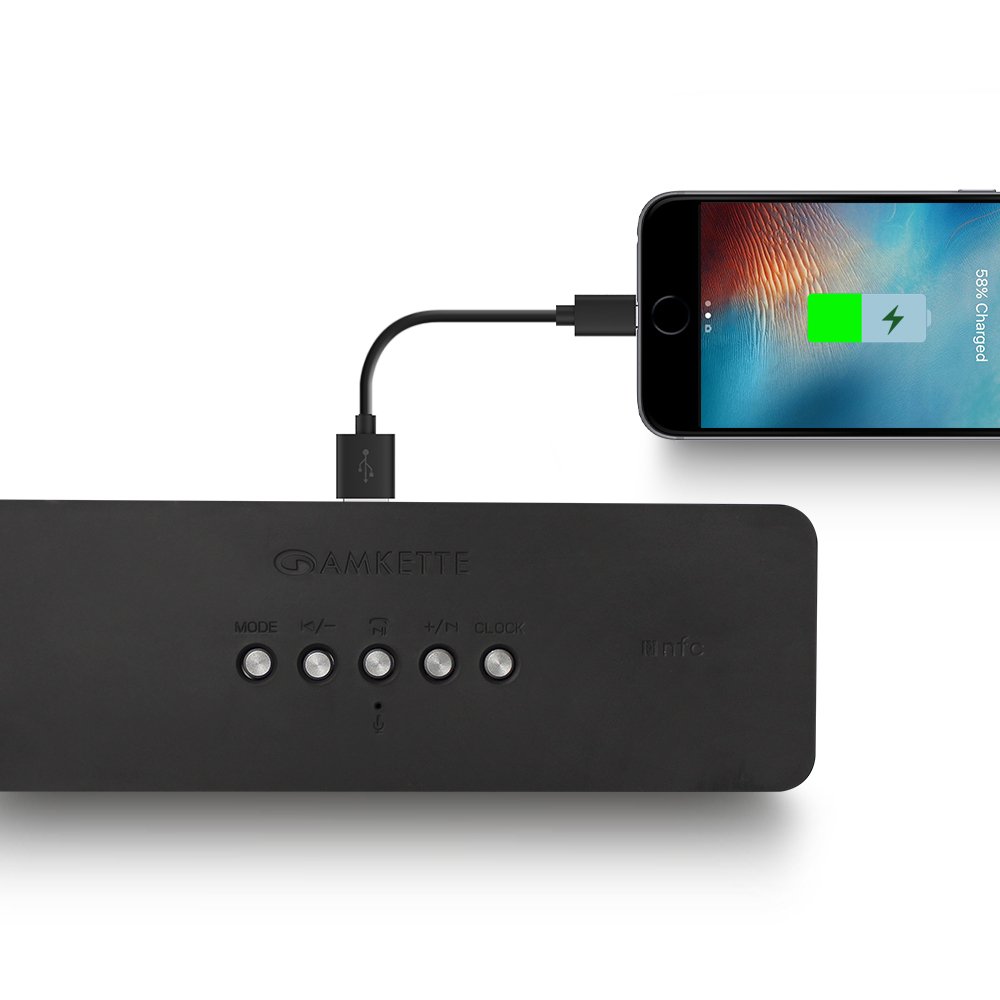
చిత్రం 8: స్పీకర్ దాని USB హోస్ట్ పోర్ట్ ద్వారా స్మార్ట్ఫోన్కు శక్తిని అందిస్తోంది.
Amkette Trubeats S50 మీ స్మార్ట్ఫోన్ లేదా ఇతర USB-ఆధారిత పరికరాలను ఛార్జ్ చేయగలదు. మీ పరికరం యొక్క ఛార్జింగ్ కేబుల్ను దీనికి కనెక్ట్ చేయండి USB హోస్ట్ పోర్ట్ స్పీకర్ వెనుక భాగంలో. స్పీకర్ యొక్క అంతర్గత బ్యాటరీ మీ పరికరానికి విద్యుత్ సరఫరా చేస్తుంది.
5.7 యాప్ కంట్రోల్ (ఆండ్రాయిడ్ మాత్రమే)

చిత్రం 9: ఆమ్కెట్ ట్రూబీట్స్ స్మార్ట్ స్పీకర్ యాప్ ఇంటర్ఫేస్ను ప్రదర్శిస్తున్న స్మార్ట్ఫోన్.
మెరుగైన నియంత్రణ కోసం, Google Play Store నుండి (Android ఫోన్ల కోసం) Amkette Trubeats స్మార్ట్ స్పీకర్ యాప్ను డౌన్లోడ్ చేసుకోండి. ఈ యాప్ మిమ్మల్ని వీటిని అనుమతిస్తుంది:
- విభిన్న ఆడియో మోడ్ల మధ్య మారండి.
- వాల్యూమ్ను నియంత్రించండి మరియు ప్లేబ్యాక్ను ట్రాక్ చేయండి.
- FM రేడియో స్టేషన్లను నిర్వహించండి మరియు ఖచ్చితమైన ట్యూనింగ్ చేయండి.
- అలారం మూలంతో సహా అలారాలను సెట్ చేయండి మరియు అనుకూలీకరించండి.
యాప్ కార్యాచరణ కోసం మీ స్పీకర్ బ్లూటూత్ ద్వారా మీ స్మార్ట్ఫోన్కి కనెక్ట్ చేయబడిందని నిర్ధారించుకోండి.
5.8 కాల్ నిర్వహణ
బ్లూటూత్ ద్వారా స్మార్ట్ఫోన్కి కనెక్ట్ చేసినప్పుడు, స్పీకర్ను హ్యాండ్స్-ఫ్రీ కాలింగ్ కోసం ఉపయోగించవచ్చు:
- సమాధానం కాల్: నొక్కండి ప్లే/పాజ్/సమాధానం కాల్ బటన్ ఒకసారి.
- కాల్ ముగించు: నొక్కండి ప్లే/పాజ్/సమాధానం కాల్ బటన్ కాల్ సమయంలో ఒకసారి.
- కాల్ని తిరస్కరించండి: లాంగ్ ప్రెస్ ది ప్లే/పాజ్/సమాధానం కాల్ బటన్.
6. నిర్వహణ
- స్పీకర్ను తీవ్రమైన ఉష్ణోగ్రతలు, ప్రత్యక్ష సూర్యకాంతి మరియు తేమ నుండి దూరంగా ఉంచండి.
- స్పీకర్ను మృదువైన, పొడి గుడ్డతో శుభ్రం చేయండి. రాపిడి క్లీనర్లను లేదా ద్రావకాలను ఉపయోగించవద్దు.
- స్పీకర్ను వదలడం లేదా బలమైన ప్రభావాలకు గురిచేయడం మానుకోండి.
- ఎక్కువసేపు ఉపయోగంలో లేనప్పుడు, స్పీకర్ను చల్లని, పొడి ప్రదేశంలో నిల్వ చేసి, బ్యాటరీ ఆరోగ్యాన్ని కాపాడుకోవడానికి కాలానుగుణంగా ఛార్జ్ చేయండి.
7. ట్రబుల్షూటింగ్
| సమస్య | సాధ్యమైన కారణం | పరిష్కారం |
|---|---|---|
| స్పీకర్ పవర్ ఆన్ చేయదు. | బ్యాటరీ క్షీణించింది. | స్పీకర్ను పూర్తిగా ఛార్జ్ చేయండి. |
| స్పీకర్ నుండి శబ్దం లేదు. | వాల్యూమ్ చాలా తక్కువగా ఉంది; తప్పు మోడ్ ఎంచుకోబడింది; పరికరం సరిగ్గా కనెక్ట్ కాలేదు. | స్పీకర్ మరియు సోర్స్ పరికర వాల్యూమ్ను పెంచండి. సరైన మోడ్ (బ్లూటూత్, AUX, మొదలైనవి) ఎంచుకోబడిందని నిర్ధారించుకోండి. పరికరాన్ని తిరిగి కనెక్ట్ చేయండి. |
| బ్లూటూత్ జత చేయడం విఫలమైంది. | స్పీకర్ జత చేసే మోడ్లో లేదు; పరికరం చాలా దూరంలో ఉంది; జోక్యం. | స్పీకర్ జత చేసే మోడ్లో ('BT' ఫ్లాషింగ్) ఉందని నిర్ధారించుకోండి. పరికరాన్ని స్పీకర్కు దగ్గరగా తరలించండి. ఇతర బ్లూటూత్ పరికరాలను ఆఫ్ చేయండి. |
| FM రేడియో స్పందన సరిగా లేదు. | బలహీనమైన సిగ్నల్; పర్యావరణ జోక్యం. | స్పీకర్ను మెరుగైన రిసెప్షన్ ఉన్న ప్రాంతానికి మార్చండి. మళ్ళీ ఆటో-స్కాన్ చేయండి. |
| యాప్ స్పీకర్కి కనెక్ట్ కావడం లేదు. | బ్లూటూత్ కనెక్ట్ కాలేదు; యాప్ సమస్య. | స్పీకర్ బ్లూటూత్ ద్వారా మీ ఫోన్కి జత చేయబడిందని నిర్ధారించుకోండి. యాప్ను పునఃప్రారంభించి, మళ్లీ ప్రయత్నించండి. |
8. స్పెసిఫికేషన్లు
- మోడల్: S50
- బ్రాండ్: అమ్కెట్
- స్పీకర్ రకం: పోర్టబుల్ బ్లూటూత్ స్పీకర్ (అవుట్డోర్)
- కనెక్టివిటీ: బ్లూటూత్, USB, మైక్రో SD, AUX, FM రేడియో
- వైర్లెస్ కమ్యూనికేషన్ టెక్నాలజీ: బ్లూటూత్
- నియంత్రణ పద్ధతి: బటన్లు, యాప్ (ఆండ్రాయిడ్)
- ఆడియో అవుట్పుట్ మోడ్: స్టీరియో
- ఆడియో వాట్tage: 10 వాట్స్
- శక్తి మూలం: బ్యాటరీ ఆధారితమైనది
- బ్యాటరీ లైఫ్: 12 గంటల వరకు (సగటున)
- ఛార్జింగ్ సమయం: సుమారు 4 గంటలు
- అనుకూల పరికరాలు: ల్యాప్టాప్, మొబైల్, టాబ్లెట్
- కొలతలు (LxWxH): 26.7 x 10.9 x 7.9 సెం.మీ
- వస్తువు బరువు: 703 గ్రాములు
- జలనిరోధిత: అవును
- మౌంటు రకం: టాబ్లెట్ మౌంట్
9. వారంటీ మరియు మద్దతు
ఆమ్కెట్ ట్రూబీట్స్ S50 స్మార్ట్ వైర్లెస్ బ్లూటూత్ స్పీకర్ ఒక 1 సంవత్సరాల వారంటీ కొనుగోలు చేసిన తేదీ నుండి. ఈ వారంటీ సాధారణ ఉపయోగంలో తయారీ లోపాలను కవర్ చేస్తుంది.
వారంటీ క్లెయిమ్లు, సాంకేతిక సహాయం లేదా ఏవైనా ఇతర మద్దతు విచారణల కోసం, దయచేసి వారి అధికారిక ద్వారా Amkette కస్టమర్ సపోర్ట్ను సంప్రదించండి. webసైట్ లేదా మీ కొనుగోలు డాక్యుమెంటేషన్తో అందించబడిన సంప్రదింపు సమాచారం.
దయచేసి వారంటీ ప్రయోజనాల కోసం కొనుగోలు రుజువుగా మీ కొనుగోలు రసీదును ఉంచుకోండి.