
1. పరిచయం
This manual provides essential instructions for the safe and efficient operation of your Reflecta Combo Album SCAN 64400 Scanner. Please read this manual thoroughly before using the device to ensure proper setup, usage, and maintenance. Keep this manual for future reference.
2. భద్రతా సమాచారం
To prevent damage to the device or injury to yourself, observe the following safety precautions:
- బాహ్య వినియోగం మాత్రమే: This device is designed for scanning photos, film, and slides. Do not attempt to use it for any other purpose.
- శక్తి మూలం: Use only the power adapter supplied with the scanner. Ensure the voltagఇ మీ స్థానిక విద్యుత్ సరఫరాతో సరిపోలుతుంది.
- వెంటిలేషన్: Do not block ventilation openings. Ensure adequate airflow around the scanner to prevent overheating.
- లిక్విడ్ ఎక్స్పోజర్: Keep the scanner away from water and other liquids. Do not operate the device with wet hands.
- శుభ్రపరచడం: శుభ్రపరిచే ముందు విద్యుత్తును డిస్కనెక్ట్ చేయండి. మృదువైన, పొడి వస్త్రాన్ని ఉపయోగించండి. ద్రవ లేదా ఏరోసోల్ క్లీనర్లను ఉపయోగించవద్దు.
- వేరుచేయడం: Do not attempt to disassemble or repair the scanner yourself. Refer all servicing to qualified service personnel.
- పిల్లలు: పరికరాన్ని పిల్లలకు అందుబాటులో లేకుండా ఉంచండి.
3. ప్యాకేజీ విషయాలు
ప్యాకేజీలో అన్ని అంశాలు ఉన్నాయని నిర్ధారించుకోండి:
- Reflecta Combo Album SCAN 64400 Scanner Unit
- పవర్ అడాప్టర్
- USB కేబుల్
- Film Holder (for 35mm film strips)
- Slide Holder (for mounted 35mm slides)
- క్లీనింగ్ బ్రష్
- వినియోగదారు మాన్యువల్ (ఈ పత్రం)
4. ఉత్పత్తి ముగిసిందిview
Familiarize yourself with the components of your scanner.
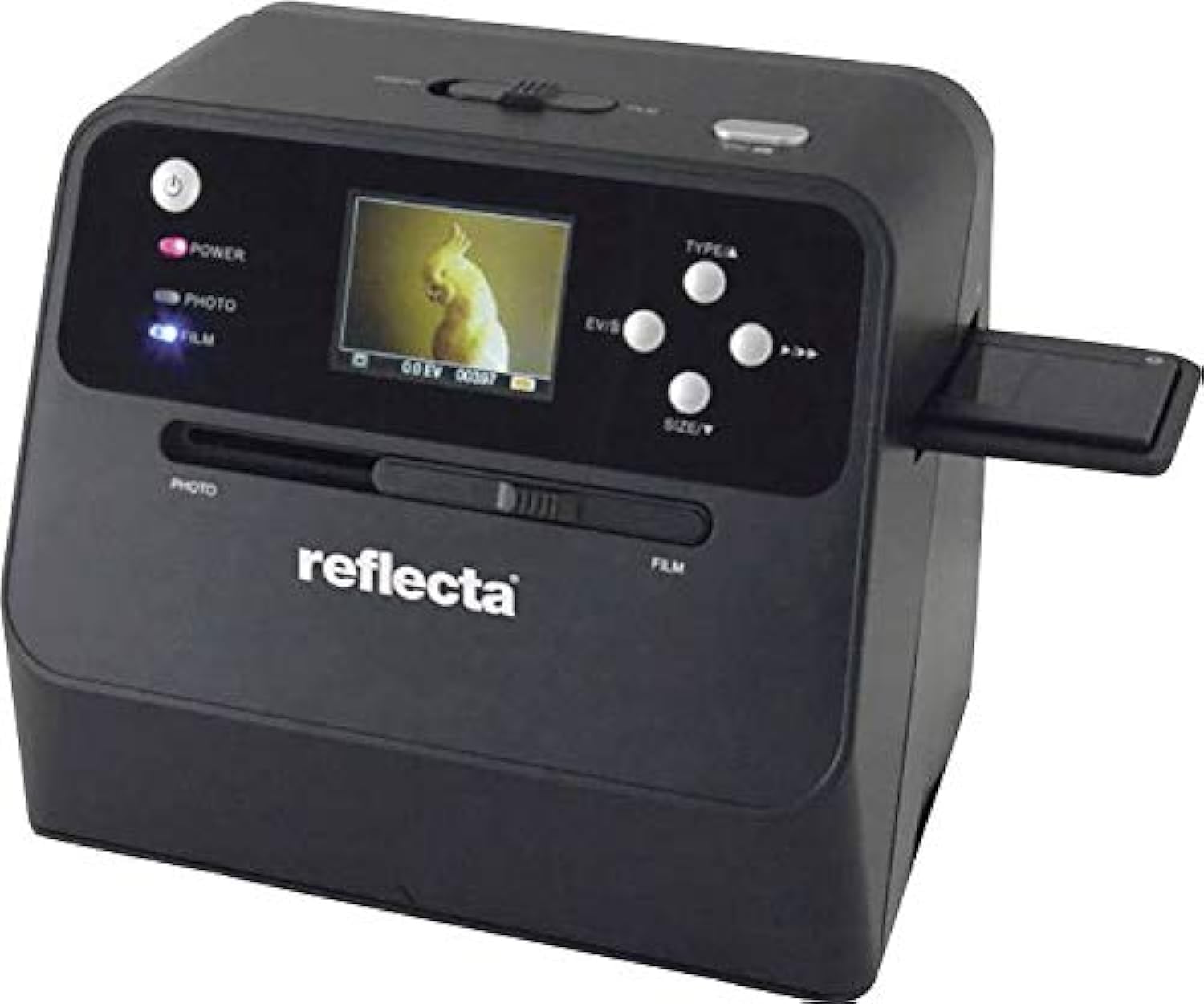
మూర్తి 4.1: ముందు view of the Reflecta Combo Album SCAN 64400 Scanner, showing the display screen, control buttons, and input slots for photos and film.

మూర్తి 4.2: The scanner unit displayed with its included film holder and a small cleaning brush, essential accessories for film and slide scanning.
4.1. Scanner Components
- పవర్ బటన్: Turns the scanner on/off.
- LCD డిస్ప్లే: Shows scan preview, menu options, and settings.
- నియంత్రణ బటన్లు: Navigation (Up/Down/Left/Right), OK/Enter, Type (Photo/Film), Size.
- Photo Input Slot: For scanning physical photos.
- Film Input Slot: For inserting film/slide holders.
- SD కార్డ్ స్లాట్: For saving scanned images (SD card not included).
- USB పోర్ట్: For connecting to a computer or power adapter.
5. సెటప్
5.1. పవర్ కనెక్షన్
- Connect the small end of the USB cable to the USB port on the scanner.
- Connect the large end of the USB cable to the provided power adapter.
- పవర్ అడాప్టర్ను ప్రామాణిక ఎలక్ట్రికల్ అవుట్లెట్లోకి ప్లగ్ చేయండి.
- Press the Power button to turn on the scanner.
5.2. Inserting an SD Card (Optional)
The scanner saves images to an SD card. If you wish to save scans, insert an SD card (up to 32GB, Class 10 recommended) into the SD card slot until it clicks into place. Ensure the card is formatted correctly (FAT32).
6. స్కానర్ను ఆపరేట్ చేయడం
6.1. Scanning Photos
This scanner is designed to digitize physical photos, including those mounted in albums.
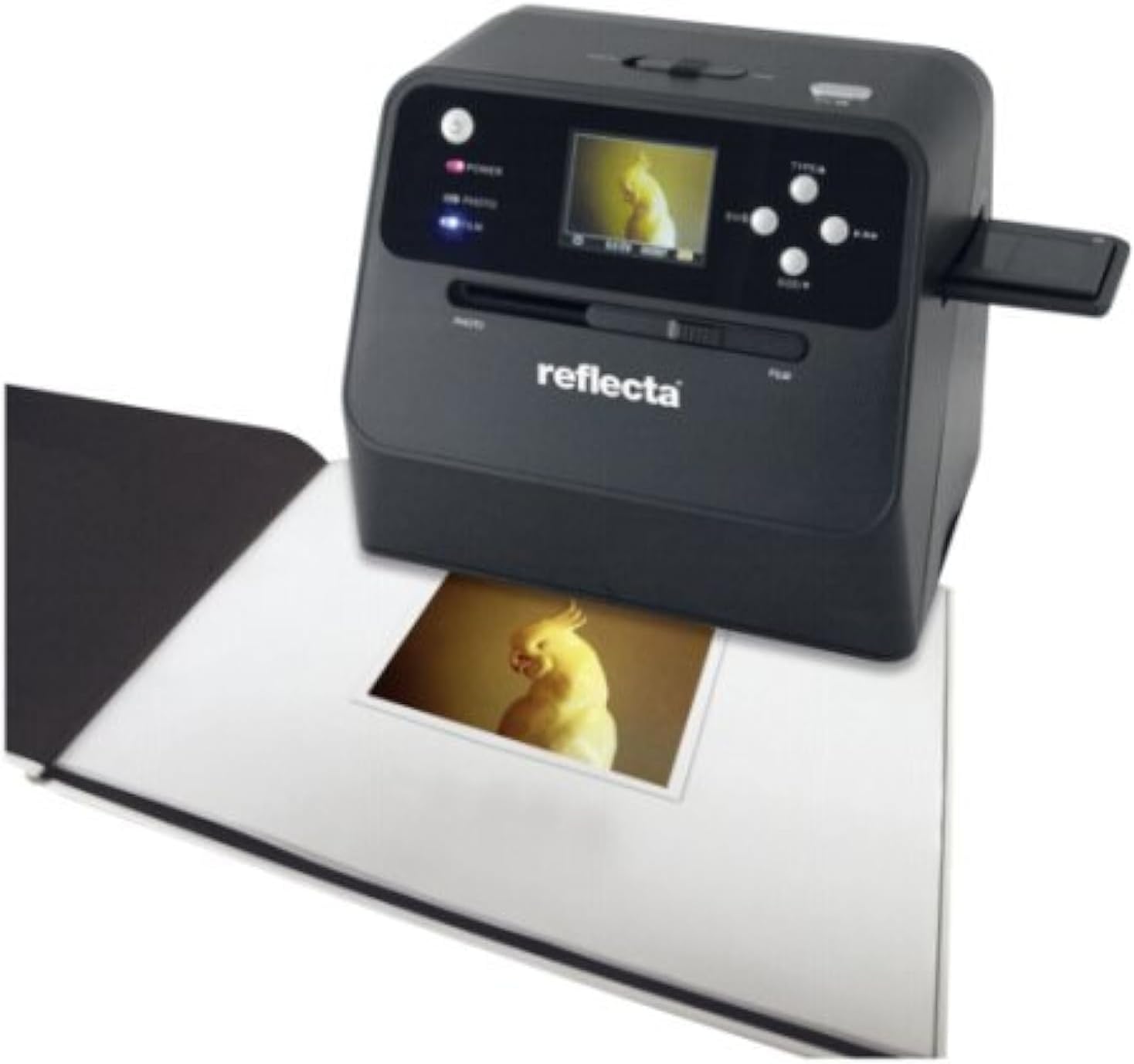
మూర్తి 6.1: The scanner positioned over an open photo album, demonstrating its capability to scan a photo directly from the album without removal.
- స్కానర్ ఆన్ చేయబడిందని నిర్ధారించుకోండి.
- నొక్కండి రకం button until "PHOTO" mode is selected on the display.
- Carefully place the scanner over the photo you wish to scan. Ensure the photo is flat and well-lit.
- Use the navigation buttons to adjust the scanning area if necessary.
- నొక్కండి OK button to initiate the scan. The scanned image will appear on the display.
- చిత్రాన్ని సేవ్ చేయడానికి, నొక్కండి OK button again. The image will be saved to the inserted SD card.
- You can adjust image settings (e.g., exposure, color balance) using the menu options before scanning. Refer to the on-screen menu for details.
6.2. Scanning Film and Slides
The scanner supports 35mm film strips and mounted slides.
- స్కానర్ ఆన్ చేయబడిందని నిర్ధారించుకోండి.
- నొక్కండి రకం button until "FILM" mode is selected on the display.
- Open the appropriate film or slide holder.
- Carefully insert your 35mm film strip or mounted slide into the holder, ensuring it is correctly aligned.
- హోల్డర్ను సురక్షితంగా మూసివేయండి.
- Insert the loaded holder into the Film Input Slot on the side of the scanner.
- Use the navigation buttons to preview and adjust the image on the display.
- నొక్కండి OK స్కాన్ ప్రారంభించడానికి బటన్.
- చిత్రాన్ని సేవ్ చేయడానికి, నొక్కండి OK button again. The image will be saved to the inserted SD card.
7. నిర్వహణ
7.1. స్కానర్ను శుభ్రపరచడం
Regular cleaning ensures optimal scan quality.
- బాహ్య: స్కానర్ యొక్క బాహ్య భాగాన్ని మృదువైన, పొడి, మెత్తటి రహిత వస్త్రంతో తుడవండి. రాపిడి క్లీనర్లను లేదా ద్రావకాలను ఉపయోగించవద్దు.
- Photo Scanning Area: Gently wipe the glass surface in the photo scanning area with a microfiber cloth. For stubborn smudges, a small amount of lens cleaning solution can be applied to the cloth (not directly to the scanner).
- Film/Slide Input: Use the provided cleaning brush (or a soft, dry brush) to remove dust from the film input slot and film/slide holders. Avoid touching the internal optical components.
- లెన్స్: If dust is visible on the internal lens, use a can of compressed air (held upright) to gently blow away particles. Do not use excessive force.
Always ensure the scanner is powered off and unplugged before cleaning.
8. ట్రబుల్షూటింగ్
సాధారణ సమస్యలు మరియు వాటి పరిష్కారాల కోసం ఈ విభాగాన్ని చూడండి.
| సమస్య | సాధ్యమైన కారణం | పరిష్కారం |
|---|---|---|
| స్కానర్ పవర్ ఆన్ అవ్వదు. | Power cable not connected properly; Power adapter faulty. | అన్ని పవర్ కనెక్షన్లను తనిఖీ చేయండి. వేరే పవర్ అవుట్లెట్ను ప్రయత్నించండి. పవర్ అడాప్టర్ పనిచేస్తుందని నిర్ధారించుకోండి. |
| Scanned images are blurry or unclear. | Dust/smudges on scanning surface/lens; Photo/film not flat or properly inserted. | Clean the scanning surfaces and lens (refer to Section 7.1). Ensure photos are flat and film/slides are correctly seated in their holders. |
| Colors in scanned images are incorrect. | Incorrect color settings; Original photo/film faded. | Adjust color balance and exposure settings in the scanner menu. Some fading in original media may be irreversible. |
| Cannot save images to SD card. | SD card full, locked, or not formatted correctly; SD card faulty. | Check if the SD card is full and delete unnecessary files. Ensure the write-protect tab is unlocked. Format the SD card (this will erase all data). Try a different SD card. |
| Scanner freezes or becomes unresponsive. | తాత్కాలిక సాఫ్ట్వేర్ లోపం. | Turn off the scanner, disconnect the power, wait 10 seconds, then reconnect and power on again. |
9. స్పెసిఫికేషన్లు
Technical specifications for the Reflecta Combo Album SCAN 64400 Scanner.
| ఫీచర్ | వివరాలు |
|---|---|
| మోడల్ పేరు | Reflecta Combo Album SCAN 64400 |
| స్కానర్ రకం | Document, Film, Photo |
| ఆప్టికల్ సెన్సార్ టెక్నాలజీ | CMOS |
| స్కానర్ రిజల్యూషన్ | 2400 DPI (Optical), 2944 DPI (Maximum Horizontal) |
| రంగు లోతు | 24 బిపిపి |
| కాంతి మూలం రకం | LED |
| Maximum Supported Photo Size | 13 x 18 cm (5x7 inches) |
| మద్దతు ఉన్న ఫిల్మ్ రకాలు | 35mm Film Strips, Mounted 35mm Slides |
| కనెక్టివిటీ టెక్నాలజీ | USB |
| నిల్వ మీడియా | SD Card (up to 32GB, not included) |
| పవర్ సోర్స్ రకం | Hand-operated / USB Power Adapter |
| ఉత్పత్తి కొలతలు | 30 x 20 x 23 సెం.మీ |
| వస్తువు బరువు | 798 గ్రాములు |
| ఆపరేటింగ్ సిస్టమ్ అనుకూలత | విండోస్ |
10. వారంటీ మరియు మద్దతు
Reflecta products are manufactured to high-quality standards. For information regarding warranty coverage, technical support, or service, please refer to the warranty card included with your product or visit the official Reflecta website. Please have your model number (64400) and purchase details available when contacting support.
తయారీదారు: ప్రతిబింబం