
1. పరిచయం
This manual provides comprehensive instructions for the proper use and care of your XIAOMI Mi In-Ear Headphones Basic (Silver), model 362891. To ensure optimal performance and longevity of your product, please read this manual thoroughly before initial use and retain it for future reference.
2. ప్యాకేజీ విషయాలు
Upon opening your product packaging, please verify that all items listed below are present and in good condition:
- One pair of XIAOMI Mi In-Ear Headphones Basic (Silver)
- Integrated cable with 3.5mm audio jack and in-line remote with microphone
3. ఉత్పత్తి ముగిసిందిview
Familiarize yourself with the components of your Mi In-Ear Headphones Basic.

చిత్రం 3.1: పూర్తి view of the XIAOMI Mi In-Ear Headphones Basic, highlighting the silver earbud design, white cable, in-line remote, and 3.5mm jack.
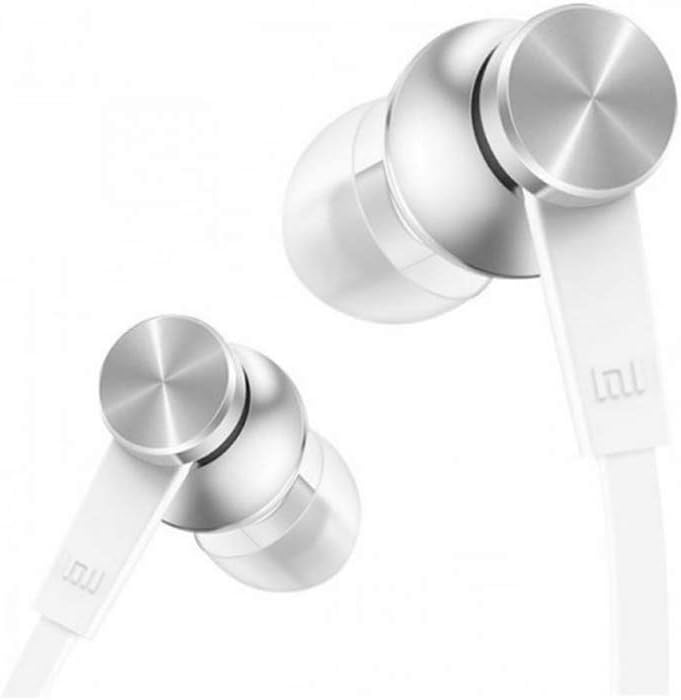
మూర్తి 3.2: వివరంగా view of the earbud housing, showcasing the sophisticated metal technology and aluminum alloy cavity.

చిత్రం 3.3: సైడ్ ప్రోfile of the earbuds, illustrating the connection point to the flat cable designed to resist tangling.

Figure 3.4: Close-up of the in-line remote, which includes a built-in microphone, and the universal 3.5mm audio jack for device connection.
4. సెటప్
మొదటి ఉపయోగం కోసం మీ హెడ్ఫోన్లను సెటప్ చేయడానికి ఈ దశలను అనుసరించండి:
- Identify Left and Right Earbuds: The earbuds are typically marked with 'L' for left and 'R' for right. Ensure correct placement for optimal sound experience.
- ఇయర్బడ్లను చొప్పించండి: Gently insert each earbud into the corresponding ear canal. Adjust them until they fit snugly and comfortably. A proper seal is crucial for sound quality and bass response.
- ఆడియో పరికరానికి కనెక్ట్ చేయండి: Plug the 3.5mm audio jack firmly into the headphone port of your smartphone, tablet, computer, or other compatible audio device.
5. ఆపరేటింగ్ సూచనలు
Your Mi In-Ear Headphones Basic feature an in-line remote for convenient control:
- ఆడియో ప్లేబ్యాక్:
- Press the button once to Play/Pause music.
- తదుపరి ట్రాక్కి వెళ్లడానికి బటన్ను రెండుసార్లు నొక్కండి.
- Press the button three times to go to the previous track.
- కాల్ నియంత్రణ:
- Press the button once to Answer/End a call.
- Press and hold the button to Reject an incoming call.
- మైక్రోఫోన్: The built-in microphone allows for hands-free communication during calls. Ensure the microphone is positioned appropriately for clear voice capture.
6. నిర్వహణ
Proper maintenance ensures the longevity and hygiene of your headphones:
- చెవి శుభ్రపరిచే చిట్కాలు: Regularly remove the ear tips and clean them with a soft, damp గుడ్డ. తిరిగి అతికించే ముందు అవి పూర్తిగా పొడిగా ఉన్నాయని నిర్ధారించుకోండి.
- Cleaning Earbud Grilles: Gently wipe the earbud grilles with a dry cotton swab to remove any earwax or debris. Avoid using liquids directly on the grilles.
- కేబుల్ కేర్: The flat cable is designed to be tangle-free. Avoid sharp bends or excessive pulling on the cable to prevent internal damage.
- నిల్వ: When not in use, store your headphones in a clean, dry place, away from extreme temperatures and direct sunlight. Avoid wrapping the cable too tightly.
7. ట్రబుల్షూటింగ్
మీ హెడ్ఫోన్లతో సమస్యలు ఎదురైతే, ఈ క్రింది సాధారణ పరిష్కారాలను చూడండి:
| సమస్య | సాధ్యమైన కారణం | పరిష్కారం |
|---|---|---|
| ధ్వని లేదా తక్కువ వాల్యూమ్ లేదు |
|
|
| పేలవమైన ధ్వని నాణ్యత (ఉదా., వక్రీకరించబడింది, బాస్ లేకపోవడం) |
|
|
| మైక్రోఫోన్ పని చేయడం లేదు |
|
|
If the issue persists after attempting these solutions, please contact XIAOMI customer support for further assistance.
8. స్పెసిఫికేషన్లు
Detailed technical specifications for the XIAOMI Mi In-Ear Headphones Basic (Silver):
- మోడల్ సంఖ్య: 362891
- బ్రాండ్: XIAOMI
- రంగు: వెండి
- చెవి ప్లేస్మెంట్: చెవిలో
- ఫారమ్ ఫ్యాక్టర్: చెవిలో
- కనెక్టివిటీ టెక్నాలజీ: వైర్డు
- హెడ్ఫోన్స్ జాక్: 3.5 మి.మీ జాక్
- ఫ్రీక్వెన్సీ రెస్పాన్స్ రేంజ్: 20 హెర్ట్జ్ - 20 కిలోహెర్ట్జ్
- మెటీరియల్: Metal (Aluminum Alloy Cavity)
- కేబుల్ పొడవు: 1.25 మీటర్లు
- కేబుల్ ఫీచర్: చిక్కు లేకుండా
- ప్రత్యేక ఫీచర్: మైక్రోఫోన్ చేర్చబడింది
- నియంత్రణ రకం: Call Control (In-line remote)
- వస్తువు బరువు: దాదాపు 0.01 కిలోగ్రాములు (0.493 ఔన్సులు)
- నీటి నిరోధక స్థాయి: వాటర్ రెసిస్టెంట్ కాదు
- సిఫార్సు చేసిన ఉపయోగాలు: సంగీతం, గేమింగ్
- అనుకూల పరికరాలు: Xiaomi phones, Android devices, iOS devices (with 3.5mm jack)
9. భద్రతా సమాచారం
Please observe the following safety guidelines to prevent damage to your headphones or personal injury:
- వాల్యూమ్ స్థాయిలు: వినికిడి దెబ్బతినకుండా నిరోధించడానికి ఎక్కువ కాలం పాటు అధిక వాల్యూమ్ స్థాయిలలో వినడం మానుకోండి.
- పర్యావరణ అవగాహన: Do not use headphones in situations where inability to hear ambient sounds could pose a danger (e.g., while driving, cycling, or walking in traffic).
- నీరు మరియు తేమ: ఈ హెడ్ఫోన్లు నీటి నిరోధకతను కలిగి ఉండవు. నీరు, వర్షం లేదా అధిక తేమకు గురికాకుండా ఉండండి.
- శుభ్రపరచడం: Use only a dry, soft cloth for cleaning. Do not use harsh chemicals or abrasive materials.
- పిల్లలు: Keep out of reach of small children, as small parts may pose a choking hazard.
10. వారంటీ మరియు మద్దతు
XIAOMI products are designed and manufactured to the highest quality standards. For information regarding warranty coverage, terms, and conditions, please refer to the warranty card included with your purchase or visit the official XIAOMI website. For technical support, troubleshooting assistance, or service inquiries, please contact XIAOMI customer support through their official channels.
XIAOMI Official Webసైట్: www.mi.com