
క్రెడర్ 8021 ను ప్రారంభించండి
LAUNCH Creader 8021 ABS SRS Scan Tool User Manual
Model: Creader 8021
పరిచయం
This manual provides detailed instructions for the operation and maintenance of the LAUNCH Creader 8021 ABS SRS Scan Tool. Please read this manual thoroughly before operating the device to ensure proper use and to prevent damage.
ఉత్పత్తి ముగిసిందిview
The LAUNCH Creader 8021 is a professional diagnostic tool designed for automotive technicians and enthusiasts. It offers comprehensive OBD2 functions, along with advanced diagnostic capabilities for ABS (Anti-lock Braking System) and SRS (Supplemental Restraint System). Additionally, it supports various reset functions including Oil Service Light, Electronic Parking Brake (EPB), Steering Angle Sensor (SAS), and Battery Management System (BMS).
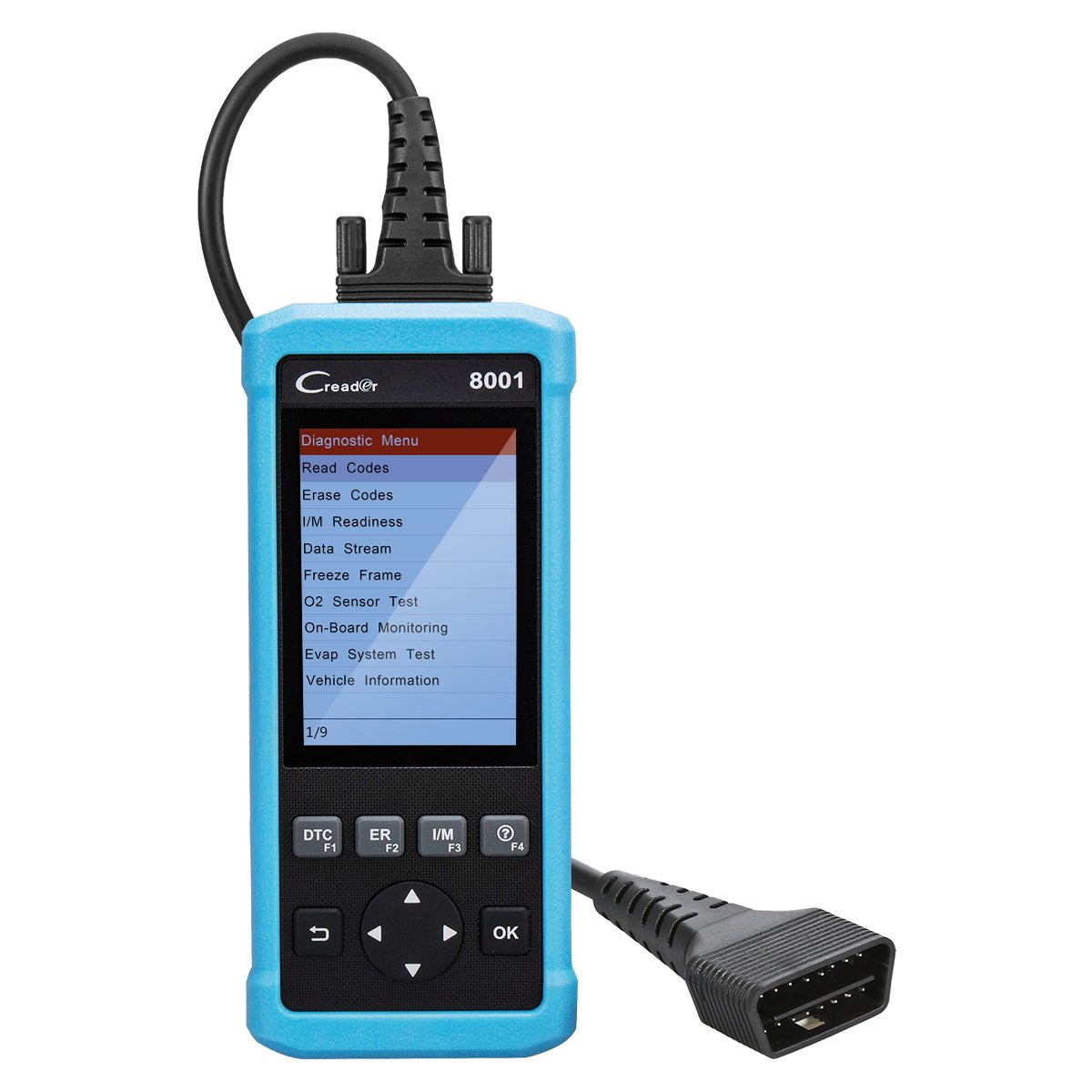
మూర్తి 1: LAUNCH Creader 8021 Device Diagram. This image illustrates the main components of the Creader 8021, including the LCD screen, diagnostic cable, DB15 connector, and various control buttons such as I/M, Erase, DTC, ESC, Help, OK, and Selection buttons.
ముఖ్య లక్షణాలు:
- ABS & SRS Diagnostics: Reads and clears DTCs, and reads data streams for Anti-lock Braking System and Supplemental Restraint System.
- ఆయిల్ రీసెట్: ఆయిల్ మార్పు తర్వాత ఆయిల్ సర్వీస్ లైట్ను రీసెట్ చేస్తుంది.
- EPB రీసెట్: బ్రేక్ ప్యాడ్ భర్తీ తర్వాత ఎలక్ట్రానిక్ పార్కింగ్ బ్రేక్ సిస్టమ్ను రీసెట్ చేస్తుంది.
- SAS రీసెట్: Clears faulty steering angle sensor memories and calibrates the steering angle sensor.
- BMS రీసెట్: Performs a reset on the vehicle battery to clear fault information and re-match the battery.
- పూర్తి OBD2 విధులు: Supports all 10 OBD2 test modes for comprehensive vehicle diagnostics.
- Data Recording & Review: Allows recording of real-time DTCs and data streams for later review.
- విస్తృతమైన వాహన కవరేజ్: Compatible with 46 vehicle brands for ABS/SRS diagnostics (2006-2016 models) and 40 car brands for Oil/EPB resets. Full OBD2 functions cover most 1996 US-Based, 2001 EU-Based, and newer vehicles.
- బహుళ భాషా మద్దతు: English, Spanish, French, Russian, German, Portuguese, Japanese.
ప్యాకేజీ విషయాలు
Upon opening the package, verify that all items are present and in good condition. If any items are missing or damaged, contact your vendor immediately.

మూర్తి 2: Package Contents. The image displays the LAUNCH Creader 8021 diagnostic tool, a diagnostic cable, a USB cable for updates, a quick start guide, and a protective carrying case.
- LAUNCH Creader 8021 Main Unit
- Diagnostic Cable (DB15 to OBD2)
- USB Cable (for updates)
- త్వరిత ప్రారంభ గైడ్
- ప్రొటెక్టివ్ క్యారీయింగ్ కేస్
సెటప్ మరియు ప్రారంభ ఉపయోగం
- పవర్ ఆన్: The Creader 8021 is powered directly from the vehicle's OBD2 port. No external power source is typically required during operation.
- OBD2 పోర్ట్ను గుర్తించండి: Identify the 16-pin Data Link Connector (DLC) in your vehicle. This port is usually located under the dashboard on the driver's side.
- వాహనానికి కనెక్ట్ చేయండి: Plug the diagnostic cable's DB15 connector into the Creader 8021 and the OBD2 connector into the vehicle's DLC. Ensure a secure connection.
- పరికర ప్రారంభం: Once connected, the Creader 8021 will automatically power on and initiate communication with the vehicle. The main menu will appear on the LCD screen.
- భాష ఎంపిక: If prompted, select your preferred language from the available options (English, Spanish, French, Russian, German, Portuguese, Japanese).

మూర్తి 3: ముందు మరియు వెనుక Views of the Device. This image shows the front display and control buttons, along with the rear label containing serial number and input specifications.
ఆపరేటింగ్ సూచనలు
Navigate through the menus using the directional buttons and confirm selections with the "OK" button. Use the "ESC" button to return to the previous screen.
1. OBD2 Diagnostics:
This function allows access to all 10 modes of OBD2 diagnostics for engine-related issues.
- కోడ్లను చదవండి: Displays Diagnostic Trouble Codes (DTCs) stored in the vehicle's ECU.
- కోడ్లను తొలగించండి: Clears DTCs from the vehicle's ECU and turns off the Malfunction Indicator Lamp (MIL).
- I/M సంసిద్ధత: ఉద్గార పర్యవేక్షణ వ్యవస్థల సంసిద్ధతను తనిఖీ చేస్తుంది.
- డేటా స్ట్రీమ్: Displays real-time data from the vehicle's sensors in text or graph format.
- ఫ్రీజ్ ఫ్రేమ్: Shows a snapshot of vehicle operating conditions at the time an emission-related fault occurred.
- O2 సెన్సార్ టెస్ట్: O2 సెన్సార్ మానిటర్ పరీక్ష ఫలితాలను పొందుతుంది.
- ఆన్-బోర్డ్ పర్యవేక్షణ: నిర్దిష్ట భాగాలు/వ్యవస్థల ఆన్-బోర్డ్ డయాగ్నస్టిక్ పర్యవేక్షణ పరీక్షల ఫలితాలను తిరిగి పొందుతుంది.
- Evap System Test: Initiates a test of the evaporative emission system.
- వాహన సమాచారం: వాహన గుర్తింపు సంఖ్య (VIN), అమరిక ID (CALID), మరియు అమరిక ధృవీకరణ సంఖ్య (CVN) లను తిరిగి పొందుతుంది.
2. ABS & SRS System Diagnostics:
Access specific diagnostic functions for the Anti-lock Braking System and Supplemental Restraint System.
- Select "ABS System" or "SRS System" from the main menu.
- Choose "Read Codes" to view system-specific DTCs.
- Choose "Erase Codes" to clear system-specific DTCs.
- Choose "Data Stream" to view real-time data from ABS/SRS sensors.
3. Reset Functions:
The Creader 8021 supports several maintenance reset functions.
- ఆయిల్ రీసెట్: Follow on-screen prompts to reset the oil service light after an oil change.
- EPB రీసెట్: Follow on-screen prompts to reset the Electronic Parking Brake system. This is crucial after replacing brake pads or performing maintenance on the EPB system.
- SAS రీసెట్: Follow on-screen prompts to calibrate the Steering Angle Sensor. This is often required after steering system repairs or alignment.
- BMS రీసెట్: Follow on-screen prompts to reset the Battery Management System. This is necessary when replacing the vehicle battery to ensure proper charging and monitoring.
నిర్వహణ మరియు నవీకరణలు
పరికర సంరక్షణ:
- Keep the device clean and dry. Avoid exposure to extreme temperatures, moisture, or direct sunlight.
- Do not use abrasive cleaners or solvents. Wipe with a soft, damp గుడ్డ.
- ఉపయోగంలో లేనప్పుడు పరికరాన్ని దాని రక్షిత మోసుకెళ్ళే కేసులో నిల్వ చేయండి.
సాఫ్ట్వేర్ అప్డేట్లు:
The LAUNCH Creader 8021 offers free lifetime software updates via the internet. Regular updates ensure compatibility with newer vehicle models and provide enhanced features.
- అప్డేట్ టూల్ను డౌన్లోడ్ చేసుకోండి: అధికారిక LAUNCH ని సందర్శించండి website and download the update tool software to your computer.
- సాఫ్ట్వేర్ను ఇన్స్టాల్ చేయండి: Install the update tool on a computer running Windows 7, 8, 10, or XP.
- పరికరాన్ని కనెక్ట్ చేయండి: Connect the Creader 8021 to your computer using the provided USB cable.
- నవీకరణ సాధనాన్ని అమలు చేయండి: Launch the update tool and follow the on-screen instructions to register your device and download the latest software.
- Transfer Updates: The update tool will guide you through transferring the updates to the device's TF card.
గమనిక: You may also remove the TF card from the device and use a card reader to update it directly on your computer, then reinsert the card into the device.
ట్రబుల్షూటింగ్
| సమస్య | సాధ్యమైన కారణం | పరిష్కారం |
|---|---|---|
| పరికరం పవర్ ఆన్ చేయదు. |
|
|
| వాహనంతో కమ్యూనికేషన్ లోపం. |
|
|
| బటన్లు స్పందించడం లేదు. |
|
|
| Update process fails. |
|
|
స్పెసిఫికేషన్లు
| ఫీచర్ | వివరాలు |
|---|---|
| మోడల్ | క్రెడర్ 8021 |
| ప్రదర్శించు | 4-అంగుళాల కలర్ LCD |
| ఇన్పుట్ వాల్యూమ్tage | 9-18V DC (via OBD2) |
| ఆపరేటింగ్ ఉష్ణోగ్రత | 0°C నుండి 50°C (32°F నుండి 122°F) |
| నిల్వ ఉష్ణోగ్రత | -20°C నుండి 70°C (-4°F నుండి 158°F) |
| కొలతలు (L x W x H) | 26.16 x 19.3 x 8.38 సెం.మీ (10.3 x 7.6 x 3.3 అంగుళాలు) |
| బరువు | 458 గ్రా (1.01 పౌండ్లు) |
| కనెక్టివిటీ | OBD2, Mini USB |
| మద్దతు ఉన్న ప్రోటోకాల్లు | ISO9141-2, ISO14230-4, SAEJ1850, ISO15765-4 |
| నవీకరణ పద్ధతి | Free internet update via USB |
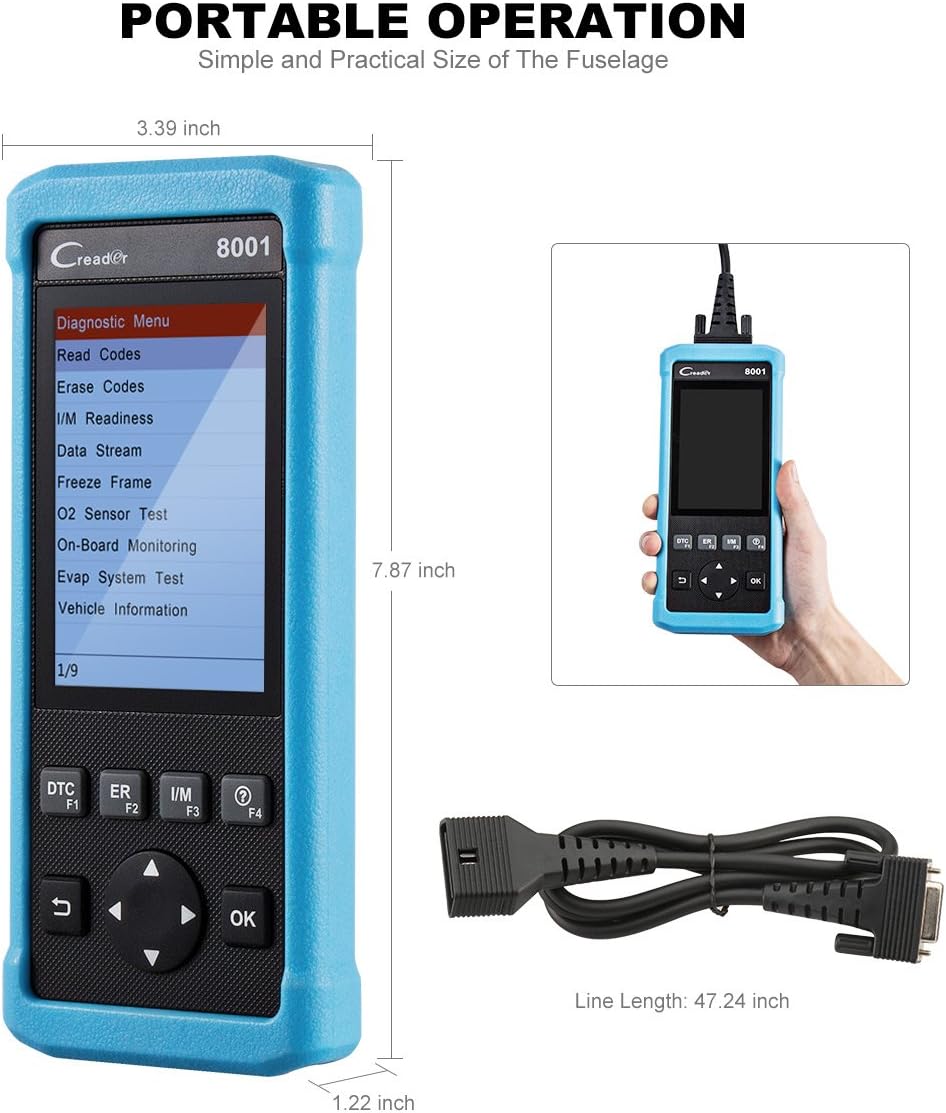
మూర్తి 4: Product Dimensions. This image provides a visual representation of the Creader 8021's physical dimensions, including its length, width, and thickness, along with the length of the diagnostic cable.
వారంటీ మరియు మద్దతు
వారంటీ సమాచారం:
The LAUNCH Creader 8021 comes with a 12 నెలల వారంటీ కొనుగోలు చేసిన తేదీ నుండి. ఈ వారంటీ సాధారణ ఉపయోగంలో తయారీ లోపాలు మరియు లోపాలను కవర్ చేస్తుంది. వారంటీ క్లెయిమ్ల కోసం దయచేసి మీ కొనుగోలు రుజువును ఉంచుకోండి.
The warranty does not cover damage caused by misuse, accidents, unauthorized modifications, or improper maintenance.
సాంకేతిక మద్దతు:
For technical assistance, troubleshooting, or warranty inquiries, please contact LAUNCH customer support. Refer to the official LAUNCH webఅత్యంత తాజా సంప్రదింపు సమాచారం కోసం సైట్.
మద్దతును సంప్రదించేటప్పుడు, దయచేసి మీ పరికరం యొక్క సీరియల్ నంబర్ మరియు కొనుగోలు రుజువును అందుబాటులో ఉంచుకోండి.
Ask a question about this manual
Ask about setup, troubleshooting, compatibility, parts, safety, or missing instructions. Manuals+ will review the question and use this page’s manual context to help answer it.