
GW Instek GPT-9903A
GW Instek GPT-9903A ఎలక్ట్రికల్ సేఫ్టీ టెస్టర్ యూజర్ మాన్యువల్
Model: GPT-9903A
1. పరిచయం
This manual provides essential instructions for the safe and effective operation of the GW Instek GPT-9903A Electrical Safety Tester. The GPT-9903A is a 3-in-1 model designed for performing AC withstanding, DC withstanding, and insulation resistance tests. It features a 500VA maximum power output and a high-efficiency PWM amplifier to ensure stable performance.
2. భద్రతా సమాచారం
హెచ్చరిక: ఈ పరికరం అధిక వాల్యూమ్తో పనిచేస్తుందిtages that can be hazardous. Always follow safety precautions to prevent electric shock or injury.
- Ensure proper grounding of the instrument and the Device Under Test (DUT).
- Do not operate the tester in wet or damp పరిస్థితులు.
- కనెక్షన్లను చేయడానికి లేదా మార్చడానికి ముందు ఎల్లప్పుడూ పవర్ను డిస్కనెక్ట్ చేయండి.
- అవుట్పుట్ వాల్యూమ్tage is automatically cut off within 150 microseconds upon detection of an abnormal output voltage or current limit trip.
- The GPT-9903A automatically discharges the DUT after each test to eliminate residual voltage.
- ఈ పరికరాలను అర్హత కలిగిన సిబ్బంది మాత్రమే నిర్వహించాలి మరియు నిర్వహించాలి.
3. ఉత్పత్తి ముగిసిందిview
3.1 ముఖ్య లక్షణాలు
- 500VA AC Test Capacity.
- 240x64 Ice Blue Dot matrix LCD for clear display.
- Sweep Function for Device Under Test (DUT) characteristic analysis.
- Insulation resistance measurement up to 50GΩ.
- Manual/Auto Mode operation.
- Performs AC withstanding (AC 5kV/100mA), DC withstanding (DC 6kV/20mA), and insulation resistance (DC 50V - 1000V/50GΩ max.) tests.
3.2 ఫ్రంట్ ప్యానెల్ భాగాలు
The front panel of the GPT-9903A is designed for intuitive operation. Refer to the image below for component identification.
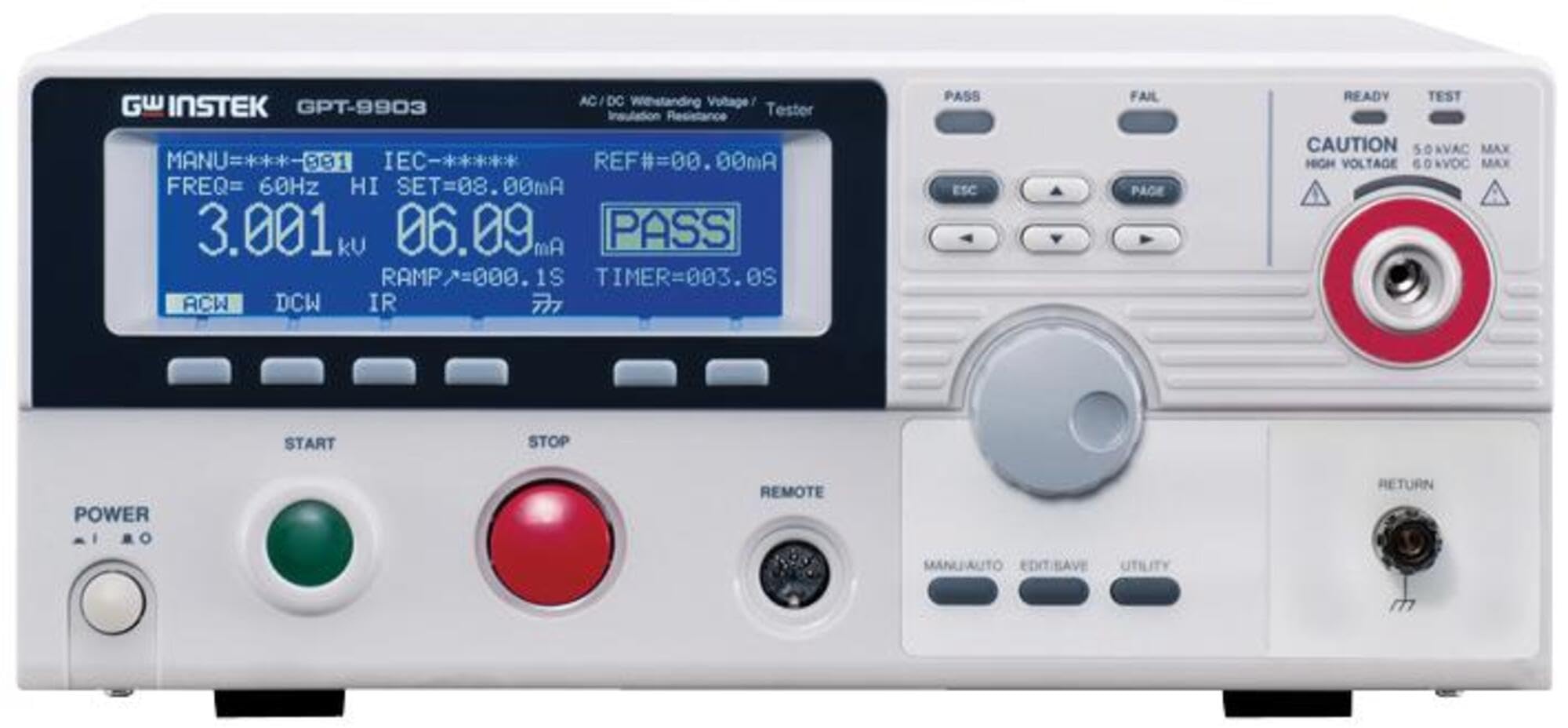
Figure 1: GW Instek GPT-9903A Front Panel. This image displays the front panel of the GPT-9903A. On the left, the "POWER" button is visible. Above it, the "GW INSTEK GPT-9903" branding is present. The large blue dot matrix LCD shows test parameters like "MANU=***-001", "FREQ= 60Hz", "HI SET=08.00mA", "3.001kV", "06.09mA", "PASS", "RAMP=000.1S", and "TIMER=003.0S", along with mode indicators "ACW", "DCW", "IR". Below the display are four function buttons. To the right of the display, there are "PASS" and "FAIL" indicators, navigation buttons (ESC, PAGE, arrow keys), and a rotary knob for adjustments. Further right, safety indicators "READY" and "TEST" are present, along with a "CAUTION" label indicating "5.0kVAC MAX" and "6.0kVDC MAX" and a high-voltage output terminal with a red ring. Below the display, large green "START" and red "STOP" buttons are prominent. A "REMOTE" port is also visible. Towards the bottom right, additional buttons for "MANU/AUTO", "EDIT/SAVE", and "UTILITY" are located, along with a "RETURN" terminal.
- పవర్ బటన్: Located on the bottom left, used to turn the unit on and off.
- LCD డిస్ప్లే: Central blue dot matrix display showing test parameters, results (PASS/FAIL), and current mode (ACW, DCW, IR).
- Function Buttons (below LCD): Context-sensitive buttons for menu navigation and parameter selection.
- Navigation/Control Buttons (right of LCD): Includes ESC, PAGE, and arrow keys for menu navigation and parameter adjustment.
- రోటరీ నాబ్: Used for fine-tuning parameter values.
- హై వాల్యూమ్tage Output Terminal: Prominent terminal with a red ring, labeled with caution for high voltage.
- START బటన్: Green button to initiate a test sequence.
- STOP బటన్: Red button to terminate a test sequence.
- రిమోట్ పోర్ట్: For connecting external control devices.
- Mode/Utility Buttons: MANU/AUTO, EDIT/SAVE, UTILITY buttons for selecting operation modes and accessing settings.
- RETURN Terminal: Ground return terminal for the test circuit.
3.3 పెట్టెలో ఏముంది
అన్ప్యాక్ చేసిన తర్వాత, కింది అంశాలు చేర్చబడ్డాయో లేదో తనిఖీ చేయండి:
- GW Instek GPT-9903A Electrical Safety Tester
- USB కేబుల్
- పవర్ కార్డ్ (ప్రాంతానికి సంబంధించినది)
- Test Leads (High Voltage Probe, Return Lead)
- వినియోగదారు మాన్యువల్ (ఈ పత్రం)
- అమరిక సర్టిఫికేట్ (వర్తిస్తే)
4. సెటప్
- ప్లేస్మెంట్: Place the GPT-9903A on a stable, level surface with adequate ventilation. Ensure it is away from direct sunlight, excessive dust, and moisture.
- పవర్ కనెక్షన్: Connect the provided power cord to the AC inlet on the rear panel of the tester and then to a grounded AC power outlet.
- గ్రౌండింగ్: Ensure the tester is properly grounded. The power cord provides grounding, but additional grounding may be required depending on the test setup.
- టెస్ట్ లీడ్ కనెక్షన్: అధిక వాల్యూమ్ని కనెక్ట్ చేయండిtage test lead to the high voltage output terminal (red ring) and the return lead to the RETURN terminal on the front panel.
- DUT Connection: Connect the test leads to the Device Under Test (DUT) according to the specific test requirements and safety standards.
5. ఆపరేటింగ్ సూచనలు
5.1 పవర్ ఆన్/ఆఫ్
- పవర్ ఆన్: Press the "POWER" button on the front panel. The LCD display will illuminate, and the unit will perform a self-test.
- పవర్ ఆఫ్: Press the "POWER" button again. Ensure no test is in progress before powering off.
5.2 Selecting Test Modes
Use the function buttons below the LCD or the navigation keys to select between AC Withstanding (ACW), DC Withstanding (DCW), and Insulation Resistance (IR) test modes. The currently selected mode will be indicated on the display.
5.3 Setting Test Parameters
For each test mode, parameters such as test voltage, current limits (HI SET), ramp-up time (RAMP), and test duration (TIMER) must be configured.
- Press the appropriate function button or navigate to the parameter you wish to adjust.
- Use the rotary knob or arrow keys to change the value.
- Confirm the setting by pressing the appropriate button (e.g., ENTER or a function button).
5.4 పరీక్ష నిర్వహించడం
- Ensure the DUT is correctly connected and all safety precautions are observed.
- Verify all test parameters are set according to the required standards.
- Press the green "START" button to initiate the test. The "TEST" indicator will illuminate.
- Monitor the display for real-time measurements and the final test result (PASS/FAIL).
- Upon completion, the GPT-9903A will automatically discharge the DUT.
- To stop a test prematurely, press the red "STOP" button.
5.5 స్వీప్ ఫంక్షన్
The "Sweep" function allows for characteristic analysis of the DUT by displaying test results point by point over the testing period, forming a trace graph. This is useful for observing parameter responses to changes in applied voltage, current, or testing time. A movable marker on the graph allows for reading parameters at specific points of interest. Refer to the detailed programming guide for advanced use of the sweep function.
6. నిర్వహణ
- శుభ్రపరచడం: Clean the exterior of the instrument with a soft, dry cloth. Do not use abrasive cleaners or solvents.
- క్రమాంకనం: Regular calibration by qualified service personnel is recommended to ensure accuracy and compliance with safety standards. Refer to the service manual for calibration procedures.
- నిల్వ: Store the tester in a clean, dry environment within the specified operating temperature and humidity ranges when not in use.
- ఫ్యూజ్ ప్రత్యామ్నాయం: If the instrument fails to power on, check and replace the fuse on the rear panel if necessary. Ensure to use a fuse of the correct rating.
7. ట్రబుల్షూటింగ్
| సమస్య | సాధ్యమైన కారణం | పరిష్కారం |
|---|---|---|
| యూనిట్ పవర్ ఆన్ చేయదు. | No AC power; Blown fuse. | Check power cord connection and outlet. Replace fuse if necessary. |
| Test fails immediately. | Incorrect test parameters; Short circuit in DUT; Open circuit in test leads. | Verify parameter settings. Check DUT for faults. Inspect test leads for damage. |
| సరికాని రీడింగ్లు. | Uncalibrated unit; Environmental interference. | Perform calibration. Ensure stable operating environment. |
| డిస్ప్లే ఎర్రర్ సందేశాన్ని చూపుతుంది. | Internal fault; Parameter out of range. | Refer to the detailed error code list in the full manual. Contact customer support if the issue persists. |
8. స్పెసిఫికేషన్లు
- మోడల్ సంఖ్య: GPT-9903A
- AC Withstanding Test: AC 5kV / 100mA
- DC Withstanding Test: DC 6kV / 20mA
- ఇన్సులేషన్ రెసిస్టెన్స్ టెస్ట్: DC 50V - 1000V / 50GΩ max.
- అవుట్పుట్ పవర్: 500VA maximum
- ప్రదర్శన: 240x64 Ice Blue Dot matrix LCD
- కొలతలు: సుమారు 23.62 x 17.32 x 11.42 అంగుళాలు (ప్యాకేజీ కొలతలు)
- బరువు: సుమారు 57.98 పౌండ్లు (ప్యాకేజీ బరువు)
- తయారీదారు: Instek
- మొదట అందుబాటులో ఉన్నవి: ఫిబ్రవరి 1, 2017
9. వారంటీ మరియు మద్దతు
For technical support, service, or warranty inquiries, please contact GW Instek customer support.
- కస్టమర్ మద్దతు: Refer to the official GW Instek webసంప్రదింపు సమాచారం కోసం సైట్ లేదా మీ కొనుగోలు డాక్యుమెంటేషన్.
- రక్షణ ప్రణాళికలు: విస్తరించిన రక్షణ ప్లాన్లు కొనుగోలుకు అందుబాటులో ఉండవచ్చు. 3-సంవత్సరాల లేదా 4-సంవత్సరాల రక్షణ ప్లాన్ల వివరాల కోసం మీ రిటైలర్ను చూడండి.
- రిటర్న్స్: This product typically includes a 30-day easy return policy. Consult your seller for specific return procedures.
Ask a question about this manual
Ask about setup, troubleshooting, compatibility, parts, safety, or missing instructions. Manuals+ will review the question and use this page’s manual context to help answer it.