
1. పరిచయం
The Generation Guard GM-800A is an automatic upper arm blood pressure monitor designed for convenient and accurate home use. This device measures systolic and diastolic blood pressure, as well as heart rate, providing essential health information. It features an advanced measuring technique for accuracy and includes a heartbeat detector and hypertension indicator for comprehensive monitoring.

Image 1: The Generation Guard GM-800A monitor with its arm cuff, displaying blood pressure and heart rate readings.
2. ఉత్పత్తి లక్షణాలు
- Instant Monitoring: Provides quick and easy measurements of systolic, diastolic blood pressure, and heart rate.
- Clinically Accurate: Utilizes an advanced measuring technique for reliable and precise readings.
- Heartbeat Detector & Hypertension Indicator: Alerts users to irregular heart rates and indicates if readings exceed internationally recognized guidelines for normal home blood pressure levels.
- మెమరీ రీకాల్: Stores up to 90 previous readings, allowing for tracking of blood pressure fluctuations over time.
- పెద్ద స్క్రీన్ డిస్ప్లే: Features a clear, easy-to-read display for all measurement results.
- Adjustable Arm Cuff: Designed to fit a range of arm sizes (22-32 cm).
- పోర్టబుల్ డిజైన్: Compact and easy to transport, ideal for home or travel.

Image 2: Visual representation of the monitor's key features.
3. ప్యాకేజీ విషయాలు
ప్యాకేజీలో అన్ని అంశాలు ఉన్నాయని నిర్ధారించుకోండి:
- Generation Guard GM-800A Blood Pressure Monitor Unit
- Upper Arm Cuff (22-32 cm)
- క్యారీయింగ్ కేసు
- 4 AA బ్యాటరీలు
- వినియోగదారు మాన్యువల్ (ఈ పత్రం)

Image 3: The monitor, cuff, and included carrying case.
4. సెటప్
4.1 బ్యాటరీ ఇన్స్టాలేషన్
- మానిటర్ వెనుక భాగంలో ఉన్న బ్యాటరీ కంపార్ట్మెంట్ కవర్ను తెరవండి.
- సరైన ధ్రువణతను (+/-) నిర్ధారించుకుని, నాలుగు (4) AA బ్యాటరీలను చొప్పించండి.
- బ్యాటరీ కంపార్ట్మెంట్ కవర్ను సురక్షితంగా మూసివేయండి.
4.2 Cuff Connection
- Locate the air tube connector on the arm cuff.
- Insert the air tube connector firmly into the air jack on the side of the monitor unit.
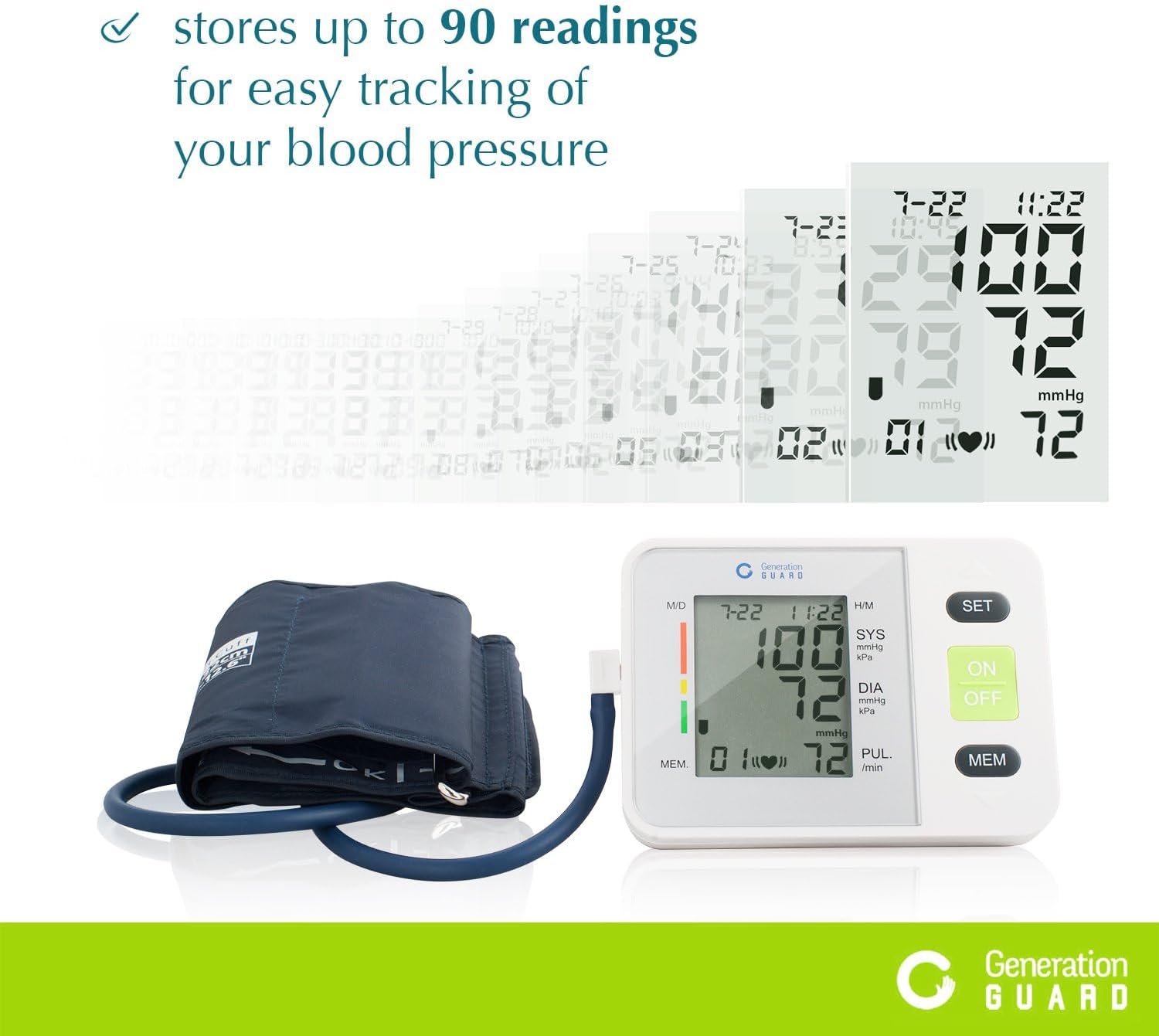
Image 4: The monitor unit with the arm cuff properly connected.
5. ఆపరేటింగ్ సూచనలు
5.1 కొలతకు ముందు
- Avoid eating, drinking alcohol, smoking, exercising, or bathing for 30 minutes before measurement.
- కొలత తీసుకునే ముందు కనీసం 5 నిమిషాలు విశ్రాంతి తీసుకోండి.
- మీ వెనుకకు మద్దతుగా మరియు నేలపై పాదాలను చదునుగా ఉంచి సౌకర్యవంతమైన స్థితిలో కూర్చోండి.
5.2 కఫ్ను వర్తింపజేయడం
- Slide the cuff onto your bare left upper arm, approximately 1-2 cm above the elbow joint.
- Ensure the air tube runs down the center of your arm, aligned with your middle finger.
- Wrap the cuff snugly around your arm, securing it with the Velcro closure. The index mark on the cuff should fall within the 'OK' range.
- మీ చేతిని టేబుల్పై ఉంచండి, తద్వారా కఫ్ మీ గుండె స్థాయికి సమానంగా ఉంటుంది.
5.3 కొలత తీసుకోవడం
- నొక్కండి ఆన్/ఆఫ్ button to power on the monitor.
- నొక్కండి ఆన్/ఆఫ్ button again to start the measurement. The cuff will automatically inflate.
- Remain still and silent during the measurement. Do not talk or move your arm.
- Once the measurement is complete, the cuff will deflate, and your readings will be displayed on the screen.
- నొక్కండి ఆన్/ఆఫ్ button to turn off the monitor, or it will automatically shut off after a period of inactivity.
Video 1: A demonstration of how to set up and take a blood pressure reading using the Generation Guard GM-800A monitor.
6. Reading Your Results
The monitor displays three key values:
- SYS (సిస్టోలిక్ ప్రెజర్): మీ గుండె కొట్టుకున్నప్పుడు మీ ధమనులలో ఒత్తిడిని సూచించే పై సంఖ్య.
- DIA (డయాస్టొలిక్ ప్రెజర్): దిగువ సంఖ్య, మీ ధమనులలో బీట్ల మధ్య ఒత్తిడిని సూచిస్తుంది.
- PUL (Pulse Rate): మీ హృదయ స్పందన రేటు, నిమిషానికి బీట్స్లో కొలుస్తారు.
The monitor also includes a color-coded hypertension indicator on the left side of the display, which visually represents your blood pressure category based on established guidelines. An irregular heartbeat detector will display a symbol if an irregular heartbeat is detected during the measurement.
7. మెమరీ ఫంక్షన్
The GM-800A monitor can store up to 90 sets of readings, allowing you to track your blood pressure trends over time. Each stored reading includes the blood pressure values, pulse rate, and the date/time of the measurement.
7.1 Accessing Memory
- మానిటర్ ఆఫ్లో ఉన్నప్పుడు, MEM బటన్.
- The most recent reading will be displayed first.
- నొక్కండి MEM మునుపటి రీడింగ్ల ద్వారా స్క్రోల్ చేయడానికి బటన్ను పదే పదే నొక్కండి.

Image 5: The monitor's display showing stored readings for easy tracking.
8. నిర్వహణ
8.1 శుభ్రపరచడం
- మానిటర్ యూనిట్ మరియు కఫ్ను మృదువైన, పొడి గుడ్డతో తుడవండి.
- అవసరమైతే, కొద్దిగా డి ఉపయోగించండిamp తేలికపాటి సబ్బుతో గుడ్డను తుడవండి, తర్వాత పొడిగా తుడవండి.
- Do not use abrasive cleaners, solvents, or immerse the unit or cuff in water.
8.2 నిల్వ
- Store the monitor and cuff in the provided carrying case when not in use.
- పరికరాన్ని చల్లని, పొడి ప్రదేశంలో, ప్రత్యక్ష సూర్యకాంతి మరియు తీవ్రమైన ఉష్ణోగ్రతలకు దూరంగా ఉంచండి.
- వంగడం లేదా వంగడం మానుకోండిasing the air tube excessively.
9. ట్రబుల్షూటింగ్
If you encounter issues with your blood pressure monitor, refer to the following common problems and solutions:
| సమస్య | సాధ్యమైన కారణం | పరిష్కారం |
|---|---|---|
| "E" or Error Message on Display | Cuff not properly applied, movement during measurement, or air leakage. | Re-apply the cuff correctly, remain still and silent, check for secure cuff connection. |
| సరికాని రీడింగ్లు | Incorrect cuff size/placement, talking/moving during measurement, or insufficient rest before measurement. | Ensure proper cuff placement and size, rest for 5 minutes, avoid talking/moving. Take multiple readings with a few minutes in between. |
| Monitor Does Not Turn On | డెడ్ లేదా తప్పుగా ఇన్స్టాల్ చేయబడిన బ్యాటరీలు. | సరైన ధ్రువణతను నిర్ధారించుకోవడానికి, బ్యాటరీలను కొత్త AA బ్యాటరీలతో భర్తీ చేయండి. |
10. స్పెసిఫికేషన్లు
- మోడల్ పేరు:
- GM-800A
- బ్రాండ్:
- జనరేషన్ గార్డ్
- శక్తి మూలం:
- 4 AA బ్యాటరీలు (చేర్చబడినవి)
- కఫ్ పరిమాణం:
- 22-32 cm (Upper Arm)
- ప్రదర్శన రకం:
- పెద్ద డిజిటల్ డిస్ప్లే
- మెమరీ సామర్థ్యం:
- 90 రీడింగ్ల వరకు
- వస్తువు బరువు (సుమారుగా):
- 0.01 ఔన్సులు
- చేర్చబడిన భాగాలు:
- Monitor Unit, Cuff, Carrying Case
- మొదటి తేదీ అందుబాటులో ఉంది:
- ఫిబ్రవరి 7, 2017
11. ముఖ్యమైన భద్రతా సమాచారం
Please read all instructions carefully before using this device. This blood pressure monitor is intended for home use to measure blood pressure and pulse rate. It is not intended to be a substitute for professional medical advice, diagnosis, or treatment. Always consult with a healthcare professional for interpretation of your blood pressure readings and for any health concerns.
హెచ్చరిక: This product can expose you to chemicals including [List known chemicals if available, otherwise state 'chemicals known to the State of California to cause cancer and birth defects or other reproductive harm.'], which is/are known to the State of California to cause cancer and birth defects or other reproductive harm. For more information go to www.P65Warnings.ca.gov.
12. వారంటీ మరియు మద్దతు
For warranty information, technical support, or service inquiries, please refer to the documentation included with your product or visit the official Generation Guard webవారంటీ క్లెయిమ్ల కోసం కొనుగోలు రుజువుగా మీ కొనుగోలు రసీదును ఉంచండి.