
పరిచయం
ధన్యవాదాలు, ధన్యవాదాలు.asing the EtoBesy Mini Portable Wireless Cube Speaker. This device combines Bluetooth audio streaming, TF card playback, AUX input, FM radio, and hands-free calling in a compact design with colorful LED lighting. Please read this manual carefully to ensure proper use and optimal performance.
పెట్టెలో ఏముంది
- 1 x Wireless Bluetooth 4.0 Radio Speaker
- 1 x ఆడియో కేబుల్
- 1 x USB ఛార్జింగ్ కేబుల్
- 1 x యూజర్ మాన్యువల్ (ఈ పత్రం)
ఉత్పత్తి ముగిసిందిview
The EtoBesy Mini Portable Wireless Cube Speaker features a unique cube design with integrated controls and ports. Understanding these components is essential for operation.
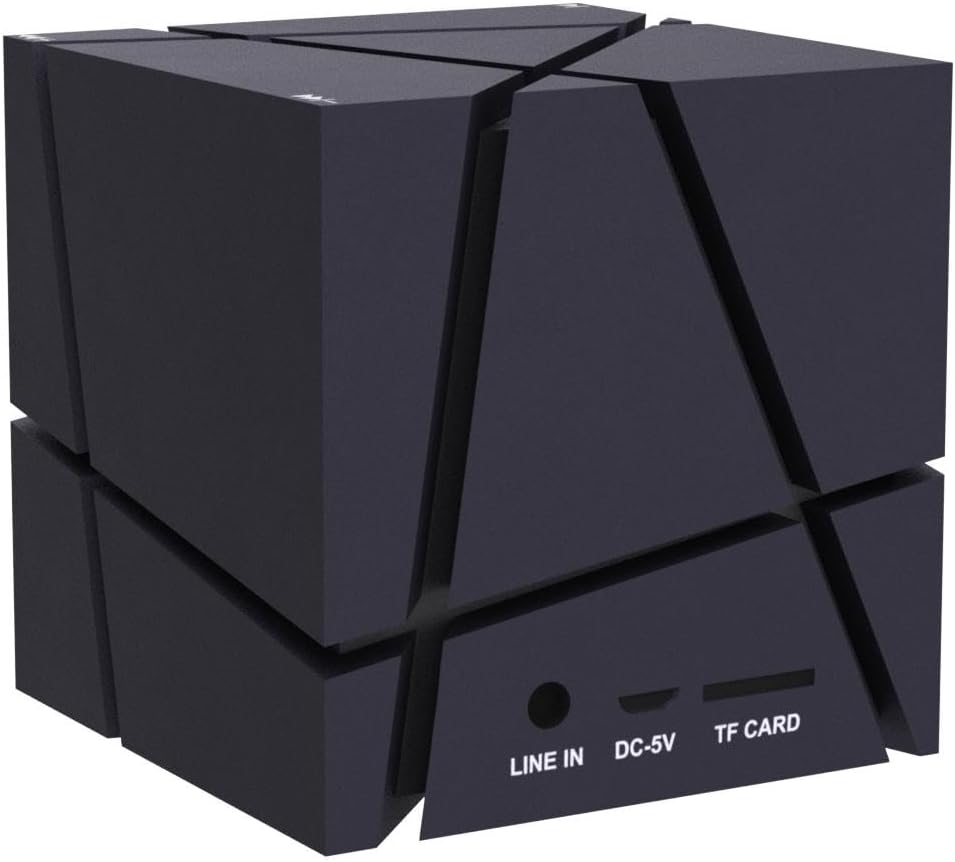
పోర్ట్లు మరియు కనెక్షన్లు
The speaker includes several ports for various connectivity options:
- వరుసగా పేర్చండి: 3.5mm audio input for connecting external devices via AUX cable.
- DC-5V: స్పీకర్ ఛార్జింగ్ కోసం మైక్రో USB పోర్ట్.
- TF కార్డ్: Slot for inserting a TF (Micro SD) memory card to play MP3 fileనేరుగా లు.
నియంత్రణ బటన్లు
The speaker's control buttons are integrated into its design, specifically located on the feet of the device. These are pressure-sensitive buttons.
- మైనస్ బటన్ (-): Used to decrease volume or navigate tracks. Double-pressing this button turns off the LED lights.
- ప్లస్ బటన్ (+): Used to increase volume or navigate tracks.
- ప్లే/పాజ్ బటన్: Controls media playback and answers/ends calls.

సెటప్
ప్రారంభ ఛార్జింగ్
Before first use, fully charge the speaker. Connect the supplied USB charging cable to the DC-5V port on the speaker and the other end to a USB power source (e.g., computer USB port, USB wall adapter). The charging indicator light will show the charging status.
పవర్ ఆన్/ఆఫ్
Locate the power switch on the underside of the speaker (refer to the "Control Buttons" image). Slide the switch to the "ON" position to power on the speaker. Slide it to the "OFF" position to power off.
ఆపరేటింగ్ సూచనలు
బ్లూటూత్ పెయిరింగ్
- Ensure the speaker is powered on and in Bluetooth mode (it usually defaults to this mode upon power-on). A voice prompt or indicator light will confirm.
- మీ పరికరంలో (స్మార్ట్ఫోన్, టాబ్లెట్, ల్యాప్టాప్), బ్లూటూత్ను ప్రారంభించి, అందుబాటులో ఉన్న పరికరాల కోసం శోధించండి.
- Select "EtoBesy Speaker" or a similar name from the list of devices.
- జత చేసిన తర్వాత, స్పీకర్ కనెక్షన్ విజయవంతమైందని సూచిస్తుంది మరియు మీరు వైర్లెస్గా ఆడియోను ప్లే చేయడం ప్రారంభించవచ్చు.
The speaker supports Bluetooth 4.0 technology with a transmission distance of up to 10 meters (32.8 feet).

TF Micro SD Card Playback
To play music directly from a memory card:
- Insert a TF (Micro SD) card containing MP3 audio files into the TF CARD slot.
- The speaker will automatically detect the card and begin playing the audio files.
- Use the Plus (+) and Minus (-) buttons to skip tracks and the Play/Pause button to control playback.
AUX ఇన్పుట్
For wired audio connection:
- Connect one end of the supplied audio cable to the LINE IN port on the speaker.
- Connect the other end of the audio cable to the 3.5mm audio output jack of your external device.
- స్పీకర్ స్వయంచాలకంగా AUX మోడ్కి మారుతుంది.
FM రేడియో
To use the built-in FM radio function:
- స్పీకర్ పవర్ ఆన్ చేయబడిందని నిర్ధారించుకోండి.
- Press the Mode button (if available, or cycle through modes using the Play/Pause button if it has multiple functions) until you hear the FM radio.
- Use the Plus (+) and Minus (-) buttons to scan for radio stations.
రంగురంగుల LED లైట్లు
The speaker features dynamic colorful LED lights. To turn off the lights, press the Minus (-) button twice in quick succession.

హ్యాండ్స్-ఫ్రీ కాలింగ్
When connected via Bluetooth to your smartphone, the built-in microphone allows for hands-free phone calls. Press the Play/Pause button to answer or end a call.
ఛార్జింగ్
To charge the speaker, connect the provided USB charging cable to the DC-5V port on the speaker and to a standard USB power source. The charging indicator will illuminate during charging and turn off or change color when fully charged. A full charge typically takes a few hours.
నిర్వహణ
- స్పీకర్ను నీరు మరియు అధిక తేమ నుండి దూరంగా ఉంచండి. ఉత్పత్తి నీటి నిరోధకం కాదు.
- స్పీకర్ను మృదువైన, పొడి గుడ్డతో శుభ్రం చేయండి. రాపిడి క్లీనర్లను లేదా ద్రావకాలను ఉపయోగించవద్దు.
- విపరీతమైన ఉష్ణోగ్రతలకు స్పీకర్ను బహిర్గతం చేయకుండా ఉండండి.
- ఎక్కువసేపు ఉపయోగంలో లేనప్పుడు, స్పీకర్ను చల్లని, పొడి ప్రదేశంలో నిల్వ చేసి, బ్యాటరీ ఆరోగ్యాన్ని కాపాడుకోవడానికి కాలానుగుణంగా ఛార్జ్ చేయండి.
ట్రబుల్షూటింగ్
| సమస్య | పరిష్కారం |
|---|---|
| స్పీకర్ పవర్ ఆన్ చేయదు. | Ensure the battery is charged. Connect the speaker to a power source using the USB charging cable. Verify the power switch is in the "ON" position. |
| బ్లూటూత్ ద్వారా జత చేయడం సాధ్యం కాదు. | Make sure the speaker is in Bluetooth pairing mode. Ensure Bluetooth is enabled on your device and it is within 10 meters of the speaker. Try restarting both the speaker and your device. |
| శబ్దం లేదు లేదా తక్కువ వాల్యూమ్ ఉంది. | Check the volume levels on both the speaker and your connected device. Ensure the correct input mode (Bluetooth, TF, AUX) is selected. |
| LED lights are not working or stuck. | Double-press the Minus (-) button to cycle the lights or turn them off and on again. |
| Speaker "jumps" due to bass. | Remove any plastic film from the feet of the speaker to ensure stable placement. |
స్పెసిఫికేషన్లు
| బ్రాండ్ | ఎటోబెసీ |
| మోడల్ పేరు | Mini Portable Wireless Cube Speaker |
| మోడల్ సంఖ్య | B06XY917BF |
| కనెక్టివిటీ టెక్నాలజీ | ఆక్సిలరీ, బ్లూటూత్, యుఎస్బి |
| వైర్లెస్ కమ్యూనికేషన్ టెక్నాలజీ | బ్లూటూత్ 4.0 |
| బ్లూటూత్ రేంజ్ | 10 మీటర్లు (32.8 అడుగులు) వరకు |
| స్పీకర్ రకం | 3D స్టీరియో |
| ప్రత్యేక ఫీచర్ | Colorful LED Light, Hands-free Calling, FM Radio, TF Card Playback |
| శక్తి మూలం | Battery Powered (Built-in lithium battery) |
| బ్యాటరీ కెపాసిటీ | 500 మిల్లీamp గంటలు |
| ఇన్పుట్ వాల్యూమ్tage | 5 వోల్ట్లు |
| స్పీకర్ గరిష్ట అవుట్పుట్ పవర్ | 3 వాట్స్ |
| ఫ్రీక్వెన్సీ రెస్పాన్స్ | 150 KHz |
| ఉత్పత్తి కొలతలు | 2.75"డి x 2.75"వా x 2.75"హ |
| వస్తువు బరువు | 8.5 ఔన్సులు |
| జలనిరోధితమైనది | నం |

వారంటీ మరియు మద్దతు
This product comes with a limited warranty. For warranty claims or technical support, please refer to the contact information provided at the point of purchase or visit the official EtoBesy webసైట్.