
పరిచయం
This manual provides instructions for setting up, operating, maintaining, and troubleshooting your Logitech Slim Folio Keyboard Case for iPad (5th and 6th Generation). Please read this manual thoroughly before using the product to ensure optimal performance and longevity.
సెటప్
1. Check iPad Compatibility
Ensure your iPad is a 5th or 6th Generation model. The model numbers for compatible iPads are A1822 and A1823.
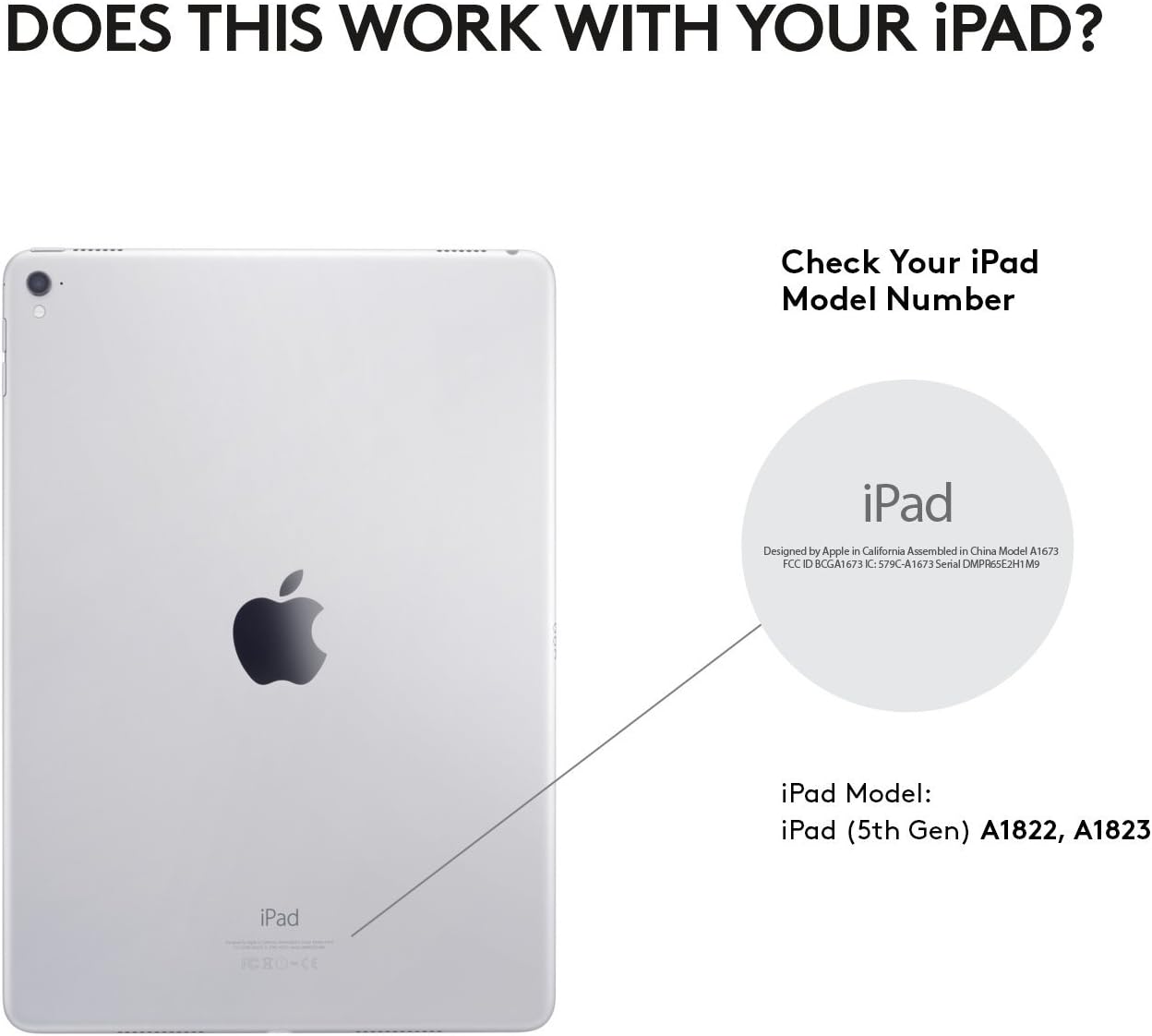
మూర్తి 1: Locate your iPad model number on the back of your device to confirm compatibility.
2. Insert iPad into the Case
Carefully align your iPad with the case and press it firmly into place. Ensure all ports, buttons, and the camera are accessible through the case's cutouts.

మూర్తి 2: The Slim Folio case provides comprehensive front and back protection for your iPad, with precise cutouts for all functionalities.
3. Initial Keyboard Activation and Bluetooth Pairing
The keyboard is powered by replaceable coin cell batteries, designed for a long lifespan. To activate the keyboard and pair it with your iPad:
- Open the Slim Folio case and place your iPad into the typing position. The keyboard will automatically power on.
- మీ ఐప్యాడ్లో, ఇక్కడికి వెళ్లండి సెట్టింగ్లు > బ్లూటూత్.
- Select "Logitech Slim Folio" from the list of available devices to pair.
- A green light on the keyboard indicates it is powered on and ready for connection.

మూర్తి 3: The Slim Folio features a replaceable battery with up to 4 years of life (based on 2 hours daily use) and an auto sleep/wake function.
For a visual guide on setting up your Logitech Slim Folio, please watch the official video below:
వీడియో 1: Official Logitech video demonstrating the setup process for the iPad Keyboard Case.
ఆపరేటింగ్ సూచనలు
టైపింగ్ మోడ్
To use the keyboard, simply open the case and position your iPad in the magnetic typing stand. The keyboard will automatically activate, allowing you to type comfortably. The keys are well-spaced for a laptop-like typing experience.

మూర్తి 4: The Slim Folio transforms your iPad into a laptop-like device, offering a comfortable typing experience with perfectly spaced keys and iOS shortcut keys.
Viewing మోడ్
For media consumption or browsing, you can fold the keyboard behind the iPad. The case is designed to hold the iPad securely at an optimal viewing angle. The keyboard will automatically deactivate in this mode to prevent accidental key presses and conserve battery.

మూర్తి 5: The Slim Folio offers versatile modes for typing, viewing, and protecting your iPad.
iOS షార్ట్కట్ కీలు
The keyboard features a dedicated row of iOS shortcut keys for quick access to common functions:
- హోమ్: హోమ్ స్క్రీన్కి తిరిగి వెళ్ళు.
- సిరి: సిరిని సక్రియం చేయండి.
- స్క్రీన్ ప్రకాశం: స్క్రీన్ ప్రకాశాన్ని సర్దుబాటు చేయండి.
- శోధన: Open the search function.
- మీడియా నియంత్రణలు: Play/pause, skip tracks.
- వాల్యూమ్ నియంత్రణలు: ఆడియో వాల్యూమ్ను సర్దుబాటు చేయండి.
- మరియు మరిన్ని.
నిర్వహణ
కేసును శుభ్రపరచడం
The Slim Folio case is made from water-repellent, easy-to-clean fabric and durable plastic material. To clean, gently wipe with a damp వస్త్రం. కఠినమైన రసాయనాలు లేదా రాపిడి క్లీనర్లను నివారించండి.
బ్యాటరీ భర్తీ
The keyboard uses replaceable coin cell batteries (CR2032). The battery life is approximately 4 years based on 2 hours of daily use. When the battery is low, the indicator light on the keyboard may flash. To replace the battery:
- Locate the battery compartment on the side of the keyboard.
- Use a small coin or tool to open the compartment.
- Remove the old batteries and insert new CR2032 batteries, ensuring correct polarity.
- బ్యాటరీ కంపార్ట్మెంట్ను సురక్షితంగా మూసివేయండి.
ట్రబుల్షూటింగ్
కీబోర్డ్ ప్రతిస్పందించడం లేదు
- బ్యాటరీని తనిఖీ చేయండి: Ensure the batteries are not depleted. Replace if necessary.
- బ్లూటూత్ను తిరిగి జత చేయండి: Go to iPad Settings > Bluetooth, forget the "Logitech Slim Folio" device, and then re-pair it.
- ఐప్యాడ్ను పునఃప్రారంభించండి: Sometimes a simple restart of your iPad can resolve connectivity issues.
కీలు సరిగ్గా పనిచేయకపోవడం
- క్లీన్ కీలు: తాళాల కింద ఎలాంటి చెత్తాచెదారం పేరుకుపోకుండా చూసుకోండి.
- సాఫ్ట్వేర్ అప్డేట్: Check if your iPad's iOS is up to date.
iPad Not Staying in Typing Position
The magnetic strip that holds the iPad in typing position is strong. If your iPad is not staying securely, ensure it is correctly aligned with the magnetic strip and that no foreign objects are interfering with the connection.
స్పెసిఫికేషన్లు
| బ్రాండ్ | లాజిటెక్ |
| మోడల్ సంఖ్య | 920-008617 |
| అనుకూల పరికరాలు | iPad 5th Generation, iPad 6th Generation (Models A1822, A1823) |
| కనెక్టివిటీ టెక్నాలజీ | బ్లూటూత్ LE |
| కీబోర్డ్ వివరణ | పొర |
| కీల సంఖ్య | 78 |
| బ్యాటరీ రకం | Replaceable Coin Cell (CR2032) |
| అంచనా వేయబడిన బ్యాటరీ జీవితం | Up to 4 years (based on 2 hours daily use) |
| మెటీరియల్ | Plastic, Water-repellent Fabric |
| రంగు | కార్బన్ నలుపు |
| వస్తువు బరువు | 1 పౌండ్ |
వారంటీ మరియు మద్దతు
The Logitech Slim Folio Keyboard Case comes with a 1-సంవత్సరం పరిమిత వారంటీ. For warranty claims, technical support, or further assistance, please visit the official Logitech support webసైట్ లేదా వారి కస్టమర్ సేవను సంప్రదించండి.
For additional information and resources, please visit: www.logitech.com