
AudioCodes UC405HDEG
ఆడియోకోడ్లు 405HD IP ఫోన్ యూజర్ మాన్యువల్
Model: UC405HDEG
పరిచయం
This manual provides comprehensive instructions for the setup, operation, maintenance, and troubleshooting of your AudioCodes 405HD IP Phone. Please read this manual carefully before using the device to ensure proper functionality and to avoid potential issues.
The AudioCodes 405HD is a cost-effective IP phone designed for Voice over IP (VoIP) communication, offering essential features for business and office environments.
ప్యాకేజీ విషయాలు
Before proceeding with the setup, verify that all components are present in the package. The standard package for the AudioCodes 405HD IP Phone typically includes:
- AudioCodes 405HD IP Phone Base Unit
- హ్యాండ్సెట్
- హ్యాండ్సెట్ త్రాడు
- ఈథర్నెట్ కేబుల్
- డెస్క్ స్టాండ్
Note: A power adapter is typically not included with this model. The phone is designed to be powered via Power over Ethernet (PoE) or a compatible external power supply (sold separately).
సెటప్
1. భౌతిక సంబంధాలు
Follow these steps to connect your AudioCodes 405HD IP Phone:
- డెస్క్ స్టాండ్ అటాచ్ చేయండి: Align the tabs on the desk stand with the slots on the back of the phone base unit and slide it into place until it clicks securely.
- హ్యాండ్సెట్ను కనెక్ట్ చేయండి: Plug one end of the coiled handset cord into the handset and the other end into the port labeled with a handset icon on the side of the phone base unit.
- నెట్వర్క్ (PoE) కి కనెక్ట్ అవ్వండి: If using Power over Ethernet, connect one end of the Ethernet cable to the LAN port on the back of the phone and the other end to a PoE-enabled network switch or router. The phone will power on automatically.
- Connect to Network (Non-PoE with Power Adapter): If not using PoE, connect one end of the Ethernet cable to the LAN port on the back of the phone and the other end to your network switch or router. Then, connect a compatible external power adapter (not included) to the power port on the back of the phone and plug it into a power outlet.
- PC కి కనెక్ట్ అవ్వండి (ఐచ్ఛికం): మీరు ఫోన్ ద్వారా కంప్యూటర్ను కనెక్ట్ చేయాలనుకుంటే, మీ PC నుండి ఈథర్నెట్ కేబుల్ను ఫోన్ వెనుక ఉన్న PC పోర్ట్కు కనెక్ట్ చేయండి.
2. ప్రారంభ బూట్-అప్
Once connected to power and network, the phone will begin its boot-up sequence. This process may take a few minutes as the phone obtains an IP address and registers with your VoIP service provider. The display will show progress messages. Upon successful boot-up, the display will show the current date, time, and line status.
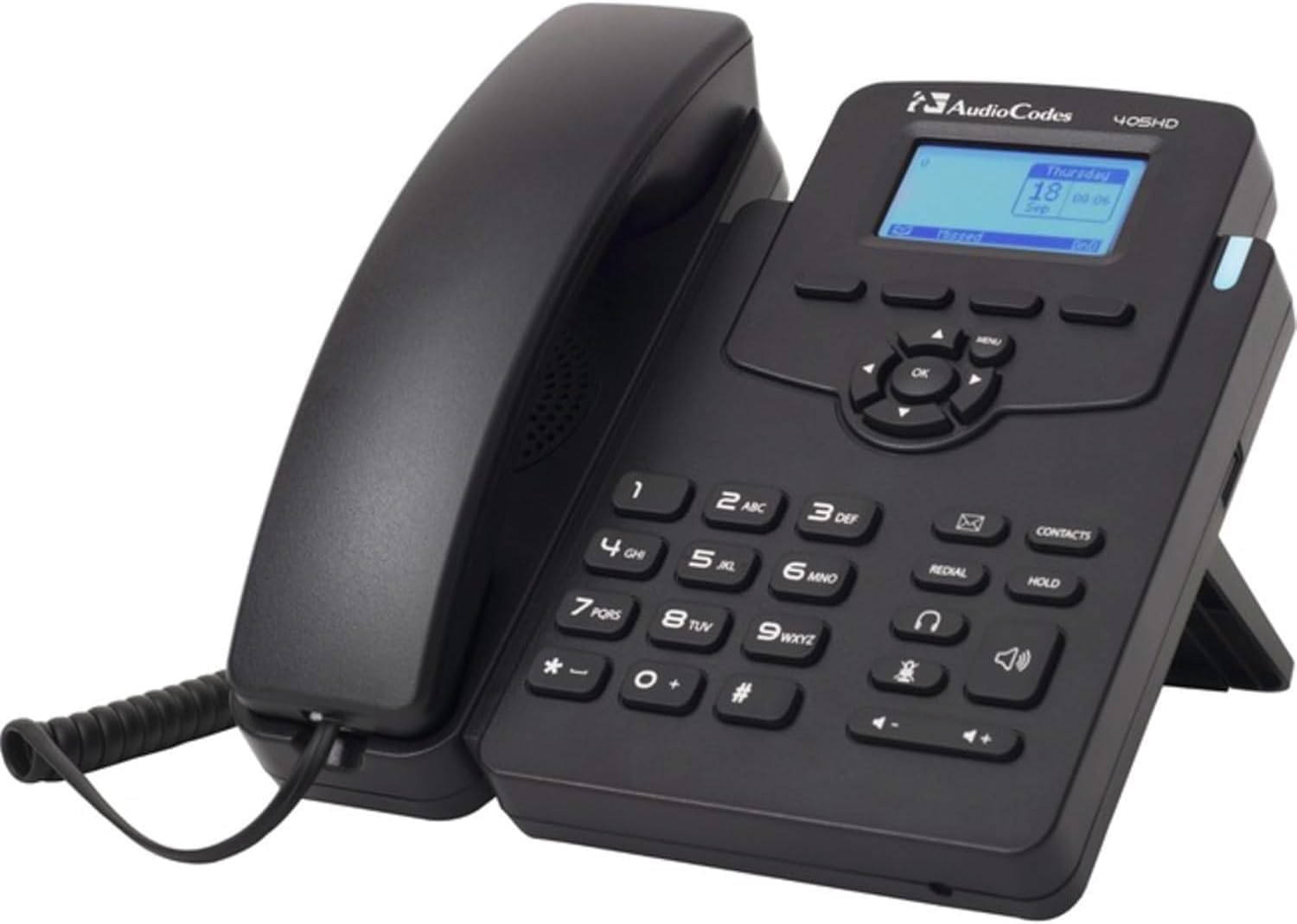
This image displays the AudioCodes 405HD IP Phone, a black corded VoIP phone. The handset is cradled on the left side of the base unit. The base features a numeric keypad, function buttons for redial, hold, contacts, speakerphone, and headset, and a central navigation cluster with an 'OK' button. A small blue-backlit LCD screen shows 'Thursday 18 Sep 00:06'. The phone is designed to stand upright with a built-in kickstand.
ఆపరేటింగ్ సూచనలు
ప్రాథమిక కాల్ విధులు
- కాల్ చేయడం:
- హ్యాండ్సెట్ను తీయండి లేదా నొక్కండి స్పీకర్ ఫోన్ బటన్.
- కీప్యాడ్ ఉపయోగించి కావలసిన ఫోన్ నంబర్ను డయల్ చేయండి.
- నొక్కండి డయల్ చేయండి soft key (if displayed) or wait for the call to connect automatically.
- కాల్కు సమాధానం ఇవ్వడం:
- ఫోన్ మోగినప్పుడు, హ్యాండ్సెట్ తీయండి లేదా నొక్కండి స్పీకర్ ఫోన్ బటన్.
- ప్రత్యామ్నాయంగా, నొక్కండి సమాధానం soft key (if displayed).
- కాల్ని ముగించడం:
- హ్యాండ్సెట్ను తిరిగి క్రెడిల్లో ఉంచండి.
- స్పీకర్ఫోన్ లేదా హెడ్సెట్ ఉపయోగిస్తుంటే, నొక్కండి కాల్ ముగించు soft key or the స్పీకర్ ఫోన్ మళ్ళీ బటన్.
Keypad and Navigation
- సంఖ్యా కీప్యాడ్ (0-9, *, #): నంబర్లను డయల్ చేయడానికి మరియు టెక్స్ట్ ఎంటర్ చేయడానికి ఉపయోగించబడుతుంది.
- Navigation Cluster (Up, Down, Left, Right, OK): Used to navigate menus and confirm selections on the display.
- మెనూ బటన్: Accesses the phone's main menu for settings and features.
- రీడియల్ బటన్: చివరిగా కాల్ చేసిన నంబర్కు డయల్ చేస్తుంది.
- హోల్డ్ బటన్: యాక్టివ్ కాల్ను హోల్డ్లో ఉంచుతుంది.
- Contacts Button: Accesses the phone's contact directory.
- స్పీకర్ ఫోన్ బటన్: స్పీకర్ఫోన్ మోడ్ను ఆన్/ఆఫ్కు టోగుల్ చేస్తుంది.
- హెడ్సెట్ బటన్: Toggles headset mode on/off (if a headset is connected).
- వాల్యూమ్ బటన్లు (+/-): Adjusts handset, speakerphone, or ringer volume.
నిర్వహణ
Proper maintenance ensures the longevity and optimal performance of your AudioCodes 405HD IP Phone.
- శుభ్రపరచడం:
- ఫోన్ను శుభ్రం చేసే ముందు పవర్ నుండి డిస్కనెక్ట్ చేయండి.
- మృదువైన, కొద్దిగా d ఉపయోగించండిamp, ఫోన్ ఉపరితలాలను తుడవడానికి లింట్-ఫ్రీ క్లాత్.
- Do not use harsh chemicals, abrasive cleaners, or aerosol sprays directly on the phone.
- ఏదైనా రంధ్రాలలోకి తేమ రాకుండా చూసుకోండి.
- సాధారణ సంరక్షణ:
- ఫోన్ను ప్రత్యక్ష సూర్యకాంతి, వేడి వనరులు మరియు అధిక తేమ నుండి దూరంగా ఉంచండి.
- Avoid dropping the phone or subjecting it to strong vibrations.
- పరికరం చుట్టూ సరైన వెంటిలేషన్ ఉండేలా చూసుకోండి.
ట్రబుల్షూటింగ్
This section addresses common issues you might encounter with your AudioCodes 405HD IP Phone.
| సమస్య | సాధ్యమైన కారణం | పరిష్కారం |
|---|---|---|
| ఫోన్ పవర్ ఆన్ అవ్వడం లేదు. | No power from PoE switch or power adapter. Defective power adapter or phone unit. |
|
| డయల్ టోన్ లేదు. | Phone not registered with VoIP service. Network connectivity issue. |
|
| కాల్స్ చేయలేరు లేదా స్వీకరించలేరు. | No dial tone (see above). Incorrect dialing procedure. Service provider issue. |
|
| డిస్ప్లే ఖాళీగా లేదా చదవలేని విధంగా ఉంది. | No power. Display settings. |
|
స్పెసిఫికేషన్లు
| ఫీచర్ | వివరాలు |
|---|---|
| బ్రాండ్ | ఆడియోకోడ్లు |
| మోడల్ సంఖ్య | UC405HDEG |
| వస్తువు బరువు | 2.08 పౌండ్లు |
| రంగు | నలుపు |
| టెలిఫోన్ రకం | corded |
| శక్తి మూలం | Corded Electric (requires external adapter or PoE) |
| డయలర్ రకం | ఒకే కీప్యాడ్ |
| సమాధానం సిస్టమ్ రకం | డిజిటల్ |
| అనుకూల పరికరాలు | VoIP services, multi-line systems |
| కాన్ఫరెన్స్ కాల్ సామర్థ్యం | ప్రాథమిక |
| బహుళ లైన్ ఆపరేషన్ | బహుళ-లైన్ ఆపరేషన్ |
వారంటీ మరియు మద్దతు
Information regarding product warranty and technical support for the AudioCodes 405HD IP Phone is typically provided by the original reseller or your VoIP service provider. Please refer to your purchase documentation or contact your vendor for specific details on warranty coverage and support options.
Ask a question about this manual
Ask about setup, troubleshooting, compatibility, parts, safety, or missing instructions. Manuals+ will review the question and use this page’s manual context to help answer it.