
Intermatic DT101
Intermatic DT101 Digital Time Switch User Manual
మోడల్: DT101
పరిచయం
The Intermatic DT101 Digital Time Switch is designed to provide precise, automated control over electrical circuits. This electronic time switch offers advanced features compared to traditional mechanical timers, including up-to-the-minute programming, battery backup for power outages, and automatic Daylight Saving Time adjustments. It supports up to 28 programmable events and operates on a standard 24-hour cycle, making it ideal for daily repeating schedules.
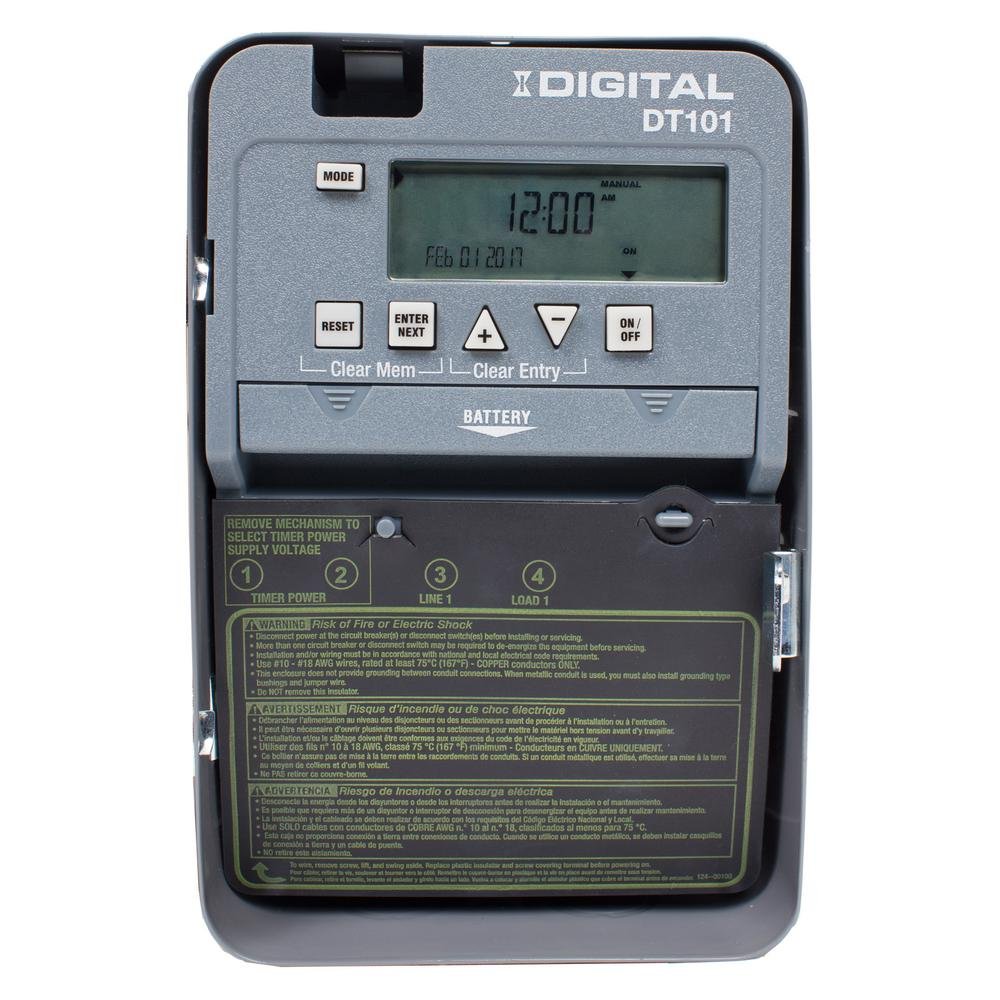
మూర్తి 1: ముందు view of the Intermatic DT101 Digital Time Switch, showing the digital display, control buttons, and battery compartment.
ముఖ్యమైన భద్రతా సమాచారం
హెచ్చరిక: అగ్ని ప్రమాదం లేదా విద్యుత్ షాక్. Installation and servicing of this product must be performed by a qualified electrician in accordance with all national and local electrical codes. Always disconnect power at the circuit breaker or disconnect switch before installing or servicing the unit. This enclosure does not provide grounding between conduit connections. If metal conduit is used, you must also install grounding type bushings and jumper wires.
- ఈ పరికరాన్ని ఇన్స్టాల్ చేయడానికి లేదా ఉపయోగించే ముందు అన్ని సూచనలను చదవండి.
- విద్యుత్ సరఫరా వాల్యూమ్తో సరిపోలుతుందని నిర్ధారించుకోండిtage requirements of the timer (120-277 VAC, 50/60 Hz).
- స్విచ్ యొక్క గరిష్ట లోడ్ రేటింగ్లను మించకూడదు.
- This device is intended for indoor use only unless installed in a suitable outdoor enclosure.

Figure 2: The Intermatic DT101 unit with its cover open, revealing the internal components, wiring terminals, and printed safety warnings on the inside of the door.
సెటప్ మరియు ఇన్స్టాలేషన్
Proper installation is critical for the safe and effective operation of your DT101 Digital Time Switch. Follow these steps carefully:
- పవర్ డిస్కనెక్ట్ చేయండి: Before beginning any installation, ensure that power to the circuit where the timer will be installed is completely disconnected at the main circuit breaker or fuse box. Verify with a voltagఇ టెస్టర్.
- మౌంటు: Mount the timer enclosure securely to a wall or suitable surface using appropriate fasteners. Ensure it is level and accessible for wiring and programming.
- బ్యాటరీ ఇన్స్టాలేషన్: Install the two (2) AAA batteries (required, not included) into the battery compartment. This provides backup power for settings during power outages.
- వైరింగ్: Connect the electrical wires to the appropriate terminals inside the timer. The DT101 supports 120-277 VAC. Refer to the wiring diagram printed inside the unit's door for correct connections (Line 1, Load 1, Neutral, Ground). Ensure all connections are tight and secure.
- Initial Power-Up and Reset: After wiring, close the enclosure door. Restore power to the circuit. The unit should power on. If the display is blank or unresponsive, or if the AUTO function does not work as expected, perform a reset. To reset, press the రీసెట్ చేయండి button. Some users have reported needing to press నమోదు చేయండి మరియు రీసెట్ చేయండి simultaneously if the unit does not function correctly after initial power-up. Ensure the device is ON before connecting the main power.
- వాల్యూమ్tagఇ ఎంపిక: If applicable, ensure the selector switch inside the unit is set to the correct input voltage (120V, 208V, 240V, or 277V) matching your electrical supply.

మూర్తి 3: క్లోజ్-అప్ view of the internal wiring and circuit board of the Intermatic DT101, illustrating the connection points for electrical installation.
ఆపరేటింగ్ సూచనలు
The DT101 allows for flexible programming of up to 28 ON/OFF events. Follow these steps to set the time and program schedules:
ప్రస్తుత సమయం మరియు తేదీని సెట్ చేస్తోంది
- నొక్కండి మోడ్ button repeatedly until "SET CLOCK" appears on the display.
- ఉపయోగించండి + మరియు - గంటను సర్దుబాటు చేయడానికి బటన్లను నొక్కి, ఆపై నొక్కండి ఎంటర్/తదుపరి.
- Adjust minutes, then press ఎంటర్/తదుపరి.
- Adjust the year, then press ఎంటర్/తదుపరి.
- Adjust the month, then press ఎంటర్/తదుపరి.
- Adjust the day, then press ఎంటర్/తదుపరి.
- The display will return to the current time. The DT101 automatically adjusts for Daylight Saving Time.
ఈవెంట్లను ఆన్/ఆఫ్ చేయడం ప్రోగ్రామింగ్
- నొక్కండి మోడ్ button repeatedly until "SET PROGRAM" appears.
- The display will show "PROG 1 ON". Use + మరియు - to set the desired ON time for the first event. Press ఎంటర్/తదుపరి.
- Select the days of the week for this ON event (e.g., MO TU WE TH FR SA SU for everyday, or specific days). Press ఎంటర్/తదుపరి.
- The display will show "PROG 1 OFF". Set the desired OFF time for the first event. Press ఎంటర్/తదుపరి.
- Select the days of the week for this OFF event. Press ఎంటర్/తదుపరి.
- Repeat steps 2-5 for additional ON/OFF events (up to 28 total). To exit programming, press మోడ్.
మాన్యువల్ ఓవర్రైడ్
The DT101 allows for temporary or permanent manual override of the programmed schedule:
- తాత్కాలిక ఓవర్రైడ్: నొక్కండి ఆన్/ఆఫ్ button once. The output will switch to the opposite state (ON if OFF, OFF if ON) until the next programmed event.
- Permanent Override: నొక్కండి మరియు పట్టుకోండి ఆన్/ఆఫ్ button for 3 seconds. The output will remain in its current state, ignoring all programmed events, until the button is pressed and held again for 3 seconds to return to automatic mode.
నిర్వహణ
The Intermatic DT101 Digital Time Switch is designed for minimal maintenance. However, periodic checks can ensure its longevity and reliable operation:
- బ్యాటరీ భర్తీ: The two AAA batteries provide backup for settings during power outages. Replace them every 3-5 years, or if a low battery indicator appears on the display. Always replace batteries with the unit powered off at the circuit breaker.
- శుభ్రపరచడం: Clean the exterior of the unit with a soft, dry cloth. Do not use abrasive cleaners or solvents.
- కనెక్షన్ తనిఖీ: Periodically, with power disconnected, inspect the wiring connections to ensure they remain tight and free from corrosion.
ట్రబుల్షూటింగ్
| సమస్య | సాధ్యమైన కారణం | పరిష్కారం |
|---|---|---|
| Display is blank or unit is unresponsive. | No power to the unit; incorrect wiring; dead batteries. | Check circuit breaker. Verify wiring connections. Replace AAA batteries. |
| Timer does not follow programmed schedule (stays ON/OFF). | Unit is in permanent manual override mode; incorrect initial setup sequence; programming error. | నొక్కి పట్టుకోండి ఆన్/ఆఫ్ button for 3 seconds to return to AUTO mode. Ensure batteries were installed and unit was ON before connecting main power. Perform a full reset (రీసెట్ చేయండి బటన్, లేదా నమోదు చేయండి + రీసెట్ చేయండి if needed) and re-program. Double-check programmed times and days. |
| సమయం లేదా తేదీ తప్పు. | Time not set correctly; power outage without battery backup. | Re-set current time and date. Ensure batteries are installed and functional. |
| Cannot program events. | Unit not in programming mode; maximum events reached. | నొక్కండి మోడ్ until "SET PROGRAM" appears. The unit supports up to 28 events. |
స్పెసిఫికేషన్లు
- మోడల్ సంఖ్య: DT101D89
- ఇన్పుట్ వాల్యూమ్tage: 120-277 VAC, 50/60 Hz (selectable)
- స్విచ్ రకం: SPST (సింగిల్ పోల్ సింగిల్ త్రో)
- Ampకోపం: 20 Amp
- Number of Events: 28 వరకు ఆన్/ఆఫ్ ఈవెంట్లు
- బ్యాటరీ బ్యాకప్: 2 x AAA బ్యాటరీలు (చేర్చబడలేదు)
- కొలతలు: 3.2"D x 8"W x 5.4"H (8.1 సెం.మీ D x 20.3 సెం.మీ W x 13.7 సెం.మీ H)
- బరువు: 2.4 పౌండ్లు (1.09 కిలోలు)
- రంగు: బూడిద రంగు
- ఫీచర్లు: To-the-minute accuracy, Temporary/Permanent manual override, Automatic Daylight Saving Time adjustment.
వారంటీ మరియు మద్దతు
For warranty information and technical support, please contact Intermatic customer service or visit the official Intermatic webవారంటీ క్లెయిమ్ల కోసం కొనుగోలు రుజువుగా మీ కొనుగోలు రసీదును ఉంచండి.
ఇంటర్మాటిక్ Webసైట్: www.intermatic.com
Ask a question about this manual
Ask about setup, troubleshooting, compatibility, parts, safety, or missing instructions. Manuals+ will review the question and use this page’s manual context to help answer it.