
పరిచయం
This manual provides comprehensive instructions for the installation, operation, and maintenance of your ALC AWF23 SightHD 1080p Full HD Pan and Tilt Indoor Wi-Fi Camera. Designed for indoor surveillance, this camera offers remote monitoring, two-way audio, and motion detection capabilities, all accessible through the ALC SightHD mobile application.
పెట్టెలో ఏముంది
- One (1) ALC AWF23 SightHD 1080p Full HD Pan and Tilt Indoor Wi-Fi Camera
- వాల్ మౌంట్ కిట్
- AC పవర్ అడాప్టర్
- పవర్ ఎక్స్టెన్షన్ కేబుల్
- త్వరిత ప్రారంభ గైడ్

Image: The ALC AWF23 SightHD camera, a white dome-shaped device with a black camera lens, shown from the front angle.
ఉత్పత్తి ముగిసిందిview
The ALC AWF23 SightHD camera offers a range of features for effective indoor surveillance:
- 1080p పూర్తి HD వీడియో: Provides clear, high-definition video streaming and recording (1920 x 1080 resolution).
- రిమోట్ పాన్ మరియు టిల్ట్: కెమెరాలను నియంత్రించండి viewing angle horizontally (270°) and vertically (100°) via the ALC SightHD app.
- రెండు-మార్గం ఆడియో: Listen to audio from the camera's location and speak through the camera's built-in speaker using your smartphone.
- రాత్రి దృష్టి: Equipped with 5 surface-mounted, high-power infrared LEDs for clear monitoring up to 35 feet in low-light or complete darkness.
- చలన గుర్తింపు: Receive instant email alerts and push notifications when motion is detected.
- స్థానిక నిల్వ: Supports microSD card recording up to 128 GB (card sold separately).
- Cloud Storage Integration: Option to automatically upload video clips from the camera to your personal Google Drive or Dropbox account.
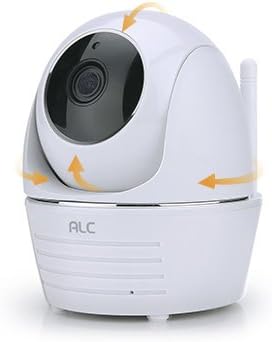
Image: The ALC AWF23 SightHD camera with orange arrows indicating its pan and tilt movement capabilities.
సెటప్
1. Download the ALC SightHD App
కోసం వెతకండి "ALC SightHD" on the Apple App Store or Google Play Store and install it on your smartphone or tablet. This app is essential for controlling and monitoring your camera.
2. కెమెరాపై పవర్
Connect the AC power adapter to the camera and plug it into a power outlet. The camera will power on and perform a self-test. Wait for the status indicator light to show it is ready for pairing (refer to the app for specific light indications during setup).
3. Wi-Fiకి కనెక్ట్ చేయండి
Open the ALC SightHD app and follow the on-screen instructions to add your new camera. This typically involves scanning a QR code on the camera or manually entering details, then connecting the camera to your home Wi-Fi network. Ensure your Wi-Fi network is 2.4GHz, as 5GHz networks are not supported.
4. కెమెరాను మౌంట్ చేయడం (ఐచ్ఛికం)
If desired, use the included wall mount kit to secure the camera to a wall or ceiling. Ensure the camera is positioned to cover the desired surveillance area. Follow the instructions provided with the wall mount kit for proper installation.

Image: The ALC AWF23 SightHD camera positioned next to a smartphone screen showing the ALC SightHD application interface.
మీ కెమెరాను ఆపరేట్ చేస్తోంది
రిమోట్ పాన్ మరియు టిల్ట్ కంట్రోల్
Within the ALC SightHD app, use the directional controls to remotely adjust the camera's horizontal (pan) and vertical (tilt) viewing angles. You can also set preset vantage points for quick access to specific areas.
రెండు-మార్గం ఆడియో
To listen to audio from the camera's location, tap the speaker icon in the app's live view. To speak through the camera's built-in speaker, press and hold the microphone icon and speak into your smartphone's microphone. Release the icon to stop speaking.
మోషన్ డిటెక్షన్ మరియు హెచ్చరికలు
Configure motion detection sensitivity and alert preferences (email, push notifications) within the app settings. When motion is detected, the camera will record and send alerts according to your settings. You can also define specific motion detection zones.
నైట్ విజన్
The camera automatically switches to night vision mode in low-light conditions. The infrared LEDs provide illumination for clear black and white video up to 35 feet, ensuring surveillance even in total darkness.
Video Recording and Storage
Insert a microSD card (up to 128 GB, sold separately) into the camera's slot for local recording. Configure recording settings (continuous, motion-triggered) via the app. You can also link your Google Drive or Dropbox account in the app settings to automatically upload recorded video clips to cloud storage.

Image: A graphic illustrating key features of the ALC AWF23 SightHD camera, including 1080p Full HD, pan & tilt, two-way audio, night vision, and motion detection.
నిర్వహణ
- శుభ్రపరచడం: Gently wipe the camera lens and exterior with a soft, dry cloth. Do not use liquid cleaners, solvents, or abrasive materials, as these can damage the camera.
- సాఫ్ట్వేర్ అప్డేట్లు: Periodically check the ALC SightHD app for firmware updates for your camera. Keeping the firmware updated ensures optimal performance, security, and access to new features.
- పవర్ సైకిల్: If the camera experiences unexpected issues or becomes unresponsive, try unplugging it from the power source for 10 seconds and then plugging it back in. This can resolve minor software glitches.
ట్రబుల్షూటింగ్
- కెమెరా పవర్ చేయడం లేదు:
- Ensure the AC power adapter is securely connected to the camera and a working power outlet.
- మరొక పరికరాన్ని ప్లగ్ చేయడం ద్వారా పవర్ అవుట్లెట్ పనిచేస్తుందో లేదో ధృవీకరించండి.
- Wi-Fiకి కనెక్ట్ చేయడం సాధ్యం కాలేదు:
- మీ Wi-Fi నెట్వర్క్ 2.4GHz అని నిర్ధారించండి. కెమెరా 5GHz నెట్వర్క్లకు మద్దతు ఇవ్వదు.
- Ensure the camera is within effective range of your Wi-Fi router.
- Double-check your Wi-Fi password for accuracy.
- Try restarting your Wi-Fi router and the camera.
- పేలవమైన వీడియో నాణ్యత:
- Check your internet connection speed. A stable and fast connection is required for optimal 1080p streaming.
- కెమెరా లెన్స్ శుభ్రంగా మరియు అడ్డంకులు లేకుండా ఉందని నిర్ధారించుకోండి.
- Motion Detection Not Working or Too Sensitive:
- Adjust the motion detection sensitivity settings within the ALC SightHD app.
- కెమెరా ఫీల్డ్ను నిర్ధారించుకోండి view is clear of objects that might cause false alerts (e.g., moving curtains, tree branches).
- రెండు-మార్గం ఆడియో సమస్యలు:
- Ensure your smartphone's microphone and speaker are working correctly.
- Check the volume settings on your smartphone and within the app.
- Verify a stable internet connection for both the camera and your smartphone.
స్పెసిఫికేషన్లు
| ఫీచర్ | వివరాలు |
|---|---|
| మోడల్ సంఖ్య | AWF23 |
| ఇండోర్/అవుట్డోర్ వినియోగం | ఇండోర్ |
| వీడియో క్యాప్చర్ రిజల్యూషన్ | 1080p (1920 x 1080) |
| పాన్ రేంజ్ | 270° |
| టిల్ట్ పరిధి | 100° |
| నైట్ విజన్ రేంజ్ | 35 అడుగుల వరకు |
| కనెక్టివిటీ ప్రోటోకాల్ | Wi-Fi (2.4GHz మాత్రమే) |
| శక్తి మూలం | AC/DC |
| వాట్tage | 5 వాట్స్ |
| అనుకూల పరికరాలు | స్మార్ట్ఫోన్, టాబ్లెట్ |
| నియంత్రణ పద్ధతి | App (ALC SightHD) |
| నిల్వ | MicroSD card (up to 128 GB, not included) |
| రెండు-మార్గం ఆడియో | అవును |
| మోషన్ డిటెక్షన్ | అవును |
| కొలతలు (L x W x H) | 4 x 3 x 4.6 అంగుళాలు |
| వస్తువు బరువు | 2.05 పౌండ్లు |
| రంగు | తెలుపు |
వారంటీ సమాచారం
For detailed warranty information regarding your ALC AWF23 SightHD camera, please refer to the warranty card included with your product or visit the official ALC website. Warranty terms and conditions may vary by region and purchase date. Please retain your proof of purchase for warranty claims.
మద్దతు
If you encounter any issues or require further assistance with your ALC AWF23 SightHD camera, please visit the ALC support website or contact their customer service department. Contact information can typically be found in the Quick Start Guide or on the official ALC website. Online resources often include FAQs, troubleshooting guides, and software downloads.