
1. పరిచయం
The Vgate VS890S is a versatile diagnostic scan tool designed to read and clear trouble codes from your vehicle's On-Board Diagnostics (OBD-II) system. It supports all OBD-II protocols, including CAN, J1850 PWM, J1850 VPW, ISO9141, and KWP2000. This manual provides detailed instructions for the proper use and maintenance of your VS890S scanner.
2. భద్రతా సమాచారం
Always observe safety precautions when working on a vehicle. Improper use of diagnostic tools can lead to personal injury or damage to the vehicle. Ensure the vehicle is in a safe, well-ventilated area. Do not wear loose clothing or jewelry when working near moving engine parts. Keep the scanner away from water and extreme temperatures.
3. ఉత్పత్తి ముగిసిందిview
The Vgate VS890S features a user-friendly interface with a clear LCD display and intuitive button layout. Familiarize yourself with the device's components before operation.
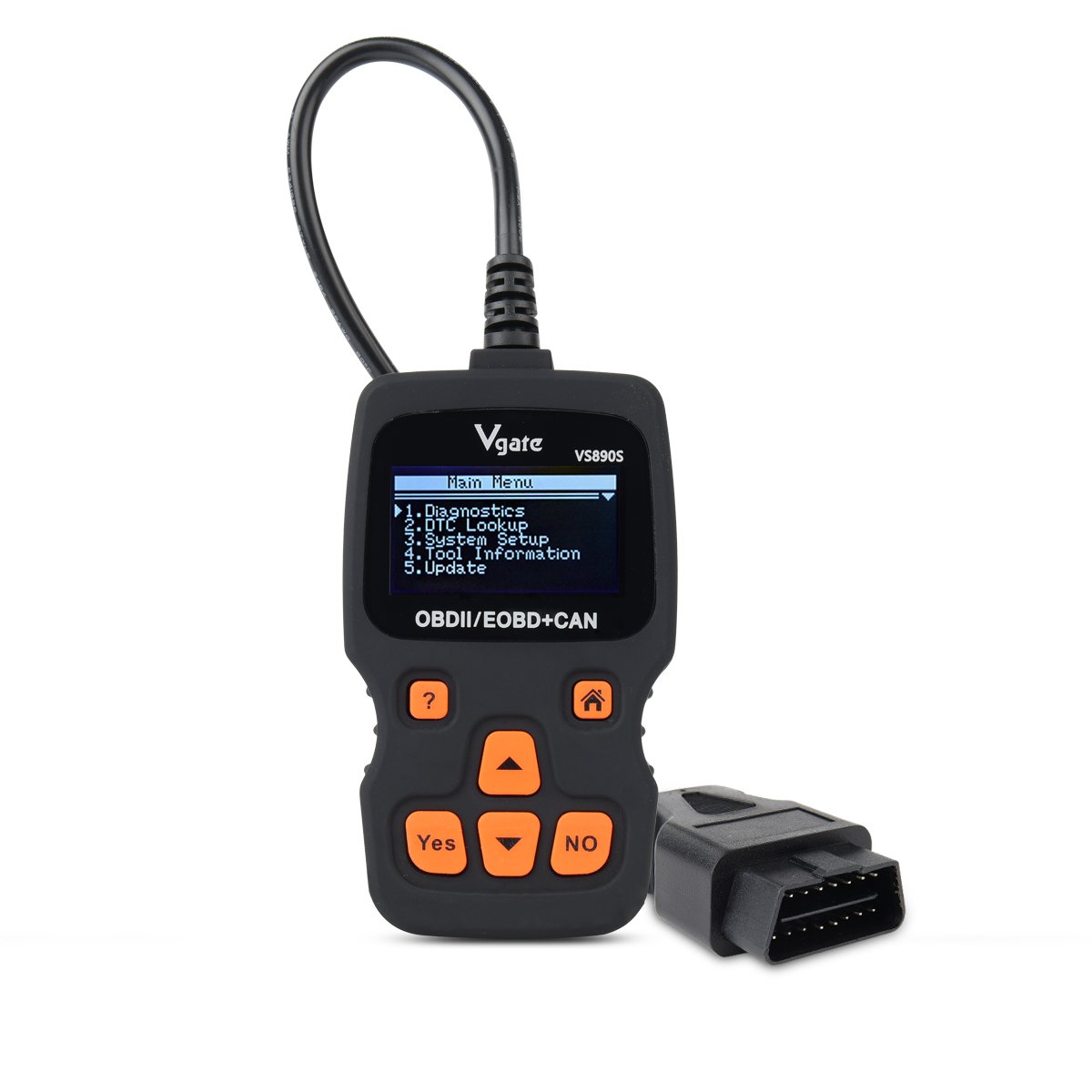
Figure 3.1: Vgate VS890S device with labeled buttons and dimensions. The image shows the front view of the scanner with its display and control buttons, along with a side profile indicating its thickness.
3.1. నియంత్రణలు మరియు సూచికలు
- Help Button (?): Provides on-screen assistance or information.
- హోమ్ బటన్ (ఇంటి చిహ్నం): ప్రధాన మెనూకు తిరిగి వస్తుంది.
- Yes Button: ఎంపికలు లేదా చర్యలను నిర్ధారిస్తుంది.
- No Button: Cancels selections or actions.
- Roll Up (Up Arrow): Navigates upwards through menu options or increases values.
- Roll Down (Down Arrow): Navigates downwards through menu options or decreases values.
4. సెటప్
Follow these steps to prepare your VS890S scanner for use.
4.1. పరికరాన్ని కనెక్ట్ చేస్తోంది
- వాహనం యొక్క 16-పిన్ డేటా లింక్ కనెక్టర్ (DLC)ని గుర్తించండి. ఇది సాధారణంగా డ్రైవర్ వైపు డాష్బోర్డ్ కింద కనిపిస్తుంది.
- వాహనం యొక్క ఇగ్నిషన్ ఆఫ్ స్థానంలో ఉందని నిర్ధారించుకోండి.
- Firmly plug the VS890S connector into the vehicle's DLC.
- Turn the vehicle's ignition to the ON position (engine off). The scanner will power on automatically.
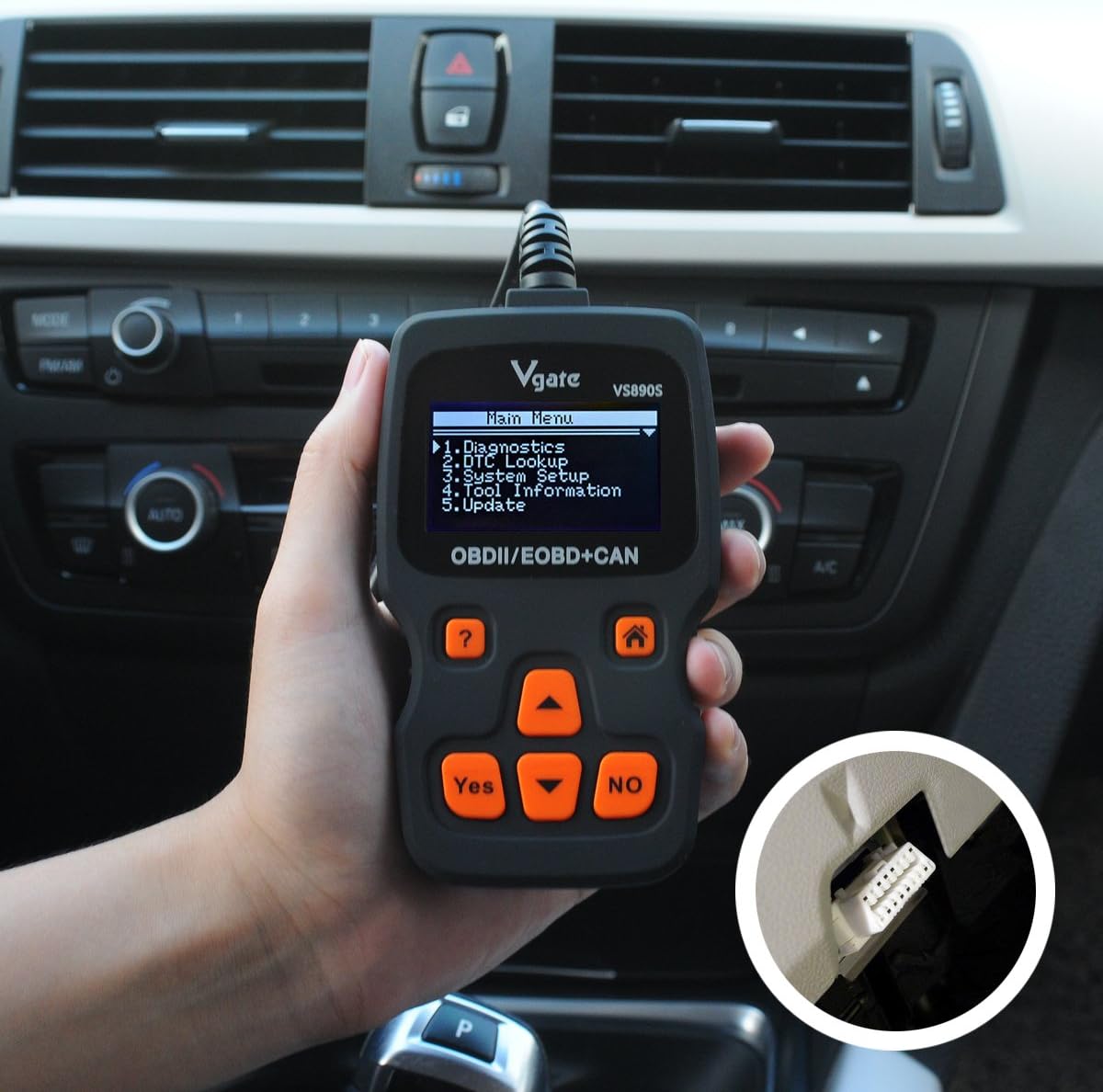
Figure 4.1: The Vgate VS890S scanner connected to a vehicle's OBD-II port, located under the dashboard. The image shows a hand holding the scanner with its cable plugged into the car's diagnostic port.
5. ఆపరేటింగ్ సూచనలు
This section details the various functions and how to navigate the Vgate VS890S.

Figure 5.1: Various screen displays of the Vgate VS890S, including the Main Menu, DTC Lookup, System Setup, and Language selection screens.
5.1. ప్రధాన మెనూ నావిగేషన్
Upon powering on, the device will display the Main Menu. Use the రోల్ అప్ మరియు క్రిందికి వెళ్లండి buttons to navigate through the options, and the అవును ఎంచుకోవడానికి బటన్.
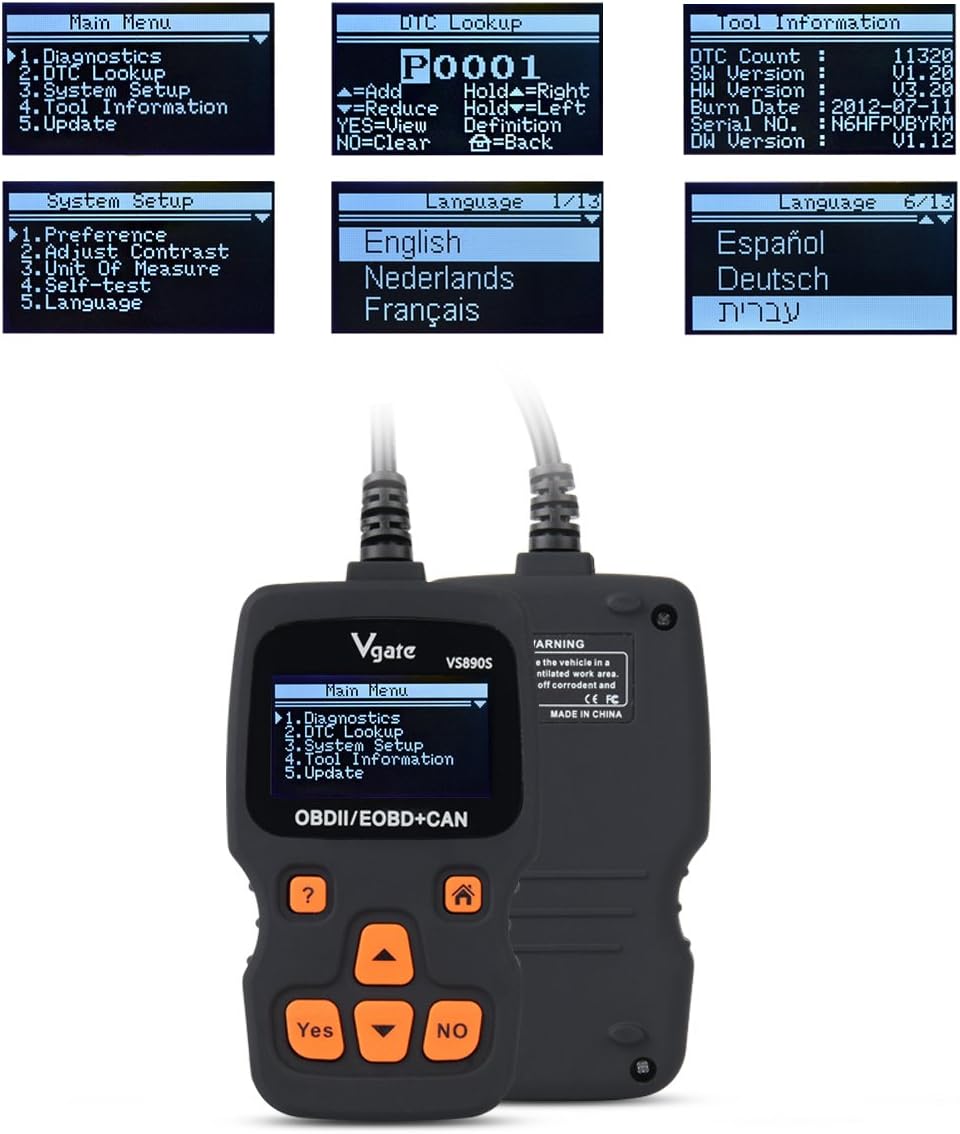
Figure 5.2: The Vgate VS890S displaying the Main Menu with options such as Diagnostics, DTC Lookup, System Setup, Tool Information, and Update.
- డయాగ్నోస్టిక్స్: Accesses vehicle diagnostic functions, including reading and clearing trouble codes, viewing live data, and more.
- DTC శోధన: Allows you to manually enter a Diagnostic Trouble Code (DTC) to view దాని నిర్వచనం.
- సిస్టమ్ సెటప్: Configures device settings such as language, display contrast, and units of measurement.
- సాధన సమాచారం: Displays details about the scanner, including software version and serial number.
- నవీకరణ: Used for updating the device's firmware (requires connection to a computer).
5.2. Reading and Clearing Trouble Codes
- ప్రధాన మెనూ నుండి, ఎంచుకోండి డయాగ్నోస్టిక్స్ మరియు నొక్కండి అవును.
- The scanner will establish communication with the vehicle. This may take a few moments.
- కనెక్ట్ అయిన తర్వాత, ఎంచుకోండి కోడ్లను చదవండి కు view any stored Diagnostic Trouble Codes (DTCs).
- కోడ్లను క్లియర్ చేయడానికి, కోడ్లను తొలగించండి మరియు నొక్కండి అవును. Confirm the action when prompted. Note: Clearing codes will turn off the Check Engine Light (MIL) but will not fix the underlying problem. Address the issue before clearing codes.
5.3. DTC లుక్అప్
If you have a DTC from another source, you can use the DTC Lookup function to get its definition.
- ప్రధాన మెనూ నుండి, ఎంచుకోండి DTC శోధన మరియు నొక్కండి అవును.
- ఉపయోగించండి రోల్ అప్ మరియు క్రిందికి వెళ్లండి buttons to select characters and the అవును button to confirm each character.
- Once the full DTC is entered, the definition will be displayed.
5.4. సిస్టమ్ సెటప్
Customize your scanner's settings.
- ప్రధాన మెనూ నుండి, ఎంచుకోండి సిస్టమ్ సెటప్ మరియు నొక్కండి అవును.
- ఎంపికలు ఉన్నాయి:
- ప్రాధాన్యత: Adjust general settings.
- Adjust Contrast: Modify screen brightness for better visibility.
- కొలమానం: Switch between Metric and Imperial units.
- స్వీయ పరీక్ష: Perform a self-diagnostic check of the scanner.
- భాష: Select your preferred operating language. The device supports multiple languages including English, Spanish, German, and French.
- ఉపయోగించండి రోల్ అప్ మరియు క్రిందికి వెళ్లండి buttons to select an option, then press అవును to enter its sub-menu or confirm a change.
5.5. సాధన సమాచారం
View details about your VS890S scanner.
- ప్రధాన మెనూ నుండి, ఎంచుకోండి సాధన సమాచారం మరియు నొక్కండి అవును.
- The screen will display information such as DTC Count, Software Version (SW Version), Hardware Version (HW Version), Burn Date, Serial Number, and Diagnostic Software Version (DW Version).
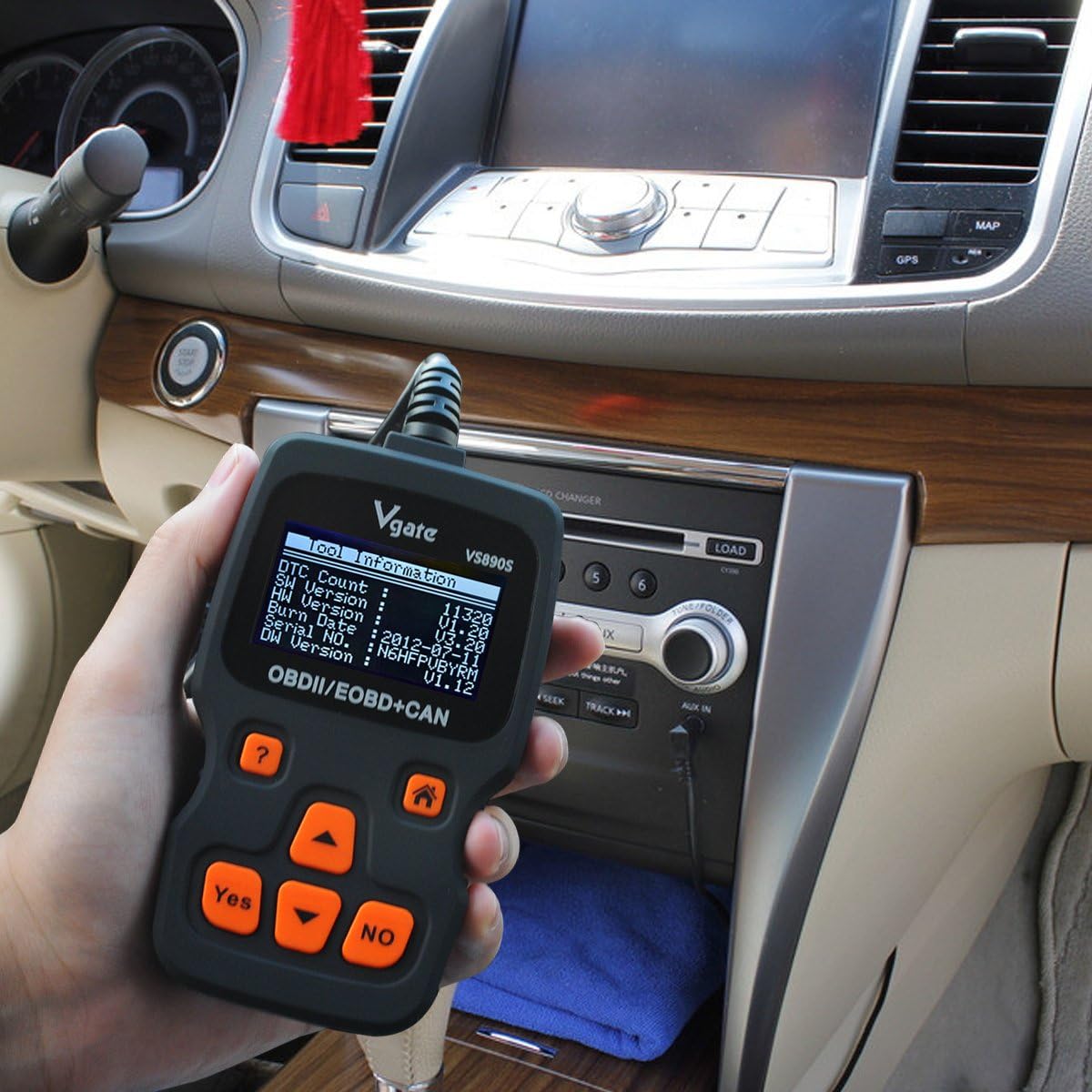
Figure 5.3: The Vgate VS890S displaying the 'Tool Information' screen, showing details like software and hardware versions, and serial number.
6. నిర్వహణ
Proper care ensures the longevity and reliability of your Vgate VS890S scanner.
- శుభ్రపరచడం: ఒక మృదువైన ఉపయోగించండి, డిamp cloth to clean the exterior of the scanner. Do not use abrasive cleaners or solvents.
- నిల్వ: పరికరాన్ని పొడి, చల్లని వాతావరణంలో, ప్రత్యక్ష సూర్యకాంతి మరియు తీవ్రమైన ఉష్ణోగ్రతలకు దూరంగా నిల్వ చేయండి.
- కేబుల్ కేర్: Avoid bending or crimping the diagnostic cable excessively. Always grasp the connector when plugging or unplugging, not the cable itself.
7. ట్రబుల్షూటింగ్
If you encounter issues with your VS890S, refer to the following common problems and solutions.
| సమస్య | సాధ్యమైన కారణం | పరిష్కారం |
|---|---|---|
| స్కానర్ పవర్ ఆన్ అవ్వదు. | Loose connection to DLC; Vehicle ignition off; Vehicle not OBD-II compliant. | Ensure cable is securely connected. Turn ignition to ON. Verify vehicle is OBD-II compliant (most vehicles 1996 and newer). |
| వాహనంతో కమ్యూనికేషన్ లోపం. | Faulty connection; Vehicle's ECU is not responding; Incorrect protocol. | Check cable connection. Ensure ignition is ON. Try on another OBD-II compliant vehicle if possible. |
| Cannot clear trouble codes. | Ignition not ON; Underlying fault still present; Specific codes cannot be cleared by generic scanner. | Ensure ignition is ON. Repair the underlying issue first. Some manufacturer-specific codes may require a specialized tool. |
| స్క్రీన్ మసకగా లేదా చదవలేని విధంగా ఉంది. | Contrast setting is too low. | Go to System Setup > Adjust Contrast to increase brightness. |
8. స్పెసిఫికేషన్లు
Technical specifications for the Vgate VS890S diagnostic scanner.
- బ్రాండ్: విగేట్
- మోడల్ సంఖ్య: VS890s
- వస్తువు బరువు: 11.7 ఔన్సులు
- ప్యాకేజీ కొలతలు: 9.37 x 5.98 x 1.38 అంగుళాలు
- శక్తి మూలం: Battery Powered (via OBD-II port)
- స్క్రీన్ పరిమాణం: 2.4 అంగుళాలు (LCD)
- మద్దతు ఉన్న ప్రోటోకాల్లు: CAN, J1850 PWM, J1850 VPW, ISO9141, KWP2000
- వినియోగదారు ఇంటర్ఫేస్: Multi-language (supports up to 13 languages)
9. వారంటీ మరియు మద్దతు
For warranty information or technical support, please refer to the documentation included with your purchase or contact Vgate customer service. Keep your purchase receipt as proof of purchase.