
XIAOMI XMZP601YM
Xiaomi Selfie Stick Tripod User Manual
Model: XMZP601YM
పరిచయం
This manual provides detailed instructions for the safe and effective use of your Xiaomi Selfie Stick Tripod. Please read this manual thoroughly before operating the device and retain it for future reference.
The Xiaomi Selfie Stick Tripod is a versatile accessory designed for mobile photography and videography. It functions as both an extendable selfie stick and a stable tripod, featuring a wireless Bluetooth shutter for convenient remote control.
ఉత్పత్తి ముగిసిందిview
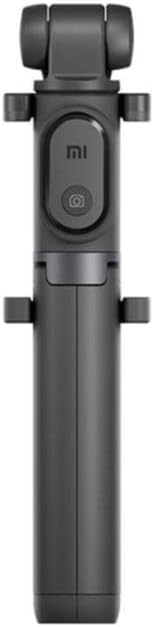
మూర్తి 1: Xiaomi Selfie Stick Tripod (Folded). This image shows the compact design of the selfie stick when not in use, highlighting the integrated phone holder and remote button.

మూర్తి 2: Xiaomi Selfie Stick Tripod in use as a tripod with a smartphone, alongside the detachable Bluetooth remote. This illustrates the product's dual functionality and wireless control.

మూర్తి 3: Various dimensions of the Xiaomi Selfie Stick Tripod, including folded length, extended length, and phone holder size. This provides a clear understanding of the product's physical measurements.

మూర్తి 4: క్లోజ్-అప్ views of key components, including the phone clamp, Bluetooth remote, and the extendable monopod section. This highlights the design and functionality of individual parts.
సెటప్
ప్యాకేజీ విషయాలు
- Xiaomi Selfie Stick Tripod (Model: XMZP601YM)
- Wireless Bluetooth Shutter Remote
- వినియోగదారు మాన్యువల్ (ఈ పత్రం)
Battery Installation (Bluetooth Remote)
The Bluetooth remote requires 1 Lithium Ion battery. Ensure correct polarity when inserting the battery.
- Locate the battery compartment on the back of the Bluetooth remote.
- బ్యాటరీ కవర్ తెరవండి.
- Insert the Lithium Ion battery, observing the positive (+) and negative (-) markings.
- బ్యాటరీ కవర్ను సురక్షితంగా మూసివేయండి.
బ్లూటూత్ రిమోట్ను జత చేయడం
To use the wireless shutter function, you must pair the remote with your smartphone.
- Ensure the Bluetooth remote is powered on.
- మీ స్మార్ట్ఫోన్లో, బ్లూటూత్ సెట్టింగ్లకు నావిగేట్ చేయండి.
- బ్లూటూత్ని ప్రారంభించండి.
- కోసం వెతకండి available devices. The remote should appear as "XMZP601YM" or similar.
- Select the remote to pair. Once paired, the indicator light on the remote will change (e.g., stop blinking).
Note: The remote is compatible with iOS 5.0 and above, and Android 4.2 and above.
ఆపరేటింగ్ సూచనలు
సెల్ఫీ స్టిక్ గా వాడటం
- Gently pull the phone holder upwards to extend the monopod arm.
- Place your smartphone securely into the adjustable phone holder. Ensure the phone is centered and stable.
- Adjust the length of the monopod arm to your desired distance (up to 850 mm).
- Angle the phone holder for optimal shot composition. The holder supports multi-angle shooting, including 90-degree vertical shots.
- Use the paired Bluetooth remote to trigger the camera shutter.
ట్రైపాడ్గా ఉపయోగించడం
- From the folded position, gently pull the bottom section downwards to reveal the tripod legs.
- Spread the three tripod legs outwards until they lock into a stable position.
- త్రిపాదను చదునైన, స్థిరమైన ఉపరితలంపై ఉంచండి.
- Extend the monopod arm to the desired height (up to 850 mm).
- Secure your smartphone in the phone holder.
- Use the paired Bluetooth remote to trigger the camera shutter from a distance (up to 10 meters).
Note: The tripod function is suitable for both table-top and floor use.
నిర్వహణ
- శుభ్రపరచడం: పరికరాన్ని మృదువైన, పొడి వస్త్రంతో తుడవండి. రాపిడి క్లీనర్లను లేదా ద్రావకాలను ఉపయోగించవద్దు.
- నిల్వ: సెల్ఫీ స్టిక్ త్రిపాదను ప్రత్యక్ష సూర్యకాంతి మరియు తీవ్రమైన ఉష్ణోగ్రతలు లేకుండా చల్లని, పొడి ప్రదేశంలో నిల్వ చేయండి.
- బ్యాటరీ సంరక్షణ: If the Bluetooth remote will not be used for an extended period, remove the battery to prevent leakage.
- నిర్వహణ: పరికరాన్ని పడవేయడం లేదా బలమైన ప్రభావాలకు గురిచేయడం మానుకోండి, ఎందుకంటే ఇది అంతర్గత భాగాలను దెబ్బతీస్తుంది.
ట్రబుల్షూటింగ్
| సమస్య | సాధ్యమైన కారణం | పరిష్కారం |
|---|---|---|
| బ్లూటూత్ రిమోట్ జత చేయడం లేదు. | Remote battery is low or dead. Bluetooth on phone is off. Remote is too far from phone. | Replace the battery in the remote. Ensure Bluetooth is enabled on your smartphone. Move the remote closer to your phone (within 10m). |
| Shutter button not working. | Remote not paired. Camera app not open or not configured for volume button shutter. | Re-pair the Bluetooth remote. Ensure your camera application is open and that its settings allow for volume button control of the shutter. |
| త్రిపాద అస్థిరంగా ఉంది. | కాళ్ళు పూర్తిగా విస్తరించబడలేదు లేదా లాక్ చేయబడలేదు. అసమాన ఉపరితలం. | Ensure all three tripod legs are fully extended and locked into position. Place the tripod on a flat, stable surface. |
| Monopod arm not extending/retracting smoothly. | Dust or debris in the telescopic mechanism. | Gently clean the telescopic sections with a soft, dry cloth. Avoid forcing the mechanism. |
స్పెసిఫికేషన్లు
- మోడల్: XMZP601YM
- బ్రాండ్: Xiaomi
- ఉత్పత్తి కొలతలు: 1.97 x 1.97 x 9.45 అంగుళాలు (మడతపెట్టబడింది)
- వస్తువు బరువు: 5.6 ఔన్సులు (160 గ్రాములు)
- Extendable Height: 180 mm to 850 mm (7 inches to 33.5 inches approx.)
- బ్లూటూత్ వెర్షన్: 3.0
- బ్లూటూత్ పరిధి: 10 మీటర్ వరకు
- అనుకూల OS: iOS 5.0 మరియు అంతకంటే ఎక్కువ, Android 4.2 మరియు అంతకంటే ఎక్కువ
- అనుకూల పరికరాలు: Smartphones, GoPro cameras
- Battery Type (Remote): 1 లిథియం అయాన్ బ్యాటరీ (అవసరం)
- రంగు: నలుపు
వారంటీ సమాచారం
This Xiaomi Selfie Stick Tripod (Model: XMZP601YM) comes with a 6 నెలల వారంటీ from the date of purchase. This warranty covers manufacturing defects and malfunctions under normal use. It does not cover damage caused by misuse, accidents, unauthorized modifications, or natural disasters.
వారంటీ క్లెయిమ్ల కోసం దయచేసి మీ కొనుగోలు రుజువును ఉంచుకోండి.
కస్టమర్ మద్దతు
For technical assistance, troubleshooting not covered in this manual, or warranty inquiries, please contact Xiaomi customer support through their official webఉత్పత్తిని కొనుగోలు చేసిన సైట్ లేదా రిటైలర్.
మరింత సమాచారం కోసం, సందర్శించండి అమెజాన్లో Xiaomi స్టోర్.
Ask a question about this manual
Ask about setup, troubleshooting, compatibility, parts, safety, or missing instructions. Manuals+ will review the question and use this page’s manual context to help answer it.