
పరిచయం
This manual provides essential information for the proper setup, operation, and maintenance of your Seville Classics Airlift Height Adjustable Sit Stand Converter Workstation. Please read these instructions thoroughly before use to ensure safe and efficient operation.
The Airlift Sit Stand Converter is designed to transform any desk into an active workstation, allowing seamless transitions between sitting and standing positions. It features a gas-spring mechanism for smooth height adjustment, a spacious work surface for multiple monitors, and a dedicated keyboard tray.
భద్రతా సమాచారం
WARNING: Always ensure the desk is properly anchored to your work surface. Do not exceed the weight limit of 33 lbs. Use caution when adjusting the height and tilt to prevent injury. Keep hands and fingers away from moving parts. Always follow the instructions provided with the product.
- Ensure the workstation is placed on a stable, level surface.
- Do not place objects that exceed the maximum weight capacity of 33 lbs on the workstation.
- Keep children and pets away from the workstation during adjustment.
- Inspect the workstation regularly for any signs of damage or wear. Discontinue use if damage is found.
- Avoid sudden movements or leaning heavily on the workstation when it is in an elevated position.
ప్యాకేజీ విషయాలు
అసెంబ్లీని ప్రారంభించే ముందు అన్ని భాగాలు ఉన్నాయని ధృవీకరించండి:
- AIRLIFT™ Desk (1)
- అలెన్ రెంచ్ (1)
- బ్రాకెట్లు (2)
- కీబోర్డ్ ట్రే (1)
- Zip-ties (2)
సెటప్ మరియు అసెంబ్లీ
The Seville Classics Airlift Sit Stand Converter Workstation comes largely pre-assembled. Only minimal setup is required.
- వర్క్స్టేషన్ను అన్ప్యాక్ చేయండి: Carefully remove all components from the packaging. Place the main desk unit on your existing desk surface.
- కీబోర్డ్ ట్రేని అటాచ్ చేయండి: Align the keyboard tray with the designated slots on the main desk unit. Secure it using the provided brackets and Allen wrench. Ensure it clicks firmly into place.
- కేబుల్స్ నిర్వహించండి: Use the included zip-ties and wire clips to manage and secure your cables, maintaining a tidy workspace.
Your workstation is now ready for use.

చిత్రం: ముందు భాగం view of the assembled workstation, ready for use.
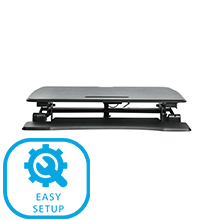
Image: Visual representation of the easy setup process, highlighting minimal assembly.
ఆపరేటింగ్ సూచనలు
The Airlift Sit Stand Converter features a pneumatic gas-spring system for smooth and effortless height adjustment.
ఎత్తు సర్దుబాటు:
- పెంచడానికి: Gently squeeze the levers located on each side of the workstation. While holding the levers, lift the work surface to your desired standing height. Release the levers to lock the workstation in place.
- దిగువకు: Gently squeeze the levers on each side. While holding the levers, apply slight downward pressure to the work surface to lower it to your desired sitting height. Release the levers to lock the workstation in place.
The workstation can be adjusted to any height between 6.2 inches (minimum) and 19.7 inches (maximum) from your desk surface.

Image: A user adjusting the workstation to a standing position.

Image: Close-up of the height adjustment levers.
Video: Official product video demonstrating the smooth gas-spring height adjustment of the Airlift Sit Stand Desk Converter. This video shows the ease of transitioning between sitting and standing positions.
ఫీచర్లు
- Instant Sit-Stand Adjustment: Effortless pneumatic vertical adjustment from 6.2 inches to 19.7 inches high.
- Wide Dual-Monitor Riser: Large desk top (35.4" x 23.5") with a beveled front edge, suitable for single monitors, dual monitors, laptop + monitor setups, and ultra-wide monitors.
- Detachable Keyboard Tray: Full-width keyboard tray (35.4" x 12.5") with an ergonomic curve for user comfort.
- ఇంటిగ్రేటెడ్ డివైస్ హోల్డర్: Built-in stand on the top tier for holding smartphones, tablet computers, and notepads.
- దృఢమైన నిర్మాణం: High-quality steel base and frame ensure stability and durability.
- బరువు సామర్థ్యం: Supports up to 33 lbs evenly distributed on the workstation top.
- కేబుల్ నిర్వహణ: Includes zip-ties and wire clips for organized cable routing.
- ANSI/BIFMA X5.5 Compliant: Engineered for ergonomic comfort and safety to meet industry standards.

చిత్రం: పై నుండి క్రిందికి view చూపించుasing the spacious work surface accommodating a laptop, monitor, and other accessories.
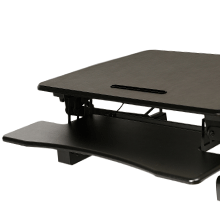
Image: Diagram illustrating the monitor riser, keyboard tray, and tablet holder features.
స్పెసిఫికేషన్లు
| గుణం | వివరాలు |
|---|---|
| మోడల్ సంఖ్య | ఆఫ్ 65807 |
| Workstation Top Dimensions | 35.43" W x 23.23" D x 0.59" thick |
| కీబోర్డ్ ట్రే కొలతలు | 35.43" W x 12.60" D x 0.59" thick |
| Overall Dimensions (Min Height) | 35.43" వెడల్పు x 35.8" వెడల్పు x 6.2" ఎత్తు |
| Overall Dimensions (Max Height) | 35.43" వెడల్పు x 35.8" వెడల్పు x 19.7" ఎత్తు |
| బేస్ కొలతలు | 32.75" వెడల్పు x 21.9" వెడల్పు |
| బరువు సామర్థ్యం | 33 పౌండ్లు (సమానంగా పంపిణీ) |
| వస్తువు బరువు | 52.3 పౌండ్లు |
| మెటీరియల్ రకం | Engineered Wood, Metal, Plastic, Steel |
| రంగు | నలుపు |
| లిఫ్టింగ్ మెకానిజం | Pneumatic Gas-Spring |
| అసెంబ్లీ అవసరం | No (Minimal attachment of keyboard tray) |

Image: Detailed dimensions of the workstation, including height range and surface areas.
నిర్వహణ
To ensure the longevity and optimal performance of your workstation, follow these simple maintenance guidelines:
- శుభ్రపరచడం: ఉపరితలాలను పొడి గుడ్డతో తుడవండి. మొండి గుర్తుల కోసం, కొద్దిగా damp వెంటనే ఆరబెట్టిన తర్వాత వస్త్రాన్ని ఉపయోగించవచ్చు. రాపిడి క్లీనర్లు లేదా కఠినమైన రసాయనాలను నివారించండి.
- తనిఖీ: అన్ని స్క్రూలు మరియు కనెక్షన్లు బిగుతుగా ఉన్నాయని నిర్ధారించుకోవడానికి కాలానుగుణంగా వాటిని తనిఖీ చేయండి. అవసరమైతే మళ్ళీ బిగించండి.
- తరలిస్తోంది: When moving the workstation, ensure it is in its lowest position and lift it carefully. Avoid dragging it across surfaces to prevent damage to the base or your desk.
ట్రబుల్షూటింగ్
If you encounter any issues with your workstation, refer to the following common problems and solutions:
- Workstation is difficult to raise or lower:
Ensure that the weight on the workstation does not exceed the 33 lbs capacity. Distribute weight evenly across the surface. Check that the levers are fully engaged when attempting to adjust the height. - Workstation feels unstable:
Verify that the workstation is placed on a flat, stable desk surface. Check all connections, especially the keyboard tray, to ensure they are securely fastened. - Keyboard tray is loose:
Ensure the brackets securing the keyboard tray are properly installed and tightened with the Allen wrench.
ఈ పరిష్కారాలను ప్రయత్నించిన తర్వాత కూడా సమస్యలు కొనసాగితే, దయచేసి కస్టమర్ మద్దతును సంప్రదించండి.
వారంటీ మరియు మద్దతు
Limited 3-Year Manufacturer's Coverage: Seville Classics AIRLIFT height adjustable converter desks are backed by a 3-year limited coverage unless otherwise specified. This warranty protects against original defects in material or workmanship under normal home or office use for the duration of the coverage period.
For warranty claims or technical support, please refer to the contact information provided with your purchase or visit the official Seville Classics webసైట్.