
BIKEVEE BKV-04
BIKEVEE Wired Bicycle Computer BKV-04 User Manual
Model: BKV-04 | Brand: BIKEVEE
1. పరిచయం
Thank you for choosing the BIKEVEE Wired Bicycle Computer BKV-04. This device is designed to provide accurate and essential cycling data, enhancing your riding experience. This manual will guide you through the installation, operation, and maintenance of your new bicycle computer. Please read it carefully before use to ensure optimal performance and longevity of the product.
2. ఉత్పత్తి ముగిసిందిview
కీ ఫీచర్లు
- గడియారం: 12H/24H format display.
- స్టాప్వాచ్: Integrated timer for tracking ride duration.
- యూనిట్ ఎంపిక: Metric (km/h) or Imperial (m/h) alternative.
- స్కాన్ మోడ్: Automatic circulation through various data displays.
- ఆటో ఆన్/ఆఫ్: Automatically powers on and off with bicycle movement.
- నిజ-సమయ డేటా: Displays Current Speed, Average Speed, and Maximum Speed.
- ట్రిప్ డేటా: Tracks Ride Time and Trip Distance.
- ఓడోమీటర్: Records total accumulated distance (ODO meter).
- LED బ్యాక్లైట్: Green LED backlight for visibility in low-light conditions.
- జలనిరోధిత డిజైన్: అన్ని వాతావరణాల ఉపయోగం కోసం మన్నికైన నిర్మాణం.
- ప్రదర్శన: Big and bright display for easy readability.
- బ్యాటరీ లైఫ్: ఎక్కువ బ్యాటరీ జీవితకాలం కోసం రూపొందించబడింది.
ప్యాకేజీ విషయాలు

The BIKEVEE BKV-04 bicycle computer unit, featuring a clear LCD display showing time, speed, odometer, ride time, and distance.

The bicycle computer display illuminated with its green LED backlight, enhancing visibility in dim conditions.

All components included in the package: the computer unit, wired sensor, mounting bracket, magnet, rubber ring, rubber slice, and cable ties.
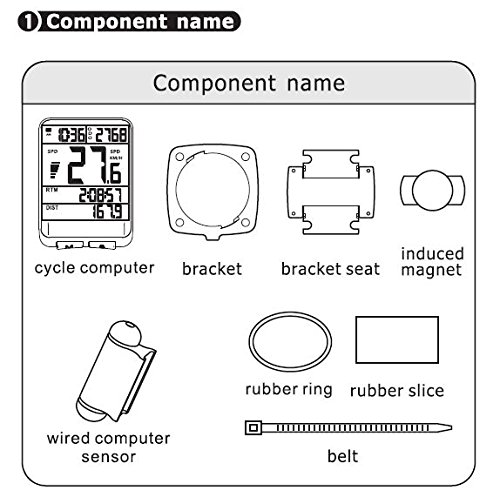
A diagram illustrating each component and its name: cycle computer, bracket, bracket seat, induced magnet, wired computer sensor, rubber ring, rubber slice, and belt (cable tie).
- BIKEVEE Bicycle Computer Unit
- Wired Speed Sensor
- Mounting Bracket and Bracket Seat
- చక్రాల మాగ్నెట్
- రబ్బరు రింగ్
- Rubber Slice (for padding)
- Cable Ties (Belt)
- బ్యాటరీ (CR2032, ముందే ఇన్స్టాల్ చేయబడింది లేదా విడిగా చేర్చబడింది)
3. సెటప్ మరియు ఇన్స్టాలేషన్
3.1 బ్యాటరీ ఇన్స్టాలేషన్
The computer uses a CR2032 button cell battery. If not pre-installed, open the battery cover on the back of the unit (usually by twisting counter-clockwise with a coin) and insert the battery with the positive (+) side facing up. Close the cover securely.

వెనుక view of the computer unit, showing the twist-lock battery compartment for the CR2032 battery.
3.2 బ్రాకెట్ను మౌంట్ చేయడం
- Choose a suitable location on your handlebar or stem for the bracket seat.
- Place the rubber slice (if provided) between the bracket seat and the handlebar to prevent slipping and protect the surface.
- Secure the bracket seat using the provided cable ties (belts). Ensure it is firmly attached and does not rotate.
- Slide the main bracket onto the bracket seat until it clicks into place.
3.3 Installing the Sensor and Magnet
- Attach the wired speed sensor to the front fork of your bicycle using cable ties. Position it so that the sensor head is aligned with the wheel spokes.
- Mount the magnet onto a spoke of the front wheel. Ensure the magnet is positioned to pass directly in front of the sensor head with a gap of approximately 1-3 mm. The magnet should not touch the sensor.
- Route the sensor wire neatly along the fork and up to the handlebar, securing it with cable ties to prevent it from interfering with moving parts.
- Plug the sensor wire into the port on the back of the computer's mounting bracket.
3.4 Attaching the Computer Unit
Slide the BIKEVEE computer unit onto the mounted bracket until it locks securely. Ensure it is facing you for easy viewing during your ride.
4. ఆపరేటింగ్ సూచనలు

దిగువన view of the computer unit, showing the 'M' (Mode) and 'S' (Set) buttons for navigation and settings.
4.1 బటన్ విధులు
- 'M' (Mode) Button: Press to cycle through different display modes (e.g., ODO, DST, MXS, AVS, TM). In setting mode, it confirms selections.
- 'S' (Set) Button: Press to enter setting mode or adjust values within setting mode. In normal display, it can activate the backlight or reset certain values.
4.2 Initial Settings (Wheel Circumference, Time, Units)
Upon first use or after battery replacement, you may need to set the wheel circumference, time, and measurement units.
- చక్రాల చుట్టుకొలత: Refer to your bicycle tire's sidewall for its size (e.g., 700x23C, 26x1.95). Consult a wheel circumference chart (available online) to find the corresponding value in millimeters (mm). Enter this value into the computer. This is crucial for accurate speed and distance readings.
- యూనిట్ సెట్టింగ్: Select between Kilometers per Hour (KM/H) or Miles per Hour (M/H) as your preferred unit of speed and distance.
- గడియార సెట్టింగ్: Set the current time (12H or 24H format).
Typically, you enter setting mode by pressing and holding the 'M' or 'S' button (refer to specific instructions in your included manual if different). Use 'S' to change values and 'M' to confirm and move to the next setting.
4.3 Display Modes and Functions
- SPD (Current Speed): Displays your real-time cycling speed.
- ODO (ఓడోమీటర్): Shows the total accumulated distance. This value is usually stored even when the battery is removed.
- DST (Trip Distance): Displays the distance covered during the current ride. Can be reset for each trip.
- MXS (Maximum Speed): Shows the highest speed achieved during the current ride.
- AVS (Average Speed): Calculates the average speed for the current ride.
- TM (Ride Time): ప్రస్తుత రైడ్ వ్యవధిని ప్రదర్శిస్తుంది.
- స్కాన్: Automatically cycles through DST, MXS, AVS, and TM displays.
- బ్యాక్లైట్: Press the 'S' button (or as per specific model instructions) to activate the green LED backlight for a few seconds.
4.4 ట్రిప్ డేటాను రీసెట్ చేయడం
To reset Trip Distance (DST), Maximum Speed (MXS), Average Speed (AVS), and Ride Time (TM) for a new ride, typically press and hold the 'S' button while in the DST or TM display mode until the values reset to zero. The Odometer (ODO) cannot be reset.
5. నిర్వహణ
- శుభ్రపరచడం: కంప్యూటర్ యూనిట్ మరియు సెన్సార్ను మృదువైన, d తో తుడవండి.amp గుడ్డ. రాపిడి క్లీనర్లు లేదా ద్రావకాలు ఉపయోగించవద్దు.
- బ్యాటరీ భర్తీ: Replace the CR2032 battery when the display becomes dim or erratic. Follow the battery installation steps.
- నిల్వ: If storing the bicycle computer for an extended period, consider removing the battery to prevent leakage. Store in a cool, dry place.
- Sensor/Magnet Alignment: Periodically check the alignment of the sensor and magnet to ensure the 1-3mm gap is maintained for accurate readings.
6. ట్రబుల్షూటింగ్
| సమస్య | సాధ్యమైన కారణం | పరిష్కారం |
|---|---|---|
| డిస్ప్లే లేదు లేదా డిమ్ డిస్ప్లే లేదు | Dead or low battery; Incorrect battery installation. | Replace the CR2032 battery; Ensure battery is inserted correctly with positive (+) side up. |
| No speed reading / Incorrect speed reading | Sensor/magnet misalignment; Loose sensor wire connection; Incorrect wheel circumference setting; Damaged sensor or wire. | Adjust sensor and magnet to be 1-3mm apart; Check sensor wire is securely plugged into the bracket; Verify wheel circumference setting; Inspect sensor and wire for damage. |
| Display shows random figures | Interference from other electronic devices; Loose connection. | Ensure no strong magnetic or electronic interference nearby; Re-check all connections. |
| బ్యాక్లైట్ పని చేయడం లేదు | Low battery; Backlight feature not activated correctly. | Replace battery; Press the 'S' button (or designated backlight button) to activate. |
| బటన్లు స్పందించడం లేదు | Unit frozen; Low battery. | Remove and reinsert battery to reset the unit; Replace battery. |
7. సాంకేతిక లక్షణాలు
| స్పెసిఫికేషన్ | వివరాలు |
|---|---|
| బ్రాండ్ | BIKEVEE |
| మోడల్ సంఖ్య | BKV 04 |
| రంగు | నలుపు |
| ప్రదర్శన రకం | LCD |
| సెన్సార్ రకం | స్పీడ్ సెన్సార్ |
| కనెక్టివిటీ టెక్నాలజీ | వైర్డు |
| శక్తి మూలం | బ్యాటరీ (CR2032) |
| మౌంటు రకం | హ్యాండిల్ బార్ మౌంట్ |
| మానవ ఇంటర్ఫేస్ ఇన్పుట్ | బటన్లు |
| అంశం కొలతలు (LxWxH) | 6 x 4.5 x 1.8 సెంటీమీటర్లు |
| నీటి నిరోధకత | జలనిరోధిత |
8. వారంటీ మరియు మద్దతు
వారంటీ సమాచారం మరియు కస్టమర్ మద్దతు కోసం, దయచేసి కొనుగోలు సమయంలో అందించిన డాక్యుమెంటేషన్ను చూడండి లేదా మీ రిటైలర్ను సంప్రదించండి. ఏవైనా వారంటీ క్లెయిమ్ల కోసం మీ కొనుగోలు రుజువును ఉంచండి.
For further assistance or technical queries, please reach out to BIKEVEE customer service through their official channels.
Ask a question about this manual
Ask about setup, troubleshooting, compatibility, parts, safety, or missing instructions. Manuals+ will review the question and use this page’s manual context to help answer it.