
పరిచయం
Thank you for choosing the Makita CL180 18V Rechargeable Cleaner. This manual provides essential information for the safe and efficient operation, maintenance, and troubleshooting of your new cleaner. Please read this manual thoroughly before use and keep it for future reference.
భద్రతా సూచనలు
అగ్ని ప్రమాదం, విద్యుత్ షాక్ మరియు వ్యక్తిగత గాయాల ప్రమాదాన్ని తగ్గించడానికి ఎల్లప్పుడూ ప్రాథమిక భద్రతా జాగ్రత్తలను పాటించండి. ఈ సూచనలను పాటించడంలో విఫలమైతే తీవ్రమైన గాయం లేదా ఆస్తి నష్టం సంభవించవచ్చు.
- Always wear appropriate personal protective equipment when operating or maintaining the cleaner.
- Ensure the battery is removed from the cleaner before performing any assembly, disassembly, maintenance, or cleaning tasks.
- Do not operate the cleaner in wet conditions or near flammable liquids, gases, or explosive dust.
- Keep children and unauthorized persons away from the operating area. Store the cleaner out of reach of children.
- Use only genuine Makita batteries and chargers specifically designed for this 18V tool. Using incompatible batteries or chargers may cause injury or damage.
- Do not pick up burning or smoking materials, such as cigarettes, matches, or hot ashes.
- Do not use the cleaner to pick up water or other liquids. This cleaner is designed for dry vacuuming only.
ప్యాకేజీ విషయాలు
The Makita CL180 Rechargeable Cleaner package typically includes the following components:
- Makita CL180 Cleaner Unit
- నాజిల్
- సందు నాజిల్
- Crevice Nozzle Holder
- స్ట్రెయిట్ పైప్
Note: The battery and charger are sold separately and are not included with the cleaner unit.
కాంపోనెంట్ ఐడెంటిఫికేషన్

సెటప్
1. బ్యాటరీ ఇన్స్టాలేషన్
To install the battery, align the battery with the battery slot on the cleaner unit. Slide the charged 18V Makita battery into the slot until it clicks securely into place. Ensure the battery is fully seated before operation.
2. ఉపకరణాలను అటాచ్ చేయడం
For extended reach and floor cleaning, attach the straight pipe to the main cleaner unit. Then, connect the desired nozzle (either the standard nozzle or the crevice nozzle) to the end of the straight pipe. For handheld cleaning of small areas or surfaces, you can attach the nozzle directly to the main cleaner unit without the straight pipe.
ఆపరేటింగ్ సూచనలు
పవర్ ఆన్/ఆఫ్
To turn the cleaner on, firmly press the trigger switch located on the handle. To turn the cleaner off, release the trigger switch.
వాడుక Exampలెస్


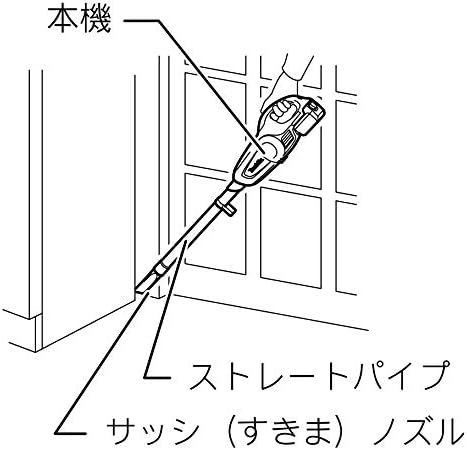
నిర్వహణ
1. Dust Capsule Emptying
To maintain optimal suction performance, regularly empty the dust capsule. Twist and remove the capsule from the main unit, then discard the collected debris into a waste bin. Reattach the capsule securely after emptying.
2. ఫిల్టర్ క్లీనింగ్
The Makita CL180 cleaner utilizes a cyclonic filter system. To clean the filter, remove it from the dust capsule. Gently tap off any loose dust and debris. If the filter is heavily soiled, it can be rinsed with water. Ensure the filter is completely dry before reinserting it into the dust capsule and reattaching the capsule to the cleaner unit. Operating the cleaner with a wet filter can cause damage.
ట్రబుల్షూటింగ్
If you encounter issues with your Makita CL180 cleaner, refer to the following common troubleshooting steps:
- శక్తి లేదు:
- బ్యాటరీ పూర్తిగా ఛార్జ్ చేయబడిందో లేదో తనిఖీ చేయండి.
- Ensure the battery is correctly and securely inserted into the cleaner unit.
- Verify that the trigger switch is fully pressed.
- తగ్గిన చూషణ:
- Empty the dust capsule. A full capsule can significantly reduce suction.
- Clean or replace the filter. A clogged filter restricts airflow.
- Check for any blockages in the nozzle, straight pipe, or the main cleaner unit's intake.
- అసాధారణ శబ్దం:
- వెంటనే క్లీనర్ ఆఫ్ చేయండి.
- Inspect for any foreign objects lodged in the fan or motor area.
- If the noise persists after checking for obstructions, discontinue use and contact customer support.
స్పెసిఫికేషన్లు
| ఫీచర్ | స్పెసిఫికేషన్ |
|---|---|
| బ్రాండ్ | మకిత |
| మోడల్ పేరు | CL180FDZ పరిచయం |
| వాల్యూమ్tage | 18 వోల్ట్లు |
| ఫిల్టర్ రకం | సైక్లోనిక్ ఫిల్టర్ |
| కెపాసిటీ | 650 మిల్లీలీటర్లు |
| కార్డ్లెస్ | అవును |
| సిఫార్సు చేసిన ఉపయోగాలు | Hard Floor, Home, Office |
| శబ్దం స్థాయి | 71 డెసిబెల్స్ |
| మోటార్ హార్స్పవర్ | 0.05 హార్స్ పవర్ |
| వస్తువు బరువు | 3.1 పౌండ్లు |
| అంశం కొలతలు (L x W x H) | 5.98"లీ x 4.49"వా x 39.33"హ |
| శక్తి స్థాయిల సంఖ్య | 2 |
| రన్టైమ్ | Up to 20 minutes (varies with usage and battery) |
| బ్యాటరీ ఛార్జ్ సమయం | Approx. 22 minutes (for specific battery types) |
వారంటీ సమాచారం
Makita products are manufactured under strict quality control standards and are backed by a limited warranty. For specific warranty terms and conditions, including coverage duration and claim procedures, please refer to the warranty card included with your original purchase or visit the official Makita webవివరణాత్మక సమాచారం కోసం సైట్.
మద్దతు
For technical assistance, inquiries about spare parts, or service, please contact your local authorized Makita service center. You can find contact information on the official Makita website. When contacting support, please have your product model number (CL180FDZ) and serial number readily available to expedite assistance.