
పరిచయం
Welcome to your Diplomat Excellence A2 Ballpoint Pen. This manual provides essential information for the proper setup, operation, and maintenance of your writing instrument. Crafted with precision in Germany, this pen combines elegant design with reliable performance.

The Diplomat Excellence A2 Ballpoint Pen, featuring a sleek black lacquer finish and elegant gold trim.
ప్రారంభ సెటప్
అన్ప్యాక్ చేస్తోంది
Carefully remove the pen from its luxury presentation box. Inspect the pen for any visible damage before use.

The Diplomat Excellence A2 Ballpoint Pen presented in its luxury box, ensuring safe transport and elegant storage.
Preparing for Writing
The pen features a continuous twist mechanism to extend and retract the ballpoint refill. To prepare for writing, twist the upper part of the barrel clockwise until the writing tip is fully extended. To retract, twist counter-clockwise.
ఆపరేటింగ్ సూచనలు
To begin writing, ensure the ballpoint tip is extended as described in the 'Preparing for Writing' section. Apply gentle, consistent pressure to the writing surface.
Optimal Writing Angle
For the smoothest writing experience and optimal ink flow, hold the pen at a comfortable angle, typically between 45 and 60 degrees to the paper. The medium point type ensures a consistent line.

ఒక వివరణాత్మక view of the Diplomat Excellence A2 Ballpoint Pen's tip and cap, highlighting the precision engineering.
నిర్వహణ
క్లీనింగ్
To maintain the pen's pristine black lacquer and gold finish, wipe it occasionally with a soft, dry, lint-free cloth. Avoid using abrasive cleaners, solvents, or harsh chemicals, as these can damage the surface.
రీఫిల్ రీప్లేస్మెంట్
When the ink runs out, replace the ballpoint refill as follows:
- Gently unscrew the pen barrel counter-clockwise to separate the upper and lower sections of the pen.
- Carefully remove the old ballpoint refill from its housing.
- Insert a new Diplomat standard ballpoint refill, ensuring it is seated correctly and securely.
- Screw the pen barrel sections back together clockwise until they are secure. Do not overtighten, as this may damage the mechanism.
For optimal performance and to preserve your pen's warranty, use only genuine Diplomat ballpoint refills.
ట్రబుల్షూటింగ్
సిరా ప్రవహించడం లేదు
- Ensure the refill is properly seated and fully extended.
- Verify that the refill is not empty. Replace if necessary.
- Try writing on a scrap piece of paper with firm pressure to prime the ballpoint and encourage ink flow.
Pen Tip Not Retracting
- Ensure the twist mechanism is fully engaged by twisting the barrel counter-clockwise until the tip is completely retracted.
- Check for any visible obstructions or debris within the twist mechanism that might be preventing full retraction.
స్పెసిఫికేషన్లు
| ఫీచర్ | వివరాలు |
|---|---|
| మోడల్ సంఖ్య | D40203040 |
| బ్రాండ్ | DIPLOMAT |
| రంగు | Black,gold |
| మెటీరియల్ రకం | మెటల్ |
| మూసివేత | Clip, Spring Loaded |
| పాయింట్ రకం | మధ్యస్థం |
| ఇంక్ కలర్ | నలుపు |
| ఉత్పత్తి కొలతలు | 14 x 1.4 x 1.4 సెం.మీ |
| వస్తువు బరువు | 49.9 గ్రా |
| చేతితో తయారు చేయబడింది | జర్మనీ |
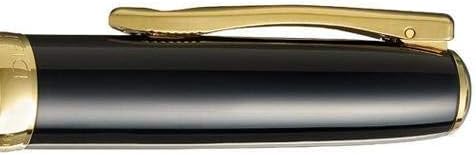
Close-up of the Diplomat Excellence A2 Ballpoint Pen's spring-loaded clip, featuring the stylized flower logo, designed for secure attachment.
వారంటీ మరియు మద్దతు
Diplomat writing instruments are crafted with precision and quality, backed by a commitment to excellence. For specific warranty details, terms, and conditions, please refer to the warranty card included with your original purchase or visit the official Diplomat webసైట్.
For customer service inquiries, technical support, or assistance with your Diplomat Excellence A2 Ballpoint Pen, please contact your authorized Diplomat retailer or the Diplomat customer support team through their official channels.