
1. పరిచయం
The Marshall MG10G is a compact 10-watt solid-state guitar amplifier designed for practice and home use. It features two channels (Clean and Overdrive), a Contour control for tone shaping, an auxiliary input for connecting external audio devices, and a headphone output for silent practice. This manual provides essential information for the safe and effective operation of your MG10G ampజీవితకాలం.
2. భద్రతా సమాచారం
WARNING: SHOCK HAZARD. DO NOT OPEN. TO REDUCE THE RISK OF FIRE OR ELECTRIC SHOCK DO NOT REMOVE COVER. NO USER-SERVICEABLE PARTS INSIDE. REFER SERVICING TO QUALIFIED SERVICE PERSONNEL.
ఎల్లప్పుడూ నిర్ధారించండి amplifier is connected to a grounded power outlet. Do not expose the amplifier to rain or moisture. Disconnect the power cord before cleaning or if the unit will be unused for extended periods. Ensure adequate ventilation around the ampజీవితకాలం.
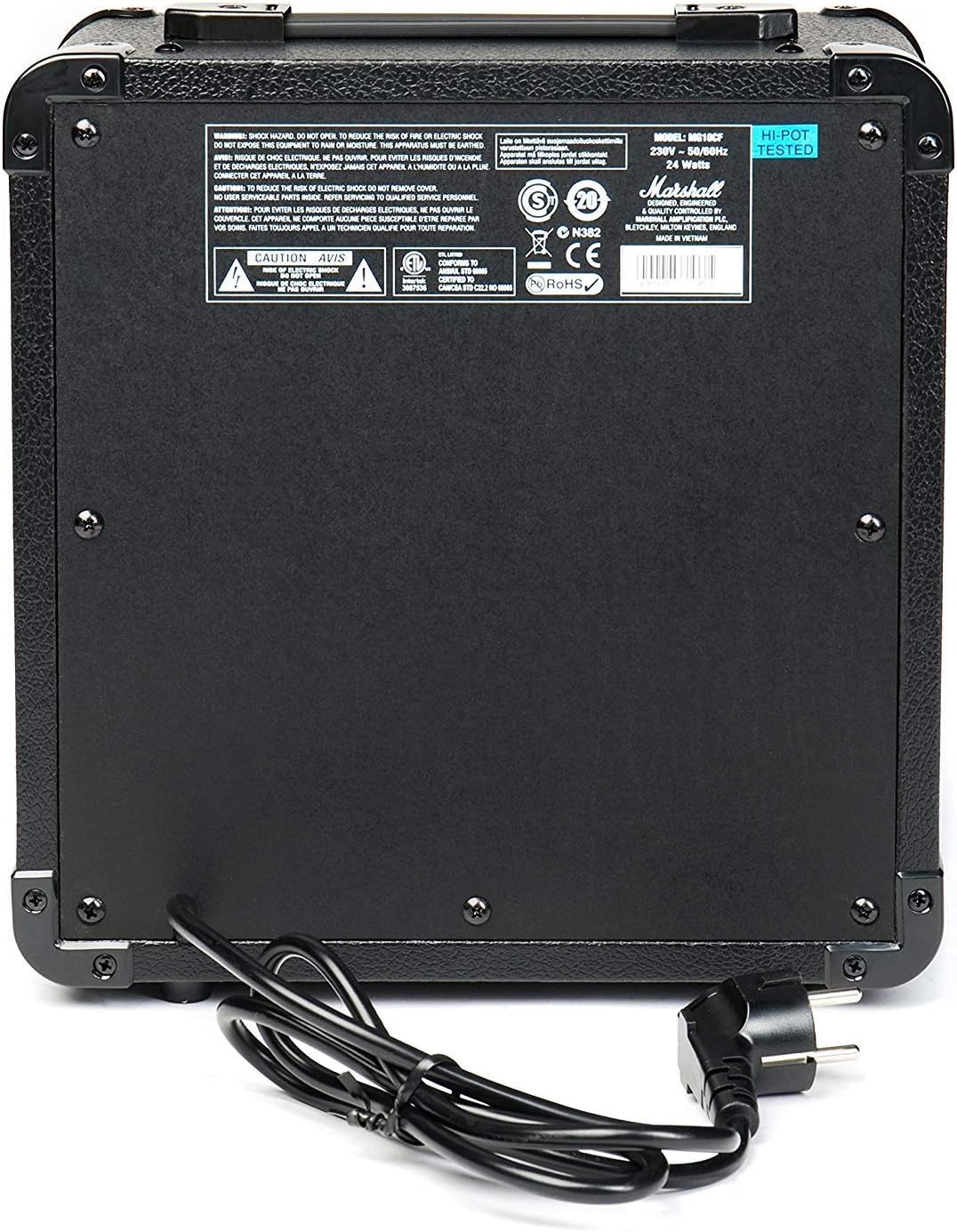
Figure 2.1: Rear panel of the MG10G amplifier, displaying safety warnings and power specifications.
3. ఉత్పత్తి ముగిసిందిview
The MG10G amplifier features a straightforward control layout for ease of use. Familiarize yourself with the front panel controls and rear panel connections before operation.

Figure 3.1: Front panel of the MG10G ampజీవితకాలం.
ముందు ప్యానెల్ నియంత్రణలు:
- ఇన్పుట్: 1/4" jack for connecting your electric guitar.
- క్లీన్ వాల్యూమ్: Controls the volume of the Clean channel.
- ఛానెల్ ఎంపిక: Button to switch between Clean and Overdrive channels.
- ఓవర్డ్రైవ్ లాభం: Adjusts the amount of distortion on the Overdrive channel.
- ఓవర్డ్రైవ్ వాల్యూమ్: Controls the volume of the Overdrive channel.
- ఆకృతి: Shapes the mid-range frequencies of your tone. Turning it clockwise scoops the mids, while counter-clockwise adds mids.
- MP3/LINE IN: 3.5mm jack for connecting external audio sources (e.g., MP3 player, phone).
- హెడ్ఫోన్స్: 3.5mm jack for connecting headphones for silent practice. Connecting headphones mutes the main speaker.
- శక్తి: On/Off switch for the ampజీవితకాలం.
వెనుక ప్యానెల్ కనెక్షన్లు:
- పవర్ ఇన్పుట్: Connects the supplied power cable to a suitable mains power supply.
4. సెటప్
- నిర్ధారించండి amplifier's POWER switch is in the OFF position.
- Connect the power cable to the POWER INPUT on the rear panel of the amplifier and then to a grounded electrical outlet.
- మీ ఎలక్ట్రిక్ గిటార్ను దీనికి కనెక్ట్ చేయండి ఇన్పుట్ jack on the front panel using a standard 1/4" instrument cable.
- If desired, connect an external audio device (e.g., MP3 player) to the MP3/LINE IN jack using a 3.5mm stereo cable.
- If desired, connect headphones to the హెడ్ఫోన్లు నిశ్శబ్ద సాధన కోసం జాక్.
- తిరగండి క్లీన్ వాల్యూమ్ మరియు ఓవర్డ్రైవ్ వాల్యూమ్ controls to their minimum settings (fully counter-clockwise).
- మారండి ampజీవనాధారం చేసేవారు శక్తి to the ON position. The power indicator light will illuminate.
5. ఆపరేటింగ్ సూచనలు
5.1 Clean Channel
To use the Clean channel, ensure the ఛానెల్ ఎంచుకోండి button is disengaged (out position). Adjust the క్లీన్ వాల్యూమ్ control to achieve your desired output level. This channel provides a clear, un-distorted guitar tone.
5.2 Overdrive Channel
To engage the Overdrive channel, press the ఛానెల్ ఎంచుకోండి button (in position). Use the ఓవర్డ్రైవ్ లాభం control to adjust the amount of distortion, from a subtle crunch to a heavier, saturated sound. The ఓవర్డ్రైవ్ వాల్యూమ్ control sets the output level for this channel.
5.3 Tone Shaping with Contour
ది కాంటౌర్ control allows you to sculpt the mid-range frequencies of your tone. Experiment with this control to find your preferred sound:
- తిరగడం కాంటౌర్ clockwise will scoop the mid-range, often resulting in a more modern, aggressive tone.
- తిరగడం కాంటౌర్ counter-clockwise will boost the mid-range, providing a warmer, fuller sound that can help your guitar cut through a mix.
5.4 Using MP3/LINE IN
Connect an external audio device to the MP3/LINE IN jack. The volume of the external device is controlled by its own volume output. This feature allows you to play along with backing tracks or music.
5.5 హెడ్ఫోన్ అవుట్పుట్
హెడ్ఫోన్లను ప్లగ్ చేయండి హెడ్ఫోన్లు jack for silent practice. The amplifier's main speaker will be muted automatically. Adjust the volume using the respective channel volume controls (Clean or Overdrive) or the volume control on your external audio device if using the MP3/LINE IN.
6. నిర్వహణ
- శుభ్రపరచడం: డిస్కనెక్ట్ చేయండి amplifier from the power supply before cleaning. Use a soft, dry cloth to wipe down the exterior. Do not use abrasive cleaners or solvents.
- నిల్వ: నిల్వ చేయండి ampప్రత్యక్ష సూర్యకాంతి మరియు తీవ్రమైన ఉష్ణోగ్రతలకు దూరంగా పొడి, చల్లని వాతావరణంలో లైఫైయర్.
- రవాణా: రవాణా చేసేటప్పుడు amplifier, ensure it is securely packed to prevent damage.
7. ట్రబుల్షూటింగ్
| సమస్య | సాధ్యమైన కారణం | పరిష్కారం |
|---|---|---|
| స్పీకర్ నుండి శబ్దం లేదు |
|
|
| బలహీనమైన లేదా వక్రీకరించిన ధ్వని |
|
|
| హెడ్ఫోన్ల నుండి శబ్దం లేదు |
|
|
ఈ పరిష్కారాలను ప్రయత్నించిన తర్వాత కూడా సమస్య కొనసాగితే, దయచేసి అర్హత కలిగిన సేవా సిబ్బందిని సంప్రదించండి.
8. స్పెసిఫికేషన్లు

Figure 8.1: Dimensions of the MG10G ampజీవితకాలం.
| ఫీచర్ | వివరాలు |
|---|---|
| మోడల్ పేరు | MG10G |
| Ampజీవిత రకం | సాలిడ్ స్టేట్ |
| అవుట్పుట్ పవర్ | 10 వాట్స్ |
| స్పీకర్ పరిమాణం | 6.5 అంగుళాలు (16.51 సెం.మీ.) |
| ఛానెల్లు | 2 (Clean, Overdrive) |
| నియంత్రణలు | Clean Volume, Channel Select, Overdrive Gain, Overdrive Volume, Contour, Power |
| ఇన్పుట్లు | 1/4" Guitar Input, 3.5mm MP3/Line In |
| అవుట్పుట్లు | 3.5mm హెడ్ఫోన్ అవుట్పుట్ |
| శక్తి మూలం | Electric Cable (230V~50Hz, 24 Watts) |
| కొలతలు (D x W x H) | 31.5 cm x 19.8 cm x 40 cm |
| వస్తువు బరువు | 5.13 కిలోలు |
| మెటీరియల్ | మెటల్, ప్లాస్టిక్ |
| రంగు | నలుపు |
| మూలం దేశం | చైనా |
9. వారంటీ మరియు మద్దతు
9.1 వారంటీ సమాచారం
This Marshall MG10G ampఒక తో వస్తుంది 1-సంవత్సరం తయారీదారు వారంటీ. Please retain your proof of purchase for warranty claims. The warranty covers manufacturing defects and malfunctions under normal use. It does not cover damage caused by misuse, accidents, unauthorized modifications, or normal wear and tear.
9.2 కస్టమర్ మద్దతు
For technical assistance, service, or warranty inquiries, please contact your authorized Marshall dealer or visit the official Marshall Ampలిఫికేషన్ webమద్దతు వనరులు మరియు సంప్రదింపు సమాచారం కోసం సైట్.