
1. పరిచయం
This manual provides detailed instructions for the installation, operation, and maintenance of your KingSpec 128GB PCIe NVMe 3D NAND M.2 Internal Solid State Drive (Model NE-128 2280). Please read this manual thoroughly before proceeding with installation to ensure proper functionality and to avoid potential issues.
The KingSpec NE-128 2280 is a high-performance internal SSD designed for desktop computers, offering enhanced data transfer speeds and improved system responsiveness compared to traditional hard drives.
2. సెటప్ మరియు ఇన్స్టాలేషన్
2.1. ప్రీ-ఇన్స్టాలేషన్ చెక్లిస్ట్
- Ensure your motherboard has an available M.2 slot that supports NVMe PCIe Gen3 x4 SSDs. Refer to your motherboard's manual for compatibility.
- అవసరమైన సాధనాలను సేకరించండి: ఫిలిప్స్ హెడ్ స్క్రూడ్రైవర్ మరియు యాంటీ-స్టాటిక్ రిస్ట్ స్ట్రాప్ (సిఫార్సు చేయబడింది).
- Back up any important data from your existing storage drive before proceeding.
- మీ కంప్యూటర్ను పవర్ ఆఫ్ చేసి, పవర్ సోర్స్ నుండి డిస్కనెక్ట్ చేయండి.
2.2. భౌతిక సంస్థాపన
Follow these steps to physically install the KingSpec NE-128 2280 SSD into your computer:
- Open your computer case. Locate the M.2 slot on your motherboard. It typically looks like a small horizontal slot with a screw hole at the end.
- Carefully insert the KingSpec M.2 NVMe SSD into the M.2 slot at a 30-degree angle. The gold contacts on the SSD should align with the pins in the slot.
- Gently push the SSD down until it is parallel with the motherboard. Secure it with the small screw provided with your motherboard or the SSD.
- Close your computer case and reconnect the power source.

Image: KingSpec M.2 NVMe SSD showing its dimensions (80.0mm length, 22.0mm width) and M Key PCIe interface, crucial for proper slot identification.
Video: This video demonstrates the physical installation process of an M.2 NVMe SSD into a motherboard slot, including securing it with a screw.
2.3. SSD ని ప్రారంభించడం మరియు ఫార్మాట్ చేయడం
After physical installation, the SSD needs to be initialized and formatted for use by your operating system. The steps may vary slightly depending on your OS (Windows, Linux, macOS).
Windows కోసం:
- మీ కంప్యూటర్ను బూట్ చేయండి.
- స్టార్ట్ బటన్ పై కుడి క్లిక్ చేసి "డిస్క్ మేనేజ్మెంట్" ఎంచుకోండి.
- You should see the new SSD listed as "Unallocated" or "Not Initialized". Right-click on it and select "Initialize Disk".
- Choose MBR (Master Boot Record) or GPT (GUID Partition Table). GPT is recommended for drives larger than 2TB and modern UEFI systems.
- After initialization, right-click on the "Unallocated" space and select "New Simple Volume". Follow the wizard to create a new partition and format it (NTFS is standard for Windows).
Linux కోసం:
వంటి సాధనాలను ఉపయోగించండి GParted or command-line utilities like fdisk తెలుగు in లో / parted to partition and format the drive (e.g., ext4 fileవ్యవస్థ).
MacOS కోసం:
ఉపయోగించండి డిస్క్ యుటిలిటీ to erase and format the drive (e.g., APFS or HFS+ fileవ్యవస్థ).
3. ఆపరేషన్
Once installed and formatted, your KingSpec NVMe SSD will function as a standard storage device. You can install your operating system, applications, and store data on it. For optimal performance, it is recommended to install your operating system on the NVMe SSD.

Image: KingSpec M.2 NVMe SSD shown installed within a laptop, illustrating its application in portable computing devices.
3.1. పనితీరు పరిగణనలు
- NVMe Driver: Ensure your operating system has the latest NVMe drivers installed for optimal performance. Windows 10/11 typically includes native NVMe support.
- PCIe లేన్ కేటాయింపు: Verify that your motherboard's BIOS/UEFI settings allocate sufficient PCIe lanes (x4) to the M.2 slot for maximum speed.
- శీతలీకరణ: While NVMe SSDs are efficient, sustained heavy workloads can generate heat. Some motherboards include M.2 heatsinks. The KingSpec NE-128 2280 may benefit from additional cooling in high-performance scenarios.
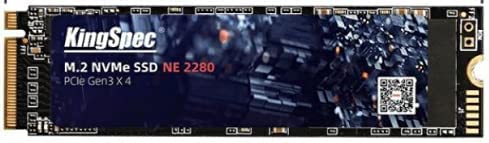
Image: KingSpec M.2 NVMe SSD featuring a cooling sticker, which functions as a heat sink to help manage operating temperatures.
4. నిర్వహణ
Proper maintenance helps ensure the longevity and performance of your SSD.
- TRIM కమాండ్: Ensure TRIM is enabled in your operating system. TRIM helps the SSD manage data blocks efficiently, preventing performance degradation over time. Windows typically enables TRIM automatically for SSDs.
- ఫర్మ్వేర్ నవీకరణలు: Periodically check the KingSpec official website for firmware updates for your specific SSD model. Firmware updates can improve performance, stability, and resolve known issues.
- పూర్తి సామర్థ్యాన్ని నివారించండి: While SSDs perform well even when nearly full, leaving some free space (e.g., 10-15%) can help maintain optimal performance and extend lifespan.
- Monitoring Health: Use S.M.A.R.T. (Self-Monitoring, Analysis, and Reporting Technology) tools (e.g., CrystalDiskInfo for Windows) to monitor the health and temperature of your SSD.
5. ట్రబుల్షూటింగ్
If you encounter issues with your KingSpec NVMe SSD, refer to the following common problems and solutions:
| సమస్య | సాధ్యమైన కారణం | పరిష్కారం |
|---|---|---|
| SSD not detected by BIOS/OS | Incorrect installation, M.2 slot disabled, incompatible motherboard, outdated BIOS. |
|
| నెమ్మదిగా పనితీరు | TRIM disabled, outdated drivers, high temperature, full drive, incorrect PCIe lane allocation. |
|
| SSD not initializing/formatting | Corrupt drive, OS issue, incorrect steps. |
|
6. స్పెసిఫికేషన్లు
Key technical specifications for the KingSpec NE-128 2280 SSD:
| ఫీచర్ | వివరాలు |
|---|---|
| మోడల్ సంఖ్య | NE-128 2280 |
| డిజిటల్ స్టోరేజ్ కెపాసిటీ | 128 GB |
| హార్డ్ డిస్క్ ఇంటర్ఫేస్ | NVMe |
| ఫారమ్ ఫ్యాక్టర్ | M.2 2280 |
| హార్డ్వేర్ కనెక్టివిటీ | పిసిఐ ఎక్స్ప్రెస్ x4 |
| చదువు వేగం | 1800 MB/s వరకు |
| వేగం వ్రాయండి | 600 MB/s వరకు |
| NAND ఫ్లాష్ రకం | 3D నంద్ |
| అనుకూల పరికరాలు | Desktop PCs (with M.2 NVMe slot) |
| సంస్థాపన రకం | అంతర్గత హార్డ్ డ్రైవ్ |
| వస్తువు బరువు | 35 గ్రాములు |
7. వారంటీ మరియు మద్దతు
7.1. వారంటీ సమాచారం
KingSpec products are manufactured to the highest quality standards. This product comes with a limited warranty against defects in materials and workmanship. The specific terms and duration of the warranty may vary by region and product. Please retain your proof of purchase for warranty claims.
7.2. సాంకేతిక మద్దతు
For technical assistance, troubleshooting, or warranty inquiries, please visit the official KingSpec website or contact their customer support. You may need to provide your product model number (NE-128 2280) and proof of purchase.
Official KingSpec Webసైట్: www.kingspec.com