
క్రేన్ EE-5622
Crane EE-5622 Digital LED Display Tower Fan User Manual
మోడల్: EE-5622
పరిచయం
This manual provides detailed instructions for the safe and efficient use of your Crane EE-5622 Digital LED Display Tower Fan. Please read all instructions carefully before operation and retain this manual for future reference.

Image: Crane EE-5622 Tower Fan with its packaging, highlighting key features like digital LED display, 12-hour timer, 70-degree oscillation, and 3 adjustable speed settings.
ముఖ్యమైన భద్రతా సూచనలు
- Always place the fan on a firm, level surface.
- దెబ్బతిన్న త్రాడు లేదా ప్లగ్తో ఫ్యాన్ను ఆపరేట్ చేయవద్దు.
- ఫ్యాన్ను నీరు లేదా ఇతర ద్రవాలకు దూరంగా ఉంచండి.
- Ensure the fan is unplugged before cleaning or maintenance.
- వేళ్లు లేదా విదేశీ వస్తువులను ఏ రంధ్రాలలోకి చొప్పించవద్దు.
- ఈ ఫ్యాన్ ఇండోర్ ఉపయోగం కోసం మాత్రమే.
- Supervise children when the fan is in use.
ప్యాకేజీ విషయాలు
ప్యాకేజీలో అన్ని అంశాలు ఉన్నాయని నిర్ధారించుకోండి:
- 1 x Crane EE-5622 Tower Fan
- 1 x Wireless Remote Control (batteries included)
- 1 x యూజర్ మాన్యువల్ (ఈ పత్రం)
సెటప్
- అన్ప్యాకింగ్: ప్యాకేజింగ్ నుండి ఫ్యాన్ మరియు అన్ని ఉపకరణాలను జాగ్రత్తగా తొలగించండి.
- ప్లేస్మెంట్: Place the fan on a stable, flat surface, ensuring there is adequate space around it for air circulation. Avoid placing it near curtains or objects that could obstruct airflow.
- పవర్ కనెక్షన్: పవర్ కార్డ్ను ప్రామాణిక ఎలక్ట్రికల్ అవుట్లెట్లోకి ప్లగ్ చేయండి.

చిత్రం: పూర్తి view of the Crane EE-5622 Tower Fan, showing its base and power cord connection point.
ఆపరేటింగ్ సూచనలు
The Crane EE-5622 Tower Fan can be operated using the control panel on top of the unit or the wireless remote control.
నియంత్రణ ప్యానెల్
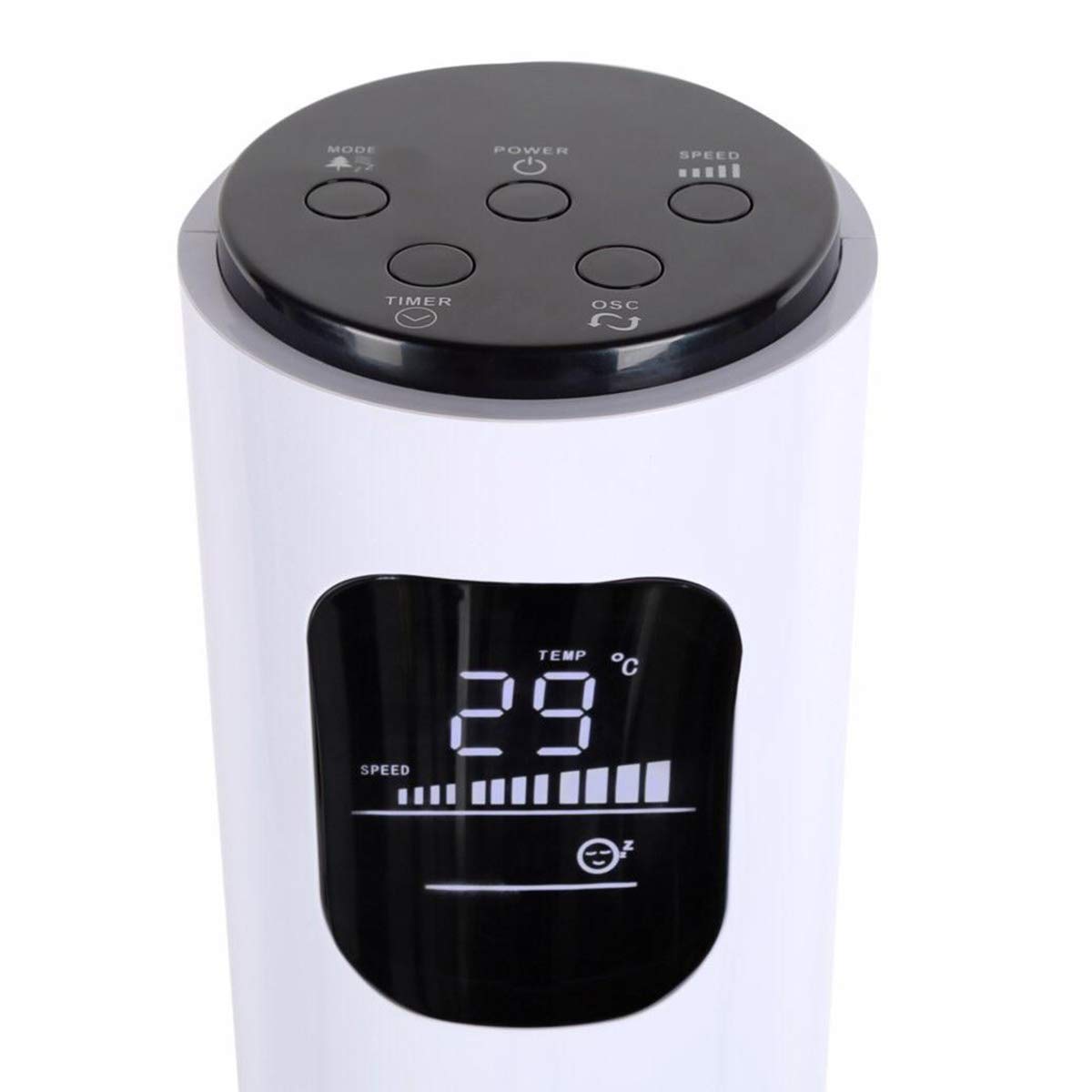
Image: Close-up of the fan's top control panel and digital LED display, showing buttons for Power, Speed, Oscillation, Timer, and Mode.
- పవర్ బటన్ (⏻ ⏻ తెలుగు): ఫ్యాన్ను ఆన్ లేదా ఆఫ్ చేయడానికి నొక్కండి.
- స్పీడ్ బటన్ (█████): Press to cycle through 3 speed settings (Low, Medium, High). The current speed is indicated on the LED display.
- ఆసిలేషన్ బటన్ (↻ లు): 70° ఆసిలేషన్ ఫంక్షన్ను యాక్టివేట్ చేయడానికి లేదా డియాక్టివేట్ చేయడానికి నొక్కండి.
- టైమర్ బటన్ (⏱ ⏱ తెలుగు): ఆటో-ఆఫ్ టైమర్ను 1 నుండి 12 గంటలకు సెట్ చేయడానికి నొక్కండి. ప్రతి ప్రెస్ టైమర్ను ఒక గంట పెంచుతుంది.
- మోడ్ బటన్ (☼ (అనువర్తనం)): Press to cycle through different operating modes:
- సాధారణ మోడ్: ఎంచుకున్న వేగంతో స్థిరమైన గాలి ప్రవాహం.
- సహజ బ్రీజ్ మోడ్: ఫ్యాన్ వేగాన్ని మార్చడం ద్వారా సహజ గాలిని అనుకరిస్తుంది.
- స్లీప్ మోడ్: నిద్రలో నిశ్శబ్దంగా పనిచేయడానికి కాలక్రమేణా ఫ్యాన్ వేగాన్ని క్రమంగా తగ్గిస్తుంది.
వైర్లెస్ రిమోట్ కంట్రోల్
The remote control provides convenient operation from a distance. Ensure the remote is pointed towards the fan's receiver.
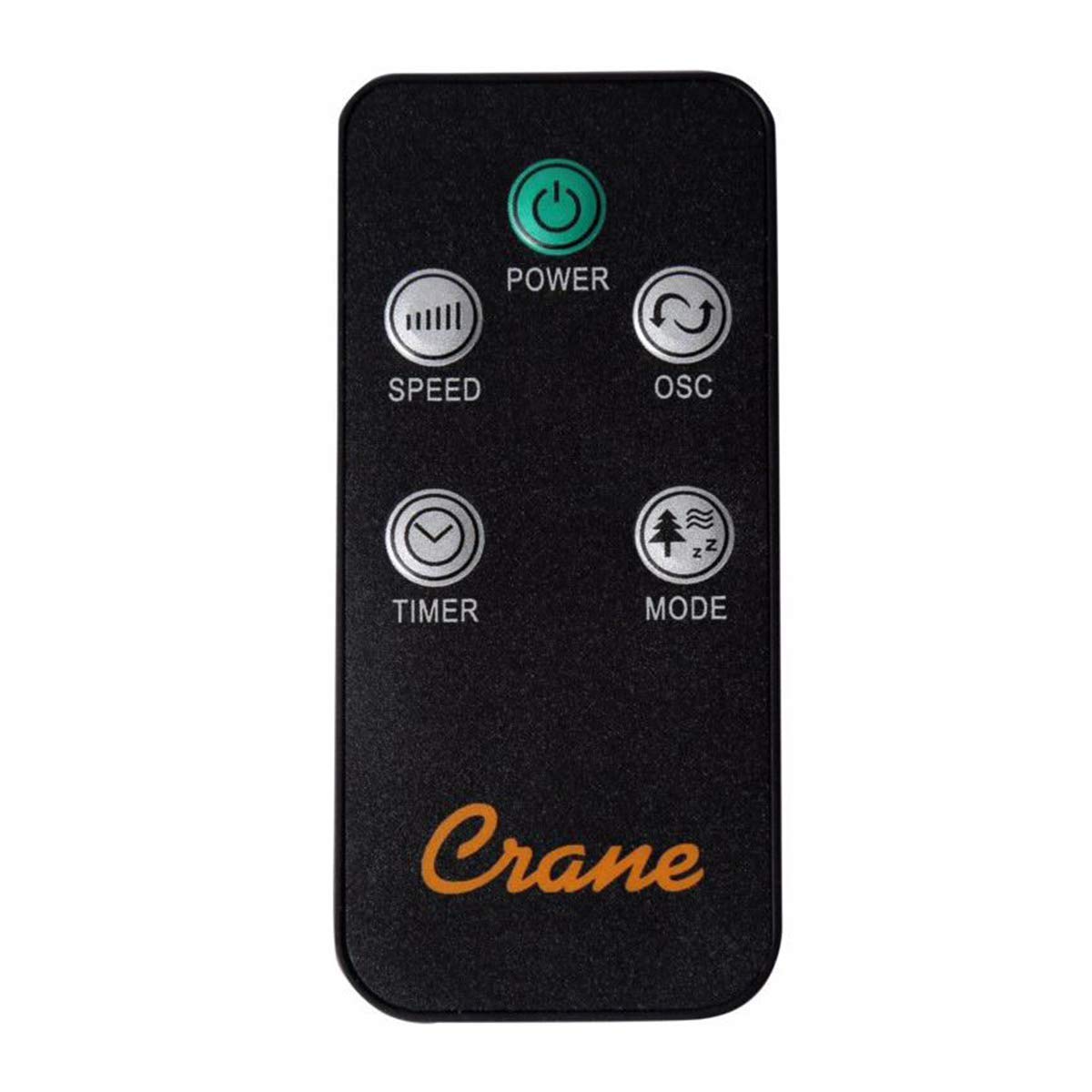
Image: The wireless remote control for the Crane EE-5622 Tower Fan, showing buttons for Power, Speed, Oscillation, Timer, and Mode.
The remote control features the same buttons as the control panel for Power, Speed, Oscillation, Timer, and Mode. It requires batteries (included).

చిత్రం: పైన view of the Crane EE-5622 Tower Fan, illustrating the integrated slot for storing the remote control.
నిర్వహణ
క్రమం తప్పకుండా నిర్వహణ మీ ఫ్యాన్ యొక్క ఉత్తమ పనితీరును మరియు దీర్ఘాయువును నిర్ధారిస్తుంది.
- శుభ్రపరచడం: శుభ్రం చేసే ముందు ఎల్లప్పుడూ ఫ్యాన్ను అన్ప్లగ్ చేయండి. మృదువైన, d ఉపయోగించండిamp cloth to wipe the exterior surfaces. Do not use abrasive cleaners or allow water to drip into the fan's interior.
- దుమ్ము తొలగింపు: Use a vacuum cleaner with a brush attachment or compressed air to remove dust from the air intake and exhaust grilles.
- నిల్వ: If storing the fan for an extended period, clean it thoroughly, place it back in its original packaging, and store it in a cool, dry place.
ట్రబుల్షూటింగ్
| సమస్య | సాధ్యమైన కారణం | పరిష్కారం |
|---|---|---|
| ఫ్యాన్ ఆన్ అవ్వదు. | విద్యుత్ సరఫరా లేదు; విద్యుత్ తీగ ప్లగ్ ఇన్ చేయబడలేదు; పవర్ బటన్ నొక్కలేదు. | పవర్ అవుట్లెట్ను తనిఖీ చేయండి; పవర్ కార్డ్ సురక్షితంగా ప్లగిన్ చేయబడిందని నిర్ధారించుకోండి; పవర్ బటన్ను నొక్కండి. |
| బలహీనమైన గాలి ప్రవాహం. | Fan speed set too low; Air intake/exhaust blocked; Dust accumulation. | Increase fan speed; Clear any obstructions; Clean the fan grilles. |
| ఫ్యాన్ శబ్దం చేస్తోంది. | Fan not on a level surface; Foreign object inside; Dust accumulation. | Place fan on a flat, stable surface; Unplug and check for obstructions; Clean the fan. |
| రిమోట్ కంట్రోల్ పనిచేయడం లేదు. | Batteries depleted; Obstruction between remote and fan; Remote not pointed correctly. | Replace remote control batteries; Remove obstructions; Point remote directly at the fan's receiver. |
స్పెసిఫికేషన్లు
| బ్రాండ్ | క్రేన్ |
| మోడల్ సంఖ్య | EE-5622 |
| శక్తి మూలం | AC Powered (Remote Control: Battery Powered) |
| వాట్tage | 45 వాట్స్ |
| స్పీడ్ల సంఖ్య | 3 |
| ఆసిలేషన్ యాంగిల్ | 70° |
| టైమర్ | 1 నుండి 12 గంటలు |
| ఎత్తు | దాదాపు 115 సెం.మీ (44 అంగుళాలు) |
| వస్తువు బరువు | 5.1 పౌండ్లు |
| నియంత్రణ పద్ధతి | రిమోట్ కంట్రోల్, ఆన్-యూనిట్ బటన్లు |
| ప్రత్యేక లక్షణాలు | Digital LED Display, Room Temperature Display, Natural Breeze Mode, Sleep Mode, Auto Shut-off |
| మెటీరియల్ | Acrylonitrile Butadiene Styrene (ABS), Plastic Blades |
| ఇండోర్/అవుట్డోర్ ఉపయోగం | ఇండోర్ ఉపయోగం మాత్రమే |
వారంటీ మరియు మద్దతు
For warranty information or technical support, please refer to the warranty card included with your product or contact Crane customer service directly. Contact details are typically available on the manufacturer's official webసైట్ లేదా ఉత్పత్తి ప్యాకేజింగ్.
Note: Customer reviews indicate potential challenges with service support. It is recommended to retain your purchase receipt for warranty claims.
Ask a question about this manual
Ask about setup, troubleshooting, compatibility, parts, safety, or missing instructions. Manuals+ will review the question and use this page’s manual context to help answer it.