
1. పరిచయం
The Vonyx VMM-F701 is a versatile 7-channel mixer designed for various audio applications, including live performances and studio recording. It features multiple input options, an integrated effect processor, USB playback, and +48V phantom power for condenser microphones. This manual provides essential information for the safe and effective use of your VMM-F701 mixer.
2. భద్రతా సూచనలు
- Always read these instructions carefully before using the device. Keep this manual for future reference.
- విద్యుత్ సరఫరా వాల్యూమ్తో సరిపోలుతుందని నిర్ధారించుకోండిtagఇ పరికరంలో సూచించబడింది.
- పరికరం వర్షం లేదా తేమను బహిర్గతం చేయవద్దు.
- మెరుపు తుఫానుల సమయంలో లేదా ఎక్కువసేపు ఉపయోగించనప్పుడు విద్యుత్ తీగను డిస్కనెక్ట్ చేయండి.
- To reduce the risk of electric shock, do not remove the cover. There are no user-serviceable parts inside. Refer all servicing to qualified service personnel.
3. ఉత్పత్తి ముగిసిందిview
The Vonyx VMM-F701 mixer offers a comprehensive set of features for audio mixing. It includes 5 mono microphone/line inputs (XLR/6.3mm Jack combo), 1 stereo line input (6.3mm Jack), and an integrated USB player. Each channel provides Hi, Mid, and Low equalization controls, along with FX, Pan, and AUX adjustments. The mixer also features a built-in effect processor with delay and repeat functions, +48V phantom power for condenser microphones, a balanced stereo main output, and a headphone output.
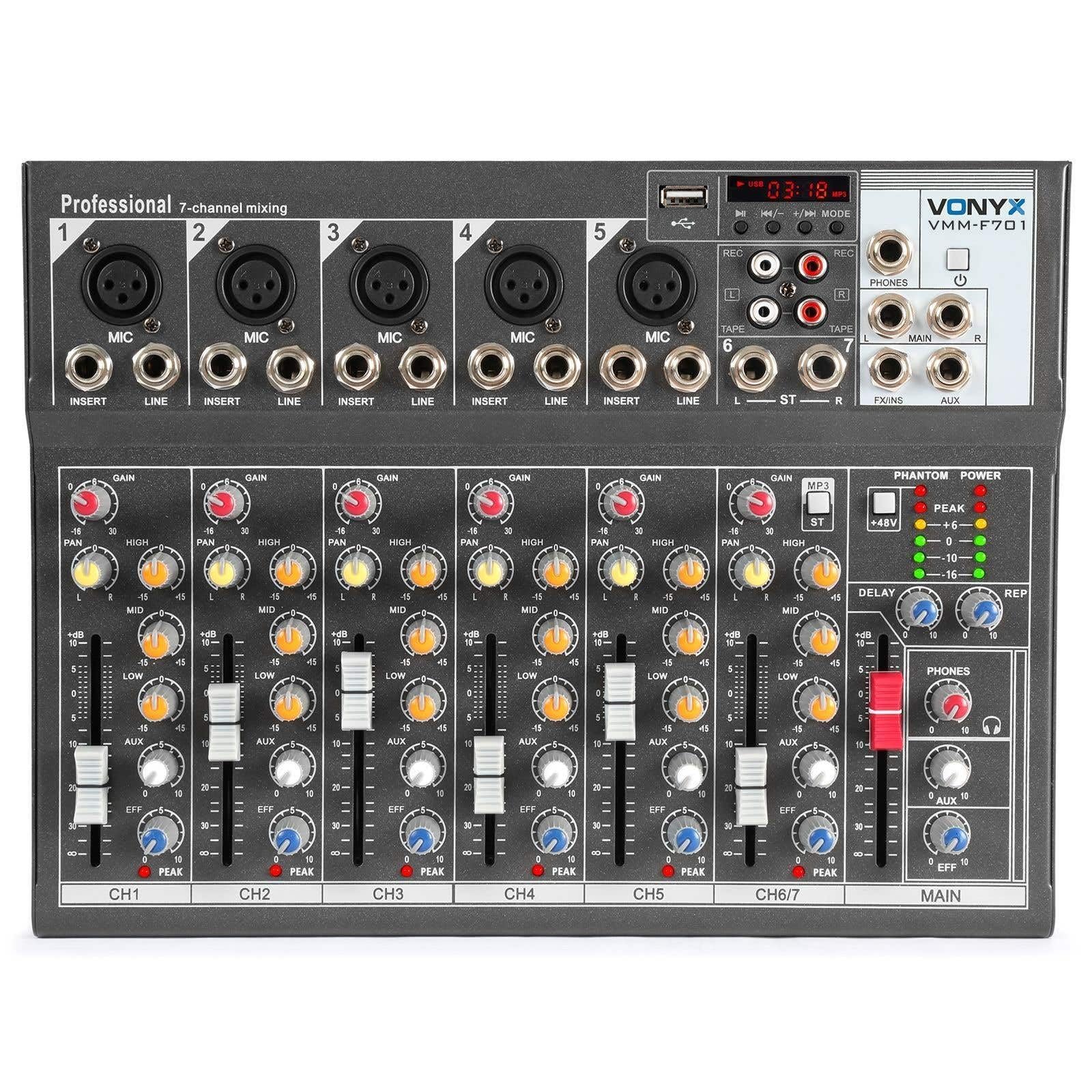
మొత్తంమీద view of the Vonyx VMM-F701 7-channel mixer, showcasing దాని కాంపాక్ట్ డిజైన్ మరియు నియంత్రణ లేఅవుట్.

పై నుండి క్రిందికి view of the Vonyx VMM-F701 mixer, highlighting the input channels, faders, and equalization knobs.

Close-up of the USB input and media player controls on the Vonyx VMM-F701 mixer, with a USB drive inserted.

Rear panel of the Vonyx VMM-F701 mixer, showing the power input and USB port for external power.
4. సెటప్
- పవర్ కనెక్షన్: Connect the mixer to a 230Vac/50Hz power source using the provided power cable. The mixer can also be powered via USB (5V/1A) for certain functions.
- ఇన్పుట్ కనెక్షన్లు:
- For microphones, use XLR or 6.3mm jack cables to connect to channels 1-5. Activate +48V phantom power for condenser microphones.
- For line-level instruments or devices, use 6.3mm jack cables to connect to channels 1-5 (line inputs) or the stereo line input (channels 6/7).
- అవుట్పుట్ కనెక్షన్లు: మీ ప్రధాన స్పీకర్లను కనెక్ట్ చేయండి లేదా amplifier to the balanced stereo main output (6.3mm Jack).
- హెడ్ఫోన్లు: Connect headphones to the dedicated headphone output for monitoring.

వివరంగా view of the mains power input and a wiring diagram for microphone/line inputs on the Vonyx VMM-F701 mixer.
5. ఆపరేటింగ్ సూచనలు
- నియంత్రణ సంపాదించు: Adjust the input sensitivity for each channel using the GAIN knob.
- సమీకరణ (EQ): Use the HI, MID, and LOW knobs to adjust the treble, midrange, and bass frequencies for each channel.
- పాన్ నియంత్రణ: Adjust the stereo positioning of each channel using the PAN knob.
- FX పంపండి: Use the FX knob to send a portion of the channel's signal to the internal effect processor.
- AUX Send: Use the AUX knob to send a portion of the channel's signal to an external effect unit or monitor mix (via FX Send/Return).
- ఛానల్ ఫెడర్స్: Adjust the volume level for each individual channel.
- Main Fader: Control the overall output volume of the mixer.
- Effect Processor: Adjust the DELAY and REP (Repeat) knobs to control the characteristics of the built-in delay effect.
- USB ప్లేయర్: ఆడియో ప్లే చేయడానికి USB పోర్ట్లోకి USB డ్రైవ్ను చొప్పించండి. files. Use the media player controls (play/pause, skip, mode) to navigate and control playback.
- ఫాంటమ్ పవర్: Press the +48V PHANTOM POWER button to supply power to condenser microphones. Ensure microphones are connected before activating.
6. నిర్వహణ
- శుభ్రపరచడం: Use a soft, dry cloth to clean the mixer's surface. Avoid liquid cleaners or solvents.
- నిల్వ: మిక్సర్ను ప్రత్యక్ష సూర్యకాంతి మరియు తీవ్రమైన ఉష్ణోగ్రతలకు దూరంగా చల్లని, పొడి ప్రదేశంలో నిల్వ చేయండి.
- వెంటిలేషన్: వేడెక్కకుండా నిరోధించడానికి మిక్సర్ చుట్టూ సరైన వెంటిలేషన్ ఉండేలా చూసుకోండి.
7. ట్రబుల్షూటింగ్
| సమస్య | సాధ్యమైన కారణం | పరిష్కారం |
|---|---|---|
| సౌండ్ అవుట్పుట్ లేదు | Power off; cables disconnected; faders down; incorrect input selection. | Check power connection; ensure all cables are securely connected; raise channel and main faders; verify correct input source. |
| వక్రీకరించిన ధ్వని | Input gain too high; output level too high; faulty cable. | Reduce GAIN knob; lower main fader; try a different cable. |
| మైక్రోఫోన్ పని చేయడం లేదు | Phantom power off (for condenser mics); mic not connected; faulty mic. | Activate +48V PHANTOM POWER; check mic connection; test with another microphone. |
| USB player not working | USB drive not recognized; unsupported file ఫార్మాట్. | Ensure USB drive is properly inserted; try a different USB drive; check file formats (e.g., MP3). |
8. స్పెసిఫికేషన్లు
| ఫీచర్ | స్పెసిఫికేషన్ |
|---|---|
| మోడల్ సంఖ్య | VMM-F701 |
| ఛానెల్ల సంఖ్య | 7 |
| ఫ్రీక్వెన్సీ రేంజ్ | 20 హెర్ట్జ్ - 20 కిలోహెర్ట్జ్ |
| THD (మొత్తం హార్మోనిక్ డిస్టార్షన్) | <0.01% |
| సిగ్నల్-టు-శబ్ద నిష్పత్తి | >110dB |
| అవుట్పుట్ స్థాయి | ±1V |
| లైన్ ఇన్పుట్ సెన్సిటివిటీ | ±150mV |
| మైక్రోఫోన్ ఇన్పుట్ సున్నితత్వం | ±1.5mV |
| కనెక్షన్ వాల్యూమ్tage | 230Vac / 50Hz (USB 5V/1A) |
| కొలతలు (L x W x H) | 230 x 312 x 45 మిమీ (9.06 x 12.28 x 1.77 అంగుళాలు) |
| బరువు | 2.25 కిలోలు (4.96 పౌండ్లు) |
| కనెక్టివిటీ టెక్నాలజీ | USB |
| ఆడియో ఇన్పుట్ | XLR, 1/4 inch (6.3 mm) jack |
| అవుట్పుట్ కనెక్టర్ రకం | TRS 1/4" (balanced) |
9. వారంటీ మరియు మద్దతు
వారంటీ: This product comes with a 2-year warranty on spare parts. For warranty claims, please retain your proof of purchase.
మద్దతు: For technical assistance, troubleshooting, or service inquiries, please contact your local Vonyx dealer or visit the official Vonyx webమద్దతు వనరుల కోసం సైట్.