
1. పరిచయం
Thank you for choosing the SPC 3602N Landline Telephone. This manual provides essential information for setting up, operating, and maintaining your new telephone. Please read it carefully to ensure proper use and to fully utilize all features.

Image 1: The SPC 3602N Landline Telephone, a corded phone with a black finish and large, easy-to-read buttons.
2. ప్యాకేజీ విషయాలు
అన్బాక్సింగ్ తర్వాత ప్యాకేజీ కంటెంట్లను తనిఖీ చేయండి:
- SPC 3602N Landline Telephone Unit
- హ్యాండ్సెట్
- చుట్టబడిన హ్యాండ్సెట్ త్రాడు
- Telephone Line Cord (RJ11)
- వినియోగదారు మాన్యువల్ (ఈ పత్రం)
3. ఉత్పత్తి ముగిసిందిview మరియు ఫీచర్లు
The SPC 3602N is designed for simplicity and functionality, offering essential features for reliable communication.
ముఖ్య లక్షణాలు:
- 3 Direct Memory Buttons (M1, M2, M3): For quick dialing of frequently used numbers.
- 10 Indirect Memory Locations: Additional storage for important contacts.
- మ్యూట్ ఫంక్షన్: కాల్ సమయంలో మీ మైక్రోఫోన్ను తాత్కాలికంగా మ్యూట్ చేస్తుంది.
- "R" Key (Flash Function): Allows access to operator services or call waiting features (network dependent).
- సర్దుబాటు చేయగల రింగర్ వాల్యూమ్: 3 levels (Low, Medium, High) to suit your environment.
- 3 Ringer Melodies: Choose your preferred ringtone.
- Adjustable Earpiece Volume: 2 levels (High, Low) for comfortable listening.
- Tone Dialing (DTMF): Standard dialing method.
- Line-in-use Indicator: Visual indication when the line is active.
- మ్యూట్ సూచిక: Visual indication when the mute function is active.
- Integrated Directory: For managing stored numbers.
- బహుముఖ ప్లేస్మెంట్: Designed for both desktop and wall-mounted use.
- RJ11 Telephone Connection: Standard connection for analog telephone lines.

చిత్రం 2: క్లోజప్ view of the function buttons on the SPC 3602N, including M1, M2, M3, VOL, MENU, MEM, P, R, and RLL keys.

చిత్రం 3: వివరణాత్మక view of the large, clearly labeled numeric keypad on the SPC 3602N telephone.
4. సెటప్
4.1 Connecting the Telephone
- హ్యాండ్సెట్ను కనెక్ట్ చేయండి: Plug one end of the coiled handset cord into the handset and the other end into the handset jack on the side of the telephone base unit.
- టెలిఫోన్ లైన్కు కనెక్ట్ అవ్వండి: Plug one end of the telephone line cord (RJ11) into the LINE jack on the back or side of the telephone base unit. Plug the other end into your wall telephone jack.
- ప్లేస్మెంట్: Place the telephone on a flat, stable surface for desktop use, or use the integrated wall-mount bracket (if applicable) to mount it on a wall. Ensure it is within reach of the telephone line jack.
4.2 ప్రారంభ పరీక్ష
After connecting, lift the handset. You should hear a dial tone, indicating the phone is ready for use.
5. ఆపరేటింగ్ సూచనలు
5.1 కాల్ చేయడం
- హ్యాండ్సెట్ను ఎత్తండి.
- డయల్ టోన్ కోసం వేచి ఉండండి.
- కీప్యాడ్ ఉపయోగించి కావలసిన టెలిఫోన్ నంబర్ను డయల్ చేయండి.
- Once the call is complete, replace the handset to hang up.
5.2 కాల్ స్వీకరించడం
- ఫోన్ మోగినప్పుడు, కాల్కు సమాధానం ఇవ్వడానికి హ్యాండ్సెట్ను ఎత్తండి.
- Once the call is complete, replace the handset to hang up.
5.3 మెమరీ ఫంక్షన్లను ఉపయోగించడం
The SPC 3602N offers both direct and indirect memory dialing.
Storing Numbers (Direct Memory M1, M2, M3):
- హ్యాండ్సెట్ను ఎత్తండి.
- నొక్కండి MEM బటన్.
- Dial the telephone number you wish to store.
- నొక్కండి MEM మళ్ళీ బటన్.
- Press the desired direct memory button (M1, M2, లేదా M3) to save the number.
Dialing from Direct Memory:
- హ్యాండ్సెట్ను ఎత్తండి.
- Press the desired direct memory button (M1, M2, లేదా M3). The stored number will be dialed automatically.
Storing Numbers (Indirect Memory 1-10):
- హ్యాండ్సెట్ను ఎత్తండి.
- నొక్కండి MEM బటన్.
- Dial the telephone number you wish to store.
- నొక్కండి MEM మళ్ళీ బటన్.
- Press the numeric key (1-0) corresponding to the desired indirect memory location.
Dialing from Indirect Memory:
- హ్యాండ్సెట్ను ఎత్తండి.
- నొక్కండి MEM బటన్.
- Press the numeric key (1-0) corresponding to the desired indirect memory location. The stored number will be dialed automatically.
5.4 వాల్యూమ్ సర్దుబాటు
- Earpiece Volume: కాల్ సమయంలో, నొక్కండి VOL button to cycle between High and Low earpiece volume levels.
- రింగర్ వాల్యూమ్: Use the switch on the side or back of the phone (if present) or the VOL button in standby mode to adjust the ringer volume (Low, Medium, High).
5.5 మ్యూట్ ఫంక్షన్
- కాల్ సమయంలో, నొక్కండి మ్యూట్ button (often indicated by a microphone icon). The mute indicator light will illuminate. Your voice will not be transmitted to the other party.
- నొక్కండి మ్యూట్ button again to resume the conversation. The mute indicator light will turn off.
5.6 Using the "R" Key (Flash)
ది R key (Flash) is used to access network services such as call waiting or transferring calls. Its functionality depends on your telephone service provider. Consult your provider for specific instructions on using this feature.
6. నిర్వహణ
To ensure the longevity and optimal performance of your SPC 3602N telephone, follow these maintenance guidelines:
- శుభ్రపరచడం: Wipe the telephone unit and handset with a soft, damp cloth. Do not use abrasive cleaners, solvents, or strong chemicals, as these can damage the surface.
- ద్రవాలను నివారించండి: Keep the telephone away from water and other liquids. If liquid spills on the unit, immediately unplug it from the wall jack and allow it to dry completely before reconnecting.
- ఉష్ణోగ్రత మరియు తేమ: Store and operate the telephone in a dry environment, away from extreme temperatures and high humidity.
- కేబుల్ నిర్వహణ: Ensure that the telephone line cord and handset cord are not tangled or pinched, which could lead to damage.
7. ట్రబుల్షూటింగ్
If you encounter issues with your telephone, please refer to the following common problems and solutions:
| సమస్య | సాధ్యమైన కారణం | పరిష్కారం |
|---|---|---|
| డయల్ టోన్ లేదు | టెలిఫోన్ లైన్ త్రాడు డిస్కనెక్ట్ చేయబడింది లేదా తప్పుగా ఉంది. | Ensure the telephone line cord is securely plugged into both the phone and the wall jack. Try a different wall jack or line cord if available. |
| కాల్స్ చేయలేరు లేదా స్వీకరించలేరు | Line issue from service provider; phone not connected properly. | Check all connections. If the problem persists, contact your telephone service provider. |
| Ringer does not sound | Ringer volume set to Low or Off. | Adjust the ringer volume to Medium or High using the switch or button. |
| Poor call quality (static, low volume) | Loose connections; interference; earpiece volume too low. | Check handset and line cord connections. Adjust earpiece volume. Move phone away from other electronic devices. |
| Memory dialing not working | Number not stored correctly; incorrect dialing procedure. | Review Section 5.3 for correct storage and dialing procedures. Re-store the number if necessary. |
8. స్పెసిఫికేషన్లు
Detailed technical specifications for the SPC 3602N telephone:
| ఫీచర్ | స్పెసిఫికేషన్ |
|---|---|
| మోడల్ | 3602N |
| బ్రాండ్ | SPC |
| టెలిఫోన్ రకం | corded |
| డయలర్ రకం | ఒకే కీప్యాడ్ |
| కనెక్షన్ రకం | RJ11 Analog Line |
| Direct Memory | 3 locations (M1, M2, M3) |
| Indirect Memory | 10 locations (0-9) |
| Ringer Volume Levels | 3 (తక్కువ, మధ్యస్థం, ఎక్కువ) |
| Earpiece Volume Levels | 2 (ఎక్కువ, తక్కువ) |
| కొలతలు (H x D x W) | 81mm (with handset lifted) x 191mm x 137mm |
| వస్తువు బరువు | 0.462 కిలోలు (462 గ్రాములు) |
| మెటీరియల్ | కున్స్టాఫ్ (ప్లాస్టిక్) |
| రంగు | స్క్వార్జ్ (నలుపు) |
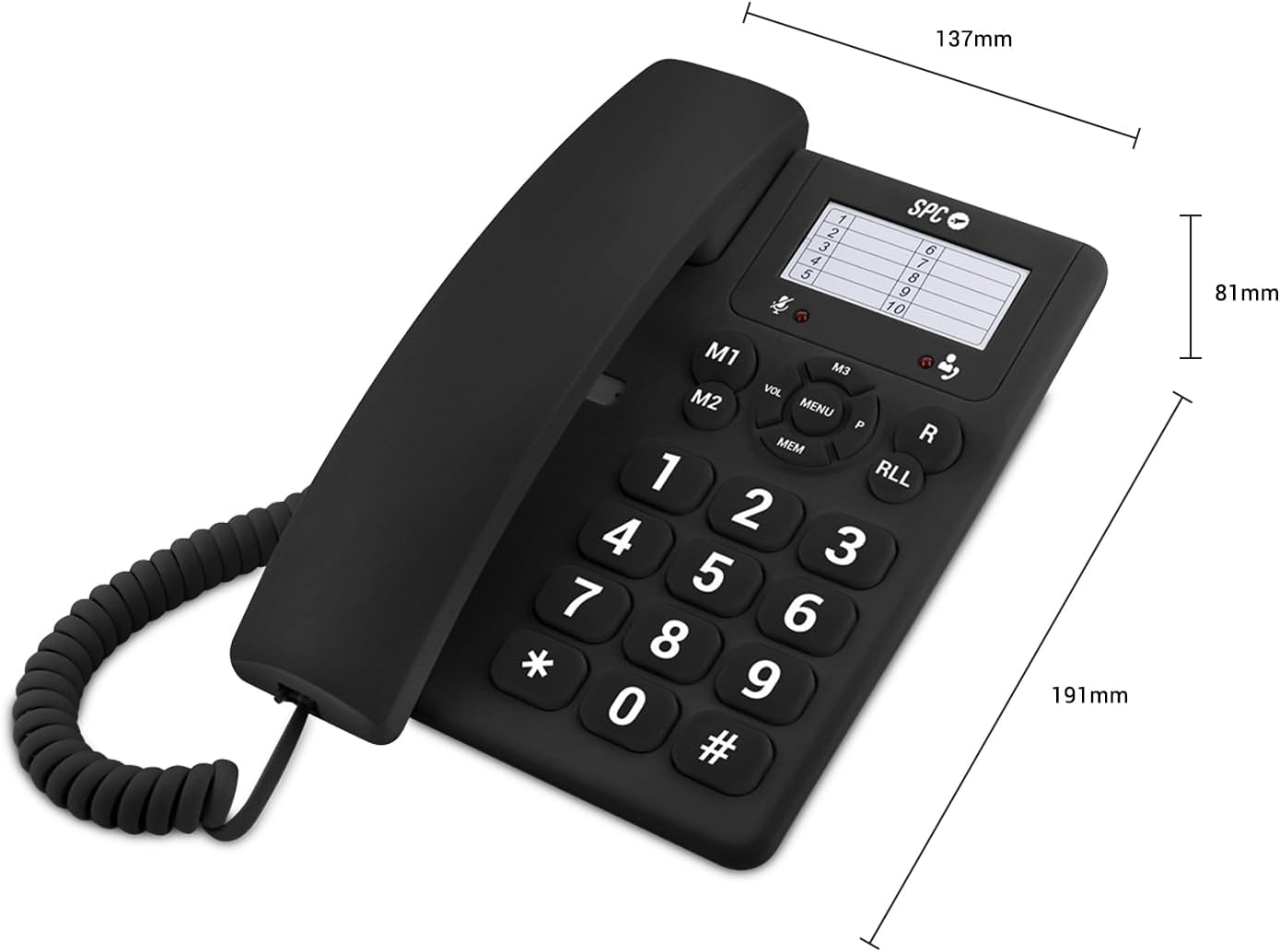
Image 4: The SPC 3602N telephone shown with its key dimensions: 81mm height, 191mm depth, and 137mm width.
9. వారంటీ మరియు మద్దతు
Your SPC 3602N Landline Telephone comes with a రెండు సంవత్సరాల వారంటీ against factory defects. Please retain your proof of purchase for warranty claims.
For technical support or warranty inquiries, please contact your retailer or the official SPC customer service channels. Refer to the packaging or SPC's official webసంప్రదింపు సమాచారం కోసం సైట్.