
AccuWeight Accuweight-255B
AccuWeight Gram Scale User Manual
Model: Accuweight-255B | Brand: AccuWeight
1. పరిచయం
Thank you for choosing the AccuWeight Gram Scale. This high-precision digital scale is designed for accurate measurements of various small items, including coffee, jewelry, and other delicate materials. Its compact size and multiple functions make it an indispensable tool for both professional and personal use. Please read this manual thoroughly before operation to ensure proper use and maintenance.

Figure 1: AccuWeight Gram Scale with protective cover and included batteries.
2 కీ ఫీచర్లు
- అధిక ఖచ్చితత్వం: Accuracy of +/- 0.03% for items from 0.2 g to 1,000 g.
- తారే ఫంక్షన్: Quickly calculate the net weight of loose materials by subtracting container weight.
- Count by Piece (PCS): Determine the number of individual pieces for small items like coins or beads.
- Multiple Weighing Units: Choose from 6 units: g (grams), ct (carats), dwt (pennyweights), ozt (troy ounces), oz (ounces), gn (grains).
- బ్యాక్లిట్ LCD డిస్ప్లే: వివిధ లైటింగ్ పరిస్థితులలో స్పష్టంగా చదవగలిగేలా చేస్తుంది.
- అమరిక ఫంక్షన్: Allows for recalibration to maintain accuracy over time.
- ఉపయోగించడానికి సులభం: Intuitive button layout for straightforward operation.
- Pocket-Size Design: Compact and lightweight for easy portability and storage.
- రక్షణ కవచం: Doubles as a weighing tray for convenience.
- ఆటో షట్-ఆఫ్: 90-second auto shut-off feature to conserve battery life.
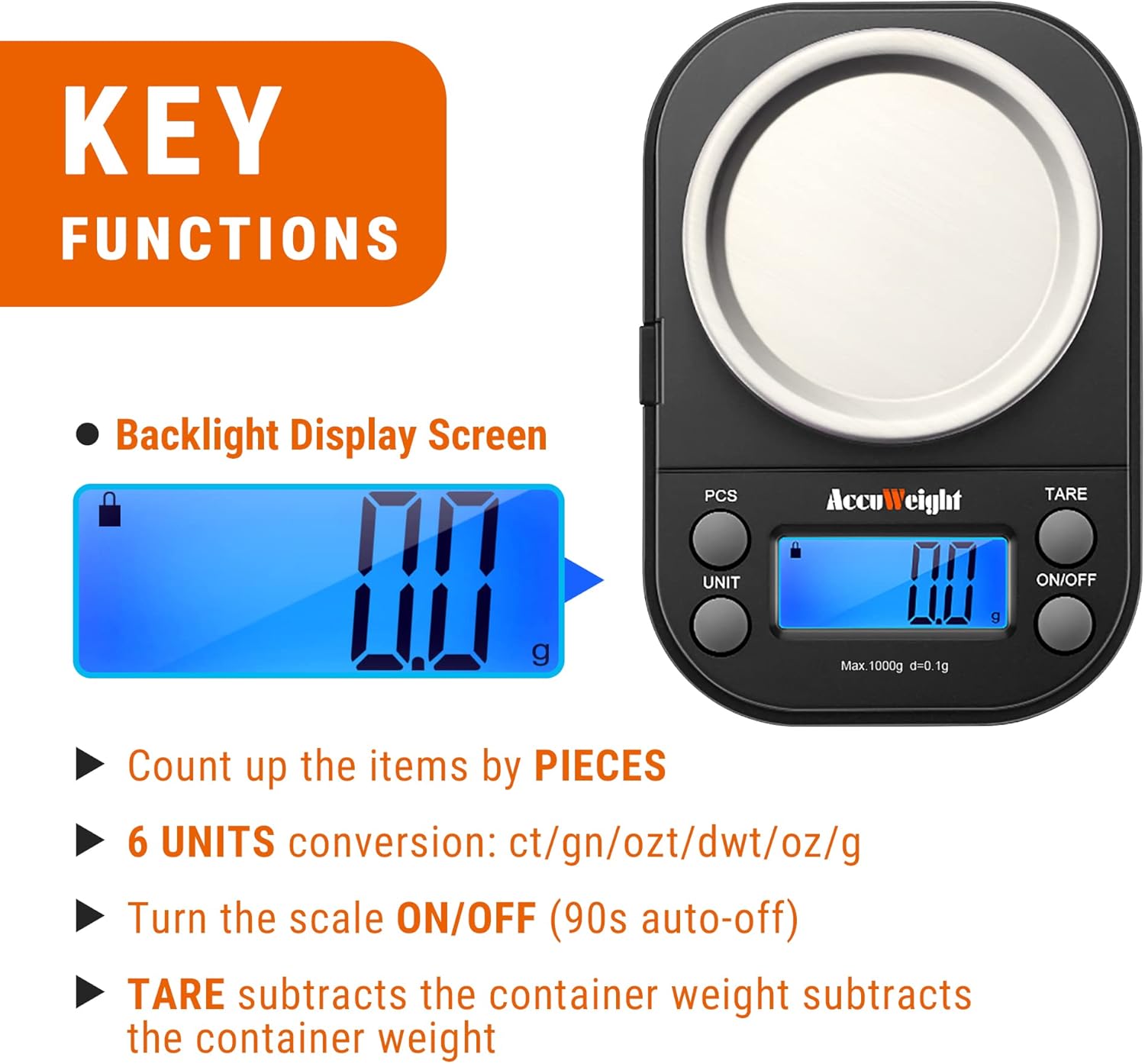
చిత్రం 2: పైగాview of the scale's key functions.
3. సెటప్
3.1 అన్ప్యాకింగ్
Carefully remove all components from the packaging. Ensure you have the scale unit, protective cover/weighing tray, and two AAA batteries. Inspect the scale for any signs of damage during transit.

మూర్తి 3: ప్యాకేజీ విషయాలు.
3.2 బ్యాటరీ ఇన్స్టాలేషన్
- స్కేల్ యొక్క దిగువ భాగంలో బ్యాటరీ కంపార్ట్మెంట్ను గుర్తించండి.
- స్లయిడ్ బ్యాటరీ కంపార్ట్మెంట్ కవర్ తెరవండి.
- కంపార్ట్మెంట్ లోపల సూచించిన విధంగా సరైన ధ్రువణత (+/-) ఉండేలా చూసుకుంటూ రెండు AAA బ్యాటరీలను చొప్పించండి.
- బ్యాటరీ కంపార్ట్మెంట్ కవర్ను సురక్షితంగా మూసివేయండి.
3.3 ప్లేస్మెంట్
Place the scale on a hard, flat, and stable surface. Uneven surfaces can affect accuracy. Avoid placing the scale near strong electromagnetic fields, extreme temperatures, or vibrations.
4. ఆపరేషన్
4.1 Basic Weighing (On/Off & Tare)
- నొక్కండి ఆన్/ఆఫ్ button to turn on the scale. The display will show "88888" and then "0.0g".
- If using a container, place it on the weighing platform before pressing the తారే button. The display will reset to "0.0g", effectively subtracting the container's weight.
- Place the item(s) to be weighed onto the platform or into the tared container. The weight will be displayed.
- స్కేల్ను ఆఫ్ చేయడానికి, నొక్కి పట్టుకోండి ఆన్/ఆఫ్ button for a few seconds. The scale will also automatically shut off after 90 seconds of inactivity to conserve battery life.
4.2 యూనిట్ మార్పిడి
While the scale is on, press the యూనిట్ button repeatedly to cycle through the available weighing units: grams (g), carats (ct), pennyweights (dwt), troy ounces (ozt), ounces (oz), and grains (gn).

చిత్రం 4: ఉదాamples of unit conversions on the display.
4.3 Piece Counting (PCS)
This function allows you to count multiple pieces of an item based on a sampలే పరిమాణం.
- Turn on the scale and ensure it reads "0.0g".
- నొక్కండి మరియు పట్టుకోండి PCS button until "25" appears on the display.
- నొక్కండి యూనిట్ button to select a sample quantity (25, 50, 75, or 100 pieces).
- s యొక్క ఖచ్చితమైన సంఖ్యను ఉంచండిampతూకం వేసే వేదికపైకి ముక్కలను (ఉదా. 25 ముక్కలు) విసిరేయండి.
- నొక్కండి PCS s ని నిర్ధారించడానికి మళ్ళీ బటన్ నొక్కండిample. The display will show the sampలే పరిమాణం.
- You can now add more pieces of the same item, and the scale will count them.
- లెక్కింపు మోడ్ నుండి నిష్క్రమించడానికి, PCS బటన్.

Figure 5: Piece counting in action.
5. క్రమాంకనం
Calibration ensures the accuracy of your scale over time. A 1000g calibration weight (not included) is required for this process.
- స్కేల్ని ఆన్ చేయండి.
- నొక్కండి మరియు పట్టుకోండి యూనిట్ key until the display shows "CAL".
- నొక్కండి యూనిట్ key again. The display will show "1000.0g".
- Place a 1000g calibration weight on the center of the weighing platform.
- Wait for the display to show "PASS". This indicates successful calibration.
- Remove the calibration weight. The scale is now ready for use.

Figure 6: Step-by-step calibration guide.
6. నిర్వహణ
6.1 శుభ్రపరచడం
స్కేల్ను శుభ్రం చేయడానికి, దానిని మృదువైన, డి-స్కట్టర్తో తుడవండి.amp cloth. Do not use abrasive cleaners or immerse the scale in water. Ensure the scale is completely dry before storage or next use.
6.2 నిల్వ
Store the scale in a cool, dry place. The protective cover should be placed over the weighing platform to prevent dust and damage. Remove batteries if the scale will not be used for an extended period.
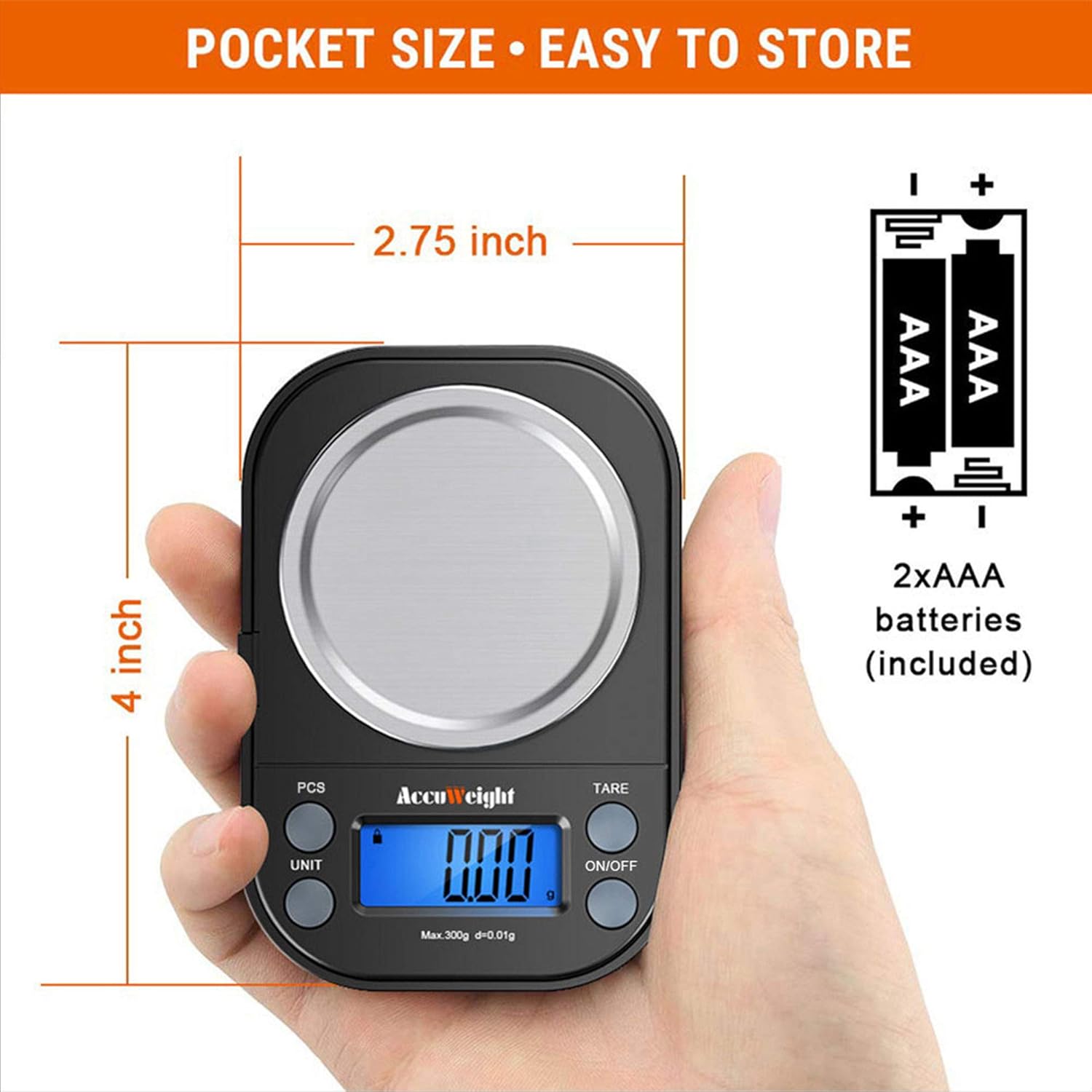
Figure 7: Scale's compact size for easy storage.
7. ట్రబుల్షూటింగ్
| సమస్య | సాధ్యమైన కారణం | పరిష్కారం |
|---|---|---|
| స్కేల్ ఆన్ చేయబడదు | తక్కువ లేదా డెడ్ బ్యాటరీలు; సరికాని బ్యాటరీ ఇన్స్టాలేషన్ | బ్యాటరీలను మార్చండి; బ్యాటరీ ధ్రువణతను తనిఖీ చేయండి |
| సరికాని రీడింగ్లు | Unstable surface; Overload; Needs calibration | Place on flat, stable surface; Do not exceed 1000g; Perform calibration |
| "O-Ld" ప్రదర్శించబడింది | Overload (weight exceeds capacity) | నష్టాన్ని నివారించడానికి అదనపు బరువును వెంటనే తొలగించండి. |
| "ఇక్కడ" ప్రదర్శించబడింది | తక్కువ బ్యాటరీ శక్తి | బ్యాటరీలను భర్తీ చేయండి |
| డిస్ప్లే మసకగా లేదా మిణుకుమిణుకుమంటూ ఉంది | తక్కువ బ్యాటరీ శక్తి | బ్యాటరీలను భర్తీ చేయండి |
8. స్పెసిఫికేషన్లు
| ఫీచర్ | వివరాలు |
|---|---|
| బ్రాండ్ | అక్యూవెయిట్ |
| మోడల్ సంఖ్య | Accuweight-255B |
| రంగు | నలుపు |
| బరువు పరిమితి | 1000 Grams (1kg) |
| రీడౌట్ ఖచ్చితత్వం | 0.1గ్రా |
| కనీస బరువు | 0.2గ్రా |
| కొలత యూనిట్లు | g, ct, dwt, ozt, oz, gn |
| ప్రదర్శన రకం | బ్యాక్లైట్తో LCD |
| శక్తి మూలం | 2 AAA బ్యాటరీలు (చేర్చబడినవి) |
| ఉత్పత్తి కొలతలు | 3.74 x 2.44 x 0.83 అంగుళాలు |
| వస్తువు బరువు | 5 ఔన్సులు |
| మెటీరియల్ | Stainless Steel (platform) |
| ప్రత్యేక ఫీచర్ | Tare, Count by Piece, Calibration |
9. Additional Visual Aids

Figure 8: Large weighing range for various items.

Figure 9: Backlit display for clear visibility.

Figure 10: Protective cover doubles as a weighing tray.
10. అధికారిక ఉత్పత్తి వీడియోలు
There are no official seller-provided videos available for this product at this time.
11. వారంటీ మరియు మద్దతు
For detailed warranty information and customer support, please refer to the contact information provided in your product packaging or visit the official AccuWeight website. A digital version of the user manual is also available for download via the following link: AccuWeight User Manual (PDF).
Ask a question about this manual
Ask about setup, troubleshooting, compatibility, parts, safety, or missing instructions. Manuals+ will review the question and use this page’s manual context to help answer it.