
1. పరిచయం
This manual provides essential information for the safe and efficient operation of your Onida 50UIR KY Rock 50-inch 4K Ultra HD Smart LED TV. Please read it thoroughly before using the television and retain it for future reference.
2. భద్రతా సమాచారం
Observe the following safety precautions to prevent fire, electric shock, or damage to the product:
- వర్షం లేదా తేమకు టీవీని బహిర్గతం చేయవద్దు.
- Do not open the cabinet; refer all servicing to qualified personnel.
- సరైన వెంటిలేషన్ ఉండేలా చూసుకోండి; వెంటిలేషన్ ఓపెనింగ్లను అడ్డుకోకండి.
- Place the TV on a stable, level surface or mount securely to a wall.
- మెరుపు తుఫానుల సమయంలో లేదా ఎక్కువసేపు ఉపయోగించనప్పుడు టీవీని అన్ప్లగ్ చేయండి.
3. ప్యాకేజీ విషయాలు
ప్యాకేజింగ్లో అన్ని వస్తువులు ఉన్నాయని నిర్ధారించుకోండి:
- 1 x Onida 50UIR LED TV
- 1 x టేబుల్ టాప్ స్టాండ్
- 1 x వాల్ మౌంట్ బ్రాకెట్
- 1 x వినియోగదారు మాన్యువల్
- 1 x వారంటీ కార్డ్
- 1 x రిమోట్ కంట్రోల్
4. సెటప్
4.1 Installing the Stand or Wall Mount
You can choose to install the included table-top stand or use the wall mount bracket. Ensure the TV is placed on a stable surface or securely mounted to a wall according to the provided instructions for the chosen mounting method.
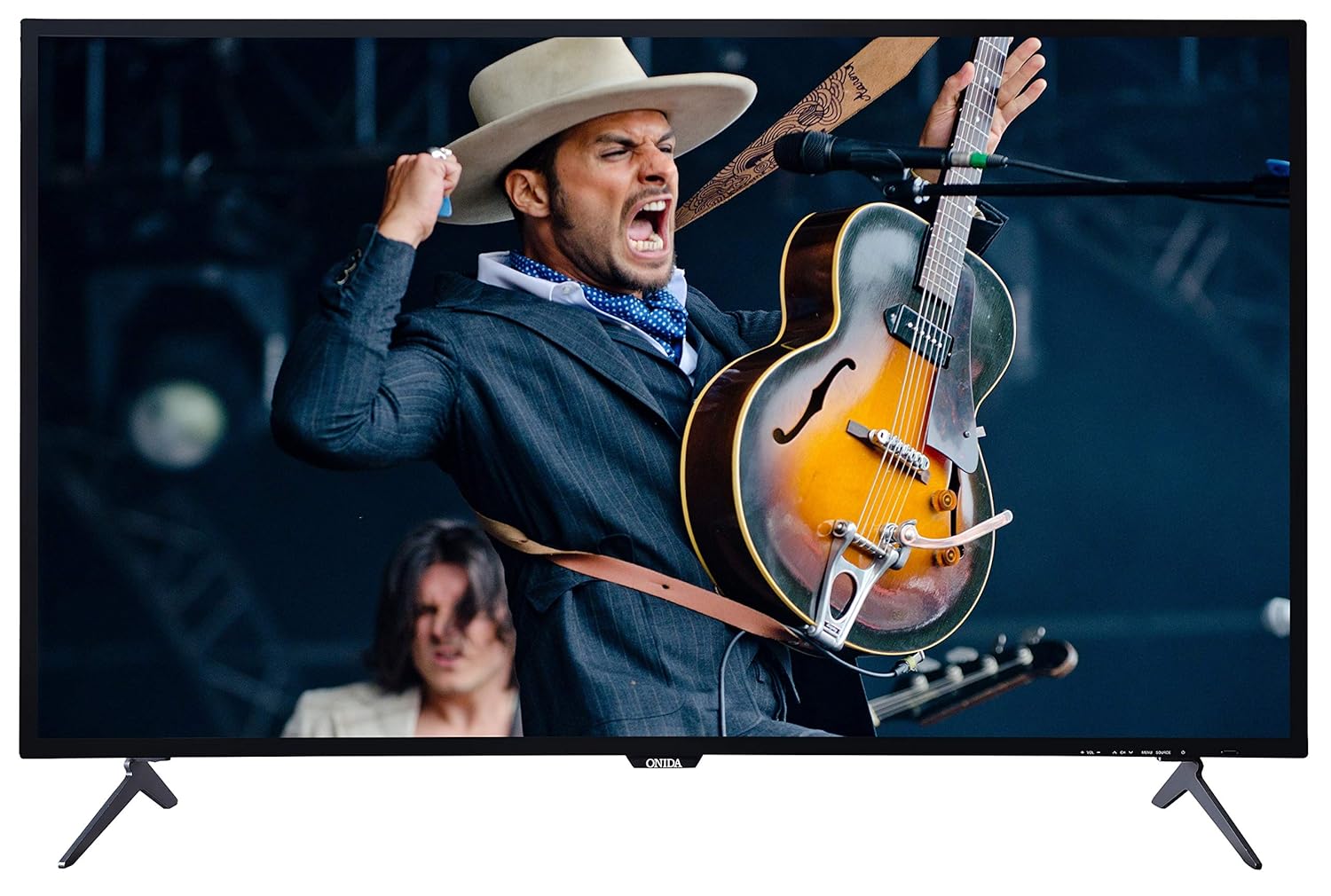
This image displays the front of the Onida 50UIR television, showcasing its slim bezels and the included table-top stands. The screen shows a vibrant image of a musician.

కోణీయ view of the Onida 50UIR TV, highlighting its profile and the design of the table-top stands.
4.2 ప్రారంభ పవర్-ఆన్ మరియు కాన్ఫిగరేషన్
After connecting the power cable, press the power button on the TV or remote control. Follow the on-screen prompts to complete the initial setup, including language selection, network connection, and channel scanning.
5. ఆపరేటింగ్ సూచనలు
5.1 ప్రాథమిక విధులు
- పవర్ ఆన్/ఆఫ్: రిమోట్ లేదా టీవీలో పవర్ బటన్ను నొక్కండి.
- వాల్యూమ్ నియంత్రణ: రిమోట్లోని VOL +/- బటన్లను ఉపయోగించండి.
- ఛానెల్ ఎంపిక: రిమోట్లో CH +/- బటన్లు లేదా నంబర్ ప్యాడ్ను ఉపయోగించండి.
- ఇన్పుట్ మూలం: Press the SOURCE button to select between HDMI, AV, VGA, or TV inputs.
6 కనెక్టివిటీ
The Onida 50UIR TV offers various connectivity options for external devices:
- HDMI పోర్ట్లు (3): సెట్-టాప్ బాక్స్లు, బ్లూ-రే ప్లేయర్లు, గేమింగ్ కన్సోల్లను కనెక్ట్ చేయండి.
- USB పోర్ట్లు (2): మీడియా ప్లేబ్యాక్ కోసం హార్డ్ డ్రైవ్లు, USB ఫ్లాష్ డ్రైవ్లను కనెక్ట్ చేయండి.
- VGA Port (1): కంప్యూటర్ను కనెక్ట్ చేయండి.
- AV ఇన్పుట్: Connect older devices using composite video and stereo audio.
- యాంటెన్నా ఇన్పుట్: Connect a terrestrial or cable antenna.
- ఈథర్నెట్ (LAN) పోర్ట్: వైర్డు ఇంటర్నెట్ కనెక్షన్ కోసం.

ఒక వివరణాత్మక view of the rear panel of the Onida 50UIR TV, displaying various input and output ports including HDMI, USB, VGA, and audio connections.

This image provides another detailed view of the rear connectivity panel, highlighting the Ethernet port, additional HDMI inputs, VGA, PC Audio In, and Antenna input.
7. స్మార్ట్ టీవీ ఫీచర్లు
Your Onida 50UIR TV is equipped with smart functionalities for an enhanced viewఅనుభవం:
- ఆపరేటింగ్ సిస్టమ్: Android OS 5.1.1
- ప్రాసెసర్: ARM A7 Quad-core processor
- మెమరీ: 2GB RAM, 8GB Internal Memory
- యాప్ యాక్సెస్: Full access to the Google Play Store for downloading applications.
- వైర్లెస్ కనెక్టివిటీ: Built-in Wi-Fi for internet access.
- స్క్రీన్ మిర్రరింగ్: Share content from compatible mobile devices to the TV screen.
- మద్దతు ఉన్న సేవలు: Includes YouTube and other streaming applications available via the Play Store.

A graphic detailing the main features of the Onida 50UIR TV, including 4K UHD resolution, Android OS, ARM A7 Quad Core Processor, Screen Mirroring, Built-In Wi-Fi, Quality Checks, Quick & Free Installation, and 300+ Service Centers.
8. రిమోట్ కంట్రోల్
The included remote control features navigation keys and a full QWERTY keyboard for convenient operation and text input.
8.1 బ్యాటరీ ఇన్స్టాలేషన్
Open the battery compartment on the back of the remote control. Insert two AAA batteries, ensuring correct polarity (+/-). Close the compartment securely.
8.2 Remote Control Technology
The remote control utilizes both Infrared (IR) and Bluetooth technology for communication with the TV.

This image shows both the front and back of the Onida Smart TV remote control. The front features standard navigation and media playback buttons, while the back reveals a full QWERTY keyboard for easier text input.
9. నిర్వహణ
9.1 టీవీని శుభ్రపరచడం
మెత్తటి, పొడి వస్త్రంతో స్క్రీన్ మరియు క్యాబినెట్ను సున్నితంగా తుడవండి. మొండి గుర్తుల కోసం, కొద్దిగా d ఉపయోగించండి.amp cloth with a mild, non-abrasive cleaner specifically designed for electronics. Do not spray cleaner directly onto the screen.
9.2 నిల్వ
If storing the TV for an extended period, disconnect it from the power outlet and store it in a cool, dry place, protected from dust and extreme temperatures.
10. ట్రబుల్షూటింగ్
మీ టీవీలో సమస్యలు ఎదురైతే, ఈ క్రింది సాధారణ సమస్యలు మరియు పరిష్కారాలను చూడండి:
- శక్తి లేదు: Ensure the power cable is securely connected and the power outlet is functional. Check if the power indicator light is on.
- చిత్రం/ధ్వని లేదు: Verify the correct input source is selected. Check all cable connections (HDMI, AV, etc.). Try another channel or media source.
- రిమోట్ కంట్రోల్ పనిచేయదు: Check battery levels and ensure they are inserted correctly. Point the remote directly at the TV's IR sensor.
- స్పందించని స్మార్ట్ ఫీచర్లు: Check your internet connection (Wi-Fi or Ethernet). Restart the TV by unplugging it for a few minutes and plugging it back in.
- పేలవమైన చిత్ర నాణ్యత: చిత్ర సెట్టింగ్లను సర్దుబాటు చేయండి (ప్రకాశం, కాంట్రాస్ట్, షార్ప్నెస్). ఇన్పుట్ సోర్స్ అధిక-నాణ్యత సిగ్నల్ను అందిస్తుందని నిర్ధారించుకోండి.
నిరంతర సమస్యల కోసం, కస్టమర్ మద్దతును సంప్రదించండి.
11. స్పెసిఫికేషన్లు
| ఫీచర్ | స్పెసిఫికేషన్ |
|---|---|
| బ్రాండ్ | ఒనిడా |
| మోడల్ | 50UIR |
| మోడల్ పేరు | KY Rock |
| స్క్రీన్ పరిమాణం | 50 అంగుళాలు (127 సెం.మీ.) |
| ప్రదర్శన సాంకేతికత | LED ADS Panel |
| రిజల్యూషన్ | 4K అల్ట్రా HD (3840 x 2160 పిక్సెల్లు) |
| రిఫ్రెష్ రేట్ | 60 Hz |
| ఆపరేటింగ్ సిస్టమ్ | Android OS 5.1.1 |
| ప్రాసెసర్ | ARM A7 Quad core |
| మెమరీ స్టోరేజ్ కెపాసిటీ | 8 GB (అంతర్గత) |
| RAM | 2 GB |
| సౌండ్ అవుట్పుట్ | 20 Watts (Stereo) |
| HDMI పోర్ట్లు | 3 |
| USB పోర్ట్లు | 2 |
| VGA పోర్ట్ | 1 |
| హార్డ్వేర్ ఇంటర్ఫేస్ | HDMI, USB, VGA |
| కనెక్టివిటీ టెక్నాలజీ | HDMI, USB, Built-in Wi-Fi |
| రిమోట్ కంట్రోల్ టెక్నాలజీ | ఐఆర్, బ్లూటూత్ |
| Viewing యాంగిల్ | 178 డిగ్రీలు |
| చిత్రం కారక నిష్పత్తి | 16:9 |
| ఇమేజ్ కాంట్రాస్ట్ రేషియో | 3000000 : 1 |
| శక్తి మూలం | AC |
| ఉత్పత్తి కొలతలు (LxWxH) | 110.8 x 23 x 70 సెం.మీ |
| వస్తువు బరువు | 11 కిలోలు |

A technical diagram illustrating the physical dimensions of the Onida 50UIR TV, including width, height, depth, and screen diagonal in both inches and centimeters.
12. వారంటీ మరియు మద్దతు
12.1 వారంటీ సమాచారం
The Onida 50UIR TV comes with a 1 సంవత్సరాల తయారీదారు వారంటీ కొనుగోలు తేదీ నుండి. వారంటీ క్లెయిమ్ల కోసం దయచేసి మీ కొనుగోలు రసీదుని ఉంచుకోండి.
12.2 కస్టమర్ మద్దతు
For technical assistance, service requests, or warranty inquiries, please contact MIRC Electronics (Onida) customer service:
- కస్టమర్ సర్వీస్ నంబర్: 1800-103-1000