
Xiaomi xiaomi mi band 3
Xiaomi Mi Band 3 Fitness Tracker User Manual
Model: Xiaomi Mi Band 3 | Brand: Xiaomi
పరిచయం
The Xiaomi Mi Band 3 is an advanced fitness tracker designed to help you monitor your daily activities and health metrics. Featuring an OLED display and touchpad, it provides real-time information on exercise duration, mileage, heart rate, and more. With 50-meter water resistance, it is suitable for swimming and various water-based activities. This manual provides essential information for setting up, operating, and maintaining your Mi Band 3.
ప్యాకేజీ విషయాలు
Upon opening the sealed box, verify that all components are present:
- Xiaomi Mi Band 3 Tracker Unit
- Black Wristband (Microfiber material)
- అంకితమైన ఛార్జింగ్ కేబుల్
- వినియోగదారు మాన్యువల్ (ఈ పత్రం)

Figure 1: Xiaomi Mi Band 3 main unit and wristband.
సెటప్
1. పరికరాన్ని ఛార్జ్ చేస్తోంది
Before first use, fully charge your Mi Band 3. Connect the charging cable to the tracker unit and a USB power source (e.g., computer USB port or a USB wall adapter). The OLED display will show the charging status.
2. Mi Fit యాప్ను ఇన్స్టాల్ చేయడం
To utilize all features of your Mi Band 3, download and install the official Xiaomi Sports (Mi Fit) App on your smartphone. The app is available for both Android and iOS devices.
- Android కోసం: కోసం వెతకండి "Mi Fit" on the Google Play స్టోర్.
- iOS కోసం: కోసం వెతకండి "Mi Fit" on the ఆపిల్ యాప్ స్టోర్.
3. మీ స్మార్ట్ఫోన్తో జత చేయడం
- మీ స్మార్ట్ఫోన్లో బ్లూటూత్ ప్రారంభించబడిందని నిర్ధారించుకోండి.
- Open the Mi Fit App and create an account or log in.
- Follow the in-app instructions to add a new device. Select "Mi Band" from the list.
- The app will search for your Mi Band 3. Once found, confirm the pairing on both your phone and the band (by tapping the button on the band when prompted).

Figure 2: Mi Band 3 display showing time and date.
ఆపరేటింగ్ సూచనలు
ప్రదర్శనను నావిగేట్ చేస్తోంది
The Mi Band 3 features an OLED touchpad display. Swipe up or down to scroll through different functions and tap the capacitive button below the screen to select or confirm actions.
ముఖ్య లక్షణాలు:
- సమయం మరియు తేదీ: The default screen displays the current time and date.
- నడకదూరాన్ని కొలిచే పరికరము: Tracks your daily steps taken. This data is synchronized with the Mi Fit App for detailed analysis.
- హార్ట్ రేట్ మానిటర్: Swipe to the heart rate screen and the band will automatically measure your heart rate. Ensure the band is snug on your wrist for accurate readings.

Figure 3: Mi Band 3 displaying heart rate measurement.
- నిద్ర ట్రాకింగ్: Automatically monitors your sleep patterns, including deep and light sleep, providing insights through the Mi Fit App.
- నోటిఫికేషన్లు: Receive call, message, and app notifications directly on your wrist. You can reject calls by long-pressing the button.
- వాతావరణ సూచన: View current weather conditions and forecasts for the next few days (requires synchronization with the Mi Fit App and internet connection).
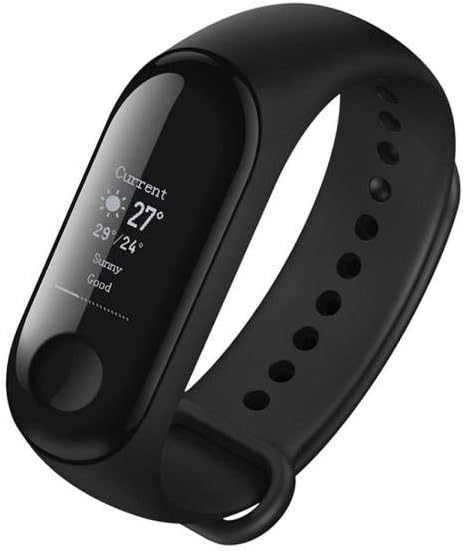
Figure 4: Mi Band 3 displaying weather information.
- సెడెంటరీ రిమైండర్: The band can remind you to move if you've been inactive for too long, configurable via the app.
- నా ఫోన్ని కనుగొనండి: Use this feature on the band to make your paired phone ring, even if it's on silent mode (within Bluetooth range).
- వ్యాయామ మోడ్లు: Initiate specific workout tracking sessions (e.g., outdoor run, treadmill, cycling) from the band or the app.
నిర్వహణ
- శుభ్రపరచడం: Regularly clean the band and the tracker unit with a soft, damp వస్త్రం. కఠినమైన రసాయనాలు లేదా రాపిడి పదార్థాలను నివారించండి.
- నీటి నిరోధకత: The Mi Band 3 is 50-meter water resistant, suitable for swimming and showering. However, avoid prolonged exposure to hot water, diving, or high-pressure water jets. Do not operate the band's touch screen underwater.
- నిల్వ: When not in use for extended periods, store the band in a cool, dry place.
- బ్యాటరీ సంరక్షణ: Charge the device before the battery is completely depleted to prolong its lifespan.
- పట్టీ భర్తీ: The microfiber wristband is interchangeable. Ensure any replacement straps are compatible with the Mi Band 3 unit.
ట్రబుల్షూటింగ్
| సమస్య | సాధ్యమైన పరిష్కారం |
|---|---|
| Band not turning on/displaying anything. | Ensure the band is fully charged. Connect it to the charger and check if the charging icon appears. |
| స్మార్ట్ఫోన్తో జత చేయడం సాధ్యం కాదు. |
|
| సరికాని హృదయ స్పందన రేటు రీడింగ్లు. | Ensure the band is worn snugly on your wrist, about one finger's width from your wrist bone. Avoid excessive movement during measurement. |
| నోటిఫికేషన్లు కనిపించడం లేదు. |
|
| Display not visible in direct sunlight. | The OLED display may be difficult to read in very bright direct sunlight. Try shading the screen with your hand. |
స్పెసిఫికేషన్లు
| ఫీచర్ | వివరాలు |
|---|---|
| మోడల్ పేరు | Xiaomi Mi బ్యాండ్ 3 |
| ప్రదర్శన రకం | OLED Touchpad |
| స్క్రీన్ పరిమాణం | 0.3 అంగుళాలు |
| నీటి నిరోధకత | 50 మీటర్లు (5 ATM) |
| కనెక్టివిటీ | బ్లూటూత్ |
| బ్యాటరీ రకం | లిథియం అయాన్ |
| బరువు | 30 గ్రాములు |
| మెటీరియల్ | Microfiber (wristband) |
| ప్రత్యేక లక్షణాలు | Time Display, Sleep Monitor, Sedentary Reminder, Pedometer, Heart Rate Monitor |
వారంటీ మరియు మద్దతు
The Xiaomi Mi Band 3 comes with a standard manufacturer's warranty. For specific warranty terms and conditions, please refer to the warranty card included with your product or visit the official Xiaomi website. For technical support, troubleshooting assistance, or service inquiries, please contact Xiaomi customer support through their official channels or visit their support page online.
అధికారిక Xiaomi Webసైట్: www.mi.com
Ask a question about this manual
Ask about setup, troubleshooting, compatibility, parts, safety, or missing instructions. Manuals+ will review the question and use this page’s manual context to help answer it.