
1. పరిచయం
Thank you for choosing the Zerone LP-838 Small Power Amplifier. This manual provides essential information for the safe and efficient operation of your device. Please read these instructions thoroughly before use and retain them for future reference.
2. ఉత్పత్తి ముగిసిందిview
2.1 ముఖ్య లక్షణాలు
- కాంపాక్ట్ మరియు పోర్టబుల్ డిజైన్.
- RCA and 3.5mm audio input compatibility.
- High-power audio amplifier chip for 2.1 channel output.
- Adjustable Treble, Bass, and Volume controls.
- Durable all-aluminum alloy shell for electromagnetic interference reduction.
2.2 కాంపోనెంట్ ఐడెంటిఫికేషన్
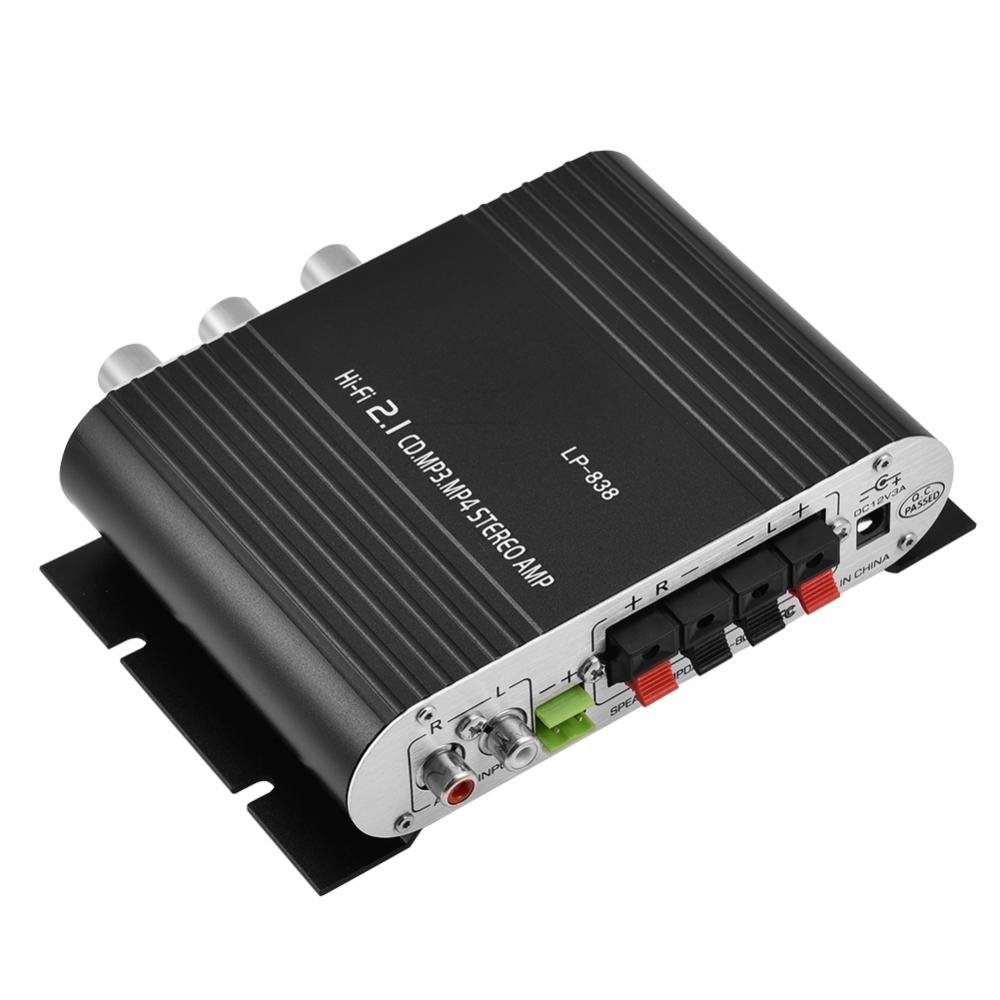
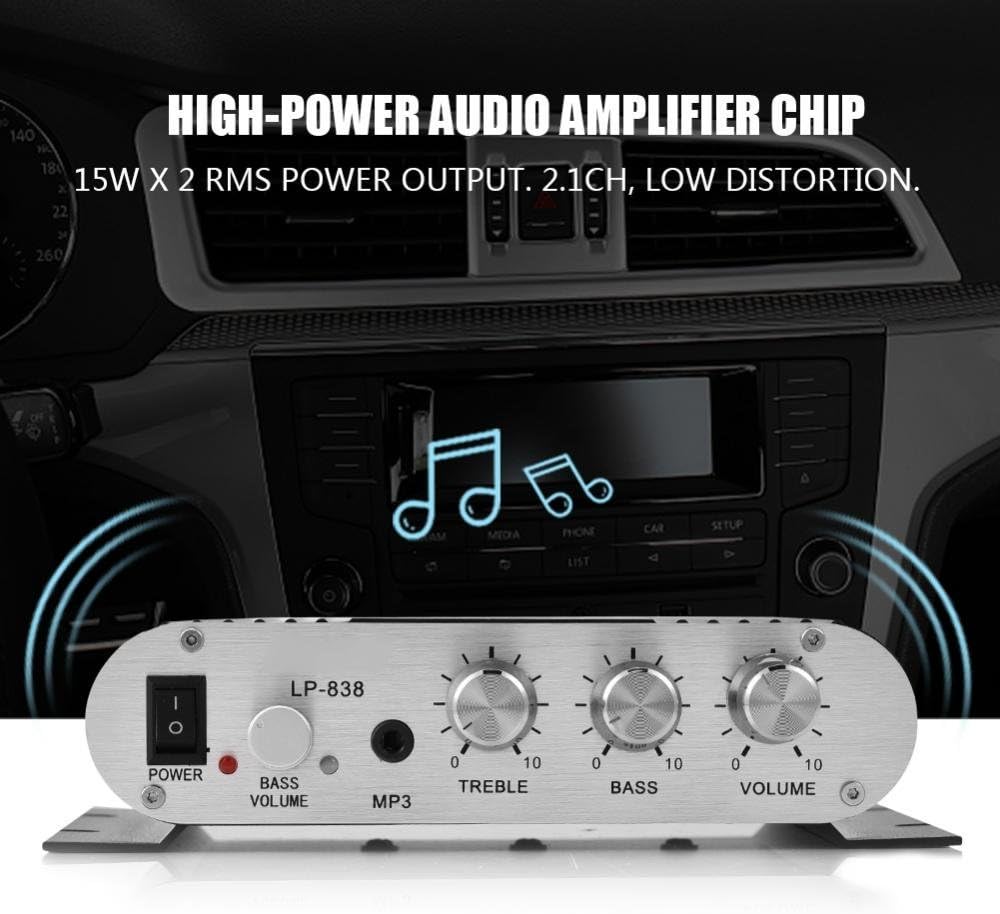
Figure 1: Front Panel Controls and Inputs
This image displays the front panel of the LP-838 amplifier. From left to right, it features a power switch, a bass volume knob, a 3.5mm MP3 input jack, and three rotary knobs for Treble, Bass, and Master Volume control. The unit also supports RCA audio input, as indicated by the text overlay.
చిత్రం 2: వెనుక ప్యానెల్ కనెక్షన్లు
This image shows the rear panel of the LP-838 amplifier. On the left are the RCA audio input jacks (red for right, white for left). In the center are the spring-clip speaker terminals for connecting left and right speakers. On the right is the DC 12V/3A power input jack and a 'Q.C. PASSED' stamp, indicating quality control.
ముందు ప్యానెల్:
- పవర్ స్విచ్: టోగుల్ చేస్తుంది ampలైఫైయర్ ఆన్/ఆఫ్.
- BASS VOLUME Knob: ఆడియో అవుట్పుట్ యొక్క బాస్ స్థాయిని సర్దుబాటు చేస్తుంది.
- MP3 ఇన్పుట్: 3.5mm jack for connecting portable audio devices.
- TREBLE నాబ్: అధిక-ఫ్రీక్వెన్సీ ప్రతిస్పందనను సర్దుబాటు చేస్తుంది.
- BASS నాబ్: తక్కువ-ఫ్రీక్వెన్సీ ప్రతిస్పందనను సర్దుబాటు చేస్తుంది.
- వాల్యూమ్ నాబ్: మొత్తం అవుట్పుట్ వాల్యూమ్ను నియంత్రిస్తుంది.
వెనుక ప్యానెల్:
- ఆడియో ఇన్పుట్ (RCA): Red and white RCA jacks for connecting audio sources (e.g., DVD players, computers).
- SPEAKER OUTPUTS (+R -R +L -L): Spring-clip terminals for connecting passive speakers. Ensure correct polarity (+ to + and - to -).
- DC 12V/3A ఇన్పుట్: Power input jack for connecting the external power adapter (not included).
3. సెటప్
- స్పీకర్లను కనెక్ట్ చేయండి: Connect your passive speakers to the SPEAKER OUTPUT terminals on the rear panel. Ensure the positive (+) terminal of the ampలైఫైయర్ స్పీకర్ యొక్క పాజిటివ్ (+) టెర్మినల్కు మరియు నెగటివ్ (-) టెర్మినల్కు కనెక్ట్ అవుతుంది. amplifier connects to the negative (-) terminal of the speaker. The ampలైఫైయర్ 4-8 ఓంల ఇంపెడెన్స్ ఉన్న స్పీకర్లకు మద్దతు ఇస్తుంది.
- ఆడియో మూలాన్ని కనెక్ట్ చేయండి:
- For RCA input: Connect your audio source (e.g., CD player, TV, computer) to the RCA AUDIO INPUT jacks on the rear panel using an RCA cable.
- For 3.5mm input: Connect your portable audio device (e.g., smartphone, MP3 player) to the MP3 input jack on the front panel using a 3.5mm audio cable.
- పవర్ కనెక్ట్ చేయండి: Connect a compatible DC 12V/3A power adapter (not included) to the DC 12V/3A input jack on the rear panel. Plug the power adapter into a wall outlet.
Important: Ensure all connections are secure before powering on the ampజీవితకాలం.
4. ఆపరేటింగ్ సూచనలు
- పవర్ ఆన్: Flip the POWER switch on the front panel to the 'ON' position. The power indicator light will illuminate.
- ఇన్పుట్ని ఎంచుకోండి: ది amplifier automatically uses the active input. If both RCA and 3.5mm inputs are connected, the 3.5mm input may take precedence.
- వాల్యూమ్ సర్దుబాటు: Start with the VOLUME knob set to a low level. Begin playing audio from your source, then slowly increase the VOLUME knob to your desired listening level.
- టోన్ సర్దుబాటు చేయండి: Use the TREBLE and BASS knobs to fine-tune the high and low frequencies according to your preference. The BASS VOLUME knob provides additional control over the bass output.
- పవర్ ఆఫ్: When finished, turn the VOLUME knob down to its minimum setting, then flip the POWER switch to the 'OFF' position.
5. నిర్వహణ
- శుభ్రపరచడం: వెలుపలి భాగాన్ని శుభ్రం చేయడానికి మృదువైన, పొడి వస్త్రాన్ని ఉపయోగించండి ampలిఫైయర్. లిక్విడ్ క్లీనర్లు లేదా ద్రావకాలను ఉపయోగించవద్దు.
- వెంటిలేషన్: నిర్ధారించండి ampవేడెక్కకుండా నిరోధించడానికి లైఫైయర్ బాగా వెంటిలేషన్ ఉన్న ప్రదేశంలో ఉంచబడుతుంది. వెంటిలేషన్ స్లాట్లను నిరోధించవద్దు.
- నిల్వ: When not in use for extended periods, disconnect the power adapter and store the ampచల్లని, పొడి ప్రదేశంలో లైఫైయర్.
6. ట్రబుల్షూటింగ్
| సమస్య | సాధ్యమైన కారణం | పరిష్కారం |
|---|---|---|
| శక్తి లేదు | పవర్ అడాప్టర్ కనెక్ట్ కాలేదు లేదా తప్పుగా ఉంది; పవర్ స్విచ్ ఆఫ్ చేయబడింది. | Ensure power adapter is securely connected and functional. Flip power switch to ON. |
| సౌండ్ అవుట్పుట్ లేదు | Incorrect audio input connection; speaker wires loose or incorrect polarity; volume too low; audio source issue. | Check audio input cables and connections. Verify speaker wire connections and polarity. Increase volume. Test audio source with another device. |
| వక్రీకరించిన ధ్వని | Volume too high; incorrect tone settings; faulty audio source or cable. | Reduce volume. Adjust Treble and Bass knobs. Test with a different audio source or cable. |
| హమ్మింగ్ లేదా బజ్జింగ్ శబ్దం | Ground loop issue; interference from other electronics; faulty cables. | Ensure all components are properly grounded. Move amplifier away from other electronic devices. Try different audio cables. |
7. స్పెసిఫికేషన్లు
- బ్రాండ్: జీరోన్
- మోడల్ సంఖ్య: Zeroneq8ae3d902g-02 (LP-838)
- వాల్యూమ్tage: 14.4 వోల్ట్లు (ఆపరేటింగ్)
- ఛానెల్ల సంఖ్య: 2
- స్పీకర్ ఇంపెడెన్స్: 4-8 ఓం
- మౌంటు రకం: ఉపరితల మౌంట్
- వస్తువు బరువు: 7.8 ఔన్సులు
- ASIN: B07DM4QJGX
- UPC: 763741184919
- మొదటి తేదీ అందుబాటులో ఉంది: జూలై 4, 2019
8. వారంటీ సమాచారం
For specific warranty terms and conditions, please refer to the documentation provided at the time of purchase or contact your retailer. Warranty coverage typically includes defects in materials and workmanship under normal use.
9. మద్దతు
If you encounter issues that cannot be resolved using the troubleshooting guide, please contact the retailer or manufacturer for assistance. Provide your product model number (LP-838) and a detailed description of the problem when seeking support.