
1. పరిచయం
This manual provides instructions for the Easytry123 replacement infrared remote control, model Easytry0400. This remote is designed to function as a direct replacement for the original remote controls of Dynex DX-LCD37-09-02 and DX-LCD37-09-2 LCD LED HDTV television models. Please ensure your television model is listed for proper compatibility. This remote operates using infrared technology and requires 2 AAA batteries (not included).
2. సెటప్: బ్యాటరీ ఇన్స్టాలేషన్
To begin using your Easytry123 replacement remote control, you must first install the batteries.
- రిమోట్ కంట్రోల్ వెనుక బ్యాటరీ కంపార్ట్మెంట్ను గుర్తించండి.
- బ్యాటరీ కంపార్ట్మెంట్ కవర్ను తెరవడానికి దాన్ని క్రిందికి లేదా బయటికి జారండి.
- Insert two (2) AAA batteries, ensuring the positive (+) and negative (-) terminals align correctly with the markings inside the compartment. Incorrect battery orientation can prevent the remote from functioning.
- బ్యాటరీ కంపార్ట్మెంట్ కవర్ సురక్షితంగా క్లిక్ అయ్యే వరకు దాన్ని తిరిగి స్థానంలోకి స్లైడ్ చేయండి.
మూర్తి 1: వెనుకకు view of the Easytry123 remote control with the battery compartment open, illustrating where to insert the two AAA batteries.
3. ఆపరేటింగ్ సూచనలు
Point the remote control directly towards the infrared receiver on your Dynex television. Ensure there are no obstructions between the remote and the TV.

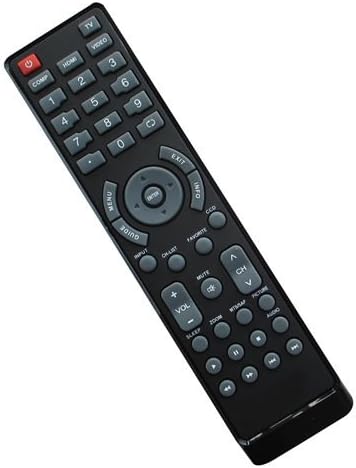
మూర్తి 2: ముందు view of the Easytry123 remote control, displaying its button layout.
బటన్ విధులు:
- POWER (Red button): టెలివిజన్ని ఆన్ లేదా ఆఫ్ చేస్తుంది.
- COMP, HDMI, VIDEO, 1-9, 0: Number buttons for direct channel selection and input source selection.
- మెను: టెలివిజన్ ప్రధాన మెనూను యాక్సెస్ చేస్తుంది.
- గైడ్: Displays the electronic program guide (if supported by your TV and service).
- ARROW buttons (Up, Down, Left, Right): మెనులు మరియు ఎంపికల ద్వారా నావిగేట్ చేస్తుంది.
- నమోదు చేయండి: మెనూలలో ఎంపికలను నిర్ధారిస్తుంది.
- బయటకి దారి: ప్రస్తుత మెనూ లేదా స్క్రీన్ నుండి నిష్క్రమిస్తుంది.
- సమాచారం: ప్రస్తుత ప్రోగ్రామ్ లేదా ఇన్పుట్ గురించి సమాచారాన్ని ప్రదర్శిస్తుంది.
- DCC: Likely for Closed Captioning display.
- ఇన్పుట్: Cycles through available input sources (HDMI, Video, etc.).
- CH జాబితా: ఛానెల్ జాబితాను ప్రదర్శిస్తుంది.
- మ్యూట్: టెలివిజన్ ఆడియోను మ్యూట్ చేస్తుంది లేదా అన్మ్యూట్ చేస్తుంది.
- VOL +/-: వాల్యూమ్ స్థాయిని సర్దుబాటు చేస్తుంది.
- CH ^/v: టెలివిజన్ ఛానెల్ని పైకి లేదా క్రిందికి మారుస్తుంది.
- MTMAP, PICTURE, AUDIO: Likely dedicated buttons for picture modes, audio settings, or other TV features.
- జూమ్: స్క్రీన్ జూమ్ స్థాయిని సర్దుబాటు చేస్తుంది.
- నిద్ర: టెలివిజన్ కోసం స్లీప్ టైమర్ని సెట్ చేస్తుంది.
- Playback Controls (Rewind, Play/Pause, Fast Forward, Stop, Record): For controlling connected media devices or TV's built-in media player.
Note: Some advanced functions or specific buttons may require your television to support those features. Refer to your television's original user manual for detailed information on its capabilities.
4. నిర్వహణ
సరైన సంరక్షణ మరియు నిర్వహణ మీ రిమోట్ కంట్రోల్ యొక్క జీవితాన్ని పొడిగిస్తుంది.
- శుభ్రపరచడం: Use a soft, dry cloth to clean the remote control. For stubborn dirt, lightly dampen the cloth with water or a mild cleaning solution, then wipe dry immediately. Do not use abrasive cleaners or immerse the remote in liquids.
- బ్యాటరీ భర్తీ: రిమోట్ స్పందన మందగించినప్పుడు లేదా పనిచేయడం ఆగిపోయినప్పుడు బ్యాటరీలను మార్చండి. ఎల్లప్పుడూ రెండు బ్యాటరీలను ఒకే సమయంలో కొత్త AAA బ్యాటరీలతో భర్తీ చేయండి. పాత మరియు కొత్త బ్యాటరీలను లేదా వివిధ రకాల బ్యాటరీలను కలపవద్దు.
- నిల్వ: If the remote will not be used for an extended period, remove the batteries to prevent leakage, which can damage the remote.
5. ట్రబుల్షూటింగ్
మీ రిమోట్ కంట్రోల్తో మీకు సమస్యలు ఎదురైతే, ఈ క్రింది ట్రబుల్షూటింగ్ దశలను ప్రయత్నించండి:
- రిమోట్ స్పందించడం లేదు:
- Ensure the remote is pointed directly at the TV's infrared sensor.
- Check if there are any obstructions between the remote and the TV.
- తాజా AAA బ్యాటరీలతో బ్యాటరీలను భర్తీ చేయండి.
- Verify that the TV is powered on.
- కొన్ని బటన్లు పనిచేయడం లేదు:
- This replacement remote is designed to replicate the original remote's functions. However, some specific or advanced features of your TV might not be fully supported if they differ significantly from the original remote's design.
- Ensure your TV model is indeed one of the compatible models (Dynex DX-LCD37-09-02 or DX-LCD37-09-2).
- జోక్యం:
- Strong light sources, especially fluorescent lights or direct sunlight, can interfere with infrared signals. Try operating the remote in different lighting conditions.
ఈ దశలను ప్రయత్నించిన తర్వాత కూడా సమస్య కొనసాగితే, దయచేసి కస్టమర్ సపోర్ట్ను సంప్రదించండి.
6. స్పెసిఫికేషన్లు
| మోడల్ సంఖ్య: | ఈజీట్రీ0400 |
| బ్రాండ్: | ఈజీట్రీ123 |
| కనెక్టివిటీ టెక్నాలజీ: | ఇన్ఫ్రారెడ్ (IR) |
| నియంత్రిక రకం: | బటన్ నియంత్రణ |
| అనుకూల పరికరాలు: | Dynex DX-LCD37-09-02, Dynex DX-LCD37-09-2 LCD LED HDTVs |
| బ్యాటరీలు అవసరం: | 2 x AAA (చేర్చబడలేదు) |
| ప్రత్యేక ఫీచర్: | Ergonomic replacement design |
7. కస్టమర్ మద్దతు
For any questions, concerns, or troubleshooting assistance not covered in this manual, please contact the seller or Easytry123 customer support through the platform where the product was purchased. Please have your product model number (Easytry0400) and purchase details ready when contacting support.