
1. పరిచయం
The UNI-T UT251A is a high-accuracy, high-sensitivity leakage current clamp meter designed for precise testing of AC leakage current. This high-resolution meter is suitable for various applications, including checking leakage current in motors, home appliances, and other electrical equipment up to 600A. It features a 4-digit LCD digital display with 10000 display count, auto-ranging capabilities, a 2/s sampling rate, peak hold function, and the ability to store 99 sets of data. The device also includes an RS-232 interface for data transmission, data hold, auto power-off, overload indication, and low battery indication.
2. భద్రతా సమాచారం
పరికరాన్ని ఆపరేట్ చేసే ముందు దయచేసి అన్ని భద్రతా సూచనలను చదివి అర్థం చేసుకోండి. ఈ సూచనలను పాటించడంలో విఫలమైతే విద్యుత్ షాక్, అగ్ని ప్రమాదం లేదా తీవ్రమైన గాయం సంభవించవచ్చు.
- Always wear appropriate personal protective equipment (PPE) when working with electrical systems.
- మీటర్ దెబ్బతిన్నట్లు కనిపిస్తే లేదా అసాధారణంగా పనిచేస్తుంటే దాన్ని ఉపయోగించవద్దు.
- ఉపయోగించే ముందు బ్యాటరీ కంపార్ట్మెంట్ సురక్షితంగా మూసివేయబడిందని నిర్ధారించుకోండి.
- ఏ ఫంక్షన్కైనా గరిష్ట ఇన్పుట్ రేటింగ్లను మించకూడదు.
- Avoid touching live circuits with bare hands or conductive materials.
- పరికరాన్ని పొడిగా మరియు శుభ్రంగా ఉంచండి.
- Refer to local and national safety codes for proper electrical work procedures.
3. ఉత్పత్తి ముగిసిందిview
The UNI-T UT251A is a compact and robust leakage current clamp meter. Key features include:
- 4-digit LCD Digital Display: Provides clear readings with a 10000 display count.
- ఆటో రేంజ్: తగిన కొలత పరిధిని స్వయంచాలకంగా ఎంచుకుంటుంది.
- 2/s Sampలింగ్ రేటు: Ensures quick and responsive measurements.
- పీక్ హోల్డ్: Captures and displays the maximum measured value.
- డేటా లాగింగ్: Stores up to 99 sets of data for later analysis.
- RS-232 ఇంటర్ఫేస్: Allows connection to a PC for data transfer and analysis.
- డేటా హోల్డ్: డిస్ప్లేపై ప్రస్తుత రీడింగ్ను స్తంభింపజేస్తుంది.
- ఆటో పవర్ ఆఫ్: Conserves battery life by automatically shutting down after a period of inactivity.
- ఓవర్లోడ్ సూచన: Alerts the user when the measurement exceeds the range.
- తక్కువ బ్యాటరీ సూచిక: Notifies the user when the battery needs replacement.

మూర్తి 3.1: ముందు view of the UNI-T UT251A Leakage Current Clamp Meter, showing the display, clamp దవడ, మరియు నియంత్రణ బటన్లు.
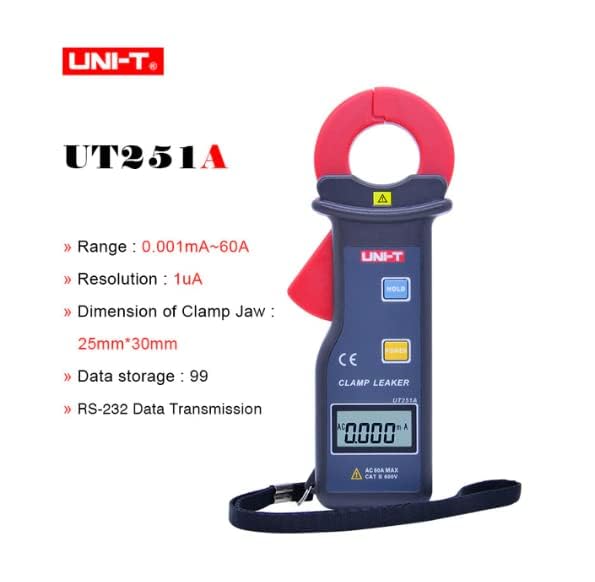
Figure 3.2: The UNI-T UT251A Clamp Meter highlighting its range, resolution, clamp jaw dimension, data storage, and RS-232 data transmission capabilities.
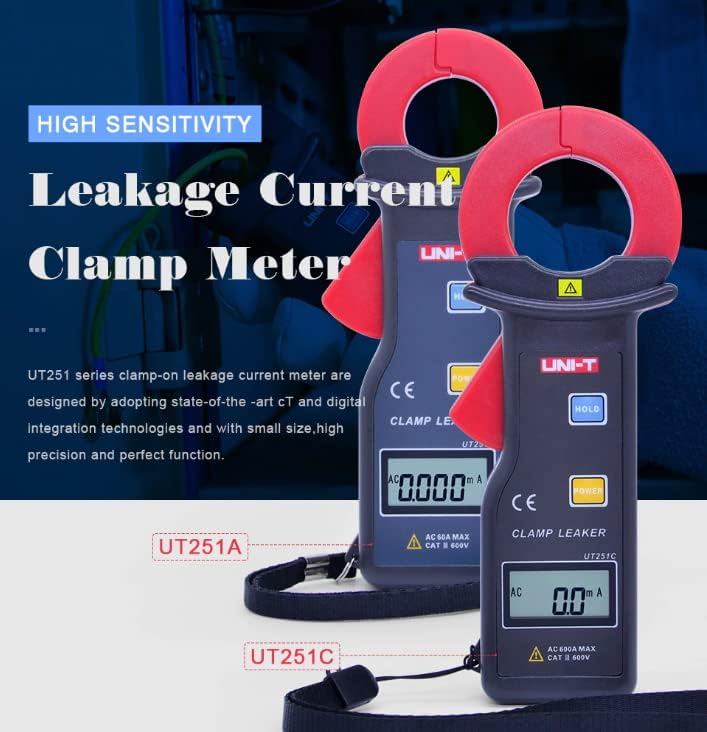
Figure 3.3: Comparison of UT251A and UT251C models, emphasizing their high sensitivity for leakage current measurement.
4. సెటప్
4.1 బ్యాటరీ ఇన్స్టాలేషన్
- మీటర్ వెనుక భాగంలో బ్యాటరీ కంపార్ట్మెంట్ కవర్ను గుర్తించండి.
- స్క్రూ(లు) విప్పి కవర్ తీసివేయడానికి స్క్రూడ్రైవర్ని ఉపయోగించండి.
- Insert the 9V battery (6F22) into the compartment, observing correct polarity.
- బ్యాటరీ కంపార్ట్మెంట్ కవర్ను మార్చండి మరియు స్క్రూ(లు) బిగించండి.
4.2 ప్రారంభ తనిఖీ
- Press the POWER button to turn on the meter.
- Verify that the LCD display shows "0.000mA" or a similar low reading in a stable environment.
- If a low battery indicator appears, replace the battery before use.
5. ఆపరేటింగ్ సూచనలు
5.1 Measuring AC Leakage Current
- నొక్కడం ద్వారా మీటర్ను ఆన్ చేయండి శక్తి బటన్.
- cl తెరవండిamp ట్రిగ్గర్ నొక్కడం ద్వారా దవడ.
- జాగ్రత్తగా clamp the meter around a single conductor (live, neutral, or ground wire) of the circuit you wish to measure. Ensure the jaw is completely closed.
- Read the leakage current value displayed on the LCD. The meter will automatically select the appropriate range.
- For accurate readings, ensure no other conductors are within the clamp దవడ.
5.2 డేటా హోల్డ్ ఫంక్షన్
- కొలత సమయంలో, నొక్కండి పట్టుకోండి డిస్ప్లేలో ప్రస్తుత రీడింగ్ను స్తంభింపజేయడానికి బటన్.
- నొక్కండి పట్టుకోండి button again to release the data hold and resume live measurement.
5.3 Peak Hold Function
- The meter automatically captures peak values. Refer to the specific manual for detailed instructions on accessing and clearing peak hold readings.

Figure 5.1: The UNI-T UT251A Clamp Meter in use, measuring current on an electrical wire.

Figure 5.2: A user wearing protective gloves operating the UNI-T UT251A Clamp Meter within an electrical panel, demonstrating a typical application.
6. Data Logging and RS-232 Interface
The UT251A can store up to 99 sets of measurement data. This data can be retrieved and analyzed using the RS-232 interface and the provided PC software.
6.1 డేటాను నిల్వ చేయడం
- During a measurement, press the appropriate button (refer to the specific manual for button identification, often labeled "MEM" or similar) to save the current reading.
- The meter will indicate successful data storage, often by displaying a memory location number.
6.2 Connecting to PC via RS-232
- Install the PC software from the provided CD onto your computer.
- Connect the RS-232 interface cable to the meter's RS-232 port and to your computer's serial port (or a USB-to-serial adapter).
- Launch the PC software.
- Follow the software's instructions to establish communication with the meter and download the stored data.
Video 6.1: An official product video demonstrating the features and usage of the UNI-T UT251A/UT251C clamp meters, including a comparison of the two models and their accessories.
7. నిర్వహణ
7.1 శుభ్రపరచడం
- మీటర్ యొక్క సి తుడవండిasinప్రకటనతో గ్రాamp వస్త్రం మరియు తేలికపాటి డిటర్జెంట్. అబ్రాసివ్లు లేదా ద్రావకాలను ఉపయోగించవద్దు.
- cl ఉంచండిamp jaw clean and free of debris to ensure accurate measurements.
7.2 బ్యాటరీ భర్తీ
- When the low battery indicator appears, replace the 9V battery as described in the "Battery Installation" section.
- Remove the battery if the meter will not be used for an extended period to prevent leakage.
7.3 నిల్వ
- మీటర్ను చల్లని, పొడి ప్రదేశంలో, ప్రత్యక్ష సూర్యకాంతి మరియు తీవ్రమైన ఉష్ణోగ్రతలకు దూరంగా నిల్వ చేయండి.
- Use the provided carrying bag for protection during storage and transport.
8. ట్రబుల్షూటింగ్
| సమస్య | సాధ్యమైన కారణం | పరిష్కారం |
|---|---|---|
| మీటర్ పవర్ ఆన్ అవ్వదు. | డెడ్ లేదా తప్పుగా ఇన్స్టాల్ చేయబడిన బ్యాటరీ. | Check battery polarity or replace the 9V battery. |
| సరికాని రీడింగ్లు. | డర్టీ clamp jaw; external magnetic fields; multiple conductors in jaw. | clని శుభ్రం చేయండిamp jaw; move away from strong magnetic fields; ensure only one conductor is clamped. |
| "OL" (ఓవర్లోడ్) ప్రదర్శించబడింది. | Measured current exceeds the meter's range. | Ensure the current is within the meter's specified range (up to 60A for UT251A). |
| PC కి కనెక్ట్ చేయడం సాధ్యం కాలేదు. | Incorrect cable connection; software not installed or configured properly. | Verify RS-232 cable connection; reinstall PC software; check software communication settings. |
9. స్పెసిఫికేషన్లు
| లక్షణం | వివరాలు |
|---|---|
| మోడల్ | UT251A |
| Range (Leakage Current) | 0.001mA ~ 60A |
| రిజల్యూషన్ | 1µA |
| డిస్ప్లే కౌంట్ | 10000 |
| Sampలింగ్ రేటు | 2 సార్లు / సెకను |
| Clamp Jaw Dimension | 25 మిమీ x 30 మిమీ |
| డేటా నిల్వ | 99 సెట్లు |
| ఇంటర్ఫేస్ | RS-232 |
| శక్తి | 9V బ్యాటరీ (6F22) |
| ప్రదర్శన పరిమాణం | 32 మిమీ x 15 మిమీ |
| ఉత్పత్తి నికర బరువు | 120గ్రా |
| ఉత్పత్తి పరిమాణం | 175mm x 70mm x 38mm |
| భద్రతా రేటింగ్ | క్యాట్ III 600 వి |
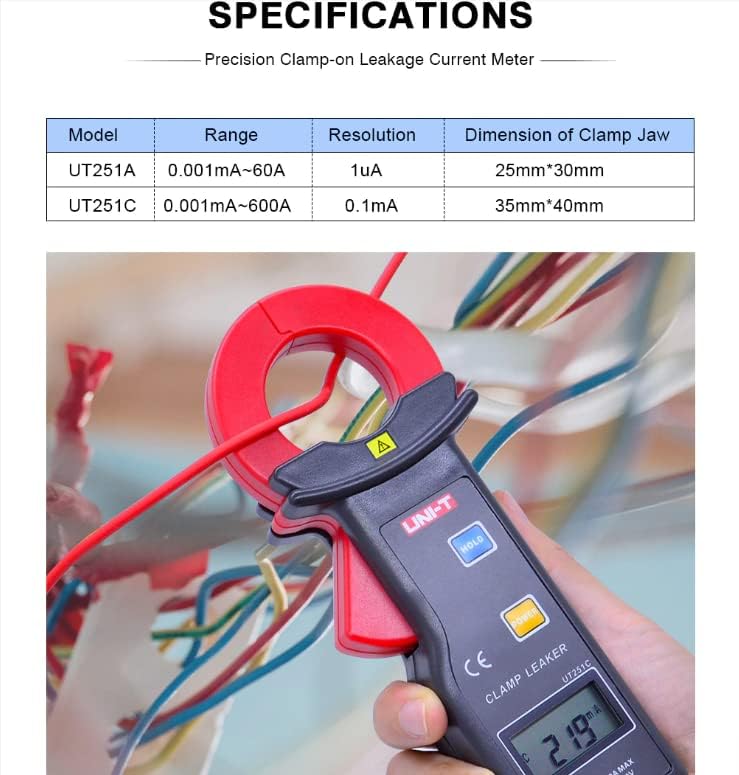
Figure 9.1: Detailed specifications table comparing the UT251A and UT251C models, including range, resolution, and clamp పరిమాణం.
10. పెట్టెలో ఏముంది
The standard package for the UNI-T UT251A includes:
- UNI-T UT251A Leakage Current Clamp మీటర్
- 9V Battery (6F22)
- RS-232 ఇంటర్ఫేస్ కేబుల్
- PC Software CD
- బహుమతి పెట్టె
- క్యారీయింగ్ బ్యాగ్
- ఆంగ్ల మాన్యువల్
- టూల్ బాక్స్

Figure 10.1: The UNI-T UT251A Clamp Meter shown with its packaging and included accessories, such as the RS-232 cable and software CD.
11. వారంటీ మరియు మద్దతు
For warranty information and technical support, please refer to the documentation included with your product or contact UNI-T customer service directly. Details can typically be found on the official UNI-T webసైట్ లేదా మీ కొనుగోలు కేంద్రం ద్వారా.