
పరిచయం
This manual provides detailed instructions for the setup, operation, and maintenance of your Zerone BN59-01179A Replacement Remote Control. Please read this manual carefully before using the product to ensure proper functionality and longevity.
ఉత్పత్తి ముగిసిందిview
The Zerone BN59-01179A is a universal replacement remote control designed for compatible Smart TVs. It offers a compact design and a comprehensive set of buttons for various functions.
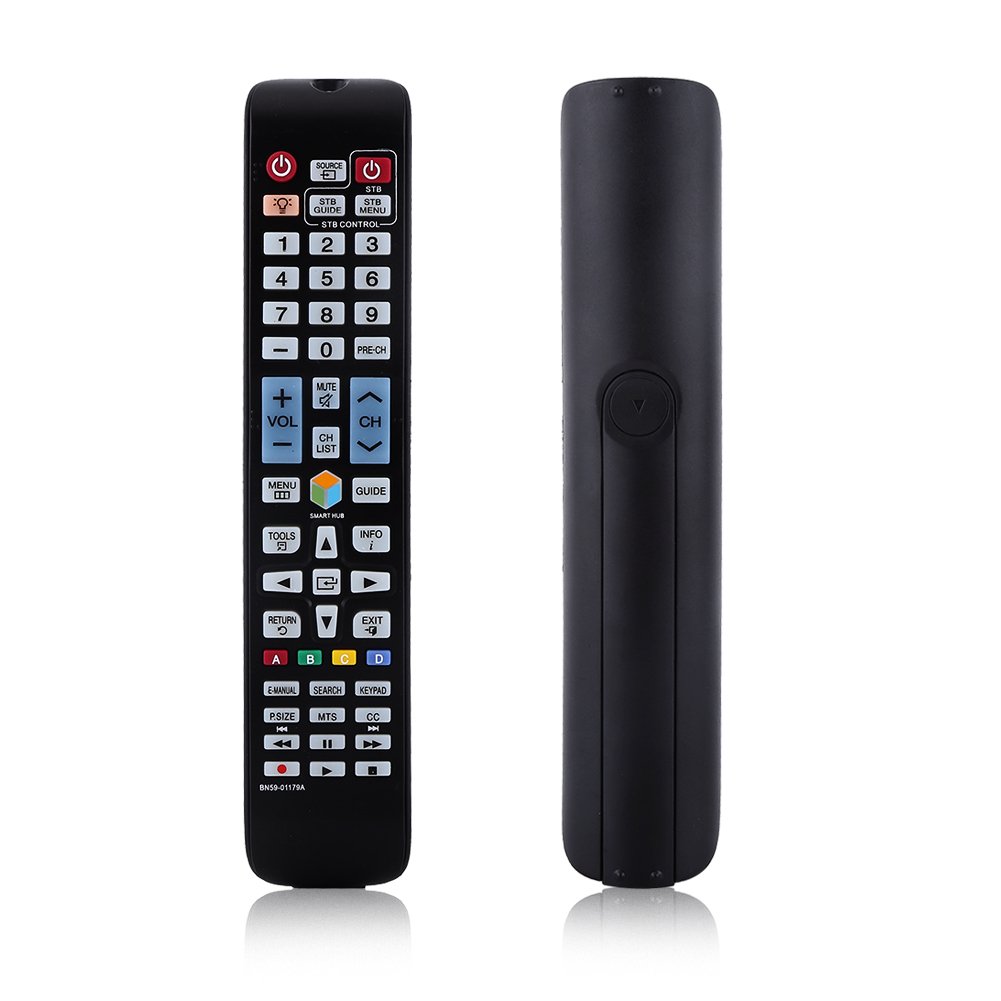
చిత్రం: ముందు భాగం view of the Zerone BN59-01179A remote control, showing its full layout and approximate dimensions (23cm length, 4.7cm width, 2cm thickness).
సెటప్
బ్యాటరీ సంస్థాపన
- రిమోట్ కంట్రోల్ వెనుక బ్యాటరీ కంపార్ట్మెంట్ను గుర్తించండి.
- బ్యాటరీ కవర్ను క్రిందికి జారండి లేదా తెరవడానికి గడియను నొక్కి, ఎత్తండి.
- రెండు (2) AAA బ్యాటరీలను చొప్పించండి, పాజిటివ్ (+) మరియు నెగటివ్ (-) టెర్మినల్స్ కంపార్ట్మెంట్ లోపల ఉన్న గుర్తులతో సరిగ్గా సమలేఖనం చేయబడ్డాయని నిర్ధారించుకోండి.
- బ్యాటరీ కవర్ సురక్షితంగా క్లిక్ అయ్యే వరకు దాన్ని తిరిగి స్థానానికి స్లైడ్ చేయడం ద్వారా దాన్ని భర్తీ చేయండి.
గమనిక: Batteries are not included with the remote control. Please use new AAA batteries for optimal performance.

Image: The back of the remote control with the battery cover removed, showing the empty battery compartment ready for two AAA batteries.
ఆపరేటింగ్ సూచనలు
This remote control is designed for immediate use with compatible TVs without requiring programming. Simply insert batteries and point the remote towards your television.
కీ విధులు

Image: A hand holding the Zerone remote control, with inset close-ups highlighting the power/source buttons and the navigation/Smart Hub buttons.
- పవర్ (ఎరుపు బటన్): టీవీని ఆన్ లేదా ఆఫ్ చేస్తుంది.
- మూలం: ఇన్పుట్ సోర్స్లను (HDMI, AV, మొదలైనవి) ఎంచుకుంటుంది.
- STB/DTV: Switches between Set-Top Box and Digital TV modes.
- సంఖ్య బటన్లు (0-9): ప్రత్యక్ష ఛానెల్ ఎంపిక.
- ప్రీ-CH: మునుపటి ఛానెల్కి తిరిగి వస్తుంది.
- వాల్యూమ్ (+/-): వాల్యూమ్ స్థాయిని సర్దుబాటు చేస్తుంది.
- మ్యూట్: టీవీ సౌండ్ను మ్యూట్ చేస్తుంది లేదా అన్మ్యూట్ చేస్తుంది.
- Channel (CH Up/Down): టీవీ ఛానెళ్లను వరుసగా మారుస్తుంది.
- CH జాబితా: ఛానెల్ జాబితాను ప్రదర్శిస్తుంది.
- మెను: టీవీ ప్రధాన మెనూను యాక్సెస్ చేస్తుంది.
- స్మార్ట్ హబ్: Opens the Smart Hub interface for apps and streaming services.
- గైడ్: ఎలక్ట్రానిక్ ప్రోగ్రామ్ గైడ్ను ప్రదర్శిస్తుంది.
- సమాచారం: ప్రస్తుత ప్రోగ్రామ్ గురించి సమాచారాన్ని చూపుతుంది.
- సాధనాలు: Accesses quick settings or contextual options.
- Navigation Buttons (Up/Down/Left/Right/Enter): మెనూల ద్వారా నావిగేట్ చేసి ఎంపికలను ఎంచుకుంటుంది.
- వాపసు: మునుపటి స్క్రీన్ లేదా మెనూకు తిరిగి వెళుతుంది.
- బయటకి దారి: ప్రస్తుత మెను లేదా అప్లికేషన్ నుండి నిష్క్రమిస్తుంది.
- రంగు బటన్లు (A, B, C, D): Functionality varies by TV model and application.
- E-MANUAL: Accesses the TV's electronic manual.
- శోధన: Opens the search function.
- కీప్యాడ్: Displays an on-screen keypad.
- P.SIZE: Adjusts picture size/aspect ratio.
- MTS: Multi-channel Television Sound (SAP).
- CC: క్లోజ్డ్ క్యాప్షనింగ్.
- మీడియా నియంత్రణ బటన్లు (ప్లే, పాజ్, స్టాప్, రివైండ్, ఫాస్ట్ ఫార్వర్డ్): మీడియా ప్లేబ్యాక్ను నియంత్రిస్తుంది.
నిర్వహణ
- శుభ్రపరచడం: రిమోట్ కంట్రోల్ శుభ్రం చేయడానికి మృదువైన, పొడి వస్త్రాన్ని ఉపయోగించండి. ద్రవ క్లీనర్లు లేదా రాపిడి పదార్థాలను ఉపయోగించవద్దు.
- బ్యాటరీ భర్తీ: రిమోట్ స్పందన మందగించినప్పుడు లేదా పనిచేయడం ఆగిపోయినప్పుడు బ్యాటరీలను మార్చండి. ఎల్లప్పుడూ రెండు బ్యాటరీలను ఒకే సమయంలో కొత్త వాటితో భర్తీ చేయండి.
- నిల్వ: రిమోట్ను ఎక్కువ కాలం ఉపయోగించకపోతే, లీకేజీ మరియు నష్టాన్ని నివారించడానికి బ్యాటరీలను తీసివేయండి.
- బహిర్గతం కావద్దు: Keep the remote away from direct sunlight, heat sources, and moisture.
ట్రబుల్షూటింగ్
- రిమోట్ స్పందించడం లేదు:
- సరైన ధ్రువణతతో బ్యాటరీలు సరిగ్గా చొప్పించబడ్డాయని నిర్ధారించుకోండి.
- పాత బ్యాటరీలను కొత్త AAA బ్యాటరీలతో భర్తీ చేయండి.
- రిమోట్ మరియు టీవీ ఇన్ఫ్రారెడ్ సెన్సార్ మధ్య ఏవైనా అడ్డంకులు ఉన్నాయా అని తనిఖీ చేయండి.
- రిమోట్ నేరుగా టీవీ వైపు ఉంచబడిందని నిర్ధారించుకోండి.
- పరిమిత పరిధి:
- బ్యాటరీలను భర్తీ చేయండి.
- Ensure there are no strong light sources or electronic devices interfering with the signal.
- పనిచేయని నిర్దిష్ట బటన్లు:
- Clean the remote control, especially around the unresponsive buttons, to remove any dirt or debris.
- బ్యాటరీని మార్చడం మరియు శుభ్రపరచడం తర్వాత సమస్య కొనసాగితే, రిమోట్ పనిచేయకపోవచ్చు.
స్పెసిఫికేషన్లు
| ఫీచర్ | వివరణ |
|---|---|
| బ్రాండ్ | జీరోన్ |
| మోడల్ పేరు | Zerone32687x9gqs (BN59-01179A compatible) |
| కనెక్టివిటీ టెక్నాలజీ | ఇన్ఫ్రారెడ్ |
| అనుకూల పరికరాలు | Television (specifically for Samsung BN59-01179A compatible models) |
| మద్దతు ఉన్న పరికరాల గరిష్ట సంఖ్య | 8 (Universal functionality) |
| బటన్ పరిమాణం | 12 (referring to main function groups, actual count is higher) |
| కంట్రోలర్ రకం | బటన్ నియంత్రణ |
| గరిష్ట పరిధి | 8 మీటర్లు |
| బ్యాటరీ రకం | AAA |
| బ్యాటరీల సంఖ్య | 2 AAA బ్యాటరీలు అవసరం (చేర్చబడలేదు) |
| ప్రత్యేక ఫీచర్ | Universal replacement, no programming required |
వారంటీ మరియు మద్దతు
Zerone provides a service guarantee for this product. If you encounter any questions or issues regarding your remote control, please contact the seller or manufacturer for assistance. They will provide follow-up services to address your concerns.
For specific warranty details and support contact information, please refer to your purchase documentation or the retailer's webసైట్.