
Rosewill RHPA-18003
Rosewill Portable Air Conditioner
User Manual - Model RHPA-18003

ముందు view of the Rosewill RHPA-18003 Portable Air Conditioner, showcasing దాని సొగసైన తెల్లని డిజైన్ మరియు డిజిటల్ డిస్ప్లే.
1. పరిచయం
Thank you for choosing the Rosewill RHPA-18003 Portable Air Conditioner. This versatile 4-in-1 unit provides cooling, heating, dehumidifying, and fan functions, designed to offer comfort in spaces up to 300 square feet. Its compact design, remote control, and intelligent features like Sleep Mode and a 24-hour timer make it an efficient and convenient solution for your home or office.
Please read this manual thoroughly before operating the appliance to ensure proper use, maintenance, and safety.
2. భద్రతా సమాచారం
- యూనిట్ను ఎల్లప్పుడూ చదునైన, స్థిరమైన ఉపరితలంపై ఉంచండి.
- Ensure proper ventilation around the unit. Maintain at least 20 inches (50 cm) of clearance from walls and other objects.
- ఎయిర్ ఇన్లెట్లు లేదా అవుట్లెట్లను నిరోధించవద్దు.
- Use only the power supply specified on the rating label.
- The unit is equipped with an LCDI (Leakage-Current Detection and Interruption) plug to reduce the risk of fire. Do not tamper with or attempt to repair this plug.
- యూనిట్ను శుభ్రం చేయడానికి లేదా ఏదైనా నిర్వహణ చేయడానికి ముందు దాన్ని అన్ప్లగ్ చేయండి.
- ఆపరేషన్ సమయంలో పిల్లలు మరియు పెంపుడు జంతువులను యూనిట్ నుండి దూరంగా ఉంచండి.
3. ఉత్పత్తి భాగాలు
The Rosewill RHPA-18003 comes with the following components:
- పోర్టబుల్ ఎయిర్ కండిషనర్ యూనిట్
- Exhaust Heat Pipe Assembly
- రిమోట్ కంట్రోల్
- విండో సీలింగ్ ప్లేట్ అసెంబ్లీ
- Washer, Screw, Nut (for assembly)

Illustration of the main components included with the portable air conditioner: Exhaust Heat Pipe Assembly, Remote Control, Washer/Screw/Nut, and Window Sealing Plate Assembly.
4. సెటప్ మరియు ఇన్స్టాలేషన్
ప్రారంభ సెటప్ కోసం ఈ దశలను అనుసరించండి:
- యూనిట్ స్థానం: Place the air conditioner on a firm, level surface near a window. Ensure there is at least 20 inches (50 cm) of space around the unit for proper airflow.
- ఎగ్జాస్ట్ హోస్ను ఇన్స్టాల్ చేయడం:
- Attach one end of the exhaust heat pipe assembly to the air outlet on the back of the unit.
- Extend the exhaust hose and attach the other end to the window sealing plate assembly.
- విండో కిట్ ఇన్స్టాలేషన్:
- Open the window and place the window sealing plate assembly into the window opening. Adjust the plate to fit snugly.
- Close the window securely against the plate to seal the opening.
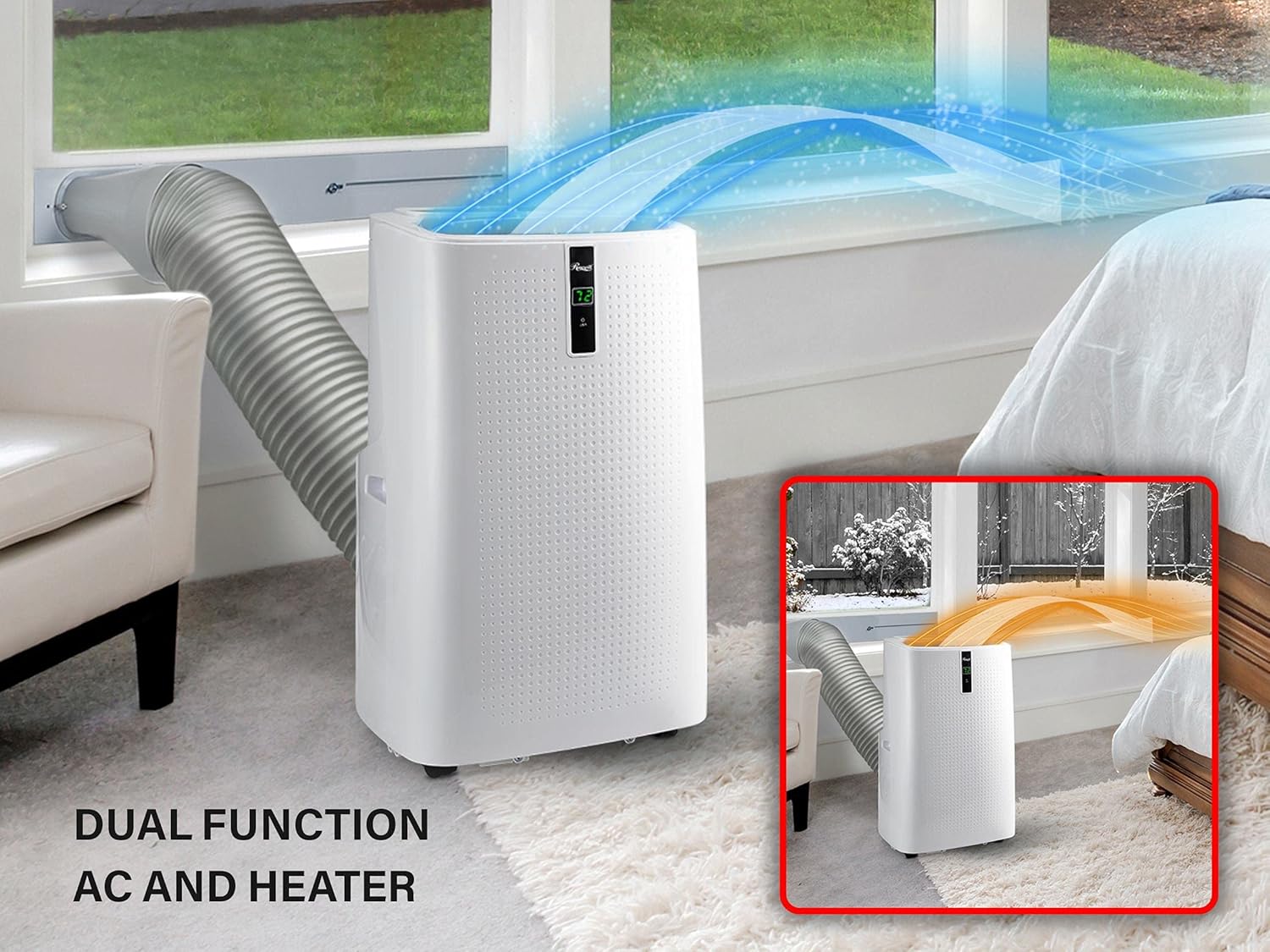
The portable air conditioner with its exhaust hose connected to a window kit, demonstrating proper setup for air ventilation.
- పవర్ కనెక్షన్: Plug the LCDI power cord into a grounded electrical outlet.
5. ఆపరేటింగ్ సూచనలు
The unit can be operated using either the control panel on top of the unit or the included remote control.
కంట్రోల్ ప్యానెల్ ఓవర్view

వివరంగా view of the control panel with buttons for Timer, Fan, Up, Display Window, Down, Mode, and Power, each numbered for easy identification.
- పవర్ బటన్: యూనిట్ని ఆన్ లేదా ఆఫ్ చేయడానికి నొక్కండి.
- మోడ్ బటన్: Press to cycle through operating modes: Cool (AC), Fan, Dry (Dehumidifier), Heat.
- పైకి/క్రింది బటన్లు: Adjust temperature settings (in Cool/Heat mode) or timer settings.
- ఫ్యాన్ బటన్: Select fan speed (Low, Medium, High) in Cool or Fan mode.
- TIMER బటన్: ఆటో-ఆన్ లేదా ఆటో-ఆఫ్ టైమర్ను సెట్ చేయండి (24 గంటల వరకు).
రిమోట్ కంట్రోల్ ఓవర్view
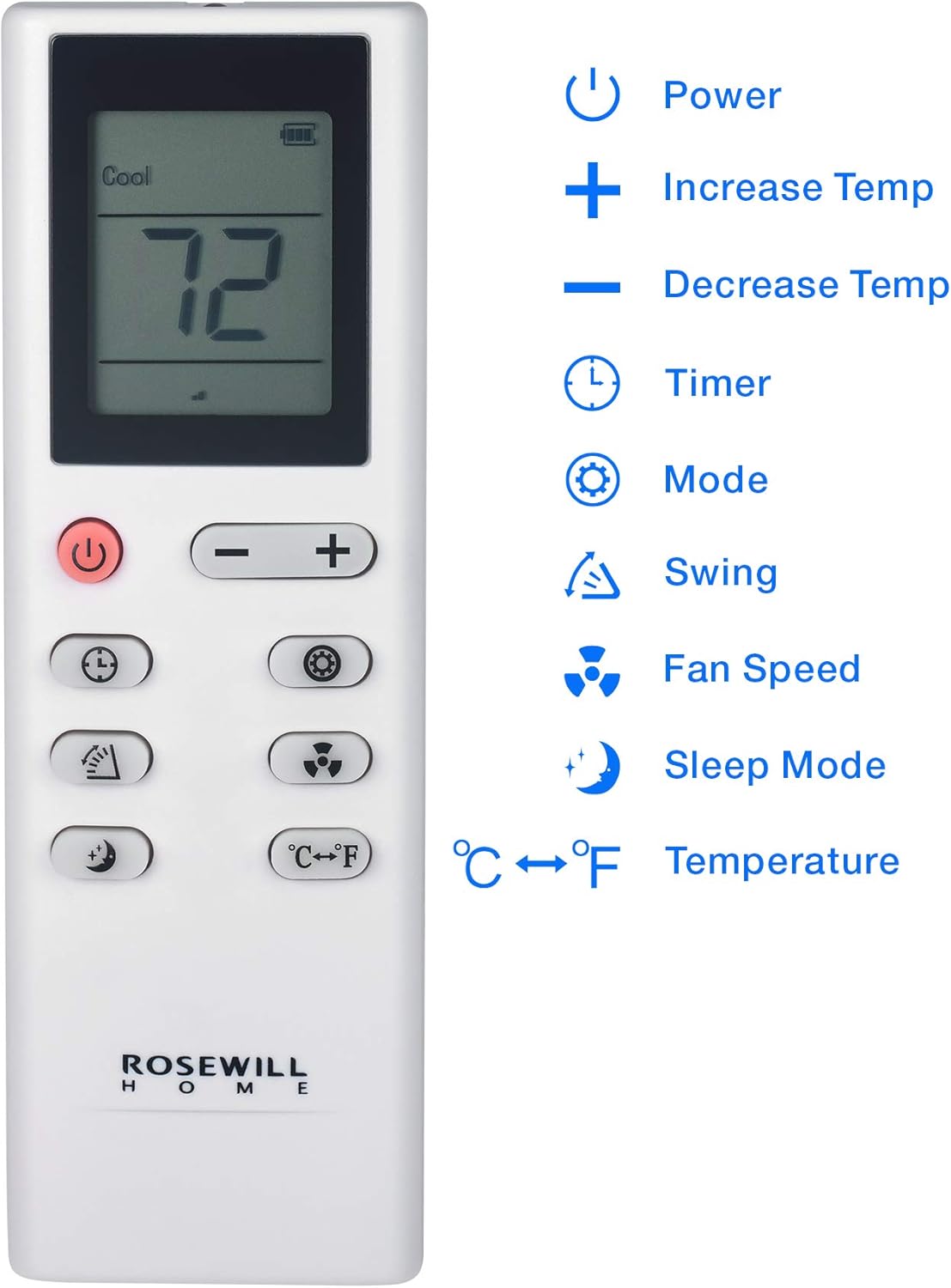
The remote control for the portable air conditioner, showing buttons for Power, Temperature Increase/Decrease, Timer, Mode, Swing, Fan Speed, Sleep Mode, and Temperature unit conversion (°C/°F).
The remote control duplicates most functions of the control panel and adds a స్వింగ్ button for automatic louver movement and a ° C / ° F. button to switch temperature units.
ఆపరేటింగ్ మోడ్లు
- Cool Mode (AC): చల్లదనాన్ని అందిస్తుంది. పైకి/క్రిందికి బటన్లను ఉపయోగించి కావలసిన ఉష్ణోగ్రతను సెట్ చేయండి.
- అభిమాని మోడ్: Circulates air without cooling or heating. Select fan speed.
- డ్రై మోడ్ (డీహ్యూమిడిఫైయర్): Removes moisture from the air. The fan speed is fixed to low in this mode. Ensure continuous drainage is set up if operating for extended periods.
- హీట్ మోడ్: వేడిని అందిస్తుంది. పైకి/క్రిందికి బటన్లను ఉపయోగించి కావలసిన ఉష్ణోగ్రతను సెట్ చేయండి.
ప్రత్యేక విధులు
- స్లీప్ మోడ్: Optimizes temperature and fan speed for comfortable sleep while conserving energy.
- 3-Minute Delay Booting: To protect the compressor, the unit will not start immediately after being turned off or if the power is interrupted. There is a 3-minute delay before the compressor restarts. This is normal operation.
6. నిర్వహణ
Regular maintenance ensures optimal performance and extends the life of your unit.
ఎయిర్ ఫిల్టర్ శుభ్రపరచడం
The unit features washable dust filters (Coated Net Filter, Activated Carbon, Pre-Filter) that trap dirt and debris. Clean the filters every two weeks or more frequently depending on usage and air quality.
- పవర్ అవుట్లెట్ నుండి యూనిట్ను అన్ప్లగ్ చేయండి.
- Locate the air filter panel on the side/back of the unit.
- ఫిల్టర్ను సున్నితంగా బయటకు లాగడం ద్వారా దాన్ని తొలగించండి.
- Wash the filter under running water (warm, not hot) or use a vacuum cleaner to remove dust. For heavily soiled filters, a mild detergent can be used.
- ఫిల్టర్ను యూనిట్లోకి తిరిగి చొప్పించే ముందు పూర్తిగా గాలికి ఆరనివ్వండి. ప్రత్యక్ష సూర్యకాంతికి గురికావద్దు.

వైపు view of the Rosewill portable air conditioner showing the removable air filter for cleaning.
నీరు పోయడం
In Dehumidifier mode or high humidity conditions, water will accumulate in the internal reservoir. The unit has a self-evaporating system, but manual drainage may be required if the 'Full' indicator lights up.
- యూనిట్ను ఆపివేసి, అన్ప్లగ్ చేయండి.
- యూనిట్ దిగువన వెనుక భాగంలో డ్రైనేజ్ పోర్ట్ కింద ఒక నిస్సారమైన పాన్ లేదా ట్రే ఉంచండి.
- నీరు బయటకు ప్రవహించడానికి డ్రెయిన్ ప్లగ్ తొలగించండి.
- నీరు ఖాళీ అయిన తర్వాత, డ్రెయిన్ ప్లగ్ను సురక్షితంగా మార్చండి.
నిల్వ
యూనిట్ను ఎక్కువ కాలం నిల్వ చేస్తే:
- పేరుకుపోయిన నీళ్లనంతా తీసివేయండి.
- ఎయిర్ ఫిల్టర్లను శుభ్రం చేయండి.
- పవర్ కార్డ్ను తీసివేసి, దానిని చక్కగా చుట్టండి.
- Store the unit in a dry, cool place, away from direct sunlight and extreme temperatures.
7. ట్రబుల్షూటింగ్
| సమస్య | సాధ్యమైన కారణం | పరిష్కారం |
|---|---|---|
| యూనిట్ ఆన్ చేయబడలేదు. | No power; LCDI plug tripped; Timer is set. | Check power outlet; Reset LCDI plug; Cancel timer setting. |
| యూనిట్ సమర్థవంతంగా చల్లబడదు/వేడి చేయదు. | ఎయిర్ ఫిల్టర్ మురికిగా ఉంది; గది చాలా పెద్దది; ఎగ్జాస్ట్ గొట్టం సరిగ్గా అమర్చబడలేదు; తలుపులు/కిటికీలు తెరిచి ఉన్నాయి. | Clean air filter; Ensure room size is within specifications; Check exhaust hose connection; Close all doors and windows. |
| నీటి లీకేజీ. | Drain plug loose; Unit not level; Internal reservoir full. | Secure drain plug; Place unit on a level surface; Drain water from the unit. |
| ధ్వనించే ఆపరేషన్. | యూనిట్ సమతల ఉపరితలంపై లేదు; ఫ్యాన్లో అడ్డంకి. | Ensure unit is level; Check for and remove any obstructions. |
ఈ పరిష్కారాలను ప్రయత్నించిన తర్వాత కూడా సమస్య కొనసాగితే, దయచేసి కస్టమర్ మద్దతును సంప్రదించండి.
8. స్పెసిఫికేషన్లు
| ఫీచర్ | స్పెసిఫికేషన్ |
|---|---|
| మోడల్ | RHPA-18003 |
| విధులు | Cooling, Heating, Fan, Dehumidifying |
| శీతలీకరణ శక్తి | 12,000 BTU |
| కవరేజ్ ఏరియా | 300 చదరపు అడుగులు వరకు. |
| శబ్దం స్థాయి | 56 డిబి |
| వాల్యూమ్tage | 115 వోల్ట్లు |
| కొలతలు (H x W x D) | 34.70" x 18.90" x 15.80" |
| యూనిట్ బరువు | 73.00 lbs (71.4 pounds listed in specifications) |
| టైమర్ | 24 గంటలు |
| ఫ్యాన్ వేగం | 3 |
| శక్తి సామర్థ్యం | Energy Star Certified, SEER 7.00 |
9. వారంటీ మరియు మద్దతు
వారంటీ సమాచారం
This Rosewill RHPA-18003 Portable Air Conditioner comes with a 1-సంవత్సరం పరిమిత వారంటీ from the date of purchase. This warranty covers defects in materials and workmanship under normal use. For specific terms and conditions, please refer to the warranty card included with your product or contact Rosewill customer support.
కస్టమర్ మద్దతు
For technical assistance, troubleshooting, or warranty claims, please contact Rosewill customer support. You may also find additional resources and FAQs on the official Rosewill webసైట్.
For a digital copy of the user manual, you can refer to the PDF document available at: Rosewill RHPA-18003 User Manual PDF
Ask a question about this manual
Ask about setup, troubleshooting, compatibility, parts, safety, or missing instructions. Manuals+ will review the question and use this page’s manual context to help answer it.