
పరిచయం
ది ఫెండర్ Champఅయాన్ II 50 గిటార్ Amplifier is a versatile and user-friendly amplifier designed for various guitar playing styles. Whether you are a beginner seeking your first practice amp or a seasoned player needing powerful stage gear, this 50-watt amplifier offers a wide range of tones and effects.
ముఖ్య లక్షణాలు ఉన్నాయి:
- 50 watts of power with a 12-inch Fender special design guitar speaker.
- World-renowned Fender clean and overdrive tones, plus British and modern distortion flavors.
- Multi-effects with two channels, including reverb, delay/echo, chorus, tremolo, and Vibratone.
- TAP button for easy synchronization of delay times and tremolo speeds.
- Auxiliary input for external devices, headphone output for private practice, and a rear-panel USB port.
సెటప్
Follow these steps to set up your Fender Champion II 50 ampజీవితకాలం:
- అన్ప్యాకింగ్: జాగ్రత్తగా తొలగించండి amplifier from its packaging. Retain all packaging materials for future transport or storage.
- ప్లేస్మెంట్: ఉంచండి ampస్థిరమైన, చదునైన ఉపరితలంపై లైఫైయర్. యూనిట్ చుట్టూ తగినంత వెంటిలేషన్ ఉండేలా చూసుకోండి.
- పవర్ కనెక్షన్: సరఫరా చేయబడిన విద్యుత్ కేబుల్ను కనెక్ట్ చేయండి amplifier's power input and then to a suitable AC power outlet.
- పరికర కనెక్షన్: మీ గిటార్ని ప్లగ్ చేయండి ఇన్పుట్ jack on the front panel using a standard 1/4-inch instrument cable.
- పవర్ ఆన్: తిరగండి amplifier's power switch to the ON position. The PWR LED will illuminate.
ఆపరేటింగ్ సూచనలు
కంట్రోల్ ప్యానెల్ ఓవర్view
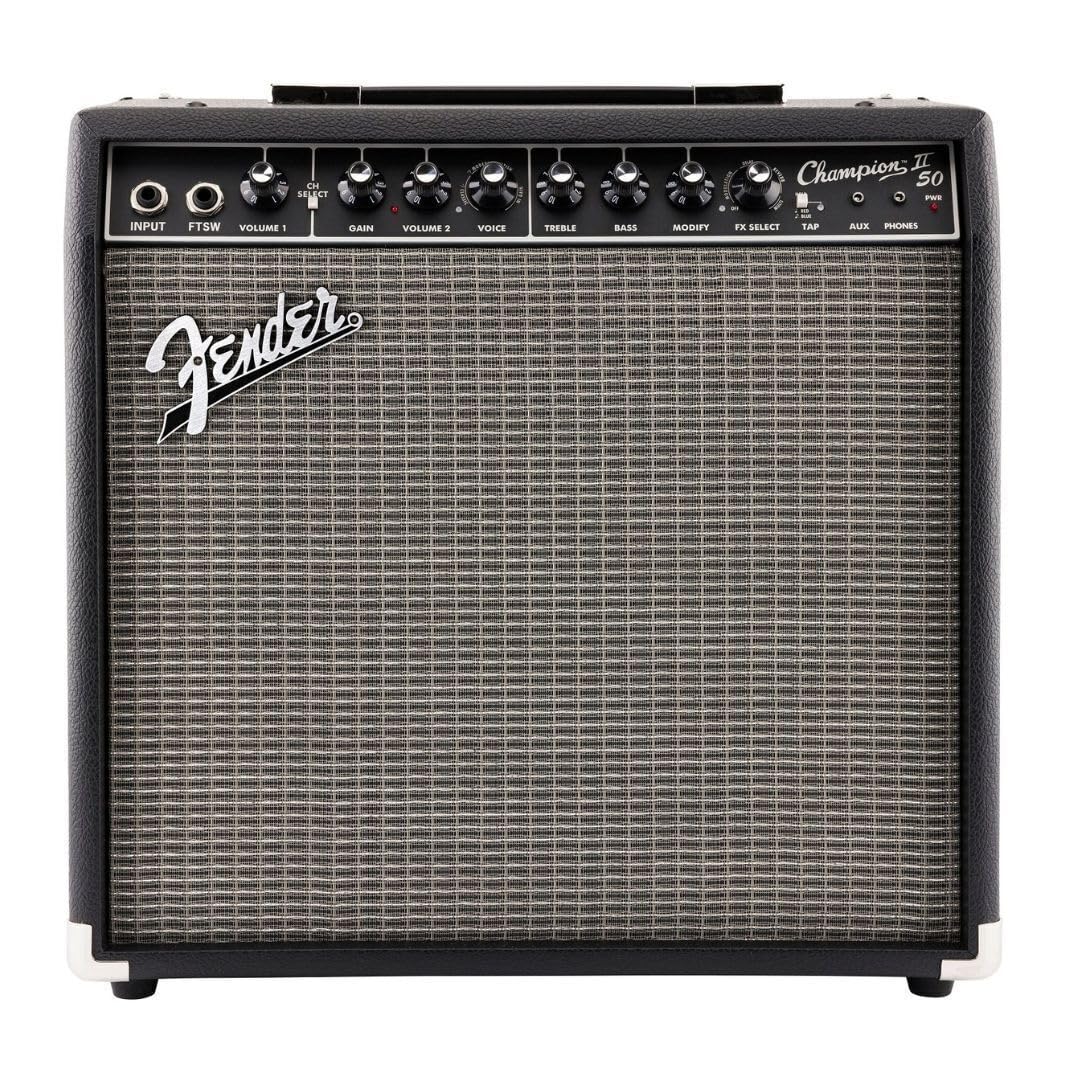
ది Champion II 50 features an intuitive control panel for easy tone shaping:

- ఇన్పుట్: 1/4-inch jack for connecting your instrument.
- FTSW (Footswitch): 1/4-inch jack for connecting an optional footswitch to toggle channels or effects.
- వాల్యూమ్ 1: Controls the output level of Channel 1.
- CH ఎంపిక: Toggles between Channel 1 (clean) and Channel 2 (voice/effects).
- గెయిన్: Controls the amount of overdrive/distortion in Channel 2.
- వాల్యూమ్ 2: Controls the output level of Channel 2.
- వాయిస్: వేరేదాన్ని ఎంచుకుంటుంది amplifier voicings (e.g., Classic Fender, British, Modern Distortion).
- ట్రెబుల్: అధిక-ఫ్రీక్వెన్సీ ప్రతిస్పందనను సర్దుబాటు చేస్తుంది.
- బాస్: తక్కువ-ఫ్రీక్వెన్సీ ప్రతిస్పందనను సర్దుబాటు చేస్తుంది.
- సవరించు: Adjusts a secondary parameter for the selected effect.
- FX ఎంపిక: Selects from 12 built-in effects (e.g., Reverb, Delay/Echo, Chorus, Tremolo, Vibratone).
- ట్యాప్: Used to set the tempo for time-based effects like delay and tremolo. Hold to activate dotted eighth note delay.
- AUX: 1/8-inch stereo input for connecting external audio devices (e.g., MP3 player).
- ఫోన్లు: 1/8-inch stereo output for headphones, automatically mutes the speaker.
- పిడబ్ల్యుఆర్: పవర్ సూచిక LED.
ఉపయోగించి Amp నమూనాలు మరియు ప్రభావాలు
ది Champion II 50 offers a variety of amp models and effects to customize your sound:
- Amp Voicings: ఉపయోగించండి వాయిస్ knob to select different amp types, ranging from classic Fender clean tones to various overdrive and high-gain options.
- అంతర్నిర్మిత ప్రభావాలు: తిరగండి FX SELECT knob to choose from 12 different effects. The సవరించు knob allows for fine-tuning of the selected effect's parameters.
- టెంపో కంట్రోల్: For effects like delay and tremolo, press the ట్యాప్ చేయండి button repeatedly to set the desired tempo. Holding the ట్యాప్ చేయండి button will activate a dotted eighth note delay function.
కనెక్టివిటీ
ది amplifier provides convenient connectivity options:
- సహాయక ఇన్పుట్: Connect your music player to the AUX input to play along with your favorite tracks.
- హెడ్ఫోన్ అవుట్పుట్: ఉపయోగించండి ఫోన్లు jack for silent practice. The speaker output is automatically muted when headphones are connected.
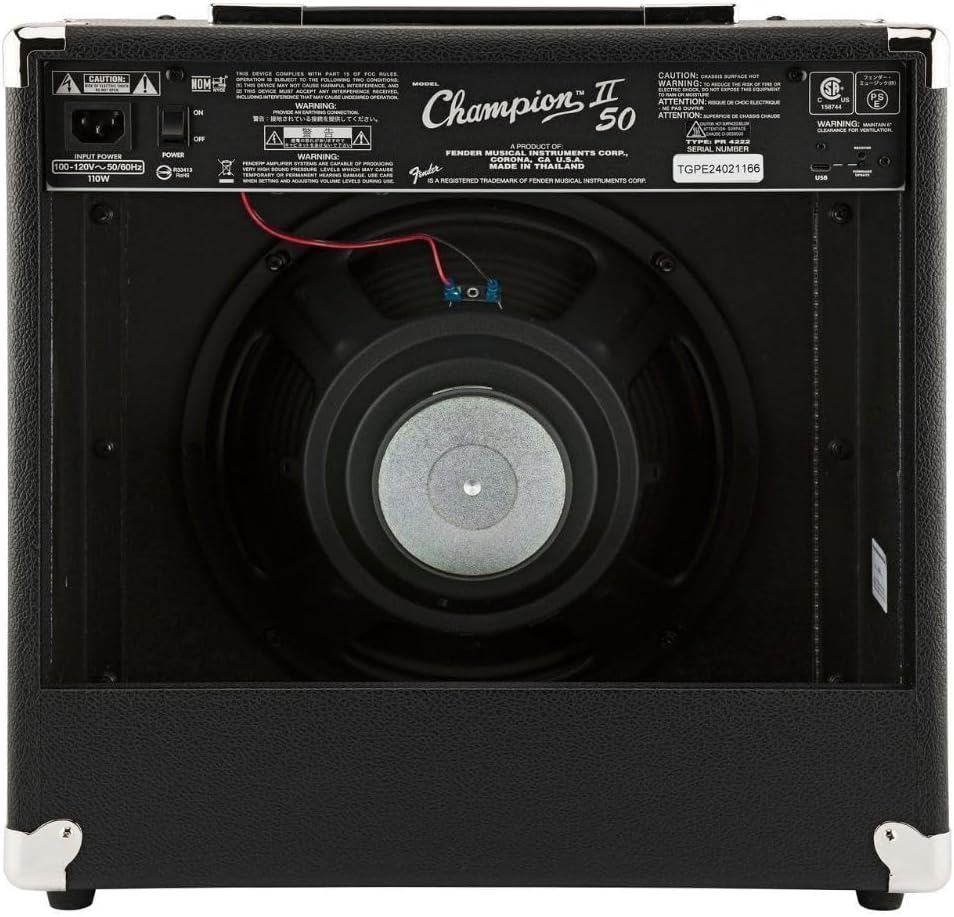
- USB పోర్ట్: A rear-panel USB port is available for recording directly to a computer.
అధికారిక ఉత్పత్తి వీడియోలు
వీడియో 1: Champఅయాన్ II Amps Demo Video. This video provides a comprehensive demonstration of the features and sound capabilities of the Fender Champఅయాన్ II amplifier series, including the 50-watt model.
వీడియో 2: Champఅయాన్ II Amps Demo Video 2. A shorter demonstration showcasing additional tones and effects available on the Fender Champఅయాన్ II ampలైఫైయర్ సిరీస్.
నిర్వహణ
సరైన నిర్వహణ మీ దీర్ఘాయువు మరియు సరైన పనితీరును నిర్ధారిస్తుంది ampజీవితకాలం:
- శుభ్రపరచడం: వెలుపలి భాగాన్ని శుభ్రం చేయడానికి మృదువైన, పొడి వస్త్రాన్ని ఉపయోగించండి amplifier. Avoid abrasive cleaners or solvents.
- నిల్వ: ఉపయోగంలో లేనప్పుడు, నిల్వ చేయండి amplifier in a dry, temperature-controlled environment, away from direct sunlight or extreme temperatures.
- వెంటిలేషన్: అని నిర్ధారించుకోండి amplifier's vents are not obstructed to prevent overheating.
- కేబుల్ కేర్: Always handle power and instrument cables carefully. Avoid bending or crimping them excessively.
ట్రబుల్షూటింగ్
మీరు మీతో సమస్యలను ఎదుర్కొంటే amplifier, try these basic troubleshooting steps:
- శక్తి లేదు: Check if the power cable is securely connected to both the amplifier and the power outlet. Ensure the power switch is ON and the PWR LED is lit. Try a different power outlet.
- ధ్వని లేదు: Verify that your instrument cable is properly connected to both the guitar and the amplifier's INPUT jack. Check the VOLUME knobs for both channels and ensure they are not set to zero. If using headphones, ensure they are fully plugged into the PHONES jack.
- Distorted Sound (unintended): Check the GAIN and VOLUME settings. High GAIN settings are intended for distortion, but excessive levels can cause unwanted clipping. Ensure your instrument's volume is not too high.
- పనిచేయని ప్రభావాలు: Ensure the FX SELECT knob is not set to OFF. Adjust the MODIFY knob to see if the effect parameter needs adjustment.
స్పెసిఫికేషన్లు
| ఫీచర్ | వివరణ |
|---|---|
| బ్రాండ్ | ఫెండర్ |
| మోడల్ పేరు | Champion II 50 |
| మోడల్ సంఖ్య | 2330800000 |
| అవుట్పుట్ వాట్tage | 50 వాట్స్ |
| స్పీకర్ పరిమాణం | 12 అంగుళాలు |
| Output Channel Quantity | 1 (with two selectable input channels) |
| అంశం కొలతలు (D x W x H) | 19.8"డి x 19.8"వా x 11.5"హ |
| వస్తువు బరువు | 23 పౌండ్లు |
| మెటీరియల్ | Stainless Steel (Enclosure) |
| అంతర్నిర్మిత ప్రభావాలు | 12 (Reverb, Delay/Echo, Chorus, Tremolo, Vibratone, etc.) |
వారంటీ & మద్దతు
Your Fender Champఅయాన్ II 50 గిటార్ Ampఒక తో వస్తుంది 2-సంవత్సరం పరిమిత వారంటీ. Fender amplifiers are built with unmatched quality, and this warranty covers defects in materials and workmanship for two (2) years from the original purchase date.
For warranty claims, technical support, or service inquiries, please refer to the official Fender website or contact Fender customer service directly. Keep your proof of purchase for warranty validation.