
పరిచయం
This manual provides essential information for the safe and effective operation of your Ampeg BA-210V2 450-Watt Bass Combo Amplifier. The BA-210V2 is designed to deliver classic Ampeg bass tone with features optimized for stage performance. It includes a Bass Scrambler overdrive, a true 60-degree monitoring angle, front-facing controls, auxiliary inputs, and a headphone jack.
Please read this manual thoroughly before using the amplifier to ensure proper setup and to maximize your experience with this product.
ముఖ్యమైన భద్రతా సూచనలు
- ఈ సూచనలను చదవండి.
- ఈ సూచనలను ఉంచండి.
- అన్ని హెచ్చరికలను గమనించండి.
- అన్ని సూచనలను అనుసరించండి.
- నీటి దగ్గర ఈ ఉపకరణాన్ని ఉపయోగించవద్దు.
- పొడి గుడ్డతో మాత్రమే శుభ్రం చేయండి.
- వెంటిలేషన్ ఓపెనింగ్లను బ్లాక్ చేయవద్దు. తయారీదారు సూచనలకు అనుగుణంగా ఇన్స్టాల్ చేయండి.
- రేడియేటర్లు, హీట్ రిజిస్టర్లు, స్టవ్లు లేదా ఇతర ఉపకరణాలు (సహా ampలిఫైయర్లు) వేడిని ఉత్పత్తి చేస్తాయి.
- ధ్రువణ లేదా గ్రౌండింగ్-రకం ప్లగ్ యొక్క భద్రతా ప్రయోజనాన్ని ఓడించవద్దు. పోలరైజ్డ్ ప్లగ్ రెండు బ్లేడ్లను కలిగి ఉంటుంది, ఒకటి మరొకదాని కంటే వెడల్పుగా ఉంటుంది. గ్రౌండింగ్-రకం ప్లగ్లో రెండు బ్లేడ్లు మరియు మూడవ గ్రౌండింగ్ ప్రాంగ్ ఉన్నాయి. మీ భద్రత కోసం విస్తృత బ్లేడ్ లేదా మూడవ ప్రాంగ్ అందించబడ్డాయి. అందించిన ప్లగ్ మీ అవుట్లెట్కి సరిపోకపోతే, వాడుకలో లేని అవుట్లెట్ను భర్తీ చేయడానికి ఎలక్ట్రీషియన్ను సంప్రదించండి.
- ప్రత్యేకించి ప్లగ్లు, కన్వీనియన్స్ రెసెప్టాకిల్స్ మరియు అవి ఉపకరణం నుండి నిష్క్రమించే ప్రదేశంలో నడవడం లేదా పించ్ చేయడం నుండి పవర్ కార్డ్ను రక్షించండి.
- తయారీదారు పేర్కొన్న జోడింపులు/యాక్సెసరీలను మాత్రమే ఉపయోగించండి.
- తయారీదారు పేర్కొన్న కార్ట్, స్టాండ్, త్రిపాద, బ్రాకెట్ లేదా టేబుల్తో మాత్రమే ఉపయోగించండి లేదా ఉపకరణంతో విక్రయించబడుతుంది. కార్ట్ను ఉపయోగించినప్పుడు, టిప్-ఓవర్ నుండి గాయం కాకుండా ఉండటానికి కార్ట్/ఉపకరణ కలయికను తరలించేటప్పుడు జాగ్రత్త వహించండి.
- మెరుపు తుఫానుల సమయంలో లేదా ఎక్కువ కాలం ఉపయోగించనప్పుడు ఈ ఉపకరణాన్ని అన్ప్లగ్ చేయండి.
- అన్ని సేవలను అర్హత కలిగిన సేవా సిబ్బందికి సూచించండి. విద్యుత్ సరఫరా త్రాడు లేదా ప్లగ్ పాడైపోయినప్పుడు, ద్రవం చిందినప్పుడు లేదా ఉపకరణంలో వస్తువులు పడిపోయినప్పుడు, ఉపకరణం వర్షం లేదా తేమకు గురైనప్పుడు, సాధారణంగా పని చేయనప్పుడు, ఉపకరణం ఏదైనా విధంగా దెబ్బతిన్నప్పుడు సర్వీసింగ్ అవసరం. , లేదా తొలగించబడింది.
ఫీచర్లు
ది Ampeg BA-210V2 Bass Combo Amplifier offers a range of features designed for bass players seeking powerful tone and versatility:
- 450 వాట్స్ RMS పవర్: Delivers substantial power suitable for stagఇ పనితీరు.
- 2x10" Ampeg Custom Speakers: Equipped with two 10-inch Ampeg Custom speakers for clear and robust bass reproduction.
- Bass Scrambler Overdrive: Provides a classic tube-like grind, allowing for versatile tonal options.
- Ultra Hi/Lo Tone Shaping: Offers enhanced tonal flexibility for sculpting your sound.
- 1" HF Tweeter: Includes a 1-inch high-frequency tweeter for extended treble response.
- 60° Monitoring Angle: The cabinet design allows for a true 60-degree monitoring angle, directing sound towards the player.
- Front-Facing Controls: All controls are conveniently located on the front panel for easy access.
- సహాయక ఇన్పుట్: Allows connection of external audio devices for practice.
- హెడ్ఫోన్ జాక్: నిశ్శబ్ద అభ్యాసాన్ని ప్రారంభిస్తుంది.
నియంత్రణలు మరియు కనెక్షన్లు
ముందు ప్యానెల్ నియంత్రణలు
The front panel provides all necessary controls for shaping your sound and connecting your instrument and other devices.

చిత్రం 1: ముందు ప్యానెల్ ఓవర్view of the BA-210V2 Ampజీవితకాలం.
- ఇన్పుట్: మీ బాస్ గిటార్ని ఇక్కడ కనెక్ట్ చేయండి.
- -15 dB ప్యాడ్: Engages a 15 dB attenuation for active basses or high-output instruments to prevent input clipping.
- Scrambler (Drive, Blend):
- డ్రైవ్: Adjusts the amount of overdrive/distortion.
- మిశ్రమం: Mixes the overdriven signal with the clean signal.
- వాల్యూమ్: యొక్క మొత్తం అవుట్పుట్ స్థాయిని నియంత్రిస్తుంది ampజీవితకాలం.
- అల్ట్రా హై: Boosts high frequencies for added clarity and presence.
- అల్ట్రా లో: Boosts low frequencies for a deeper, fuller bass tone.
- బాస్: Adjusts the low-frequency equalization.
- మధ్య: Adjusts the mid-frequency equalization.
- ట్రెబెల్: Adjusts the high-frequency equalization.
- AUX Level: Controls the volume of the auxiliary input.
- AUX లో: 3.5mm stereo input for connecting external audio devices like MP3 players or phones.
- గీత భయట: XLR balanced output for connecting to a mixing console or recording interface.
- పంపు: Output for sending signal to external effects processors.
- తిరిగి: Input for receiving signal from external effects processors.
- ఫోన్లు: 1/4-inch stereo headphone output for silent practice.
- HF Mute: Mutes the high-frequency tweeter. Useful for certain tones or when using external cabinets without tweeters.
- ఫుట్ స్విచ్: Input for an optional footswitch to control the Scrambler and HF Mute functions.
- శక్తి: On/Off switch for the ampజీవితకాలం.
వెనుక ప్యానెల్ కనెక్షన్లు
The rear panel provides connections for power and external speaker options.
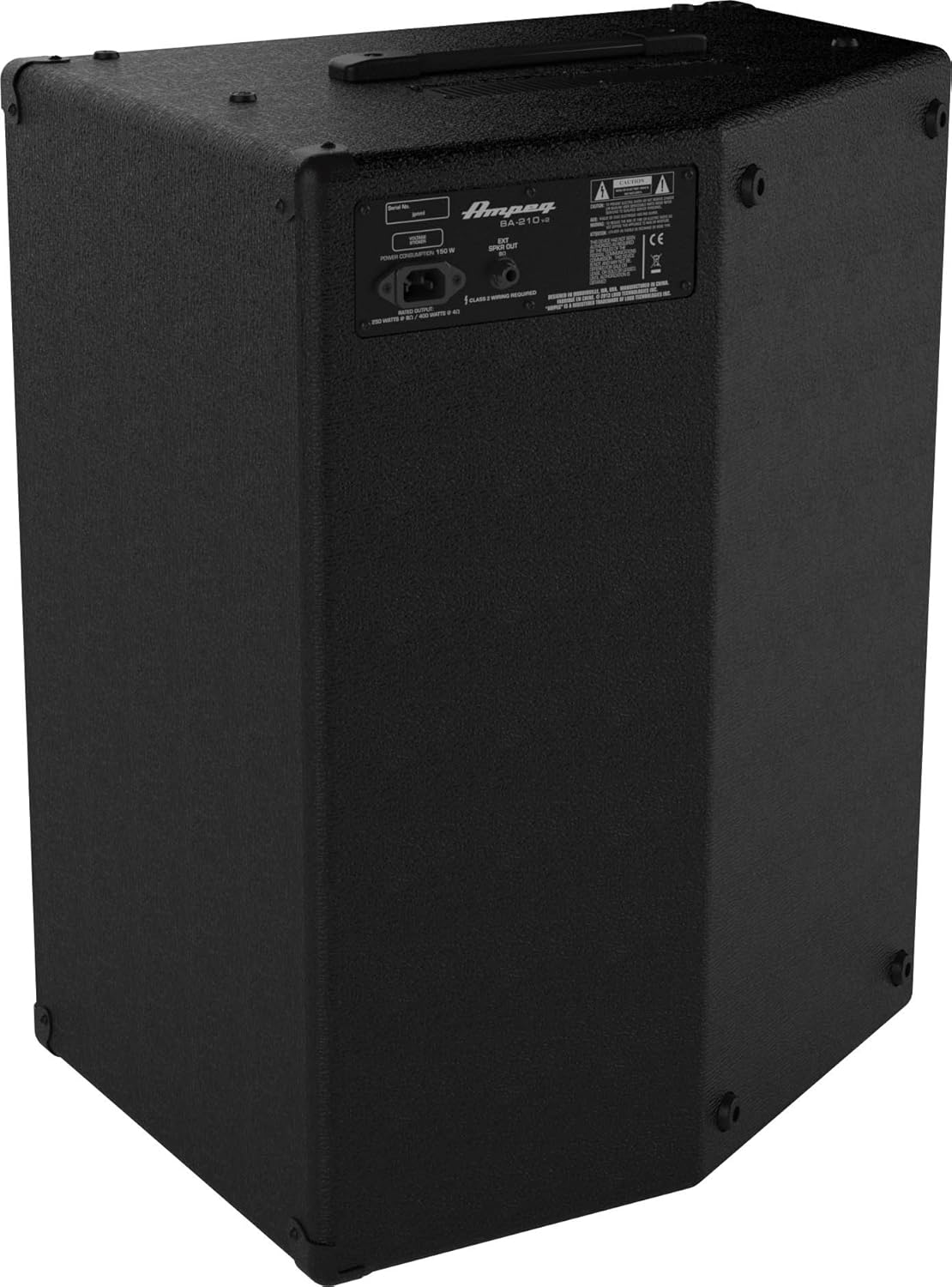
చిత్రం 2: వెనుక ప్యానెల్ ఓవర్view of the BA-210V2 Ampజీవితకాలం.
- AC పవర్ ఇన్పుట్: సరఫరా చేయబడిన AC పవర్ కార్డ్ను ఇక్కడ కనెక్ట్ చేయండి.
- External Speaker Output: 1/4-inch output for connecting an external speaker cabinet. Ensure the impedance matches the ampలైఫైయర్ అవసరాలు.
సెటప్
అన్ప్యాకింగ్ మరియు ప్లేస్మెంట్
- జాగ్రత్తగా తొలగించండి ampదాని ప్యాకేజింగ్ నుండి లైఫైయర్.
- ఉంచండి amplifier on a stable, level surface.
- యూనిట్ చుట్టూ తగినంత వెంటిలేషన్ ఉండేలా చూసుకోండి. గాలి వెంట్లను నిరోధించవద్దు.
- The BA-210V2 can be used in a standard upright position or tilted back at a 60-degree angle for use as a floor monitor.
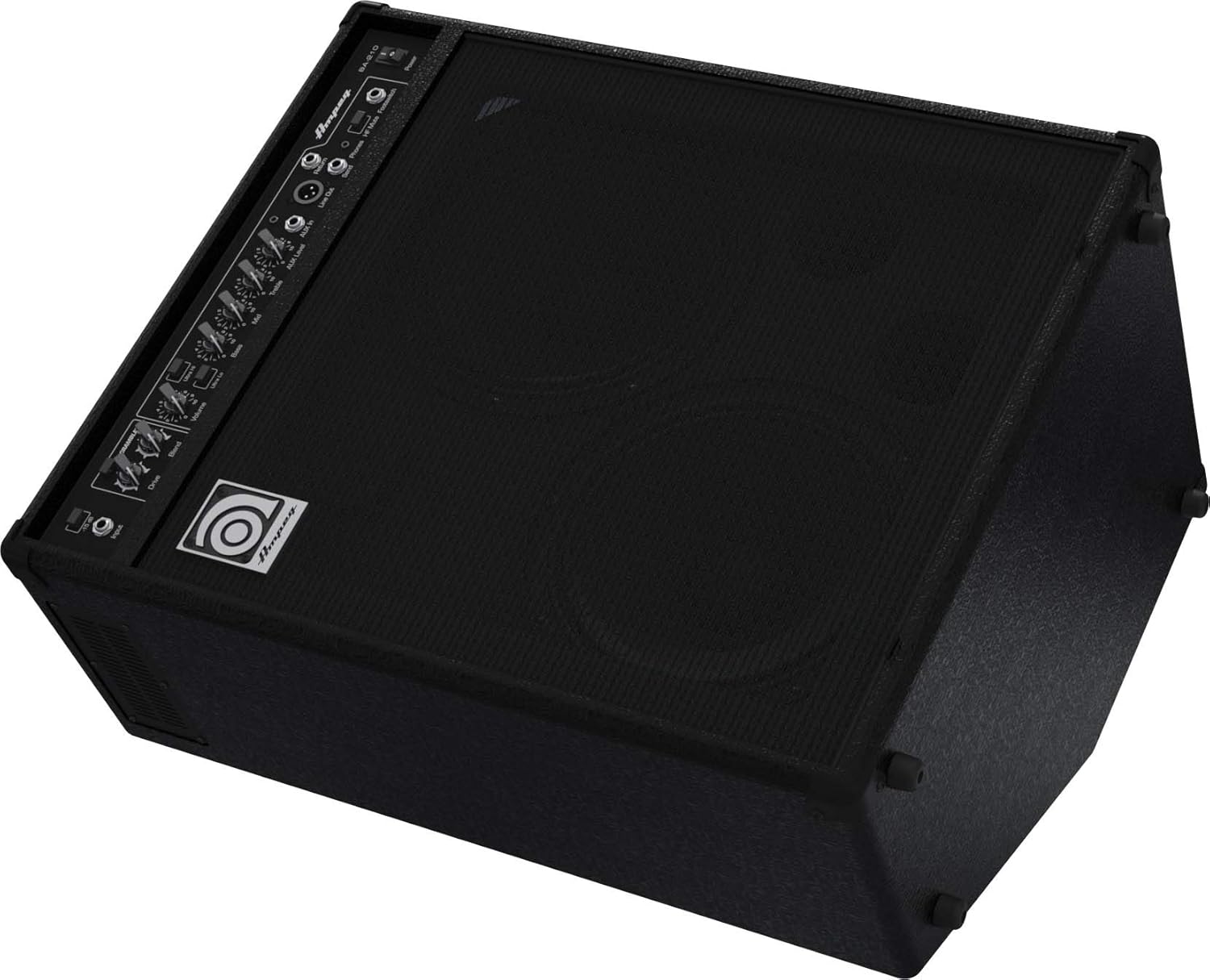
Figure 3: BA-210V2 in 60-degree monitoring position.
మీ పరికరాన్ని కనెక్ట్ చేస్తోంది
- నిర్ధారించండి ampలైఫైయర్ యొక్క పవర్ స్విచ్ ఆఫ్ స్థానంలో ఉంది.
- మీ బాస్ గిటార్ను దీనికి కనెక్ట్ చేయండి ఇన్పుట్ జాక్ను ప్రామాణిక 1/4-అంగుళాల ఇన్స్ట్రుమెంట్ కేబుల్ ఉపయోగించి బిగించండి.
- If using an active bass or a high-output instrument, engage the -15 dB ప్యాడ్ switch to prevent input clipping.
పవర్ ఆన్/ఆఫ్
- Before powering on, ensure all volume controls are set to their minimum.
- సరఫరా చేయబడిన AC పవర్ కార్డ్ని కనెక్ట్ చేయండి ఎసి పవర్ ఇన్పుట్ on the rear panel and then to a grounded electrical outlet.
- ఫ్లిప్ ది శక్తి switch to the ON position. The power indicator light will illuminate.
- To power off, turn down all volume controls, then flip the శక్తి OFF స్థానానికి మారండి.
ఆపరేటింగ్ సూచనలు
Basic Tone Setting
- తో ప్రారంభించండి బాస్, మధ్య, మరియు ట్రిబుల్ controls at their center (12 o'clock) positions.
- నెమ్మదిగా పెంచండి వాల్యూమ్ control to a desired listening level.
- సర్దుబాటు చేయండి బాస్, మధ్య, మరియు ట్రిబుల్ controls to achieve your preferred tone.
- ప్రయోగం చేయండి Ultra Hi మరియు Ultra Lo switches to further shape your sound.
Using the Bass Scrambler Overdrive
- పాల్గొనండి స్క్రాంబ్లర్ switch to activate the overdrive circuit.
- సర్దుబాటు చేయండి డ్రైవ్ చేయండి knob to control the amount of distortion.
- ఉపయోగించండి కలపండి knob to mix the overdriven signal with your clean bass tone. A lower blend setting will retain more of your original signal, while a higher setting will emphasize the overdrive.
Auxiliary Input and Headphone Use
- బాహ్య ఆడియో మూలాన్ని (ఉదా. స్మార్ట్ఫోన్, MP3 ప్లేయర్) కనెక్ట్ చేయండి AUX ఇన్ jack using a 3.5mm stereo cable.
- Adjust the playback volume on your external device and the AUX స్థాయి మీద నాబ్ amplifier to balance the sound with your bass.
- నిశ్శబ్ద సాధన కోసం, హెడ్ఫోన్లను దీనికి కనెక్ట్ చేయండి ఫోన్లు jack. This will mute the ampలైఫైయర్ యొక్క అంతర్గత స్పీకర్లు.
బాహ్య స్పీకర్ కనెక్షన్
- The BA-210V2 can power an external speaker cabinet. Connect a speaker cable from the బాహ్య స్పీకర్ అవుట్పుట్ on the rear panel to your external cabinet.
- Ensure the impedance of the external cabinet matches the amplifier's requirements (typically 8 ohms). Refer to the specifications section for details.
DI Output and Effects Loop
- ది లైన్ అవుట్ (XLR) provides a balanced signal for direct connection to a mixing console or recording device.
- ది పంపండి మరియు తిరిగి jacks form an effects loop, allowing you to integrate external effects processors into your signal chain. Connect the Send to the input of your effect and the output of your effect to the Return.
నిర్వహణ
- శుభ్రపరచడం: శుభ్రం చేయండి amplifier with a dry, lint-free cloth. Do not use liquid cleaners or solvents.
- నిల్వ: ఎక్కువ కాలం ఉపయోగంలో లేనప్పుడు, నిల్వ చేయండి amplifier in a dry, temperature-controlled environment.
- వెంటిలేషన్: అని ఎల్లప్పుడూ నిర్ధారించుకోండి amplifier's ventilation openings are clear and unobstructed to prevent overheating.
- సర్వీసింగ్: Refer all servicing to qualified service personnel. Do not attempt to service the unit yourself.
ట్రబుల్షూటింగ్
| సమస్య | సాధ్యమైన కారణం | పరిష్కారం |
|---|---|---|
| శబ్దం లేదు | Power cord not connected; Power switch off; Volume controls at minimum; Instrument cable faulty; Speaker cable faulty (if external speaker used); HF Mute engaged. | Check power connections; Turn power switch ON; Increase volume; Test/replace cables; Check HF Mute switch. |
| వక్రీకరించిన ధ్వని | Input signal too hot; Volume too high; Scrambler Drive too high; Faulty instrument or cable. | Engage -15 dB pad; Reduce input gain or instrument volume; Lower amplifier volume; Adjust Scrambler Drive/Blend; Test with another instrument/cable. |
| హమ్ లేదా శబ్దం | Ground loop; Faulty cables; Nearby electrical interference. | Ensure proper grounding; Use shielded cables; Try different power outlets; Move ampలైఫైయర్ను ఇతర ఎలక్ట్రానిక్ పరికరాలకు దూరంగా ఉంచండి. |
స్పెసిఫికేషన్లు
| ఫీచర్ | స్పెసిఫికేషన్ |
|---|---|
| మోడల్ | BA-210v2 |
| అవుట్పుట్ వాట్tage | 450 వాట్స్ ఆర్ఎంఎస్ |
| వక్తలు | 2 x 10" Ampeg Custom Speakers, 1 x 1" HF Tweeter |
| కొలతలు (H x W x D) | 25.7 x 15.7 x 20.7 అంగుళాలు (65.3 x 39.9 x 52.6 సెం.మీ.) |
| బరువు | 50 పౌండ్లు (22.7 కిలోలు) |
| ఇన్పుట్ ప్యాడ్ | -15 డిబి |
| సహాయక ఇన్పుట్ | 3.5mm స్టీరియో జాక్ |
| హెడ్ఫోన్ అవుట్పుట్ | 1/4" Stereo Jack |
| లైన్ అవుట్ | XLR సమతుల్యం |
| ప్రభావాలు లూప్ | Send/Return 1/4" Jacks |
| ఫుట్స్విచ్ నియంత్రణ | Scrambler On/Off, HF Mute On/Off |
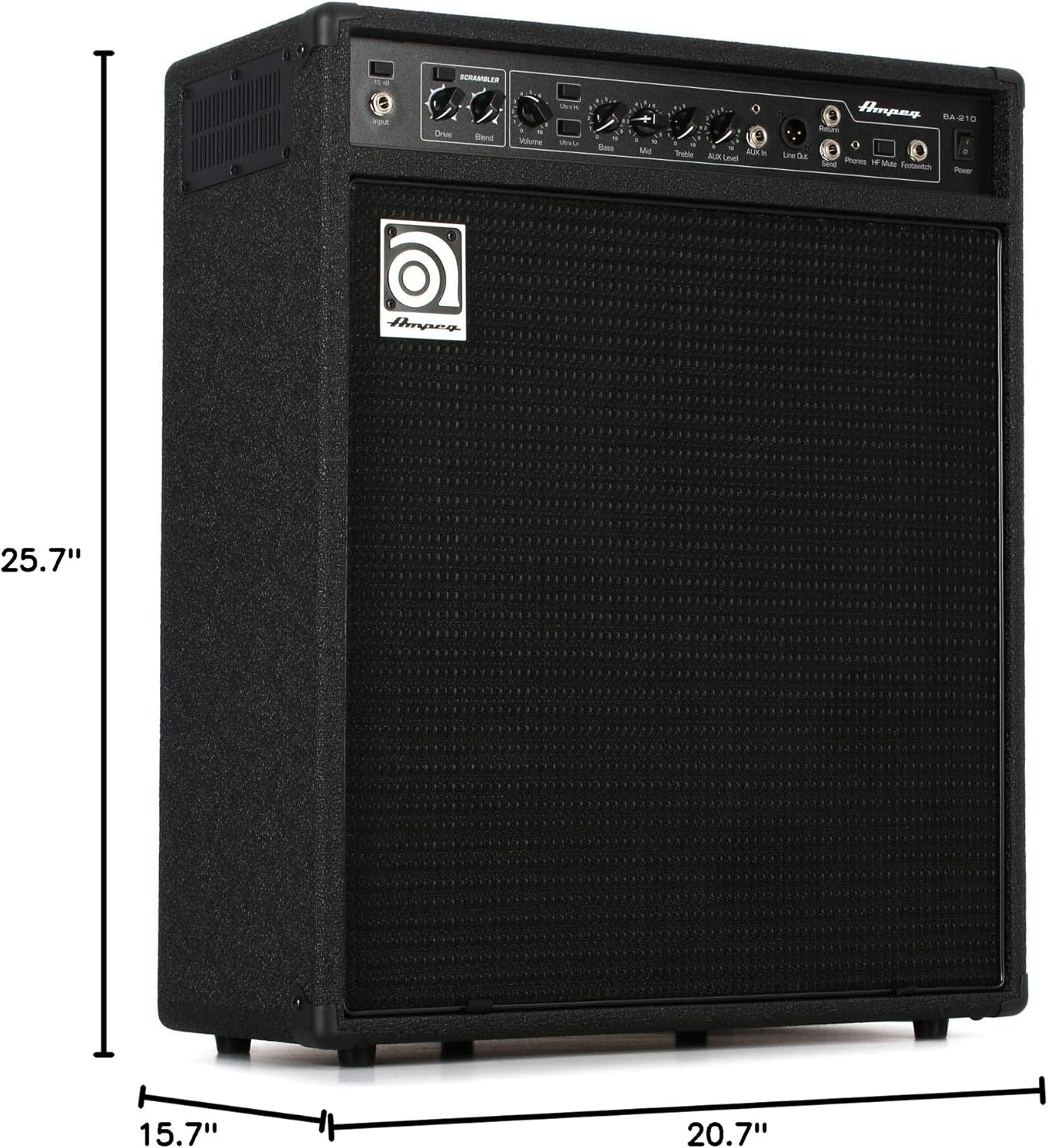
Figure 4: Dimensions of the BA-210V2 Ampజీవితకాలం.
వారంటీ మరియు మద్దతు
For warranty information and technical support, please refer to the warranty card included with your product or visit the official Ampeg webసైట్. యూనిట్ను మీరే రిపేర్ చేయడానికి ప్రయత్నించవద్దు, ఎందుకంటే ఇది మీ వారంటీని రద్దు చేయవచ్చు.
మరింత సహాయం కోసం, సంప్రదించండి Ampeg customer support through their official channels.