
Easytry123 Easytry2094
Easytry123 Replacement Remote Control User Manual
For Samsung HW-J450/ZA, PS-WJ651, PS-WJ470/ZA, HW-J6502, HW-J650 Audio Soundbar Systems
1. పరిచయం
This manual provides instructions for the Easytry123 replacement remote control, designed for use with various Samsung audio soundbar systems. This remote control offers basic functionality for compatible models. Please note that as a replacement unit, it may not support all advanced functions of the original remote control.
అనుకూల నమూనాలు:
- Samsung HW-J450/ZA
- Samsung PS-WJ651
- Samsung PS-WJ651/ZA
- Samsung PS-WJ470/ZA
- Samsung HW-J6502
- Samsung HW-J650
2. సెటప్
2.1 బ్యాటరీ ఇన్స్టాలేషన్
The remote control requires batteries for operation. Batteries are not included with the remote control and must be purchased separately. This remote typically uses standard Lithium batteries.
- రిమోట్ కంట్రోల్ వెనుక బ్యాటరీ కంపార్ట్మెంట్ను గుర్తించండి.
- Remove the battery compartment cover by sliding or gently prying it open.
- Insert the new batteries, ensuring the correct polarity (+ and -) as indicated inside the compartment.
- బ్యాటరీ కంపార్ట్మెంట్ కవర్ సురక్షితంగా స్థానంలో క్లిక్ అయ్యే వరకు దాన్ని మార్చండి.

Figure 1: Remote control with battery compartment open.
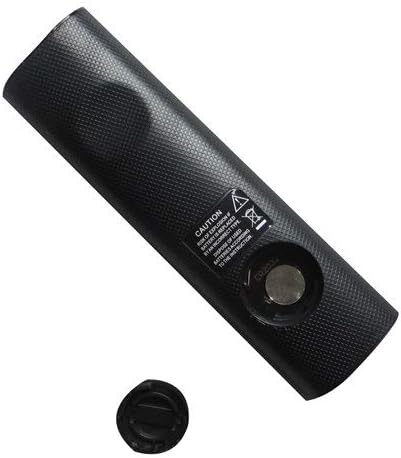
Figure 2: Remote control showing the battery cap detached.
2.2 ప్రారంభ ఉపయోగం
This remote control utilizes infrared (IR) technology. No complex pairing or programming is typically required. Once batteries are installed, point the remote directly at your Samsung soundbar system and begin operation.
3. ఆపరేటింగ్ సూచనలు
The remote control features 15 buttons for various functions. While specific button labels may vary, common functions include:
- శక్తి: సౌండ్బార్ సిస్టమ్ను ఆన్ లేదా ఆఫ్ చేస్తుంది.
- వాల్యూమ్ అప్/డౌన్: ఆడియో అవుట్పుట్ స్థాయిని సర్దుబాటు చేస్తుంది.
- మ్యూట్: ఆడియో అవుట్పుట్ను నిశ్శబ్దం చేస్తుంది.
- ఇన్పుట్/మూలం: Cycles through available audio input sources (e.g., HDMI, Optical, Bluetooth).
- నావిగేషన్ బటన్లు: Used for menu navigation (if supported by the soundbar and remote).
- ప్లేబ్యాక్ నియంత్రణలు: Play, Pause, Skip (if controlling a connected media device).
For optimal performance, ensure a clear line of sight between the remote control and the soundbar's IR receiver. The maximum effective range is approximately 10 meters (33 feet).
4. నిర్వహణ
4.1 బ్యాటరీ భర్తీ
Replace batteries when the remote control's response becomes inconsistent or stops working. Always replace all batteries at the same time with new ones of the same type. Do not mix old and new batteries, or different types of batteries.
4.2 శుభ్రపరచడం
To clean the remote control, wipe it with a soft, dry cloth. Do not use liquid cleaners, abrasive pads, or chemical solvents, as these can damage the remote's surface or internal components.
4.3 నిల్వ
రిమోట్ కంట్రోల్ను చల్లని, పొడి ప్రదేశంలో ప్రత్యక్ష సూర్యకాంతి మరియు తీవ్రమైన ఉష్ణోగ్రతలకు దూరంగా నిల్వ చేయండి. రిమోట్ను ఎక్కువ కాలం ఉపయోగించకపోతే, లీకేజీని నివారించడానికి బ్యాటరీలను తీసివేయమని సిఫార్సు చేయబడింది.
5. ట్రబుల్షూటింగ్
- రిమోట్ స్పందించడం లేదు:
- సరైన ధ్రువణతతో బ్యాటరీలు సరిగ్గా చొప్పించబడిందో లేదో తనిఖీ చేయండి.
- బ్యాటరీలను తాజా వాటితో భర్తీ చేయండి.
- Ensure there is a clear line of sight between the remote and the soundbar's IR receiver. Remove any obstructions.
- Make sure you are within the effective operating range (approximately 10 meters).
- కొన్ని విధులు పనిచేయవు:
- As a replacement remote, it may not support all advanced or specific functions of the original equipment. This is normal for universal or replacement remotes.
- Verify that your soundbar model is listed as compatible in the Introduction section.
6. స్పెసిఫికేషన్లు
| ఫీచర్ | స్పెసిఫికేషన్ |
|---|---|
| బ్రాండ్ | ఈజీట్రీ123 |
| మోడల్ పేరు | ఈజీట్రీ2094 |
| కనెక్టివిటీ టెక్నాలజీ | ఇన్ఫ్రారెడ్ (IR) |
| బటన్ పరిమాణం | 15 |
| కంట్రోలర్ రకం | బటన్ నియంత్రణ |
| గరిష్ట పరిధి | 10 మీటర్లు |
| బ్యాటరీ రకం | Lithium (not included) |
| రంగు | నలుపు |
| అనుకూల పరికరాలు | Samsung Audio Soundbar Systems (specific models listed) |
7. వారంటీ మరియు మద్దతు
For warranty information and customer support, please refer to the seller or retailer from whom you purchased this product. Specific warranty terms and support channels are typically provided at the point of sale.
Ask a question about this manual
Ask about setup, troubleshooting, compatibility, parts, safety, or missing instructions. Manuals+ will review the question and use this page’s manual context to help answer it.