
1. పరిచయం
The FAAC 785506 Decoder SL is a high-quality electronic component designed for integration into FAAC automation systems. This device facilitates secure and reliable communication within your system, ensuring optimal performance and control. This manual provides essential information for the correct installation, operation, and maintenance of your Decoder SL.
Please read this manual carefully before proceeding with installation or operation to ensure safety and proper functionality.
2. భద్రతా సమాచారం
ముఖ్యమైన భద్రతా సూచనలు:
- సంస్థాపన మరియు నిర్వహణ అర్హత కలిగిన సిబ్బంది మాత్రమే నిర్వహించాలి.
- Disconnect power to the main system before performing any installation or maintenance procedures.
- Ensure all electrical connections comply with local regulations and standards.
- Do not expose the device to moisture, extreme temperatures, or corrosive substances.
- ప్యాకేజింగ్ మెటీరియల్స్ పిల్లలకు దూరంగా ఉంచండి.
3. ప్యాకేజీ విషయాలు
Verify that all components are present and undamaged upon opening the package. The standard package for the FAAC 785506 Decoder SL typically includes:
- FAAC 785506 Decoder SL unit
- సూచనల మాన్యువల్ (ఈ పత్రం)
- మౌంటు హార్డ్వేర్ (వర్తిస్తే)
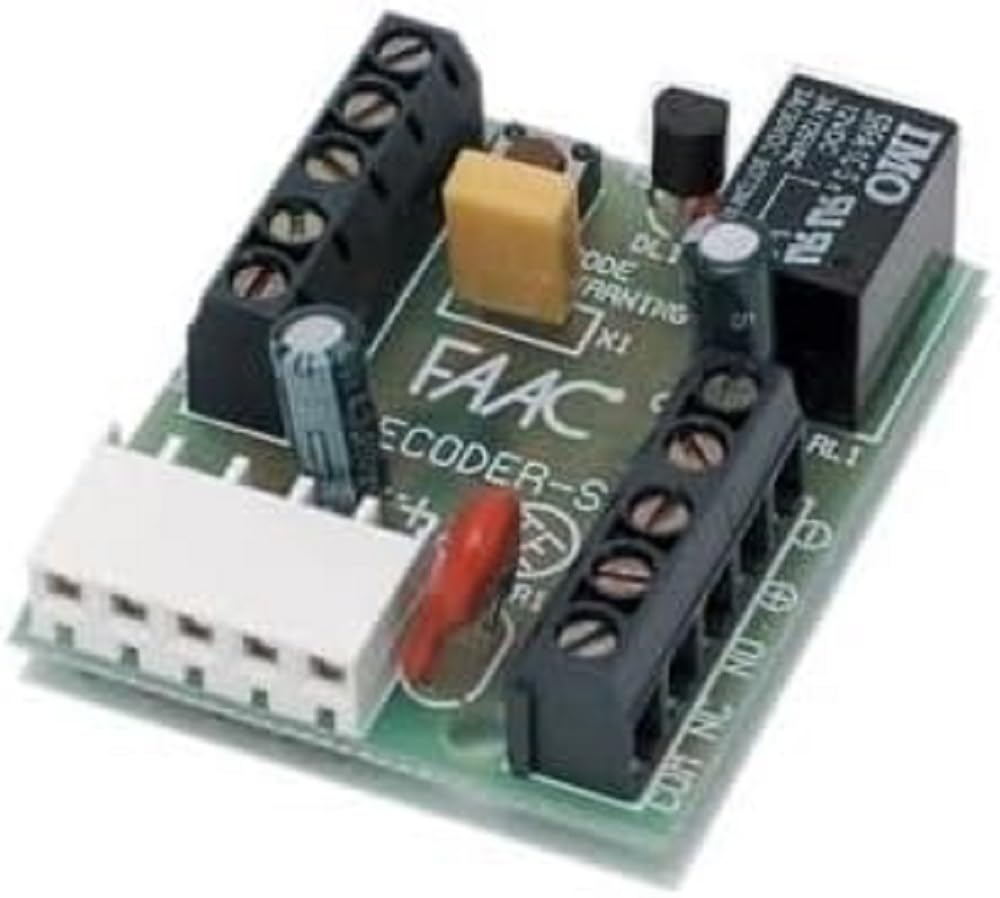
మూర్తి 1: The FAAC 785506 Decoder SL unit. This image displays the compact design of the decoder, typically featuring connection terminals and indicator lights.
4. సెటప్ మరియు ఇన్స్టాలేషన్
The FAAC 785506 Decoder SL is designed for easy integration into existing FAAC control units. Follow these general steps for installation:
- పవర్ డిస్కనెక్ట్: Ensure the main power supply to the automation system is completely disconnected before beginning installation.
- మౌంటు: Securely mount the Decoder SL in a suitable, protected location within the control unit enclosure, away from direct moisture or excessive heat. Use the provided mounting hardware.
- వైరింగ్: Connect the Decoder SL to the control unit according to the wiring diagram provided with your specific FAAC control panel. Pay close attention to polarity and terminal designations. Typical connections include power supply, data lines, and output signals.
- ధృవీకరణ: Double-check all connections to ensure they are secure and correct.
- విద్యుత్ పున కనెక్షన్: Once all connections are verified, restore power to the main system.
Refer to the specific wiring diagrams of your FAAC control unit for detailed connection instructions.
5. ఆపరేటింగ్ సూచనలు
Once installed and powered, the FAAC 785506 Decoder SL operates automatically as part of your FAAC automation system. Its primary function is to decode signals from connected devices, such as remote controls or keypads, and transmit them to the main control unit.
- సూచిక లైట్లు: Observe any indicator lights on the decoder. These typically provide status information, such as power on, signal reception, or error states. Consult your control unit's manual for specific indicator light meanings.
- సిస్టమ్ ఇంటిగ్రేషన్: The decoder works in conjunction with your FAAC control board. Any programming or configuration of remote controls or access devices will be performed through the main control unit, not directly on the decoder.
For specific operational details related to your overall FAAC system, refer to the instruction manual of your main control unit.
6. నిర్వహణ
The FAAC 785506 Decoder SL is designed for minimal maintenance. However, periodic checks can help ensure its longevity and reliable operation:
- శుభ్రపరచడం: Keep the device free from dust and debris. Use a soft, dry cloth for cleaning. Do not use liquid cleaners or solvents.
- కనెక్షన్ తనిఖీ: అన్ని వైరింగ్ కనెక్షన్లు సురక్షితంగా మరియు తుప్పు పట్టకుండా ఉండేలా కాలానుగుణంగా తనిఖీ చేయండి.
- పర్యావరణ పరిస్థితులు: ఆపరేటింగ్ వాతావరణం సిఫార్సు చేయబడిన ఉష్ణోగ్రత మరియు తేమ పరిధిలోనే ఉండేలా చూసుకోండి.
No user-serviceable parts are inside the decoder. Do not attempt to open or repair the unit yourself.
7. ట్రబుల్షూటింగ్
If you experience issues with your FAAC 785506 Decoder SL, consider the following common troubleshooting steps:
- శక్తి లేదు:
- Check the main power supply to the control unit.
- Verify all power connections to the decoder are correct and secure.
- సిగ్నల్ రిసెప్షన్ లేదు:
- Ensure the transmitting device (e.g., remote control) is functioning correctly and has fresh batteries.
- Check the wiring between the decoder and the control unit for any loose or incorrect connections.
- Verify that the transmitting device is within the operational range and not obstructed.
- సిస్టమ్ పనిచేయకపోవడం:
- If the entire automation system is not responding, consult the troubleshooting section of your main FAAC control unit manual.
- Ensure the decoder is correctly recognized by the main control unit (if applicable, check programming steps in the control unit manual).
If problems persist after attempting these steps, contact FAAC technical support or a qualified service technician.
8. స్పెసిఫికేషన్లు
| ఫీచర్ | వివరాలు |
|---|---|
| బ్రాండ్ | FAAC |
| మోడల్ సంఖ్య | 785506 |
| ASIN | B07HYVG1WS |
| తయారీదారు | Faac Spa |
| మూలం దేశం | ఇటలీ |
| విడిభాగాల లభ్యత | సమాచారం అందుబాటులో లేదు |
| సాఫ్ట్వేర్ నవీకరణలు వరకు హామీ ఇవ్వబడతాయి | సమాచారం అందుబాటులో లేదు |
9. వారంటీ మరియు మద్దతు
FAAC products are manufactured to high-quality standards. For information regarding warranty coverage, terms, and conditions, please refer to the warranty documentation provided with your complete FAAC automation system or visit the official FAAC webసైట్.
For technical support, service, or inquiries about spare parts, please contact your authorized FAAC dealer or FAAC customer service. When contacting support, please have your product model number (785506) and any relevant system information ready.
ఆన్లైన్ వనరులు: For additional information, product updates, and detailed technical documentation, please visit the official FAAC webసైట్: www.faac.com