
1. పరిచయం
ధన్యవాదాలు, ధన్యవాదాలు.asing the auna V-20 Vertical Stereo System. This manual provides essential information for the safe and efficient operation of your device. Please read it thoroughly before use and keep it for future reference.
2. భద్రతా సూచనలు
- పరికరాన్ని ఆపరేట్ చేయడానికి ముందు అన్ని సూచనలను జాగ్రత్తగా చదవండి.
- పరికరాన్ని నీరు, తేమ మరియు తీవ్రమైన ఉష్ణోగ్రతల నుండి దూరంగా ఉంచండి.
- ఏ వెంటిలేషన్ ఓపెనింగ్లను నిరోధించవద్దు.
- తయారీదారు పేర్కొన్న జోడింపులు/యాక్సెసరీలను మాత్రమే ఉపయోగించండి.
- మెరుపు తుఫానుల సమయంలో లేదా ఎక్కువ కాలం ఉపయోగించనప్పుడు పరికరాన్ని అన్ప్లగ్ చేయండి.
- అన్ని సేవలను అర్హత కలిగిన సేవా సిబ్బందికి సూచించండి.
- సి ని తెరవవద్దుasing; లోపల వినియోగదారు-సేవ చేయగల భాగాలు లేవు.
3. ప్యాకేజీ విషయాలు
దయచేసి అన్ని అంశాలు ఉన్నాయో లేదో తనిఖీ చేయండి:
- 1 x auna V-20 Vertical Stereo System
- 1 x Remote Control (including 2 x 1.5V AAA batteries)
- 1 x పవర్ అడాప్టర్
- 1 x Removable Stand Base
- 1 x Wire Antenna
- User Manual (English and German)
4. ఉత్పత్తి ముగిసిందిview
The auna V-20 is a versatile micro stereo system featuring a vertical design. It includes a CD player, DAB+ and FM radio, Bluetooth, NFC, USB, and AUX connectivity. The system can be used with its stand or mounted on a wall.

Figure 4.1: The auna V-20 Vertical Stereo System shown with its remote control in a modern living room environment.
ముందు ప్యానెల్ నియంత్రణలు మరియు ప్రదర్శన
The front panel features a sleek design with a motorized CD drive cover and an LED display that shows time and operational information. Control buttons are located on the top edge of the unit.
వెనుక ప్యానెల్ కనెక్షన్లు
The rear panel provides various connection ports for external devices and power.
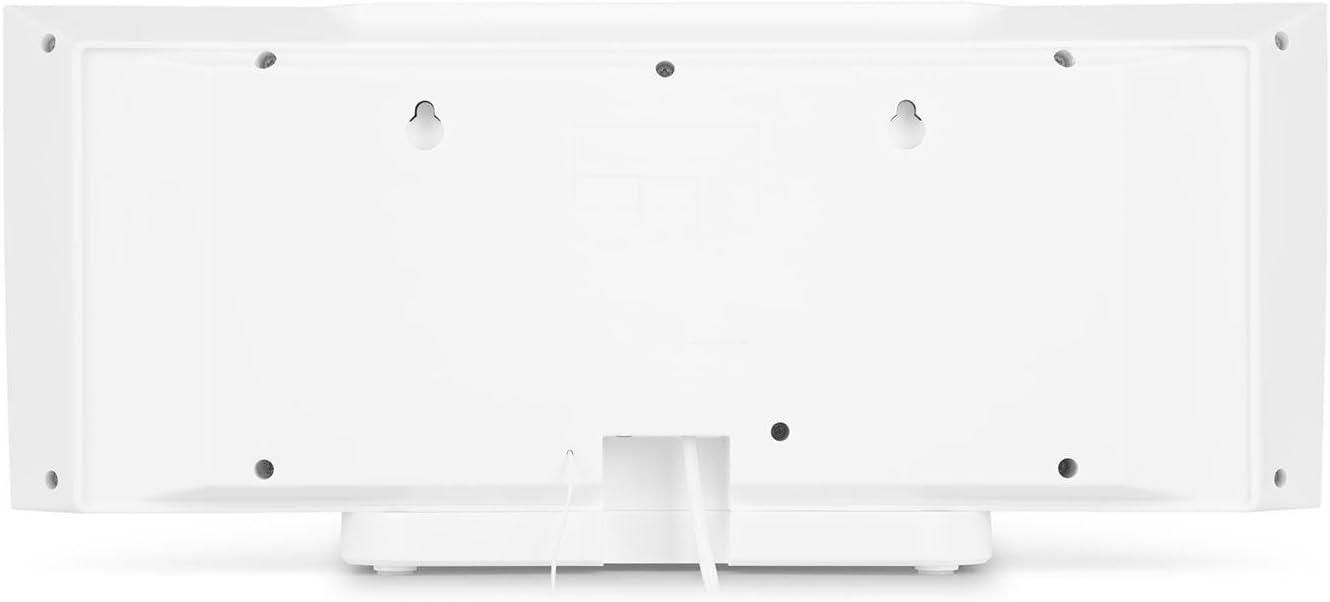
చిత్రం 4.2: వెనుక view of the auna V-20, highlighting the USB port and AUX input.
రిమోట్ కంట్రోల్
The included remote control allows for convenient operation of all functions from a distance.

మూర్తి 4.3: వివరంగా view of the remote control for the auna V-20 stereo system.
5. సెటప్
5.1 ప్లేస్మెంట్ ఎంపికలు
The auna V-20 offers flexible placement:
- స్టాండ్ మౌంటు: Attach the removable stand base for desktop or shelf placement. Ensure the unit is stable on a flat surface.
- వాల్ మౌంటు: The unit can be mounted on a wall to save space. Use appropriate wall mounting hardware (not included) and ensure the wall can support the unit's weight.

చిత్రం 5.1: వెనుక view illustrating the wall mounting points and the stand attachment area.
5.2 పవర్ కనెక్షన్
Connect the provided power adapter to the DC IN port on the rear of the unit, then plug it into a standard wall outlet (AC 230V, 50 Hz).
5.3 యాంటెన్నా కనెక్షన్
Extend the wire antenna for optimal DAB+ and FM radio reception. Adjust its position for the best signal quality.
6. ఆపరేటింగ్ సూచనలు
6.1 పవర్ ఆన్/ఆఫ్ మరియు స్టాండ్బై
నొక్కండి సంశిధ్ధంగా ఉండుట button on the unit or remote control to switch the system on or put it into standby mode.
6.2 మోడ్ ఎంపిక
నొక్కండి ఫంక్షన్ button on the unit or the dedicated mode buttons (FM/DAB, USB, CD, AUDIO IN, BLUETOOTH) on the remote control to switch between different audio sources.
6.3 వాల్యూమ్ నియంత్రణ
ఉపయోగించి వాల్యూమ్ను సర్దుబాటు చేయండి VOL+ మరియు VOL- buttons on the unit or remote control. The LED display will show the current volume level.
6.4 ఈక్వలైజర్ సెట్టింగ్లు
The system features a 2-band equalizer and equalizer presets. Use the EQ button on the remote control to cycle through presets or adjust bass/treble. The X-BASS function can be activated for enhanced bass.
7. బ్లూటూత్ మరియు NFC కనెక్టివిటీ
7.1 బ్లూటూత్ జత చేయడం
మీ స్మార్ట్ఫోన్, టాబ్లెట్ లేదా ల్యాప్టాప్ నుండి వైర్లెస్గా సంగీతాన్ని ప్రసారం చేయడానికి:
- Switch the stereo system to Bluetooth mode. The LED display will indicate pairing mode.
- మీ మొబైల్ పరికరంలో బ్లూటూత్ని ప్రారంభించండి మరియు అందుబాటులో ఉన్న పరికరాల కోసం శోధించండి.
- Select "auna V-20" from the list to pair. Once connected, you can play audio from your device.

Figure 7.1: A smartphone being used to connect to the auna V-20 via Bluetooth.
7.2 NFC కనెక్షన్
For intuitive pairing with NFC-enabled devices:
- మీ మొబైల్ పరికరంలో NFC ప్రారంభించబడిందని నిర్ధారించుకోండి.
- Gently swipe your NFC-enabled device over the NFC sensor on the auna V-20.
- The devices will automatically pair via Bluetooth.

మూర్తి 7.2: క్లోజ్-అప్ view of the NFC sensor for quick device pairing.
8. CD ప్లేయర్ ఆపరేషన్
The auna V-20 features an MP3-compatible CD player with a motorized drive.

Figure 8.1: The motorized CD player mechanism with a disc inserted.
8.1 Loading a CD
- నొక్కండి తెరవండి/మూసివేయండి button to open the motorized CD cover.
- Carefully place a CD (CD, CD-R/RW, MP3-CD) onto the spindle with the label side facing you.
- నొక్కండి తెరవండి/మూసివేయండి again to close the cover. The system will automatically switch to CD mode and begin playback.
8.2 ప్లేబ్యాక్ నియంత్రణలు
- ప్లే/పాజ్: నొక్కండి ప్లే/పాజ్ చేయండి ప్లేబ్యాక్ను ప్రారంభించడానికి లేదా పాజ్ చేయడానికి.
- ట్రాక్లను దాటవేయి: ఉపయోగించండి ఫార్వార్డ్ దాటవేయి or వెనుకకు దాటవేయి ట్రాక్ల మధ్య నావిగేట్ చేయడానికి బటన్లు.
- ఆపు: నొక్కండి ఆపు ప్లేబ్యాక్ ముగించడానికి బటన్.
- పునరావృతం/యాదృచ్ఛికం: ఉపయోగించండి పునరావృతం చేయండి మరియు యాదృచ్ఛికం buttons on the remote for playback options.
- ప్రోగ్రామబుల్ ప్లేబ్యాక్: The system supports programmable title display for custom playlists.
9. రేడియో ఆపరేషన్ (DAB+/FM)
The auna V-20 features both DAB+ digital radio and analog FM radio with RDS function.
9.1 Selecting Radio Mode
నొక్కండి FM/DAB button on the remote control to switch between FM and DAB+ modes.
9.2 ఆటోమేటిక్ స్టేషన్ స్కాన్
In either FM or DAB+ mode, press the స్కాన్ button on the remote control to automatically scan and store available stations. The system can store up to 20 presets per reception type.
9.3 Manual Tuning and Presets
- మాన్యువల్ ట్యూనింగ్: ఉపయోగించండి ట్యూన్ +/- buttons on the remote control for fine-tuning.
- ప్రీసెట్లను సేవ్ చేస్తోంది: Once a station is found, press the ప్రీసెట్ button, then use the number buttons (0-9, 10+) to assign a preset number. Press నమోదు చేయండి నిర్ధారించడానికి.
- ప్రీసెట్లను గుర్తుచేసుకుంటున్నారు: Press the corresponding number button on the remote control to quickly access a saved station.
- సమాచార బటన్: DAB+ మోడ్లో, నొక్కండి సమాచారం button to display additional information such as artist, title, album, or news.
10. USB ప్లేబ్యాక్
The auna V-20 allows playback of MP3 audio files నేరుగా USB స్టిక్ నుండి.
10.1 USB పరికరాన్ని కనెక్ట్ చేస్తోంది
- Insert your USB stick into the USB port on the rear of the unit.
- Switch the stereo system to USB mode using the USB రిమోట్ కంట్రోల్లో బటన్.
- సిస్టమ్ స్వయంచాలకంగా MP3ని గుర్తించి ప్లే చేయడం ప్రారంభిస్తుంది files.
10.2 USB Playback Controls
Playback controls (Play/Pause, Skip, Stop, Repeat, Random) are similar to CD player operation. Use the ఫోల్డర్ button on the remote to navigate through folders on the USB device.
11. AUX ఇన్పుట్
Connect external audio devices such as MP3 players, CD players, or computers using the AUX input.
11.1 బాహ్య పరికరాన్ని కనెక్ట్ చేస్తోంది
- Connect a 3.5mm audio cable (not included) from the headphone jack or audio output of your external device to the AUX IN port on the rear of the auna V-20.
- Switch the stereo system to AUDIO IN mode using the ఆడియో IN రిమోట్ కంట్రోల్లో బటన్.
- Play audio from your external device. The sound will be output through the auna V-20 speakers.
12. నిర్వహణ
12.1 శుభ్రపరచడం
- శుభ్రపరిచే ముందు పరికరాన్ని ఎల్లప్పుడూ పవర్ అవుట్లెట్ నుండి అన్ప్లగ్ చేయండి.
- బయటి ఉపరితలాలను శుభ్రం చేయడానికి మృదువైన, పొడి వస్త్రాన్ని ఉపయోగించండి.
- రాపిడి క్లీనర్లు, మైనపులు లేదా ద్రావకాలను ఉపయోగించవద్దు ఎందుకంటే అవి ముగింపును దెబ్బతీస్తాయి.
- CD లెన్స్ కోసం, అవసరమైతే ప్రత్యేకమైన CD లెన్స్ క్లీనర్ను ఉపయోగించండి.
12.2 సాధారణ సంరక్షణ
- యూనిట్పై భారీ వస్తువులను ఉంచడం మానుకోండి.
- ప్రత్యక్ష సూర్యకాంతి మరియు వేడి మూలాల నుండి యూనిట్ను దూరంగా ఉంచండి.
- వేడెక్కకుండా నిరోధించడానికి యూనిట్ చుట్టూ సరైన వెంటిలేషన్ ఉండేలా చూసుకోండి.
13. ట్రబుల్షూటింగ్
| సమస్య | సాధ్యమైన కారణం | పరిష్కారం |
|---|---|---|
| శక్తి లేదు | Power cable not connected; power outlet faulty | Check power cable connection; try a different outlet |
| శబ్దం లేదు | Volume too low; incorrect source selected; mute activated | Increase volume; select correct source; deactivate mute |
| CD ప్లే కావడం లేదు | CD inserted incorrectly; CD dirty/scratched; unsupported format | Reinsert CD correctly; clean or replace CD; ensure CD is compatible (CD, CD-R/RW, MP3-CD) |
| పేలవమైన రేడియో రిసెప్షన్ | Antenna not extended; weak signal | Extend and adjust antenna position; try moving the unit to a different location |
| బ్లూటూత్ జత చేయడం విఫలమైంది | Device too far; Bluetooth not enabled; incorrect pairing procedure | Ensure devices are close; enable Bluetooth on mobile device; follow pairing instructions (Section 7.1) |
14. స్పెసిఫికేషన్లు
| ఫీచర్ | వివరాలు |
|---|---|
| బ్రాండ్ | ఆనా |
| మోడల్ | V-20 |
| పార్ట్ నంబర్ | AUVZ-1100-ghfr |
| ఉత్పత్తి కొలతలు | 51 x 25 x 16 సెం.మీ |
| బరువు | 2.6 కిలోలు |
| శక్తి మూలం | విద్యుత్ |
| వాట్tage | 27 వాట్స్ |
| ఆడియో అవుట్పుట్ మోడ్ | స్టీరియో |
| స్పీకర్ కాన్ఫిగరేషన్ | 2.0 |
| మద్దతు ఉన్న ఆడియో ఫార్మాట్లు | MP3 |
| మీడియా రకం | CD, MP3 |
| కనెక్టర్ రకాలు | Bluetooth, NFC, USB, AUX |
| బ్లూటూత్ అనుకూలమైనది | అవును |
| బ్లూటూత్ వెర్షన్ | 2.1+EDR |
| బ్లూటూత్ ప్రోfile | A2DP |
| అనుకూల పరికరాలు | Smartphone, tablet, MP3 player |
| ప్రత్యేక లక్షణాలు | ఉపయోగించడానికి సులభం |
| రిమోట్ కంట్రోల్ బ్యాటరీలు | 2 x 1.5V AAA (చేర్చబడింది) |
| DAB+ ఫ్రీక్వెన్సీ పరిధి | 174 - 240 MHz (Band III) |
15. వారంటీ మరియు మద్దతు
This product is covered by a manufacturer's warranty. For detailed warranty information, please refer to the documentation provided at the time of purchase or contact auna customer support.
If you encounter any issues not covered in the troubleshooting section, or require further assistance, please contact auna customer service through their official webసైట్ లేదా మీ రిటైలర్.