
1. ముఖ్యమైన భద్రతా సూచనలు
Please read all instructions carefully before using the Schneider SCTO2S Toaster. Keep this manual for future reference.
- వేడి ఉపరితలాలను తాకవద్దు. హ్యాండిల్స్ లేదా నాబ్లను ఉపయోగించండి.
- విద్యుత్ షాక్ నుండి రక్షించడానికి, త్రాడు, ప్లగ్లు లేదా టోస్టర్ను నీటిలో లేదా ఇతర ద్రవంలో ముంచవద్దు.
- ఏదైనా ఉపకరణాన్ని పిల్లలు లేదా సమీపంలో ఉపయోగించినప్పుడు నిశిత పర్యవేక్షణ అవసరం.
- ఉపయోగంలో లేనప్పుడు మరియు శుభ్రపరిచే ముందు అవుట్లెట్ నుండి అన్ప్లగ్ చేయండి. భాగాలను ఉంచడానికి లేదా తీయడానికి ముందు చల్లబరచడానికి అనుమతించండి.
- పాడైపోయిన త్రాడు లేదా ప్లగ్తో లేదా ఉపకరణం పనిచేయకపోవడం లేదా ఏ పద్ధతిలో పాడైపోయిన తర్వాత ఏ పరికరాన్ని ఆపరేట్ చేయవద్దు.
- ఆరుబయట ఉపయోగించవద్దు.
- టేబుల్ లేదా కౌంటర్ అంచుపై త్రాడు వేలాడదీయవద్దు లేదా వేడి ఉపరితలాలను తాకవద్దు.
- వేడి గ్యాస్ లేదా ఎలక్ట్రిక్ బర్నర్ లేదా వేడిచేసిన ఓవెన్లో ఉంచవద్దు.
- ఉపకరణాన్ని ఉద్దేశించిన ఉపయోగం కాకుండా ఇతర వాటి కోసం ఉపయోగించవద్దు.
- టోస్టర్లో అతి పెద్ద ఆహార పదార్థాలు, మెటల్ ఫాయిల్ ప్యాకేజీలు లేదా పాత్రలను ఉంచకూడదు ఎందుకంటే అవి మంటలు లేదా విద్యుత్ షాక్ ప్రమాదాన్ని సృష్టించవచ్చు.
- టోస్టర్లు కప్పబడి ఉంటే లేదా కర్టెన్లు, డ్రేపరీలు, గోడలు మరియు వంటి వాటితో సహా మండే పదార్థాలను తాకినట్లయితే మంటలు సంభవించవచ్చు.
- టోస్టర్ ప్లగిన్ చేయబడినప్పుడు ఆహారాన్ని తీసివేయడానికి ప్రయత్నించవద్దు.
- ఎల్లప్పుడూ ముందుగా ఉపకరణానికి ప్లగ్ను అటాచ్ చేయండి, తర్వాత త్రాడును గోడ అవుట్లెట్లోకి ప్లగ్ చేయండి. డిస్కనెక్ట్ చేయడానికి, ఏదైనా నియంత్రణను 'ఆఫ్'కి తిప్పండి, ఆపై గోడ అవుట్లెట్ నుండి ప్లగ్ను తీసివేయండి.
2. ఉత్పత్తి ముగిసిందిview
The Schneider SCTO2S Vintage 2-Slice Toaster is designed for efficient and convenient toasting. Familiarize yourself with its components.

చిత్రం: ముందు భాగం view of the Schneider SCTO2S Vintage 2-Slice Toaster, showcasing its silver finish and classic design.
భాగాలు:
- టోస్టింగ్ స్లాట్లు: వివిధ రకాల బ్రెడ్లకు రెండు వెడల్పు స్లాట్లు.
- బ్రౌనింగ్ కంట్రోల్ డయల్: Adjustable dial with 6 settings for desired toast shade.
- బటన్ ఆపు: టోస్టింగ్ సైకిల్ను వెంటనే రద్దు చేస్తుంది.
- రీహీట్ బటన్: టోస్ట్ మరింత గోధుమ రంగులోకి మారకుండా వేడెక్కుతుంది.
- డీఫ్రాస్ట్ బటన్: ఘనీభవించిన రొట్టెని డీఫ్రాస్ట్ చేస్తుంది మరియు టోస్ట్ చేస్తుంది.
- చిన్న ముక్క: ముక్కలను సులభంగా శుభ్రం చేయడానికి తొలగించగల ట్రే.
- లివర్: టోస్టింగ్ స్లాట్లలోకి బ్రెడ్ను దించి పైకి లేపుతుంది.
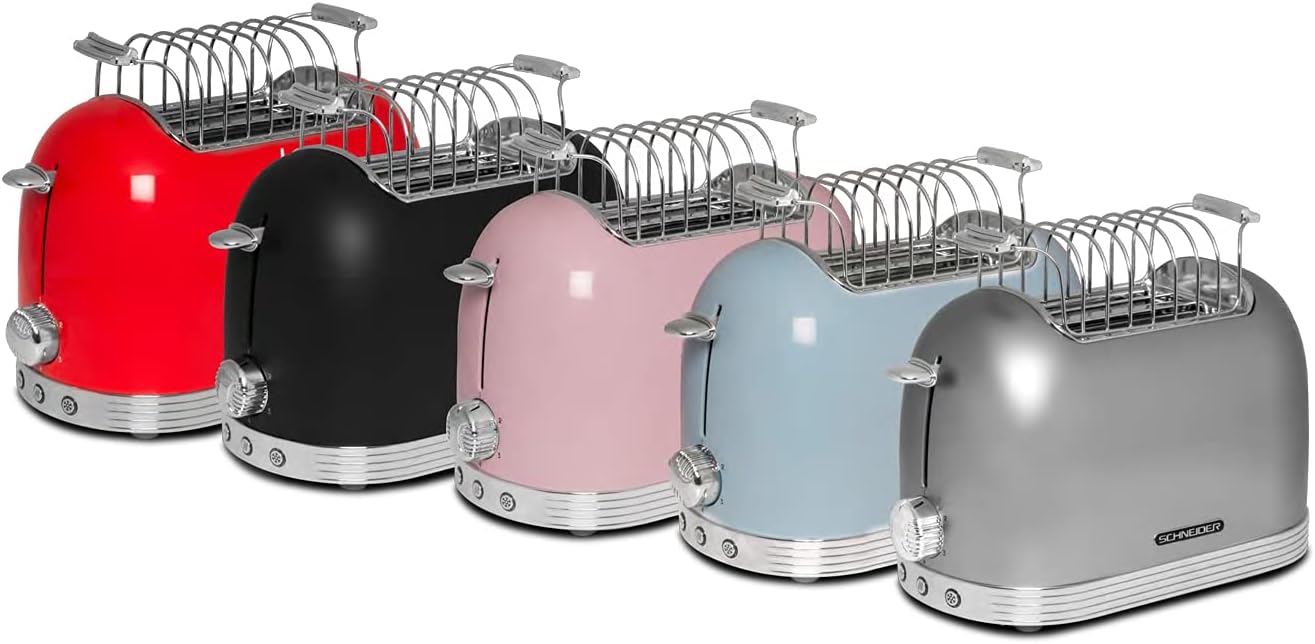
- Bread Warmer Rack: An accessory for warming pastries or rolls.

Image: The Schneider SCTO2S Toaster with the removable bread warmer rack placed on top of the toasting slots.
3. సెటప్
- అన్ప్యాకింగ్: టోస్టర్ మరియు అన్ని ఉపకరణాలను ప్యాకేజింగ్ నుండి జాగ్రత్తగా తొలగించండి. భవిష్యత్తులో నిల్వ లేదా రవాణా కోసం ప్యాకేజింగ్ను ఉంచండి.
- ప్లేస్మెంట్: టోస్టర్ను స్థిరమైన, చదునైన, వేడి-నిరోధక ఉపరితలంపై ఉంచండి, కర్టెన్లు లేదా గోడలు వంటి మండే పదార్థాలకు దూరంగా ఉంచండి. ఉపకరణం చుట్టూ తగినంత వెంటిలేషన్ ఉండేలా చూసుకోండి.
- మొదటి ఉపయోగం: Before first use, operate the toaster without bread on the highest browning setting (6) for a few minutes to burn off any manufacturing residues. A slight odor or smoke may be present; this is normal. Ensure the area is well-ventilated.
- పవర్ కనెక్షన్: పవర్ కార్డ్ను ప్రామాణిక 230V AC ఎలక్ట్రికల్ అవుట్లెట్లోకి ప్లగ్ చేయండి.
4. ఆపరేటింగ్ సూచనలు
4.1. ప్రాథమిక టోస్టింగ్
- టోస్టింగ్ స్లాట్లలో బ్రెడ్ ముక్కలను చొప్పించండి.
- బ్రౌనింగ్ కంట్రోల్ డయల్ ఉపయోగించి మీకు కావలసిన బ్రౌనింగ్ స్థాయిని ఎంచుకోండి (సెట్టింగ్లు 1-6, 1 తేలికైనది మరియు 6 చీకటిగా ఉంటుంది).
- Press the lever down until it locks into place. The toasting cycle will begin, and the indicator light will illuminate.
- Once the selected browning level is reached, the toast will automatically pop up, and the toaster will switch off.
4.2. డీఫ్రాస్ట్ ఫంక్షన్
ఘనీభవించిన బ్రెడ్ను టోస్ట్ చేయడానికి ఈ ఫంక్షన్ను ఉపయోగించండి.
- టోస్టింగ్ స్లాట్లలోకి స్తంభింపచేసిన బ్రెడ్ను చొప్పించండి.
- మీకు కావలసిన బ్రౌనింగ్ స్థాయిని ఎంచుకోండి.
- Press the lever down.
- నొక్కండి కరిగించే button (snowflake icon). The indicator light for this function will illuminate.
- The toaster will automatically adjust the toasting time to account for defrosting.
4.3. రీహీట్ ఫంక్షన్
This function allows you to warm up previously toasted bread without further browning.
- స్లాట్లలోకి చల్లని, గతంలో కాల్చిన బ్రెడ్ను చొప్పించండి.
- Press the lever down.
- నొక్కండి మళ్లీ వేడి చేయండి button (two wavy lines icon). The indicator light for this function will illuminate.
- టోస్టర్ బ్రెడ్ను కొద్దిసేపు వేడి చేసి, ఆపై స్వయంచాలకంగా పాప్ అప్ చేస్తుంది.
4.4 ఆపు ఫంక్షన్
To cancel the toasting cycle at any time, press the ఆపు బటన్.
చిత్రం: క్లోజప్ view of the control panel on the Schneider SCTO2S Toaster, showing the browning dial (1-6), Stop, Reheat, and Defrost buttons.
4.5. Using the Bread Warmer Rack
The included bread warmer rack is ideal for warming croissants, rolls, or pastries.
- Place the bread warmer rack securely over the toasting slots.
- వేడెక్కాల్సిన వస్తువులను రాక్ మీద ఉంచండి.
- బ్రౌనింగ్ నియంత్రణను తక్కువ సెట్టింగ్కు సెట్ చేయండి (ఉదా. 1 లేదా 2).
- Press the lever down to start the warming cycle.
- Monitor the items closely to prevent burning. Cancel the cycle using the Stop button when desired warmth is achieved.
5. నిర్వహణ మరియు శుభ్రపరచడం
క్రమం తప్పకుండా శుభ్రపరచడం వల్ల మీ టోస్టర్ యొక్క పనితీరు ఉత్తమంగా ఉంటుంది మరియు దాని జీవితకాలం పెరుగుతుంది.
- టోస్టర్ను ఎల్లప్పుడూ అన్ప్లగ్ చేయండి పవర్ అవుట్లెట్ నుండి తీసివేసి, శుభ్రం చేసే ముందు పూర్తిగా చల్లబరచడానికి అనుమతించండి.
- చిన్న ముక్క: Pull out the crumb tray located at the bottom of the toaster. Empty crumbs into a waste bin. Wipe the tray clean with a damp తిరిగి చొప్పించే ముందు పూర్తిగా గుడ్డతో తుడిచి ఆరబెట్టండి.

చిత్రం: క్లోజప్ view of the removable crumb tray being pulled out from the side of the Schneider SCTO2S Toaster for cleaning.
- బాహ్య: టోస్టర్ యొక్క బాహ్య భాగాన్ని మృదువైన, d శుభ్రముపరచుతో తుడవండి.amp రాపిడి క్లీనర్లు లేదా స్కౌరింగ్ ప్యాడ్లను ఉపయోగించవద్దు, ఎందుకంటే అవి ఉపరితలంపై గీతలు పడవచ్చు.
- అంతర్గత: Do not attempt to clean the interior of the toaster with any tools or objects. If bread gets stuck, unplug the toaster and carefully remove it once cooled.
- టోస్టర్ను ఎప్పుడూ నీటిలో లేదా మరే ఇతర ద్రవంలో ముంచవద్దు.
6. ట్రబుల్షూటింగ్
మీ టోస్టర్తో మీకు సమస్యలు ఎదురైతే, ఈ క్రింది సాధారణ సమస్యలు మరియు పరిష్కారాలను చూడండి:
| సమస్య | సాధ్యమైన కారణం | పరిష్కారం |
|---|---|---|
| టోస్టర్ ఆన్ అవ్వదు. | ప్లగిన్ చేయబడలేదు; పవర్ లేదాtage; తప్పు అవుట్లెట్. | టోస్టర్ పనిచేసే అవుట్లెట్లోకి సురక్షితంగా ప్లగ్ చేయబడిందని నిర్ధారించుకోండి. మీ సర్క్యూట్ బ్రేకర్ను తనిఖీ చేయండి. |
| Bread does not pop up. | Lever not fully pressed down; food jammed. | Ensure the lever is locked into place. Unplug the toaster and carefully remove any jammed food once cooled. |
| టోస్ట్ చాలా లేతగా/ముదురుగా ఉంది. | బ్రౌనింగ్ నియంత్రణ సెట్టింగ్ తప్పు. | ముదురు టోస్ట్ కోసం బ్రౌనింగ్ కంట్రోల్ డయల్ను ఎక్కువ సెట్టింగ్కు లేదా తేలికైన టోస్ట్ కోసం తక్కువ సెట్టింగ్కు సర్దుబాటు చేయండి. |
| టోస్టర్ నుండి పొగ వస్తోంది. | ముక్కలు పేరుకుపోయాయి; ఆహారం చిక్కుకుపోయింది; మొదట ఉపయోగించిన అవశేషాలు. | Immediately press the Stop button and unplug. Empty the crumb tray. If it's the first use, this is normal. If not, check for stuck food. |
ఈ పరిష్కారాలను ప్రయత్నించిన తర్వాత కూడా సమస్య కొనసాగితే, దయచేసి కస్టమర్ మద్దతును సంప్రదించండి.
7. స్పెసిఫికేషన్లు
Detailed technical specifications for the Schneider SCTO2S Toaster.

చిత్రం: వైపు view of the Schneider SCTO2S Toaster with dimensions indicated: 16.51 cm (width), 21.49 cm (height), and 30 cm (depth).
| ఫీచర్ | స్పెసిఫికేషన్ |
|---|---|
| మోడల్ సంఖ్య | SCTO2S |
| బ్రాండ్ | ష్నీడర్ |
| కొలతలు (L x W x H) | 30 x 16.5 x 21.5 సెం.మీ |
| బరువు | 1.8 కిలోలు |
| శక్తి | 685-815 వాట్స్ |
| వాల్యూమ్tage | 230 వోల్ట్లు |
| ముక్కల సంఖ్య | 2 |
| బ్రౌనింగ్ స్థాయిలు | 6 స్థానాలు |
| విధులు | Defrost, Reheat, Stop |
| చిన్న ముక్క ట్రే | తొలగించదగినది |
| మెటీరియల్ | Metal (Silver finish) |
8. వారంటీ మరియు మద్దతు
This Schneider SCTO2S Toaster comes with a standard manufacturer's warranty. Please refer to the warranty card included in your product packaging for specific terms and conditions, including the warranty period and coverage details.
For technical support, service, or warranty claims, please contact Schneider customer service. Contact information can typically be found on the manufacturer's official webసైట్ లేదా ఉత్పత్తి ప్యాకేజింగ్లో.
Please have your model number (SCTO2S) and proof of purchase ready when contacting support.