
1. పరిచయం
The AAXA P2-A is a compact, portable pico projector featuring Android OS, Wi-Fi, and Bluetooth connectivity. Designed for versatility, it supports Full HD 1080P resolution, making it suitable for various applications including home cinema, presentations, and mobile entertainment. This manual provides essential information for setting up, operating, maintaining, and troubleshooting your P2-A projector.
2. పెట్టెలో ఏముంది
దయచేసి అన్ని అంశాలు ప్యాకేజీలో ఉన్నాయని ధృవీకరించండి:
- AAXA P2-A ఆండ్రాయిడ్ స్మార్ట్ LED పికో ప్రొజెక్టర్
- mini-HDMI Cable
- AV కేబుల్
- USB కేబుల్
- మైక్రో SD కార్డ్
- రిమోట్ కంట్రోల్
- పవర్ అడాప్టర్
3. ఉత్పత్తి ముగిసిందిview
Familiarize yourself with the physical features and connection ports of your AAXA P2-A projector.
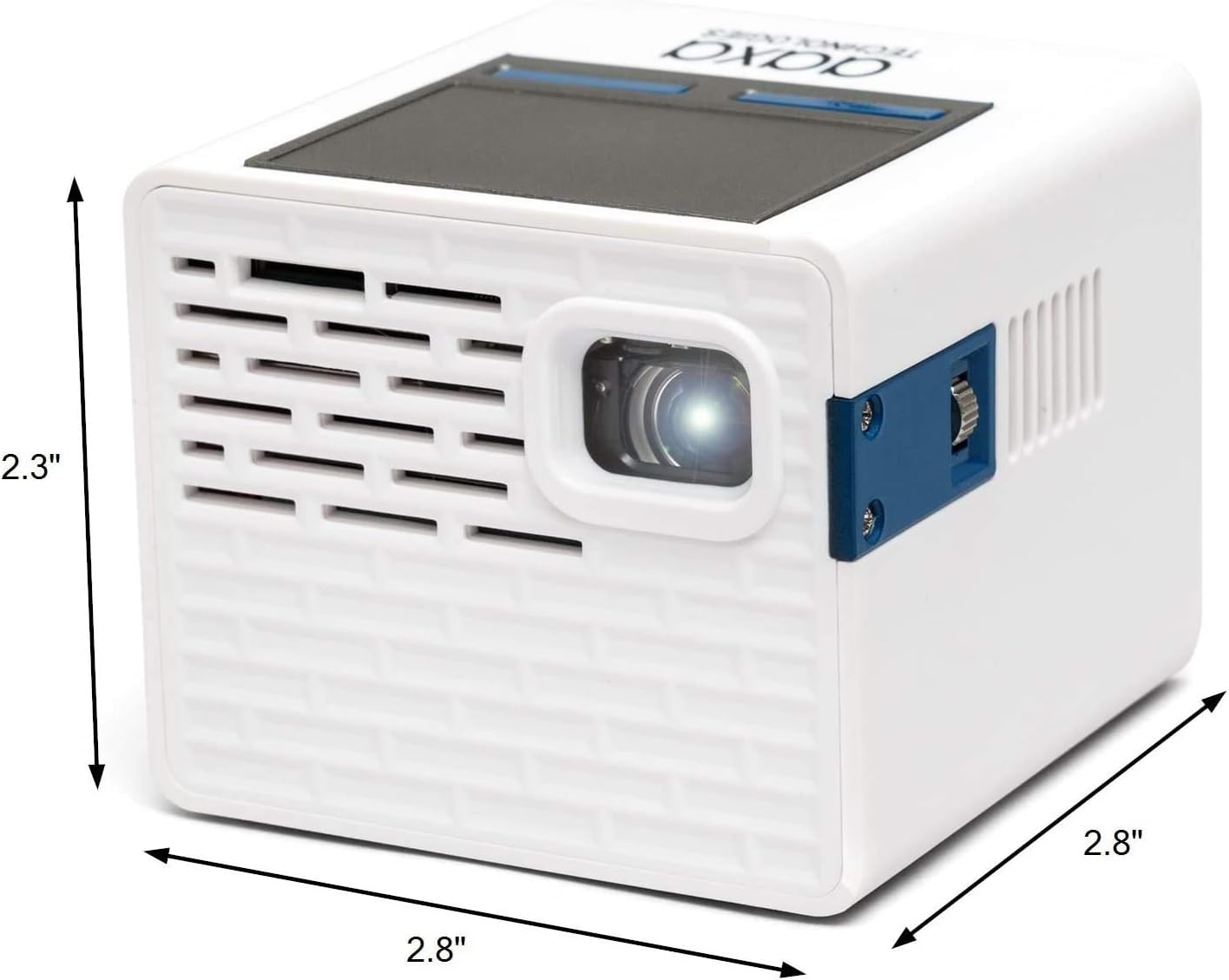
Figure 3.1: AAXA P2-A Pico Projector dimensions. The projector measures approximately 2.8 inches in width, 2.8 inches in depth, and 2.3 inches in height, highlighting its compact design.

చిత్రం 3.2: పైగాview of the AAXA P2-A Pico Projector's ports and controls. This image displays the Trackpad, MicroSD slot, Focus Wheel, Bluetooth/WiFi (built-in), IR Remote Sensor, HDMI port, Video In, AV port, MicroUSB (for firmware reflash only), 3.5mm Audio Out, Composite A/V, Speakers, USB port, DC Power input, and Power Button.
4. సెటప్
4.1 ప్రారంభ నియామకం
Place the projector on a stable, flat surface. For optimal image quality, position the projector perpendicular to the projection surface (wall or screen). Ensure there are no obstructions blocking the lens or ventilation ports.

Figure 4.1: The AAXA P2-A Pico Projector shown mounted on a small tripod, demonstrating a common setup for stable projection and adjustable positioning.
4.2 పవర్ చేయడం ఆన్/ఆఫ్
- పవర్ కనెక్ట్ చేయండి: Plug the included power adapter into the DC Power port on the projector and then into a wall outlet.
- పవర్ ఆన్: Press and hold the Power Button on the projector or the remote control until the device powers on.
- పవర్ ఆఫ్: Press and hold the Power Button again until the shutdown prompt appears, then confirm. Alternatively, use the power option in the Android interface.
4.3 ఫోకస్ సర్దుబాటు
Locate the Focus Wheel on the side of the projector. Rotate the wheel until the projected image appears sharp and clear on your screen or wall.
5. ఆపరేటింగ్ సూచనలు
5.1 నావిగేషన్
The P2-A can be navigated using the integrated touchpad on top of the unit or the included remote control. For enhanced control, a USB mouse and keyboard can be connected.
5.2 Android OS and Apps
The projector runs on an Android operating system, allowing you to download and use various applications. Connect to a Wi-Fi network to access online content and app stores.

Figure 5.1: The AAXA P2-A Pico Projector displaying the Netflix application interface, demonstrating its capability to run streaming apps directly via its Android OS.
5.3 Smartphone Mirroring
The P2-A supports smartphone mirroring. This feature typically requires Airplay for iOS devices or a compatible third-party Android app. Refer to the projector's settings or AAXA's official website for specific instructions and recommended applications.
6 కనెక్టివిటీ
The AAXA P2-A offers multiple connectivity options for various devices:
- HDMI: Connect laptops, gaming consoles, Blu-ray players, and other HDMI-enabled devices using the mini-HDMI port.
- USB: Plug in USB drives for media playback or connect a USB mouse/keyboard for easier navigation.
- మైక్రో SD: Insert a microSD card to access stored media fileనేరుగా లు.
- యొక్క: Use the included AV cable to connect older devices with composite video and stereo audio outputs.
- బ్లూటూత్: Pair with Bluetooth speakers or headphones for external audio output.
- Wi-Fi: Connect to a wireless network for internet access, app downloads, and online streaming.
- 3.5mm ఆడియో అవుట్: Connect external speakers or headphones via the 3.5mm audio jack.
7. నిర్వహణ
సరైన నిర్వహణ మీ ప్రొజెక్టర్ యొక్క దీర్ఘాయువు మరియు సరైన పనితీరును నిర్ధారిస్తుంది.
- లెన్స్ శుభ్రపరచడం: Use a soft, lint-free cloth specifically designed for optical lenses. Do not use abrasive cleaners or cloths that could scratch the lens.
- బాహ్య క్లీనింగ్: Wipe the projector's exterior with a soft, dry cloth. For stubborn dirt, slightly dampen నీటితో వస్త్రం. కఠినమైన రసాయనాలను నివారించండి.
- వెంటిలేషన్: Ensure the ventilation ports are clear of dust and debris to prevent overheating. Do not block the vents during operation.
- నిల్వ: ఉపయోగంలో లేనప్పుడు, ప్రొజెక్టర్ను చల్లని, పొడి ప్రదేశంలో, ప్రత్యక్ష సూర్యకాంతి మరియు తీవ్రమైన ఉష్ణోగ్రతలకు దూరంగా నిల్వ చేయండి.
8. ట్రబుల్షూటింగ్
సాధారణ సమస్యలు మరియు వాటి పరిష్కారాల కోసం క్రింది పట్టికను చూడండి.
| సమస్య | సాధ్యమైన కారణం | పరిష్కారం |
|---|---|---|
| చిత్రం ఏదీ ప్రొజెక్ట్ చేయబడలేదు | Power cable disconnected, projector off, input source not selected, lens cap on. | Check power connection, turn on projector, select correct input source, remove lens cap. |
| చిత్రం అస్పష్టంగా ఉంది | ఫోకస్ సర్దుబాటు చేయబడలేదు, ప్రొజెక్టర్ స్క్రీన్కు చాలా దగ్గరగా/దూరంగా ఉంది. | Adjust the Focus Wheel. Reposition the projector for optimal distance. |
| శబ్దం లేదు | వాల్యూమ్ చాలా తక్కువగా ఉంది, బాహ్య ఆడియో పరికరం కనెక్ట్ కాలేదు, తప్పు ఆడియో అవుట్పుట్ ఎంచుకోబడింది. | Increase volume. Ensure external speakers/headphones are connected and selected as output. |
| రిమోట్ కంట్రోల్ పనిచేయడం లేదు | Batteries depleted, IR sensor blocked, remote not pointed correctly. | Replace batteries. Ensure clear line of sight to the projector's IR sensor. |
| Wi-Fi/బ్లూటూత్ కనెక్టివిటీ సమస్యలు | Network issues, device not in pairing mode, interference. | Restart projector and router. Ensure devices are in pairing mode. Reduce interference. |
9. స్పెసిఫికేషన్లు
Detailed technical specifications for the AAXA P2-A Pico Projector.
| ఫీచర్ | స్పెసిఫికేషన్ |
|---|---|
| బ్రాండ్ | AAXA టెక్నాలజీస్ |
| మోడల్ పేరు | P2-A |
| ప్రదర్శన రకం | LED |
| స్థానిక రిజల్యూషన్ | 1920 x 1080 (Full HD 1080P support) |
| డిస్ప్లే రిజల్యూషన్ గరిష్టం | 1080p (1920x1080) |
| ప్రకాశం | 130 ల్యూమన్ |
| కనెక్టివిటీ టెక్నాలజీ | Bluetooth, HDMI, USB |
| ప్రత్యేక ఫీచర్ | Pico, Built-in Speakers |
| ఫారమ్ ఫ్యాక్టర్ | పోర్టబుల్ |
| మౌంటు రకం | టాబ్లెట్ మౌంట్ |
| కంట్రోలర్ రకం | అనువర్తన నియంత్రణ |
| అనుకూల పరికరాలు | Gaming Console, Laptop, Smartphone, Tablet |
| హార్డ్వేర్ కనెక్టివిటీ | USB, mini HDMI |
| నియంత్రణ పద్ధతి | యాప్ |
| వస్తువు బరువు | 0.25 కిలోలు |
10. వారంటీ మరియు మద్దతు
10.1 వారంటీ సమాచారం
The AAXA P2-A Pico Projector comes with a 90-day limited warranty. This warranty covers manufacturing defects under normal use. Please retain your proof of purchase for warranty claims. The warranty does not cover damage caused by misuse, accidents, unauthorized modifications, or normal wear and tear.
10.2 కస్టమర్ మద్దతు
For technical assistance, troubleshooting beyond this manual, or warranty inquiries, please contact AAXA Technologies customer support. Refer to the official AAXA Technologies webఅత్యంత తాజా సంప్రదింపు సమాచారం మరియు మద్దతు వనరుల కోసం సైట్.