
1. పరిచయం
This manual provides instructions for the Superior Electronics Universal Replacement Remote Control, model SUPTRB015. This remote is designed to be a direct replacement for original remote controls of LG, Samsung, and Sony televisions, including Smart TV models. It is ready to use without any programming.
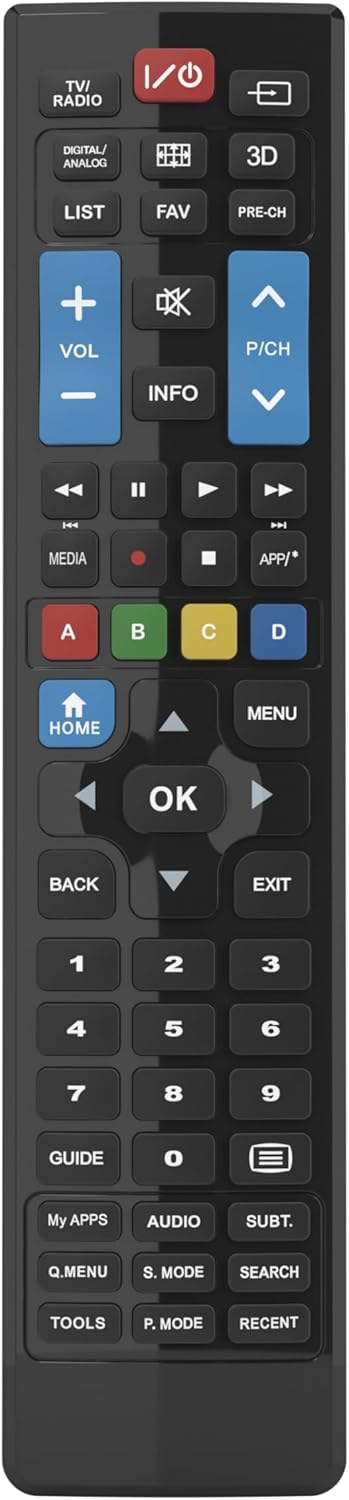
Figure 1: Superior Electronics Universal Remote Control (SUPTRB015)
2. సెటప్
2.1. బ్యాటరీ ఇన్స్టాలేషన్
రిమోట్ కంట్రోల్కు రెండు AAA బ్యాటరీలు అవసరం (చేర్చబడలేదు). వాటిని ఇన్స్టాల్ చేయడానికి ఈ దశలను అనుసరించండి:
- రిమోట్ కంట్రోల్ వెనుక బ్యాటరీ కంపార్ట్మెంట్ను గుర్తించండి.
- లాచ్ని నొక్కి, బ్యాటరీ కవర్ను స్లైడ్ చేయండి.
- రెండు AAA బ్యాటరీలను చొప్పించండి, పాజిటివ్ (+) మరియు నెగటివ్ (-) టెర్మినల్స్ కంపార్ట్మెంట్ లోపల ఉన్న రేఖాచిత్రాలకు సరిపోలుతున్నాయని నిర్ధారించుకోండి.
- సురక్షితంగా క్లిక్ చేసే వరకు బ్యాటరీ కవర్ను తిరిగి స్థానంలోకి జారండి.

Figure 2: Battery Compartment on the back of the remote.
2.2. ప్రారంభ ఉపయోగం (ప్రోగ్రామింగ్ అవసరం లేదు)
This universal remote control is designed for immediate use with LG, Samsung, and Sony televisions. Once batteries are installed, it is ready to operate your TV without any additional programming or code setup.
3. ఆపరేటింగ్ సూచనలు
The remote control features an intuitive layout with dedicated buttons for common functions and Smart TV access. Refer to Figure 3 for a visual guide to the buttons.

చిత్రం 3: రిమోట్ కంట్రోల్ బటన్ లేఅవుట్.
3.1. ప్రాథమిక టీవీ విధులు
- పవర్ బటన్ (ⓘ ⓘ తెలుగు): టీవీని ఆన్ లేదా ఆఫ్ చేస్తుంది.
- వాల్యూమ్ పెంచండి/తగ్గించండి (VOL +/-): ధ్వని వాల్యూమ్ను సర్దుబాటు చేస్తుంది.
- Channel Up/Down (P/CH +/-): టీవీ ఛానెల్లను మారుస్తుంది.
- మ్యూట్ బటన్ (🔇): టీవీ సౌండ్ను మ్యూట్ చేస్తుంది లేదా అన్మ్యూట్ చేస్తుంది.
- సంఖ్య బటన్లు (0-9): టీవీ ఛానెల్లను నేరుగా ఎంచుకోండి.
- ఇన్పుట్/సోర్స్ బటన్ (⎌): ఇన్పుట్ మూలాన్ని (HDMI, AV, మొదలైనవి) ఎంచుకుంటుంది.
3.2. నావిగేషన్ మరియు మెనూ విధులు
- Directional Pad (Up, Down, Left, Right Arrows): మెనూలు మరియు ఎంపికల ద్వారా నావిగేట్ చేస్తుంది.
- సరే బటన్: ఎంపికలను నిర్ధారిస్తుంది.
- హోమ్ బటన్: Accesses the TV's main home screen or Smart Hub.
- మెనూ బటన్: టీవీ ప్రధాన మెనూను తెరుస్తుంది.
- వెనుక బటన్: మునుపటి స్క్రీన్ లేదా మెనూకు తిరిగి వస్తుంది.
- నిష్క్రమించు బటన్: ప్రస్తుత మెనూ లేదా అప్లికేషన్ నుండి నిష్క్రమిస్తుంది.
- INFO బటన్: ప్రస్తుత ప్రోగ్రామ్ లేదా ఇన్పుట్ గురించి సమాచారాన్ని ప్రదర్శిస్తుంది.
3.3. Smart TV and Media Functions
- Dedicated Smart TV Buttons: Access popular streaming apps directly (e.g., Netflix, YouTube, Prime Video). These buttons are typically labeled or have recognizable logos.
- మీడియా నియంత్రణ బటన్లు (ప్లే, పాజ్, స్టాప్, రివైండ్, ఫాస్ట్ ఫార్వర్డ్): మీడియా ప్లేబ్యాక్ను నియంత్రిస్తుంది.
- రంగు బటన్లు (ఎరుపు, ఆకుపచ్చ, పసుపు, నీలం): These buttons often have specific functions within Smart TV apps or teletext, as indicated on your TV screen.
4. నిర్వహణ
4.1. రిమోట్ కంట్రోల్ శుభ్రపరచడం
రిమోట్ కంట్రోల్ యొక్క రూపాన్ని మరియు కార్యాచరణను నిర్వహించడానికి:
- మృదువైన, పొడి వస్త్రంతో ఉపరితలాన్ని తుడవండి.
- మొండి ధూళికి, కొద్దిగా dampనీరు లేదా తేలికపాటి, నాన్-బ్రాసివ్ క్లీనర్తో వస్త్రాన్ని en.
- Do not use harsh chemicals, solvents, or abrasive cleaning pads, as these can damage the remote's finish or internal components.
4.2. బ్యాటరీ భర్తీ
రిమోట్ స్పందన మందగించినప్పుడు లేదా అది పనిచేయడం ఆగిపోయినప్పుడు బ్యాటరీలను మార్చండి. ఎల్లప్పుడూ రెండు బ్యాటరీలను ఒకే సమయంలో కొత్త AAA బ్యాటరీలతో భర్తీ చేయండి. పాత మరియు కొత్త బ్యాటరీలను లేదా వివిధ రకాల బ్యాటరీలను కలపవద్దు.
5. ట్రబుల్షూటింగ్
If you experience issues with your remote control, try the following solutions:
- రిమోట్ స్పందించడం లేదు:
- Check if the batteries are correctly inserted with the correct polarity (+/-).
- బ్యాటరీలను తాజా వాటితో భర్తీ చేయండి.
- రిమోట్ కంట్రోల్ మరియు టీవీ ఇన్ఫ్రారెడ్ రిసీవర్ మధ్య ఎటువంటి అడ్డంకులు లేవని నిర్ధారించుకోండి.
- Make sure you are within the effective operating range (up to 10 meters).
- కొన్ని బటన్లు పనిచేయడం లేదు:
- This remote is designed for LG, Samsung, and Sony TVs. Ensure your TV is one of these brands.
- Some advanced functions or very specific buttons might not be universally supported across all TV models, especially older ones.
- Clean the remote control, especially around the unresponsive buttons, to ensure no debris is preventing contact.
- Smart TV buttons not working:
- మీ టీవీ స్మార్ట్ టీవీ అని మరియు ఇంటర్నెట్కు కనెక్ట్ అయి ఉందని నిర్ధారించుకోండి.
- The dedicated Smart TV buttons (e.g., Netflix, YouTube) are compatible with most LG, Samsung, and Sony Smart TV models. If they don't work, you may need to access these apps through your TV's main Smart Hub/Home menu using the navigation buttons.
6. స్పెసిఫికేషన్లు
| బ్రాండ్ | Superior Electronics |
| మోడల్ పేరు | Superior Electronics Replacement LG/Samsung/Sony SUPTRB015 |
| ప్రత్యేక ఫీచర్ | యూనివర్సల్ |
| రంగు | నలుపు |
| గరిష్టంగా మద్దతు ఉన్న పరికరాలు | 3 (LG, Samsung, Sony) |
| అనుకూల పరికరాలు | టెలివిజన్ |
| కనెక్టివిటీ టెక్నాలజీ | ఇన్ఫ్రారెడ్ |
| కంట్రోలర్ రకం | బటన్ నియంత్రణ |
| గరిష్ట పరిధి | 10 మీటర్లు |
| బ్యాటరీల సంఖ్య | 2 AAA (Required) |

Figure 4: Remote Control Dimensions (approx. 20 cm length, 4.5 cm width).
7. వారంటీ మరియు మద్దతు
Superior Electronics products are manufactured to high-quality standards. For information regarding warranty coverage, please refer to the documentation provided with your purchase or visit the official Superior Electronics website. For technical support or further assistance, please contact Superior Electronics customer service through their official channels.
దయచేసి భవిష్యత్తు సూచన కోసం ఈ మాన్యువల్ని ఉంచండి.