
1. పరిచయం
The Dremel 8220 12V Max Cordless Rotary Tool is designed to provide high performance and versatility for a wide range of projects. This tool is compatible with all current Dremel rotary tool accessories, offering flexibility for various applications such as cutting, grinding, sanding, cleaning, and polishing. Its ergonomic design ensures comfort and control during use.
This manual provides essential information for the safe and effective operation, maintenance, and troubleshooting of your Dremel 8220 rotary tool.

Figure 1: Dremel 8220-1/28 Cordless Rotary Tool kit, including the tool, carrying case, charger, and various accessories.
2. భద్రతా సమాచారం
Always observe basic safety precautions to reduce the risk of fire, electric shock, and personal injury when using power tools. Read and understand all instructions before operating the tool.
సాధారణ భద్రతా నియమాలు:
- పని ప్రాంత భద్రత: మీ పని ప్రదేశాన్ని శుభ్రంగా మరియు బాగా వెలుతురు ఉండేలా చూసుకోండి. చిందరవందరగా లేదా చీకటిగా ఉన్న ప్రాంతాలు ప్రమాదాలను ఆహ్వానిస్తాయి. మండే ద్రవాలు, వాయువులు లేదా ధూళి వంటి పేలుడు వాతావరణాలలో విద్యుత్ ఉపకరణాలను ఆపరేట్ చేయవద్దు.
- విద్యుత్ భద్రత: మట్టి లేదా నేలపై ఉన్న ఉపరితలాలతో శరీర సంబంధాన్ని నివారించండి. వర్షం లేదా తడి పరిస్థితులకు విద్యుత్ పనిముట్లను బహిర్గతం చేయవద్దు.
- వ్యక్తిగత భద్రత: Always wear eye protection. Use safety glasses, goggles, or a face shield. Wear hearing protection when operating for extended periods. Dress properly; avoid loose clothing or jewelry. Keep hair, clothing, and gloves away from moving parts.
- సాధన వినియోగం మరియు సంరక్షణ: Do not force the tool. Use the correct tool for your application. Disconnect the battery pack from the tool before making any adjustments, changing accessories, or storing power tools. Store idle tools out of the reach of children.
- బ్యాటరీ సాధనం వినియోగం మరియు సంరక్షణ: తయారీదారు పేర్కొన్న ఛార్జర్తో మాత్రమే రీఛార్జ్ చేయండి. ప్రత్యేకంగా నియమించబడిన బ్యాటరీ ప్యాక్లతో మాత్రమే పవర్ టూల్స్ ఉపయోగించండి.
3. ప్రారంభించడం (సెటప్)
3.1 అన్ప్యాకింగ్
Carefully remove all contents from the packaging. Verify that all items listed in the 'Kit Contents' section are present and undamaged. Retain packaging materials for future storage or transport.
3.2 బ్యాటరీని ఛార్జ్ చేయడం
The Dremel 8220 is powered by a 12V Max Lithium-Ion battery. Before first use, fully charge the battery.
- ఛార్జర్ను ప్రామాణిక ఎలక్ట్రికల్ అవుట్లెట్కి కనెక్ట్ చేయండి.
- Insert the battery pack into the charger. The charging indicator light will illuminate.
- Allow approximately one hour for a full charge. The indicator light will change or turn off when charging is complete.
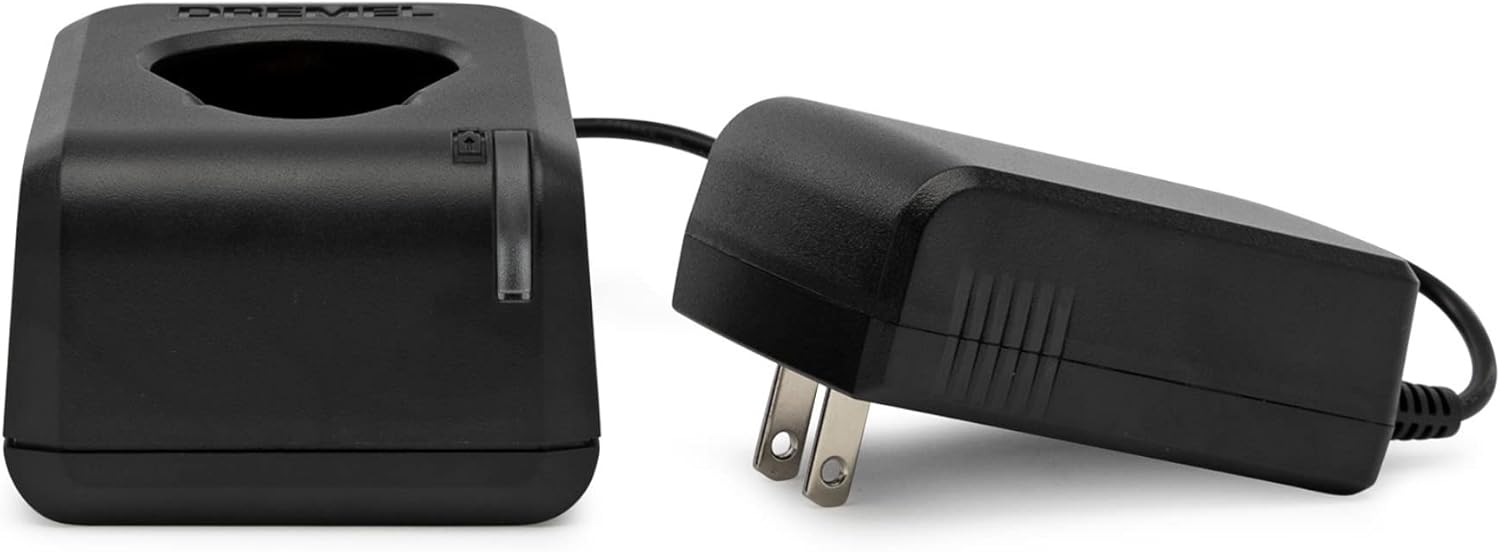
Figure 2: The Dremel 12V Max battery charger and power adapter. Ensure the battery is properly seated for charging.
3.3 Attaching and Changing Accessories
The Dremel 8220 features an EZ Twist nose cap for quick accessory changes without a separate wrench.
- Ensure the tool is turned OFF and the battery is removed before changing accessories.
- షాఫ్ట్ లాక్ బటన్ను నొక్కి పట్టుకోండి.
- Unscrew the EZ Twist nose cap counter-clockwise to loosen the collet nut.
- కావలసిన యాక్సెసరీ షాంక్ను పూర్తిగా కోలెట్లోకి చొప్పించండి.
- Tighten the EZ Twist nose cap clockwise until the accessory is securely held. Do not overtighten.

Figure 3: The Dremel EZ Twist nose cap, which integrates a wrench for easy accessory changes.

Figure 4: The Dremel 710-08 multi-purpose rotary accessory kit, containing 160 pieces for various applications.
4. ఆపరేటింగ్ సూచనలు
4.1 పవర్ చేయడం ఆన్/ఆఫ్
To turn the tool ON, slide the separate ON/OFF switch to the 'ON' position. To turn the tool OFF, slide the switch to the 'OFF' position.
4.2 వేరియబుల్ స్పీడ్ కంట్రోల్
The Dremel 8220 features variable speed control, allowing adjustment from 5,000 to 35,000 RPM for optimal precision across different materials and tasks. The speed setting is retained even after turning the tool off and on again.

మూర్తి 5: క్లోజ్-అప్ view of the Dremel 8220 tool, highlighting the variable speed dial and ergonomic grip.
- Rotate the speed dial to increase or decrease the rotational speed.
- Start with a lower speed for delicate tasks or softer materials and gradually increase as needed.
- Higher speeds are generally suitable for harder materials and more aggressive material removal.
4.3 సాధారణ వినియోగ చిట్కాలు
- వర్క్పీస్ను తాకే ముందు సాధనం పూర్తి వేగాన్ని చేరుకోవడానికి అనుమతించండి.
- Apply light pressure. Let the tool and accessory do the work. Excessive pressure can cause the tool to bog down, overheat, or damage the workpiece.
- Keep the tool moving to prevent gouging or burning the material.
5. నిర్వహణ
5.1 సాధనాన్ని శుభ్రపరచడం
Regularly clean the ventilation openings of the tool to prevent dust and debris buildup, which can affect performance and motor life. Use a soft brush or compressed air.
5.2 బ్యాటరీ సంరక్షణ
- ప్రత్యక్ష సూర్యకాంతి మరియు విపరీతమైన ఉష్ణోగ్రతల నుండి దూరంగా చల్లని, పొడి ప్రదేశంలో బ్యాటరీని నిల్వ చేయండి.
- Do not store the battery in a discharged state for extended periods. Recharge it periodically if not in use.
- Avoid dropping or subjecting the battery to heavy impacts.
5.3 అనుబంధ నిల్వ
Store accessories in their designated case (e.g., Dremel 710-08 kit case) to keep them organized and protected from damage.
6. ట్రబుల్షూటింగ్
| సమస్య | సాధ్యమైన కారణం | పరిష్కారం |
|---|---|---|
| సాధనం ఆన్ అవ్వదు. | బ్యాటరీ డిస్చార్జ్ చేయబడింది. | బ్యాటరీని పూర్తిగా రీఛార్జ్ చేయండి. |
| సాధనం ఆన్ అవ్వదు. | ON/OFF switch is in the 'OFF' position. | Slide the switch to the 'ON' position. |
| ఛార్జర్ పనిచేయడం లేదు. | Charger or power adapter is faulty. | Check the power outlet. If the issue persists, contact Dremel customer support for a replacement charger. |
| Tool loses power or slows down during use. | Battery is low or accessory is binding. | Recharge the battery. Reduce pressure on the tool or ensure the accessory is not jammed. |
| Accessory is loose or wobbles. | Collet nut not tightened sufficiently or incorrect collet size. | Ensure the EZ Twist nose cap is tightened securely. Verify the accessory shank matches the collet size. |
7. స్పెసిఫికేషన్లు
| ఫీచర్ | స్పెసిఫికేషన్ |
|---|---|
| మోడల్ సంఖ్య | 8220-1/28 |
| వాల్యూమ్tage | 12 వోల్ట్లు (గరిష్టంగా) |
| శక్తి మూలం | Cordless Electric (Lithium-Ion Battery) |
| స్పీడ్ రేంజ్ | 5,000 - 35,000 RPM (వేరియబుల్ స్పీడ్) |
| వస్తువు బరువు | 1 పౌండ్ (సుమారు 453.59 గ్రాములు) |
| ఉత్పత్తి కొలతలు (L x W x H) | 39.1 x 29.2 x 11.9 సెం.మీ |
| ప్రత్యేక లక్షణాలు | Rechargeable, Cordless, Variable Speed, EZ Twist Nose Cap |
| ఉపకరణాలు చేర్చబడ్డాయి | 28 accessories/1 attachment, Dremel 710-08 Multi-Purpose Rotary Accessory Kit (160 pieces) |
8. వారంటీ మరియు మద్దతు
8.1 పరిమిత వారంటీ
The Dremel 8220-1/28 Cordless Rotary Tool comes with a 2-సంవత్సరం పరిమిత వారంటీ. పూర్తి నిబంధనలు మరియు షరతుల కోసం దయచేసి మీ ఉత్పత్తి ప్యాకేజింగ్లో చేర్చబడిన వారంటీ కార్డును చూడండి.
8.2 కస్టమర్ మద్దతు
For technical assistance, service, or warranty claims, please contact Dremel Experts:
- ఫోన్: 1-800-437-3635 (యుఎస్ఎ)
- Webసైట్: www.dremel.com
You can also scan the QR code on the product packaging or visit http://m.dremel.com/10079 for product registration, additional manuals, and more information.