
పరిచయం
This manual provides essential information for the proper installation, operation, and maintenance of the Middle Atlantic PROGRK-RR52 Rackrail. The PROGRK-RR52 is a pair of 52-space (91-inch) cage-nut style rackrails designed specifically for use with Middle Atlantic GRK Series Racks.
ఉత్పత్తి ముగిసిందిview
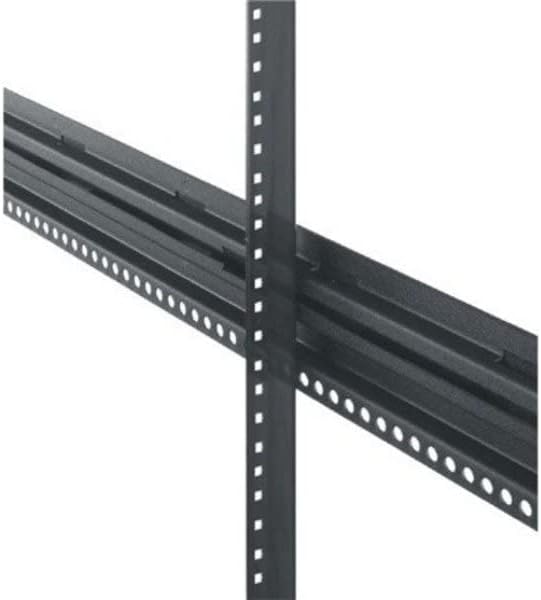
మూర్తి 1: క్లోజ్-అప్ view of the Middle Atlantic PROGRK-RR52 Rackrail, showing the perforated design for cage nuts.
The PROGRK-RR52 rackrails are crucial components for mounting equipment within Middle Atlantic GRK Series Racks. They feature a cage-nut style design, allowing for flexible and secure attachment of various rack-mountable devices. Each pair provides 52 rack spaces, accommodating a significant amount of equipment.
సెటప్ మరియు ఇన్స్టాలేషన్
The PROGRK-RR52 rackrails are designed for straightforward installation into Middle Atlantic GRK Series Racks. Follow these steps for proper setup:
- భాగాలను అన్ప్యాక్ చేయండి: Carefully remove the rackrails from their packaging. Inspect for any signs of damage during transit.
- Identify Rack Orientation: Ensure your GRK Series Rack is correctly oriented and stable before beginning installation.
- Position Rackrails: Align the rackrails with the pre-drilled holes or slots within the GRK Series Rack frame. The 52-space length corresponds to the height of the rack.
- Secure Rackrails: Use appropriate mounting hardware (typically screws and cage nuts, sold separately or included with the rack) to firmly attach the rackrails to the rack frame. Ensure all fasteners are tightened securely to prevent movement.
- అమరికను ధృవీకరించండి: After installation, visually inspect the rackrails to ensure they are parallel and properly aligned, ready for equipment mounting.
Note: Always refer to your specific GRK Series Rack manual for detailed instructions on rack assembly and component integration.
ఆపరేటింగ్ ప్రిన్సిపల్స్
The PROGRK-RR52 rackrails serve as the primary mounting points for all rack-mountable equipment within your GRK Series Rack. Their cage-nut design allows for the insertion of square cage nuts, which provide a threaded hole for attaching equipment screws. This system offers flexibility in equipment placement and ensures a secure fit.
To mount equipment:
- Insert Cage Nuts: Squeeze the cage nut and insert one side into the square hole on the rackrail. Push the other side until it snaps into place.
- Align Equipment: Position your rack-mountable equipment against the rackrails, aligning its mounting holes with the inserted cage nuts.
- సురక్షిత పరికరాలు: Insert appropriate rack screws through the equipment's mounting holes and into the cage nuts. Tighten screws firmly but do not overtighten.
నిర్వహణ
The Middle Atlantic PROGRK-RR52 rackrails require minimal maintenance. Regular inspection is recommended to ensure continued performance and safety.
- శుభ్రపరచడం: Periodically wipe down the rackrails with a soft, dry cloth to remove dust and debris. Avoid abrasive cleaners or solvents that could damage the finish.
- ఫాస్టెనర్ తనిఖీ: Annually, or as needed, check all mounting screws and cage nuts for tightness. Loose fasteners can compromise the stability of mounted equipment.
- నష్టం పరిశీలన: Inspect the rackrails for any signs of bending, cracking, or corrosion. Damaged rackrails should be replaced immediately to ensure structural integrity.
ట్రబుల్షూటింగ్
While the PROGRK-RR52 rackrails are passive components, minor issues related to installation or usage can occur.
- Difficulty Inserting Cage Nuts:
పరిష్కారం: Ensure the cage nut is correctly oriented and squeezed before insertion. Some force may be required. If the hole is obstructed, clear any debris.
- Equipment Not Sitting Flush:
పరిష్కారం: Verify that both rackrails are installed parallel to each other and are not twisted. Check that all cage nuts are fully seated and not protruding. Ensure the equipment itself is not bent or damaged.
- Loose Equipment After Mounting:
పరిష్కారం: Confirm that the correct size and type of screws are being used with the cage nuts. Tighten all screws firmly. If the issue persists, inspect the cage nuts for wear or damage and replace if necessary.
స్పెసిఫికేషన్లు
| గుణం | విలువ |
|---|---|
| మోడల్ సంఖ్య | PROGRK-RR52 |
| రాక్ స్పేసెస్ | 52U (91 inches) |
| టైప్ చేయండి | Cage-Nut Style Rackrail |
| అనుకూలత | Middle Atlantic GRK Series Racks |
| వస్తువు బరువు | 11 పౌండ్లు |
| ప్యాకేజీ కొలతలు | 66 x 4 x 3 అంగుళాలు |
| తయారీదారు | మధ్య అట్లాంటిక్ |
| మొదటి తేదీ అందుబాటులో ఉంది | జనవరి 2, 2019 |
మద్దతు
For technical assistance, replacement parts, or further information regarding the Middle Atlantic PROGRK-RR52 Rackrail or other Middle Atlantic products, please contact the manufacturer directly.
తయారీదారు: మధ్య అట్లాంటిక్
Please refer to the official Middle Atlantic webప్రస్తుత సంప్రదింపు సమాచారం మరియు మద్దతు వనరుల కోసం సైట్.